Cycling through all six. Tap any point to stop.
Measured on six things
Private, local-first catalogue and search for large file ...
Security
54HTTPS enforced, X-Content-Type-Options and Referrer-Policy set, SPF present. No HSTS, CSP, frame protection, or DMARC, and no SOC 2 / pen-test / bug bounty claims found. Local-first design limits exposure.
Screenshots
1 / 4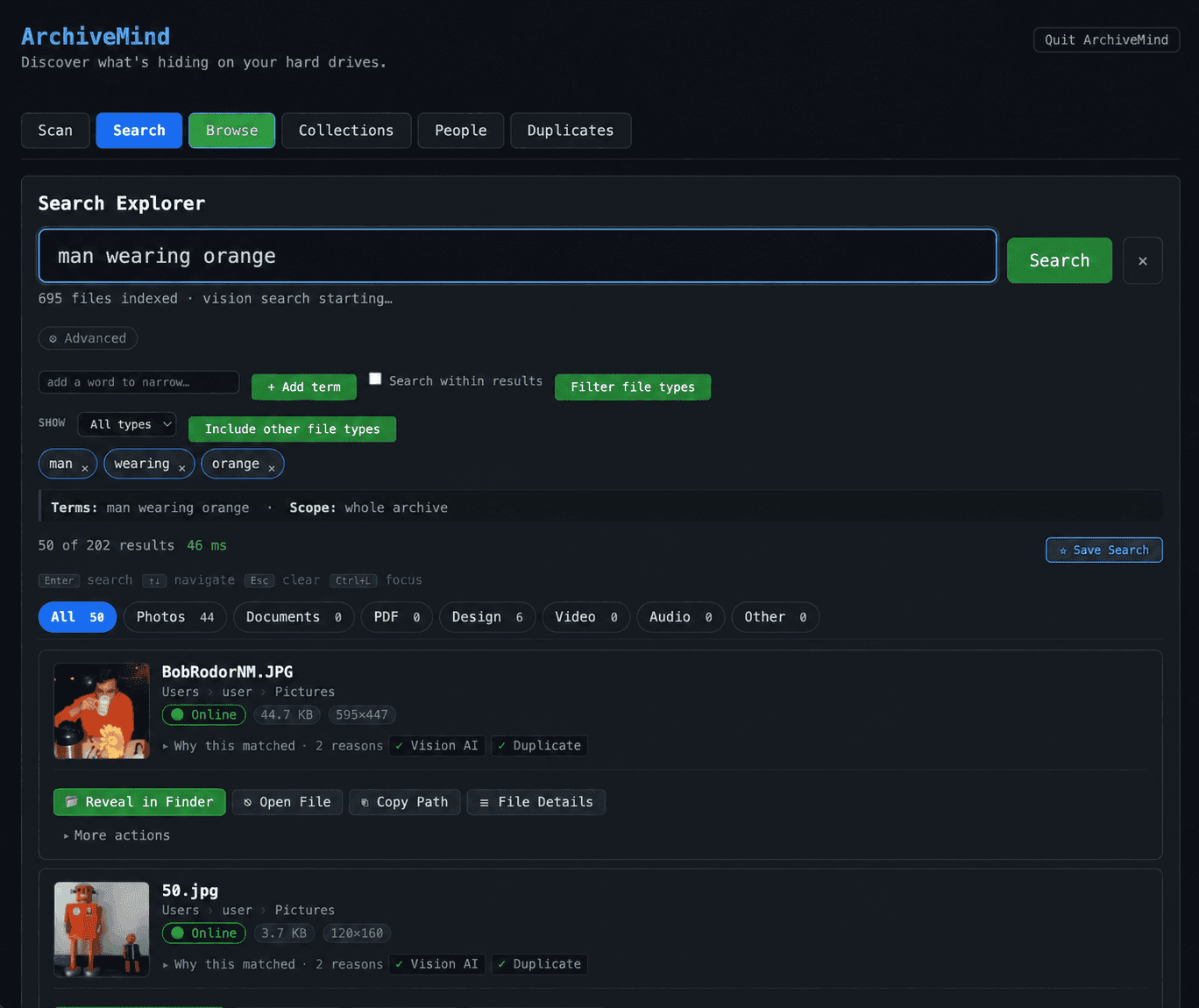
About this app
ArchiveMind is a private, local-first catalogue and search system for large collections of files across computers, folders, and external drives. It runs entirely on your machine, indexes what you point it at, and keeps even unplugged drives searchable. With a one-time purchase of US $49 (free up to 10,000 files), you get a powerful tool that respects your privacy—no cloud, no account, no telemetry. Standout features include visual search that lets you find photos by describing them ('beach sunset'), content-based duplicate detection, and rich previews like audio waveforms and video thumbnails. It's built on stubborn principles: local-first, honest about what it knows, and designed to be a catalogue you own on hardware you own. For anyone drowning in digital clutter, ArchiveMind is a breath of fresh air—a reliable map to your data, not another cloud service.
Key features
- 1Local-first indexing and search across computers, folders, and external drives — including unplugged drives that stay searchable after eject.
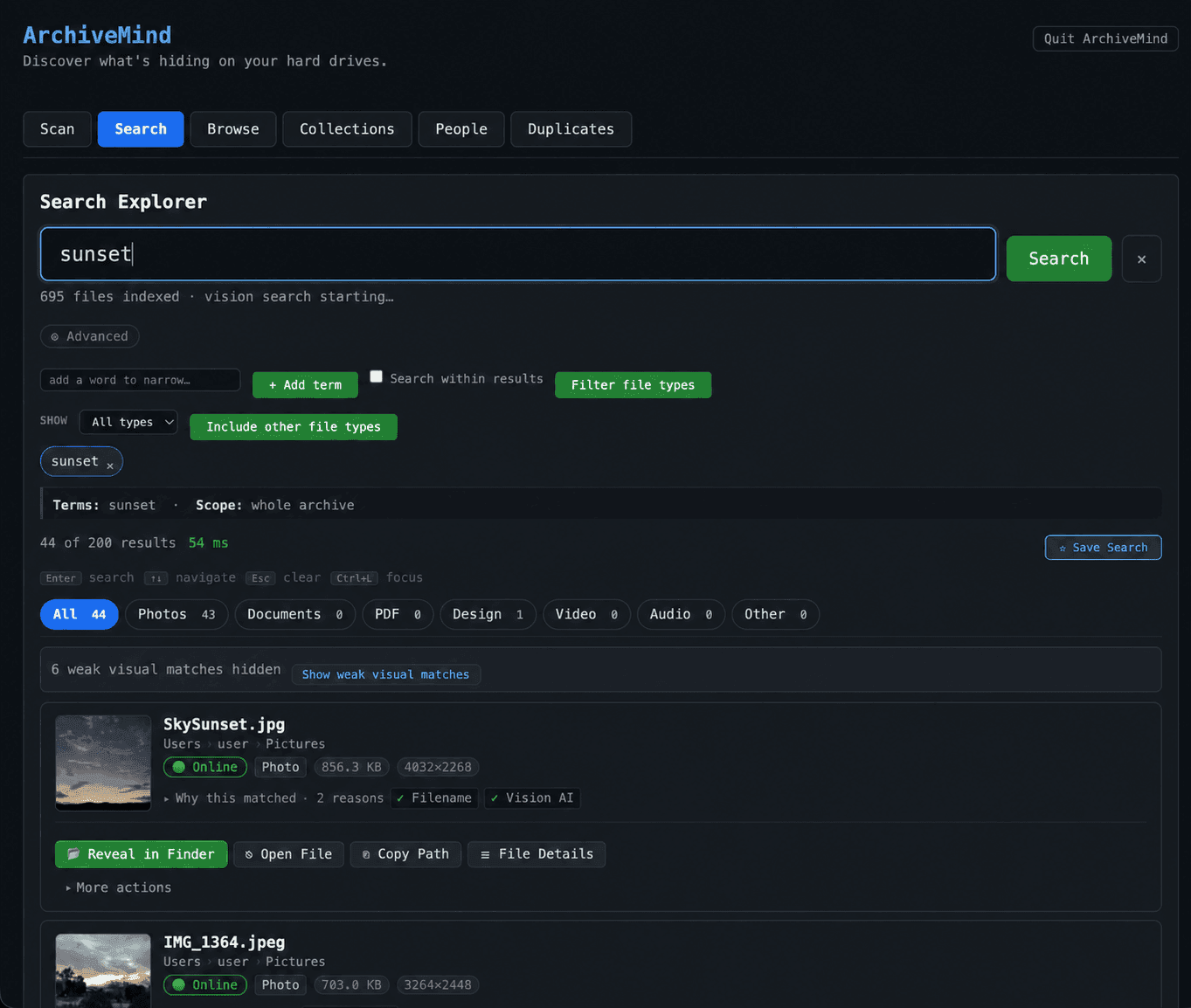
- 2Offline visual search: describe a photo ('beach sunset') and match against image content using a bundled on-device model.
- 3Content-based duplicate detection with recoverable-space totals, plus rich previews (audio waveforms, spectrograms, video thumbnails).
Target customer profile
Drawn from the product itself, not from a survey.
Demographic
Photographers and videographers
Pain points
Large media libraries across multiple drives, difficulty finding specific shots, duplicate files wasting space
Primary needs
Fast visual search, duplicate detection by content, offline access, reliable cataloging of external drives
Demographic
Researchers and academics
Pain points
Thousands of PDFs and documents scattered across folders, difficulty searching inside scanned papers, need for privacy
Primary needs
Full-text search including OCR, metadata extraction, local-only storage, no cloud dependency
Demographic
IT professionals and data hoarders
Pain points
Managing terabytes of data across many drives, needing to know what's where, ensuring data privacy
Primary needs
Comprehensive cataloging, unplugged drive search, duplicate management, no telemetry, one-time license
Scout Review
Written by AI from measured evidence, scored out of 100.
ArchiveMind is a local-first file catalogue and search tool for people with too many drives and too many files. It indexes what you point it at, keeps unplugged drives searchable, finds duplicates by content, and does visual search by description — all offline, with the model bundled in the app. The pitch is stubborn and coherent: no cloud, no account, no telemetry, one-time $49 after a free 10,000-file tier. The site is fast on desktop, the app UI is disciplined and shows real metadata rather than invented fields, and the privacy claims are architectural rather than policy theater. Where it's thinner: mobile LCP is slow, the download is 2.2 GB, security headers are minimal with no published audits, and accessibility has one easy fix outstanding. Against Everything, DocFetcher, and Recoll, it's the only one doing offline visual search and rich media previews — which is exactly the feature it's charging for.
Measure by measure
Usability
68Free up to 10,000 files with every feature, no trial clock, no nagging — that's a genuinely low-friction onboarding. Signed builds for macOS and Windows with checksums. Docs depth unverified.
Design
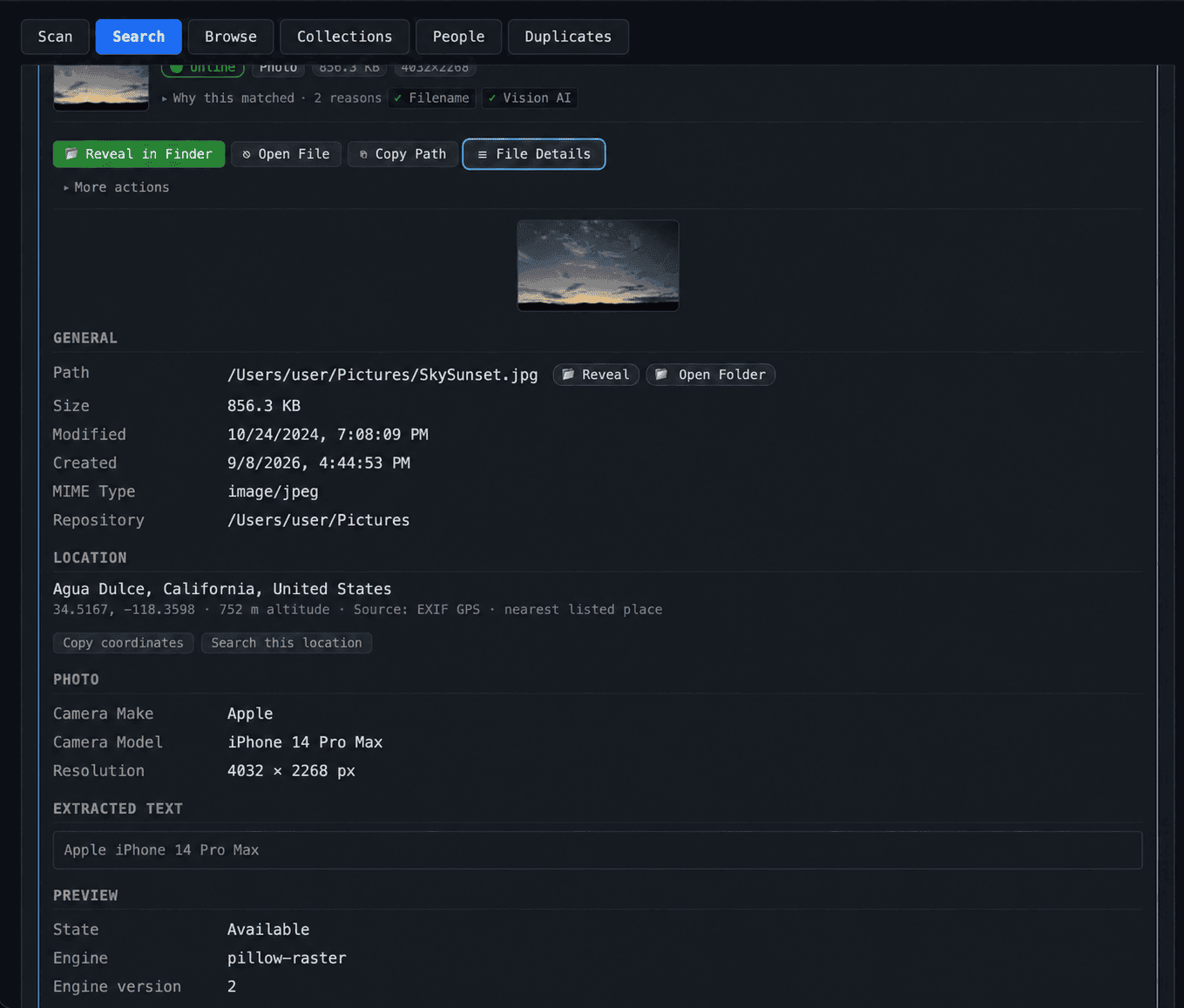
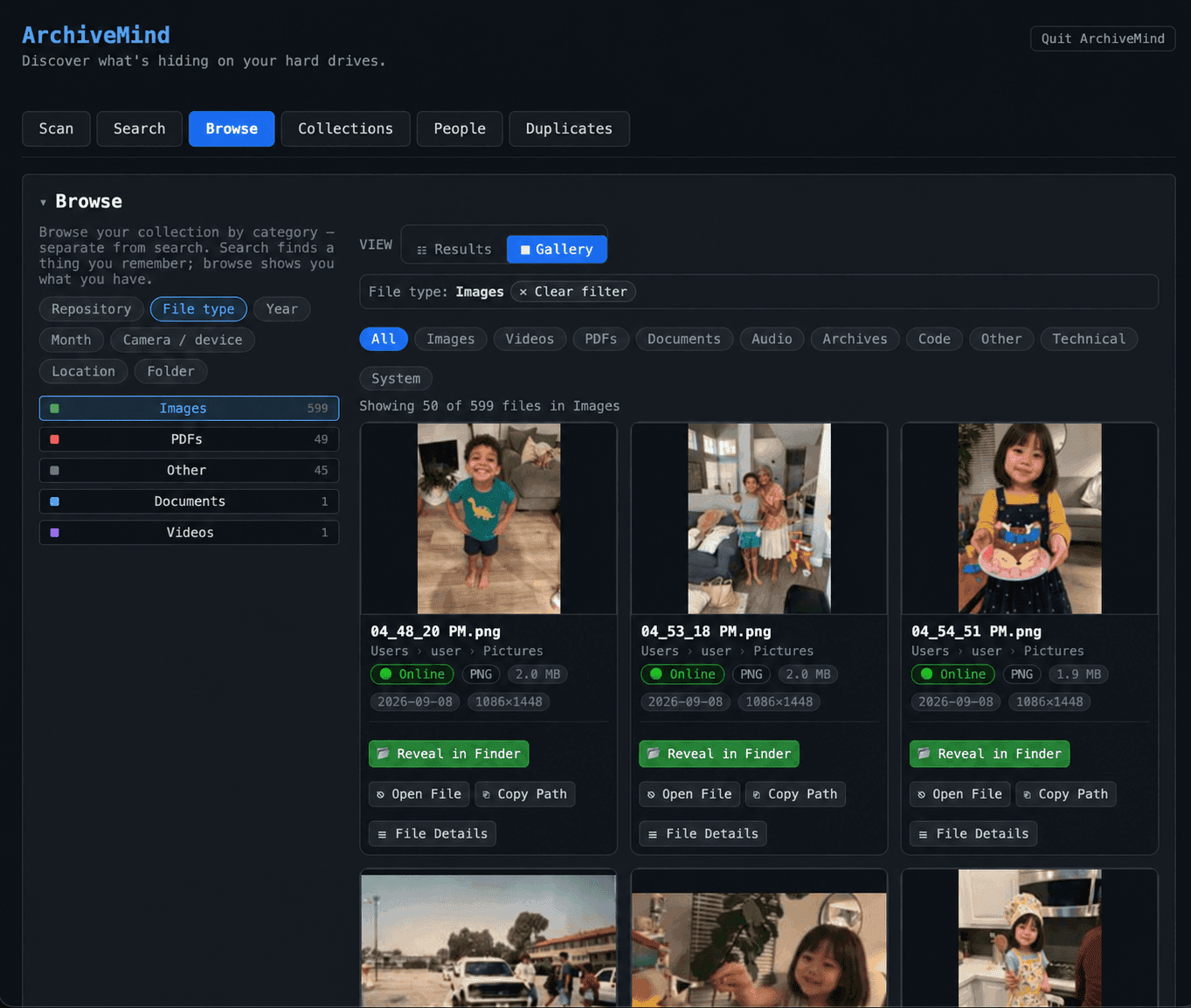
71Dark, disciplined app UI with real metadata panels and honest 'why this matched' rows. Homepage hero is slightly long and the video block is a bare play icon, but the product screenshots do the selling.
Speed
68Lighthouse desktop 91, mobile 75 with CLS 0 and TBT 0ms — the site itself is snappy. The 11.9s mobile LCP drags the score, and the app ships a ~2.2 GB bundle.
Security
54HTTPS enforced, X-Content-Type-Options and Referrer-Policy set, SPF present. No HSTS, CSP, frame protection, or DMARC, and no SOC 2 / pen-test / bug bounty claims found. Local-first design limits exposure.
Accessibility
79Lighthouse a11y 95/100 with one failing audit: links rely on color alone. No WCAG statement or multi-language support found. Responsive layout and readable contrast on the site.
Growth
62Real problem, specific segments (photographers, researchers, data hoarders), and a clear wedge: offline visual search plus content-based dedupe at a one-time $49. Category has room, but the wedge is copyable.
Improvement areas
- Web security headers are minimal — no HSTS, CSP, frame protection, or DMARC, and no published SOC 2 / pen-test / bug bounty.
- Mobile Lighthouse LCP of 11.9s and a ~2.2 GB download create real friction before a user sees the app.
- No accessibility statement or WCAG conformance claim, and one failing a11y audit (color-only links) remains unfixed.
Design & Usability
The design story here is refreshingly unglamorous: dark charcoal UI, blue and green accents, and screenshots that show actual EXIF data, extracted text, and 'why this matched' explanations instead of stock-photo dashboards. The homepage hero runs a touch long and the video block is a lonely play icon, but the embedded app shots carry the page. Usability is where the pricing model does the heavy lifting — free up to 10,000 files with every feature, no trial clock, no nagging meter, and a one-time $49 that removes the cap. Signed macOS and Windows builds with SHA-256 checksums are a nice trust signal. The friction is the 2.2 GB download and the fact that help-center depth isn't visible from the fetched pages, so onboarding past the download is hard to grade.
Speed & Security
On speed, the site itself is in good shape: Lighthouse desktop 91, mobile 75, with CLS 0 and TBT 0ms — the layout doesn't jump and the main thread stays quiet. The 11.9s mobile LCP is the sore spot, likely a heavy hero asset, and the app's ~2.2 GB bundle (visual-search model included) is a real download cost even if it's a one-time hit. Security is a mixed bag. The architecture is genuinely privacy-forward: no telemetry, no analytics, no account, no activation server, license verified on-device, and Paddle handling checkout as merchant of record. But the web layer is thin — HTTPS and a couple of headers, no HSTS, no CSP, no frame protection, no DMARC, and no published SOC 2, ISO, or pen-test. For a local-first tool that's defensible, but it's not a security story you can point at.
Accessibility & Growth
Accessibility lands at 95/100 on Lighthouse with one failing audit — links distinguished by color alone, which is a quick fix. There's no WCAG statement and no multi-language support, so the automated score is doing most of the talking. Growth is the more interesting question. ArchiveMind names real segments — photographers and videographers drowning in shots across drives, researchers with scanned PDFs, IT pros and data hoarders managing terabytes — and it has a concrete wedge against the listed alternatives: offline visual search by description, content-based duplicate detection, rich media previews, and unplugged-drive search. Everything is free but filename-only; DocFetcher and Recoll index content but skip visual search and media previews. The $49 one-time price against subscription cloud catalogues is a clean positioning. The honest limit: the visual-search wedge is copyable, and the category has no network effects to lock anyone in.
Conclusion
If you're a photographer, researcher, or data hoarder with terabytes spread across drives and a real allergy to cloud catalogues, ArchiveMind is aimed squarely at you, and the free 10,000-file tier makes trying it a low-stakes decision. The one-time $49 with a 30-day refund is about as low-risk as paid software gets. If you just need to find a file by name on Windows, Everything is free and instant and you don't need this. If you need content search on Linux and don't mind config, Recoll is free. ArchiveMind's bet is that visual search, duplicate detection, and honest offline behavior are worth paying for — and for the target user, that bet looks reasonable.
Suggestions for improvement
- Fix the color-only link contrast issue flagged by Lighthouse — it's a one-line CSS change and the only failing a11y audit.
- Add HSTS, a Content-Security-Policy, and DMARC to the web layer; the local-first architecture deserves matching header hygiene.
- Publish a short accessibility statement and consider a lighter download option that fetches the visual-search model on first run.
- Surface the help center and FAQ content on the homepage or a docs page so buyers can judge documentation depth before downloading 2.2 GB.
Alternatives comparison
Named competitors, point by point. Nobody paid to appear here or to be left out.
 ArchiveMind |  Everything |  DocFetcher |  Recoll | |
|---|---|---|---|---|
| Pricing model | Free up to 10,000 files; US $49 one-time for unlimited, 30-day refund | Free (donationware) | Free, open source | Free, open source |
| Content / full-text search | Yes — filenames, metadata, and extracted document text with OCR | No — filenames only | Yes — indexes document contents across many formats | Yes — full-text indexing of document contents |
| Visual / image-content search | Yes — describe a photo in words, matched offline by a bundled model | No | No | No |
| Duplicate detection by content | Yes — files fingerprinted during indexing, grouped across drives with recoverable space | No built-in content-based dedupe | No | No |
| Rich media previews (waveforms, video thumbnails) | Yes — audio waveforms/spectrograms, video frame thumbnails, in-app playback | No | No | No |
| Offline / unplugged-drive search | Yes — catalogue persists and stays searchable after a drive is ejected | Index persists but results reflect current filesystem state | Index persists; no explicit unplugged-drive workflow | Index persists; no explicit unplugged-drive workflow |
| Platform support | macOS (Apple silicon + Intel) and Windows | Windows | Cross-platform (Java) | Unix-like systems (Linux, macOS, BSD) |
Everything
A fast file search tool for Windows that indexes filenames and provides instant results. It's lightweight and free but lacks content search and rich previews.
DocFetcher
An open-source desktop search application that indexes document contents. It supports many file formats but lacks visual search and advanced duplicate detection.
Recoll
A full-text search tool for Unix-like systems that indexes document contents. It's powerful but requires technical setup and lacks media previews.
Comparing options? See ArchiveMind alternatives, scored side by side
More Productivity apps
View all Productivity
Qamarero
92An all-in-one hospitality software for restaurants and ba...

Puzzly – B2B Lead Generation & Sales Intelligence Platform
92Puzzly is an all-in-one B2B lead generation platform that...

The Stack Newsletter
92A weekly newsletter delivering curated tech jobs, intervi...

StoryPad
92Privacy-first open source journal app with a continuous t...

Vibe Coding Agent Skills
92A free, open-source platform offering 110 AI agent skills...

Notion
92All-in-one AI workspace for docs, projects, and knowledge...

EmbedMyReviews
92White-label reputation management software for agencies s...

QRBliss
91Branded QR codes with AI Brand Sync, 15 free dynamic code...

Strukchad Property Management
91Property management for Kenyan letting agents: rent invoices raised every month, M-Pesa rent prompts to tenants, arrears tracking and landlord statements.

CC Switch
91Open-source desktop app for switching AI coding providers...

Gerty
91Private, local AI assistant for Mac that runs offline

BACKLNK
90Backlnk is a free SEO and AI visibility website: 15 website checks, a full audit as a PDF report, and guides to get found in search and AI answers.


A platform dedicated to providing unbiased reviews of newly launched applications, analyzing everything from their features to their full potential.
info@scoutforge.net© 2026 Scoutforge. All rights reserved.
