Cycling through all six. Tap any point to stop.
Measured on six things
Backup & migrate AOL Mail to PST, PDF, and other email cl...
Design
44Dated, template-assembled homepage: mismatched panels, a popup and chat bubble covering the hero subtitle, and a one-card ratings carousel. The feature card grid is the one disciplined block.
Screenshots
1 / 1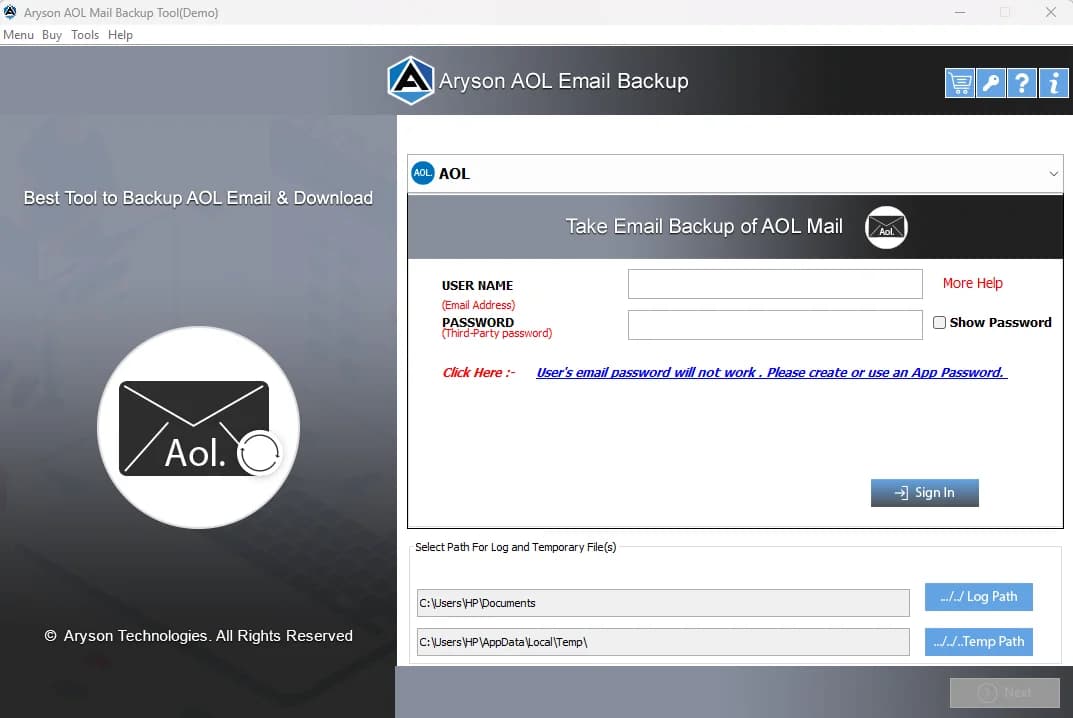
About this app
Aryson AOL Backup Tool is a specialized utility that helps AOL Mail users securely download their entire mailbox to local storage in multiple formats like PST, PDF, EML, MSG, MBOX, and more. It also supports direct migration of AOL emails to popular email clients such as Gmail, Office 365, Yahoo, IMAP, and others. The software preserves folder hierarchy, removes duplicates, and offers date‑based filtering. With a user‑friendly interface and compatibility across all Windows versions, it’s a reliable solution for individuals and businesses looking to safeguard or transfer their AOL emails. A free demo version allows backing up up to 50 items per folder, while the full license costs $49.
Key features
- 1Backs up AOL Mail to PST, PDF, EML, MSG, EMLX, MBOX and more, preserving original folder hierarchy
- 2Direct migration of AOL emails to Gmail, Office 365, Yahoo, IMAP, Thunderbird, iCloud and others
- 3Duplicate removal, date-range mail/task filters and custom folder naming before export
- 4Free demo backs up up to 50 items per folder; full license is a one-time $49
Target customer profile
Drawn from the product itself, not from a survey.
Demographic
Small business owners and teams using AOL Mail for work communications
Pain points
Slow AOL interface, ads, frequent logouts, and lack of advanced features
Primary needs
Migrate to Gmail/Office 365, backup emails locally, and maintain folder structure
Demographic
IT administrators and support staff managing multiple email accounts
Pain points
Needing to archive or transfer large volumes of AOL emails reliably
Primary needs
Bulk backup, duplicate removal, and migration to IMAP or other clients
Demographic
Individual users with years of important emails and attachments in AOL
Pain points
Fear of losing data due to account issues or service changes
Primary needs
Create local backups in common formats like PST or PDF for personal records
Scout Review
Written by AI from measured evidence, scored out of 100.
Aryson AOL Backup Tool is a competent, narrowly-scoped Windows utility with a dated marketing site wrapped around it. The measured fundamentals are solid — 87/100 mobile performance, 12/12 on security headers, 91/100 on automated accessibility — and the feature set is genuinely broad for $49: six export formats, direct migration to Gmail, Office 365, Yahoo, IMAP and more, duplicate removal, folder hierarchy preservation and date-range filtering. The demo's 50-items-per-folder cap is reasonable for evaluation but poorly surfaced. The real weaknesses are trust and shelf life: no published compliance or security documentation for a tool that handles credentials, and a market that consists entirely of people exiting AOL. If you have years of AOL mail you can't afford to lose, this does the job. If you're picking a long-term email strategy, this is a bridge, not a destination.
Measure by measure
Usability
58Clear 7-step workflow, screenshots, video and a software guide make the process legible, but the 50-item demo cap hides in a lower table and the OS selector is easy to miss.
Design
44Dated, template-assembled homepage: mismatched panels, a popup and chat bubble covering the hero subtitle, and a one-card ratings carousel. The feature card grid is the one disciplined block.
Speed
72Lighthouse mobile 87 and desktop 89 with LCP 2.7s and TBT 102ms — genuinely quick. CLS 0.175 is the one blemish, so the page shifts as it settles.
Security
74Full header hygiene: HSTS, CSP, frame protection, Referrer and Permissions policies, plus SPF and DMARC — 12/12 on the probe. No published SOC 2, ISO or pen-test claims.
Accessibility
70Lighthouse a11y 91/100, but contrast failures, out-of-order headings, undersized touch targets and a missing main landmark remain. No WCAG statement published.
Growth
58A real, specific problem — AOL Mail is genuinely painful — with concrete differentiators in multi-format export and direct migration. But the wedge is narrow and AOL's user base only shrinks.
Improvement areas
- No published SOC 2, ISO, pen-test or security/data-handling page for a credential-handling desktop tool
- Dated, template-assembled homepage with overlapping hero popups and a broken-looking ratings carousel
- Demo limit and OS selector are poorly surfaced near the primary download and purchase CTAs
- Open accessibility failures (contrast, heading order, touch targets, main landmark) with no WCAG statement
Design & Usability
The homepage is assembled rather than designed: pale blue panels, white cards, navy bands and a bordered table share no grid, and a 'Click Here for Queries' popup plus an orange chat bubble both sit on the hero's right edge, covering the subtitle. The 'Most Prominent Features' 2x4 card grid is the exception — consistent icons, one heading style, actual rhythm. Usability is better than the visuals suggest: a 7-step workflow, screenshots, a video, a software guide and an FAQ give a newcomer a real path. The friction is in the details — the 50-item demo cap lives in a lower prerequisites table instead of beside the CTA, and the Windows/Mac/Linux selector is tiny radio text next to a dominant navy button, so non-Windows users may never notice they're covered.
Speed & Security
Speed is the strongest measured dimension: Lighthouse mobile 87 and desktop 89, LCP 2.7s, TBT 102ms, FCP 1.8s. The one real flaw is CLS 0.175 — well past the 0.1 'good' threshold — so the page visibly settles as it loads, which is exactly the wrong behavior on a page whose job is to get you to click Download. Security is a clean sweep on the technical layer: HTTPS enforced, HSTS, CSP, frame protection, X-Content-Type-Options, Referrer-Policy and Permissions-Policy all present, plus SPF and DMARC for 12/12 on the probe. What's missing is the trust layer above it. There's no SOC 2, no ISO, no pen-test summary, no bug bounty, and no security or data-handling page — notable for a desktop tool that asks for AOL credentials and a third-party app password.
Accessibility & Growth
Accessibility scores 91/100 on Lighthouse, which sounds better than it is: the audit still flags insufficient color contrast, non-sequential heading order, touch targets too small or too close, and a missing main landmark. Those are the four most common real-world blockers, and there's no WCAG conformance statement anywhere on the site to say what the team is actually targeting. Growth is a narrower story than the traction signals imply. The problem is real and well-articulated — AOL Mail's ads, logouts and slow sign-in genuinely push people toward Gmail and Office 365 — and the product names specific segments (SMB teams, IT admins, individuals archiving years of mail) with concrete differentiators: PST/PDF/EML/MSG/MBOX export, direct migration to Gmail/O365/IMAP, duplicate removal, date filters. But the addressable market is defined by people leaving AOL, which shrinks every year, and Mailbird already bundles AOL support into a full email client. The wedge is real; the ceiling is low.
Conclusion
Buy it if you have a specific, immediate AOL mailbox to rescue — the format coverage and migration targets are broader than most single-purpose backup utilities, and $49 is a fair one-time price for that. Skip it if you're on Mac or Linux and only skimmed the download button, or if you need vendor compliance documentation before installing credential-handling software on a work machine. Either way, run the demo first and confirm the 50-item cap covers enough of your folder structure to prove the export actually preserves what you need.
Suggestions for improvement
- Move the 50-item demo limit next to the Download and Purchase buttons instead of a lower prerequisites table.
- Publish a security/data-handling page covering how AOL credentials and app passwords are stored and transmitted.
- Fix the CLS 0.175 layout shift and remove the overlapping queries popup from the hero's right edge.
- Add a WCAG conformance statement and resolve the contrast, heading-order and touch-target audit failures.
Alternatives comparison
Named competitors, point by point. Nobody paid to appear here or to be left out.
 Aryson AOL Backup Tool | Mailbird |  SysTools AOL Backup Tool | |
|---|---|---|---|
| Dedicated AOL mailbox backup to multiple file formats | Yes — PST, PDF, EML, MSG, EMLX, MBOX, CSV, HTML and more | Partial — local mail storage via the client, not a format-conversion backup tool | Yes — dedicated AOL backup to multiple formats |
| Direct migration of AOL email to Gmail / Office 365 / IMAP | Yes — Gmail, Office 365, Yahoo, IMAP, Zoho, Yandex, iCloud and more | Yes — multi-account client, but migration is manual re-sync rather than a guided transfer | Yes — migration to major webmail and IMAP targets |
| Duplicate removal and date-range filtering | Yes — duplicate removal plus mail and task date filters | No dedicated dedupe or date-range export filter | Yes — duplicate removal and date-based filtering |
| Free trial scope | Demo backs up 50 items per folder | Free tier available; paid plans for full features | Demo limited to a fixed number of items per folder |
| Pricing model | $49 one-time license | Subscription / tiered paid plans | One-time license, tiered by edition |
| Platform coverage | Windows, Mac and Linux downloads offered | Windows and Mac desktop client | Windows |
Mailbird
A popular email client that supports AOL and other accounts, with built‑in backup and migration features.
SysTools AOL Backup Tool
Another dedicated tool for backing up AOL emails to various formats with similar features.
Comparing options? See Aryson AOL Backup Tool alternatives, scored side by side
More Productivity apps
View all Productivity
Qamarero
92An all-in-one hospitality software for restaurants and ba...

Puzzly – B2B Lead Generation & Sales Intelligence Platform
92Puzzly is an all-in-one B2B lead generation platform that...

The Stack Newsletter
92A weekly newsletter delivering curated tech jobs, intervi...

StoryPad
92Privacy-first open source journal app with a continuous t...

Vibe Coding Agent Skills
92A free, open-source platform offering 110 AI agent skills...

Notion
92All-in-one AI workspace for docs, projects, and knowledge...

EmbedMyReviews
92White-label reputation management software for agencies s...

QRBliss
91Branded QR codes with AI Brand Sync, 15 free dynamic code...

Strukchad Property Management
91Property management for Kenyan letting agents: rent invoices raised every month, M-Pesa rent prompts to tenants, arrears tracking and landlord statements.

CC Switch
91Open-source desktop app for switching AI coding providers...

Gerty
91Private, local AI assistant for Mac that runs offline

username.md
90One verified handle for your online identity, readable by...


A platform dedicated to providing unbiased reviews of newly launched applications, analyzing everything from their features to their full potential.
info@scoutforge.net© 2026 Scoutforge. All rights reserved.
