Cycling through all six. Tap any point to stop.
Measured on six things
Convert EPUB to 13+ formats offline with batch and queue ...
Accessibility
55No accessibility measurement completed this run. Site claims multi-language UI (English, Spanish, Portuguese, Chinese) and light/dark themes, which help. Screenshots show low-contrast sidebar icons and muted labels, and no WCAG statement was found.
Screenshots
1 / 1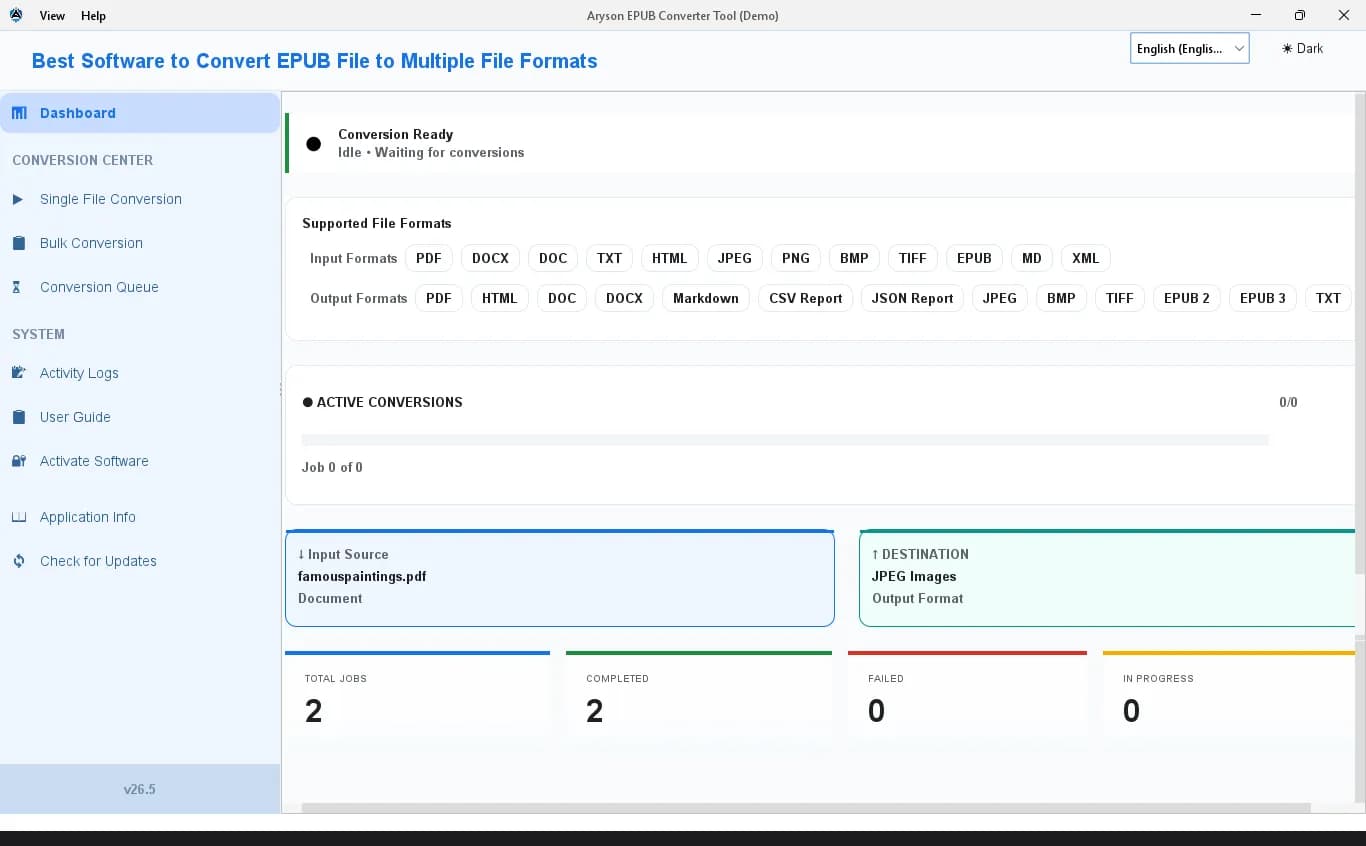
About this app
Aryson EPUB Converter Tool is a Windows and Mac desktop application designed to convert EPUB files (EPUB 2 and EPUB 3) into over 13 output formats, including PDF, DOCX, DOC, HTML, TXT, Markdown, XML, CSV, JSON, and image formats like JPEG, BMP, and TIFF. It also supports converting PDF, DOCX, HTML, XML, Markdown, TXT, and images back to EPUB 2 or EPUB 3. The tool stands out for its bulk conversion mode, multi-threaded processing with configurable thread count, and a real-time Conversion Queue that lets you monitor, pause, resume, or cancel individual tasks. Activity logs, job history, and trace archive export provide a complete audit trail. Metadata, embedded images, and CSS stylesheets can be extracted from EPUB files as standalone outputs. The interface supports multiple languages and light/dark themes, and the software works fully offline. A free demo version converts the first two pages of each document with a watermark on PDF/DOCX output, while the full license costs $49 and re...
Key features
- 1Bulk EPUB 2/3 conversion to 13+ formats (PDF, DOCX, HTML, Markdown, CSV/JSON metadata, images) and back to EPUB
- 2Real-time Conversion Queue with per-task status, progress, elapsed time, cancel controls, and resume-after-restart
- 3Multi-threaded engine with configurable thread count, plus metadata, image, and CSS stylesheet extraction
Target customer profile
Drawn from the product itself, not from a survey.
Demographic
IT administrators managing large document repositories
Pain points
Manual one-by-one EPUB conversion is slow and error-prone; no visibility into batch progress
Primary needs
Bulk convert hundreds of EPUB files to PDF/DOCX; monitor and manage each task with queue controls
Demographic
Digital publishing managers migrating EPUB 2 to EPUB 3 and PDF
Pain points
Formatting, CSS, and images often break during conversion; need simultaneous multi-format output
Primary needs
Preserve structure and metadata; convert to multiple formats in a single run; maintain formatting fidelity
Demographic
Compliance officers and legal professionals handling regulated archives
Pain points
Conversion tools lack audit trails and may strip metadata; need documented, repeatable processes
Primary needs
Convert to Searchable PDF with preserved metadata; export logs for audits and regulatory submissions
Scout Review
Written by AI from measured evidence, scored out of 100.
Aryson EPUB Converter Tool is a Windows/Mac desktop converter that turns EPUB 2/3 into 13+ formats and back, built around a real-time Conversion Queue with per-task progress, cancel controls, configurable thread count, and resume-after-restart. The positioning is sharp: IT admins, publishing teams, and compliance staff who need batch conversion with an audit trail, sold at a $49 one-time license against free Calibre and subscription Adobe. Security headers are genuinely well configured (12/12) and the offline-only design sidesteps most data-handling risk. The weak points are visible: a clipped dashboard layout, an SEO headline masquerading as a product title, no third-party security audit despite the compliance pitch, and a 2-page watermarked demo that barely lets you test anything. Speed and accessibility went unmeasured this run.
Measure by measure
Usability
63Distinct Single/Bulk/Queue workflows, a queue showing task ID, status, progress and elapsed time, plus resume-after-restart are genuinely useful. The 2-page watermarked demo limits real evaluation, and clipped content hides part of the format list.
Design
58App screenshots show a clean sidebar dashboard with color-coded stat tiles and a clear Input→Destination flow, but format chips and the Destination card clip off the right edge, and the oversized SEO-style header title fights the UI.
Speed
58No Lighthouse measurement completed this run, so site and app performance are unverified. The product is a fully offline desktop converter with multi-threaded processing and configurable thread count, which is a reasonable design for batch throughput.
Security
74HTTP probe passed 12/12: HTTPS enforced, HSTS, CSP, frame protection, Referrer-Policy, Permissions-Policy, SPF and DMARC all present. Site states it stores no credentials or file content. No SOC 2, ISO, or third-party audit claim found.
Accessibility
55No accessibility measurement completed this run. Site claims multi-language UI (English, Spanish, Portuguese, Chinese) and light/dark themes, which help. Screenshots show low-contrast sidebar icons and muted labels, and no WCAG statement was found.
Growth
62Real problem, specific buyers (IT admins, publishing, legal), and a genuine wedge over Calibre: queue control, thread tuning, audit logs, offline. But Calibre is free and Adobe is entrenched, so the ceiling is a paid niche, not a category.
Improvement areas
- Dashboard layout clips output format chips and the Destination card at default window size
- Demo limited to 2 pages with watermark; no full-featured trial to evaluate real workloads
- No SOC 2/ISO/pen-test claim or WCAG statement despite compliance and accessibility positioning
Design & Usability
The app UI is a standard desktop dashboard done competently: left sidebar with CONVERSION CENTER and SYSTEM sections, color-coded stat tiles, and Input Source → Destination cards that make the conversion flow obvious at a glance. The queue panel showing task ID, format, status, progress and elapsed time is the strongest usability asset — it's exactly what batch-conversion users complain is missing elsewhere. Two problems drag it down. First, the layout doesn't fit its own window: the output format chips run off the right edge and the Destination card is clipped, hiding information. Second, the header is set in oversized bold blue reading 'Best Software to Convert EPUB File to Multiple File Formats' — SEO copy where a product name belongs. The 2-page watermarked demo also limits how much anyone can evaluate before paying.
Speed & Security
Security is the cleanest dimension here. The HTTP probe returned 12/12: HTTPS enforced, HSTS, CSP, frame protection, X-Content-Type-Options, Referrer-Policy, Permissions-Policy, plus SPF and DMARC. The site explicitly states it stores no user credentials, file content, or organisational data — consistent with a fully offline desktop tool. What's missing is third-party validation: no SOC 2, ISO 27001, or penetration-test claim appears in the collected content, which matters given the compliance-officer positioning. Speed is unmeasured — the Lighthouse run did not complete, so neither site load nor conversion throughput has any verified number. The multi-threaded engine with configurable thread count is a sensible architecture for batch work, but architecture is not a benchmark.
Accessibility & Growth
Accessibility has no measurement this run. On paper the product does well on internationalisation — English, Spanish, Portuguese, Chinese interfaces plus light and dark themes — and desktop apps inherit OS-level keyboard and screen-reader behaviour. Against that, the screenshots show small low-contrast sidebar icons and muted section labels, and no WCAG conformance statement appears anywhere on the site. Growth is the more interesting question. The problem is real: bulk EPUB conversion with no progress visibility is genuinely painful, and the three named segments — IT admins with large repositories, publishing teams migrating EPUB 2 to 3, and legal/compliance staff needing audit trails — are specific and underserved. The wedge over Calibre is concrete: queue management, thread control, resumable jobs, exported logs, and full offline operation. The limit is that Calibre is free and Adobe is entrenched, so this is a paid niche tool rather than a category play.
Conclusion
Whether this is worth $49 depends entirely on whether you convert EPUBs in volume. For a single file, Calibre is free and fine. For a few hundred files with a deadline, per-task progress, cancel controls, resumable jobs and exportable logs are the difference between a workday and a guess. The tool clearly understands its buyer. What it hasn't done is prove it — no benchmark, no audit, no accessibility statement, and a demo that stops at page two. Fix the clipped layout, drop the keyword headline, publish a real trial, and this becomes an easy recommendation for the batch-conversion niche rather than a considered one.
Suggestions for improvement
- Fix the dashboard layout so output format chips and the Destination card fit inside the window at default size
- Replace the SEO header title with the actual product name and move keyword copy to the marketing site
- Extend the demo beyond 2 pages, or offer a time-limited full trial so buyers can test real files
- Publish a security page with audit status, data-handling detail, and a WCAG conformance statement
Alternatives comparison
Named competitors, point by point. Nobody paid to appear here or to be left out.
 Aryson EPUB Converter Tool | Calibre |  Adobe Acrobat Pro DC |  Online-Convert.com | |
|---|---|---|---|---|
| Price | $49 one-time license; free demo (2 pages, watermarked) | Free, open source | Subscription (~$19.99/mo+) | Free tier; paid plans for larger files |
| Batch conversion with queue management | Yes — real-time queue, per-task progress, cancel, resume after restart | Bulk convert, but no per-task queue controls or thread tuning | Limited batch; not EPUB-focused | Limited batch control; upload-based |
| Works fully offline | Yes — no internet required | Yes — desktop app | Desktop app, but license activation online | No — browser-based upload required |
| Audit trail / activity logs | Yes — activity logs, job history, trace archive export | Basic job log; no compliance-grade export | Not EPUB-specific | No |
| Output format breadth | 13+ formats incl. PDF, DOCX, HTML, MD, CSV/JSON metadata, images | Very broad ebook + document format support | Strong PDF-centric; limited EPUB | Broad format list, web-based |
Calibre
Free, open-source eBook manager and converter that supports EPUB and many other formats, but lacks advanced queue management and batch thread control.
Adobe Acrobat Pro DC
Commercial PDF solution with conversion capabilities, but not focused on EPUB conversion and lacks specialized EPUB batch features.
Online-Convert.com
Web-based file conversion service that supports EPUB to PDF and other formats, but requires uploading files and offers limited batch control.
Comparing options? See Aryson EPUB Converter Tool alternatives, scored side by side
More Productivity apps
View all Productivity
Qamarero
92An all-in-one hospitality software for restaurants and ba...

Puzzly – B2B Lead Generation & Sales Intelligence Platform
92Puzzly is an all-in-one B2B lead generation platform that...

The Stack Newsletter
92A weekly newsletter delivering curated tech jobs, intervi...

StoryPad
92Privacy-first open source journal app with a continuous t...

Vibe Coding Agent Skills
92A free, open-source platform offering 110 AI agent skills...

Notion
92All-in-one AI workspace for docs, projects, and knowledge...

EmbedMyReviews
92White-label reputation management software for agencies s...

QRBliss
91Branded QR codes with AI Brand Sync, 15 free dynamic code...

Strukchad Property Management
91Property management for Kenyan letting agents: rent invoices raised every month, M-Pesa rent prompts to tenants, arrears tracking and landlord statements.

CC Switch
91Open-source desktop app for switching AI coding providers...

Gerty
91Private, local AI assistant for Mac that runs offline

username.md
90One verified handle for your online identity, readable by...


A platform dedicated to providing unbiased reviews of newly launched applications, analyzing everything from their features to their full potential.
info@scoutforge.net© 2026 Scoutforge. All rights reserved.
