Cycling through all six. Tap any point to stop.
Measured on six things
Convert OLM to PST, MBOX, and 15+ formats or migrate to G...
Design
44Dated layout: dense 13-14px body text, low-res trust badges, and a Windows-chrome screenshot on a Mac product page. Hero hierarchy is clear, but a floating query popup overlaps the copy.
Screenshots
1 / 1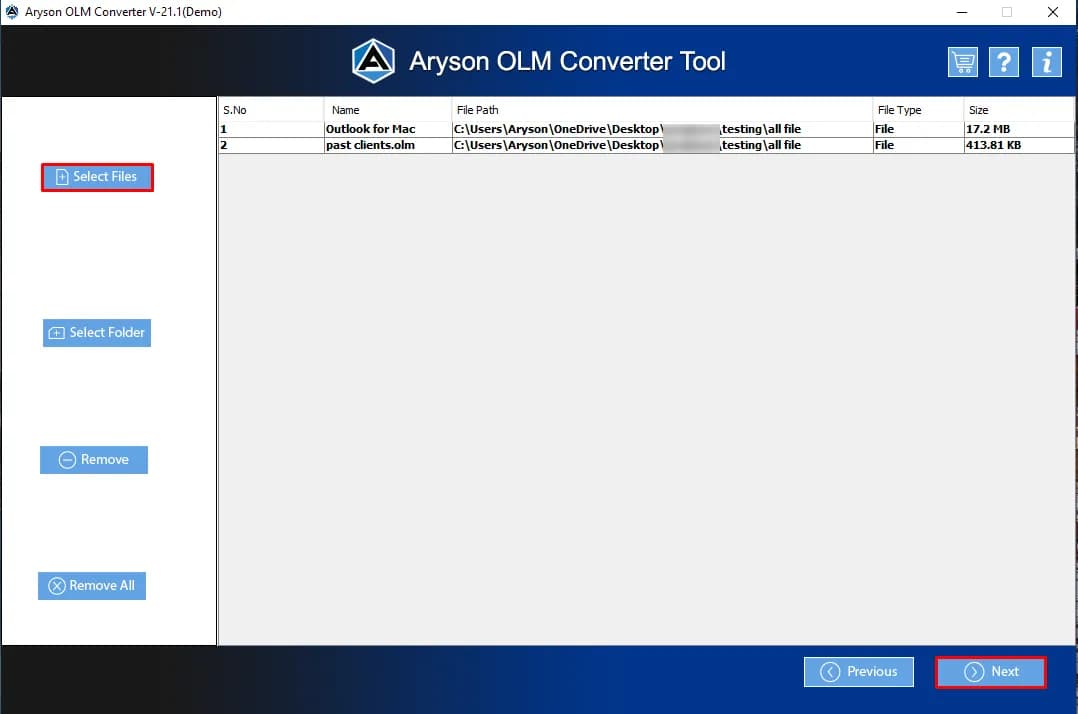
About this app
Aryson Mac OLM Converter is a professional-grade utility designed to solve a very specific headache: extracting data from Outlook for Mac's OLM files and moving it anywhere else. Whether you're switching to Windows Outlook and need a PST, consolidating to Gmail or Office 365, or simply archiving emails as PDFs, this tool handles it. It supports conversion to over 15 formats and direct migration to major email clients, all while preserving folder hierarchy and data integrity. Standout features include bulk conversion, a duplicate email remover, date-range filtering, attachment management, and automatic PST splitting. It's a focused, no-nonsense tool that gets the job done, though the 50-item-per-folder trial limit means you'll need the full version ($49) for any real work.
Key features
- 1Bulk convert OLM to PST, MBOX, EML, MSG, PDF, CSV and 15+ other formats on macOS
- 2Direct migration of OLM mailboxes to Gmail, Office 365, iCloud, Thunderbird and Outlook web
- 3Date-range filtering, folder selection, duplicate removal, attachment handling and automatic PST splitting
Target customer profile
Drawn from the product itself, not from a survey.
Demographic
IT administrators and support teams managing mixed Mac/Windows environments
Pain points
Migrating user mailboxes from Mac Outlook to Windows Outlook or Office 365 is manual and error-prone
Primary needs
Reliable batch conversion of OLM to PST with folder hierarchy intact and no data loss
Demographic
Small business owners or freelancers switching from Mac Outlook to Gmail or web-based email
Pain points
OLM files are locked to Mac Outlook and can't be imported directly into Gmail or other clients
Primary needs
Direct, secure migration of emails, contacts, and calendars from OLM to Gmail or Office 365
Demographic
Legal, compliance, or research professionals who need to archive or share email records
Pain points
Converting OLM emails to PDF or CSV while preserving attachments and metadata is cumbersome
Primary needs
Export OLM to PDF, CSV, or MBOX with attachment handling and date-range filtering
Scout Review
Written by AI from measured evidence, scored out of 100.
Aryson Mac OLM Converter is a focused utility for a genuinely annoying problem: getting mail, contacts and calendars out of Outlook for Mac's OLM format and into PST, MBOX, PDF, Gmail or Office 365. The feature list is credible — bulk conversion, folder selection, date-range filtering, attachment handling, PST splitting, and direct migration to major clients — and the free demo's 50-items-per-folder cap is disclosed up front rather than buried. The site itself is fast (97 mobile Lighthouse) and well-secured at the header level (12/12), but visually dated, with a Windows screenshot on a Mac product page and a chat popup sitting on top of the hero copy. Accessibility is decent on automated checks but fails contrast, heading order and landmark basics. Against SysTools and Stellar, it's a competent peer rather than a standout.
Measure by measure
Usability
62Short path to value: Download/Purchase above the fold, OS switcher adjacent, nav covers Features, Specs, Screenshots, Video, FAQs. The 50-item demo cap is stated early, though the chat popup adds friction.
Design
44Dated layout: dense 13-14px body text, low-res trust badges, and a Windows-chrome screenshot on a Mac product page. Hero hierarchy is clear, but a floating query popup overlaps the copy.
Speed
88Lighthouse mobile 97/100 (LCP 1.8s, TBT 53ms, CLS 0.088) and desktop 96/100. The marketing page is genuinely fast; no lag complaints surfaced in the collected evidence.
Security
74Full header stack verified: HTTPS+HSTS, CSP, frame protection, Referrer-Policy, Permissions-Policy, SPF and DMARC — 12/12 checklist points. No published SOC 2, ISO or bug bounty found.
Accessibility
68Lighthouse a11y 90/100, but four real failures: invalid aria-* values, insufficient color contrast, non-sequential headings, and no main landmark. No WCAG statement or a11y page found.
Growth
54Real, specific pain — OLM is locked to Mac Outlook — but SysTools and Stellar sell the same fix at the same price. A 13-year-old vendor with a defined niche and no visible wedge beyond format count.
Improvement areas
- Dated landing page: dense small body copy, low-res trust badges, Windows screenshot on a Mac product
- No published security documentation, audit or compliance page despite handling full mailboxes
- Accessibility gaps: no main landmark, failing contrast, non-sequential headings, invalid aria values
Design & Usability
The homepage is a long, text-heavy sales page built on a light-blue/navy banding rhythm. Hero structure is sound — box art, brand lockup, H1, star rating, bullet list, then Download/Purchase beside a Mac/Windows/Linux switcher — so the path to a download is short and the OS choice is obvious. What drags it down is craft: 13-14px body copy packed into dense paragraphs, low-resolution SourceForge and 'Power Performer' badges crowded under the box art, a floating 'Queries Related to Software Download, Purchase, Sale, and License' popup that physically overlaps the hero description, and a Windows-chrome app screenshot labelled as a Mac product. The 50-items-per-folder demo cap is disclosed early, which is honest, but the copy repeats it in the hero and again in the prerequisites table.
Speed & Security
Speed is the standout. Google Lighthouse measured 97/100 on mobile (LCP 1.8s, TBT 53ms, CLS 0.088) and 96/100 on desktop — the marketing site is lean and snappy, and nothing in the collected evidence suggests user complaints about lag. Security is solid at the transport and header layer: HTTPS enforced with HSTS, a Content-Security-Policy, frame protection, X-Content-Type-Options, Referrer-Policy and Permissions-Policy all present, plus SPF and DMARC on the domain — a clean 12/12 on the header checklist. What's missing is the compliance layer: no SOC 2, ISO 27001, penetration-test summary, security page or bug bounty is referenced anywhere in the site content. For a tool that ingests entire mailboxes and pushes them to Gmail and Office 365, that's the gap worth closing.
Accessibility & Growth
Automated accessibility lands at 90/100, which sounds better than it is: the audit still flags invalid aria-* attribute values, insufficient background/foreground contrast, headings that skip levels, and a missing main landmark. There is no accessibility statement, no WCAG conformance claim, and no evidence of keyboard or screen-reader testing. On growth, the underlying problem is legitimate and specific — OLM files are locked to Outlook for Mac and cannot be imported directly into Gmail, Office 365 or Windows Outlook, so a converter has a real job. The site backs that up with 15+ output formats, direct migration to Gmail/O365/iCloud/Thunderbird, PST splitting, date-range filters and attachment handling. But the category is crowded with established peers (SysTools, Stellar) offering the same conversion and migration set, and nothing in the product's own material names a segment it serves better or a capability the incumbents lack. A 13-year-old domain and a YouTube channel show staying power, not a wedge.
Conclusion
If you have an OLM file and need it out, this will plausibly do the job — the format coverage and migration targets are broad, and the demo lets you test 50 items per folder before paying $49. Go in expecting a functional tool wrapped in a dated sales page, and check the output on a sample mailbox before committing a whole migration to it. The missing piece is trust infrastructure: no published audit, no security page, no accessibility statement. For an IT admin moving a whole team's mail, that's the thing to ask the vendor about directly before you hand over the archive.
Suggestions for improvement
- Replace the Windows-chrome 'V-21.1 Demo' screenshot with a real macOS UI capture — it's a Mac product.
- Fix the four Lighthouse a11y failures: aria-* values, contrast ratios, heading order, and add a main landmark.
- Publish a security page covering data handling during conversion and migration, plus any audit or pen-test.
- Kill or reposition the 'Queries Related to Software Download, Purchase, Sale, and License' popup off the hero.
Alternatives comparison
Named competitors, point by point. Nobody paid to appear here or to be left out.
 Aryson Mac OLM Converter |  SysTools OLM Converter |  Stellar Converter for OLM | |
|---|---|---|---|
| OLM to PST conversion | Yes, with automatic PST splitting | Yes, core feature | Yes, core feature |
| Direct migration to Gmail / Office 365 | Yes — Gmail, Office 365, iCloud, Thunderbird, Yahoo, Zoho | Yes — Office 365 and Gmail migration | Yes — Office 365 and Gmail migration |
| Free trial limit | 50 items per folder | Limited demo, per-folder cap | Free demo with item cap |
| Price (full version) | $49 | Comparable paid tier | Comparable paid tier |
| Date-range filter and attachment handling | Yes — date filter, exclude or export attachments separately | Yes — filtering options available | Yes — filtering options available |
SysTools OLM Converter
A well-known alternative that converts OLM to PST and other formats, with similar migration features to Office 365 and Gmail.
Stellar Converter for OLM
Another established tool for OLM to PST conversion and migration, often praised for its user-friendly interface and recovery features.
Comparing options? See Aryson Mac OLM Converter alternatives, scored side by side
More Productivity apps
View all Productivity
Qamarero
92An all-in-one hospitality software for restaurants and ba...

Puzzly – B2B Lead Generation & Sales Intelligence Platform
92Puzzly is an all-in-one B2B lead generation platform that...

The Stack Newsletter
92A weekly newsletter delivering curated tech jobs, intervi...

StoryPad
92Privacy-first open source journal app with a continuous t...

Vibe Coding Agent Skills
92A free, open-source platform offering 110 AI agent skills...

Notion
92All-in-one AI workspace for docs, projects, and knowledge...

EmbedMyReviews
92White-label reputation management software for agencies s...

QRBliss
91Branded QR codes with AI Brand Sync, 15 free dynamic code...

Strukchad Property Management
91Property management for Kenyan letting agents: rent invoices raised every month, M-Pesa rent prompts to tenants, arrears tracking and landlord statements.

CC Switch
91Open-source desktop app for switching AI coding providers...

Gerty
91Private, local AI assistant for Mac that runs offline

BACKLNK
90Backlnk is a free SEO and AI visibility website: 15 website checks, a full audit as a PDF report, and guides to get found in search and AI answers.


A platform dedicated to providing unbiased reviews of newly launched applications, analyzing everything from their features to their full potential.
info@scoutforge.net© 2026 Scoutforge. All rights reserved.
