Cycling through all six. Tap any point to stop.
Measured on six things
Convert MBOX files to PST and more with batch processing ...
Design
46Dated homepage: a support popup clips the hero headline, badges and duplicate CTAs crowd the fold, and button styles (blue vs orange-red) lack a clear system. The tabbed format-explorer is the one genuinely well-structured section.
Screenshots
1 / 1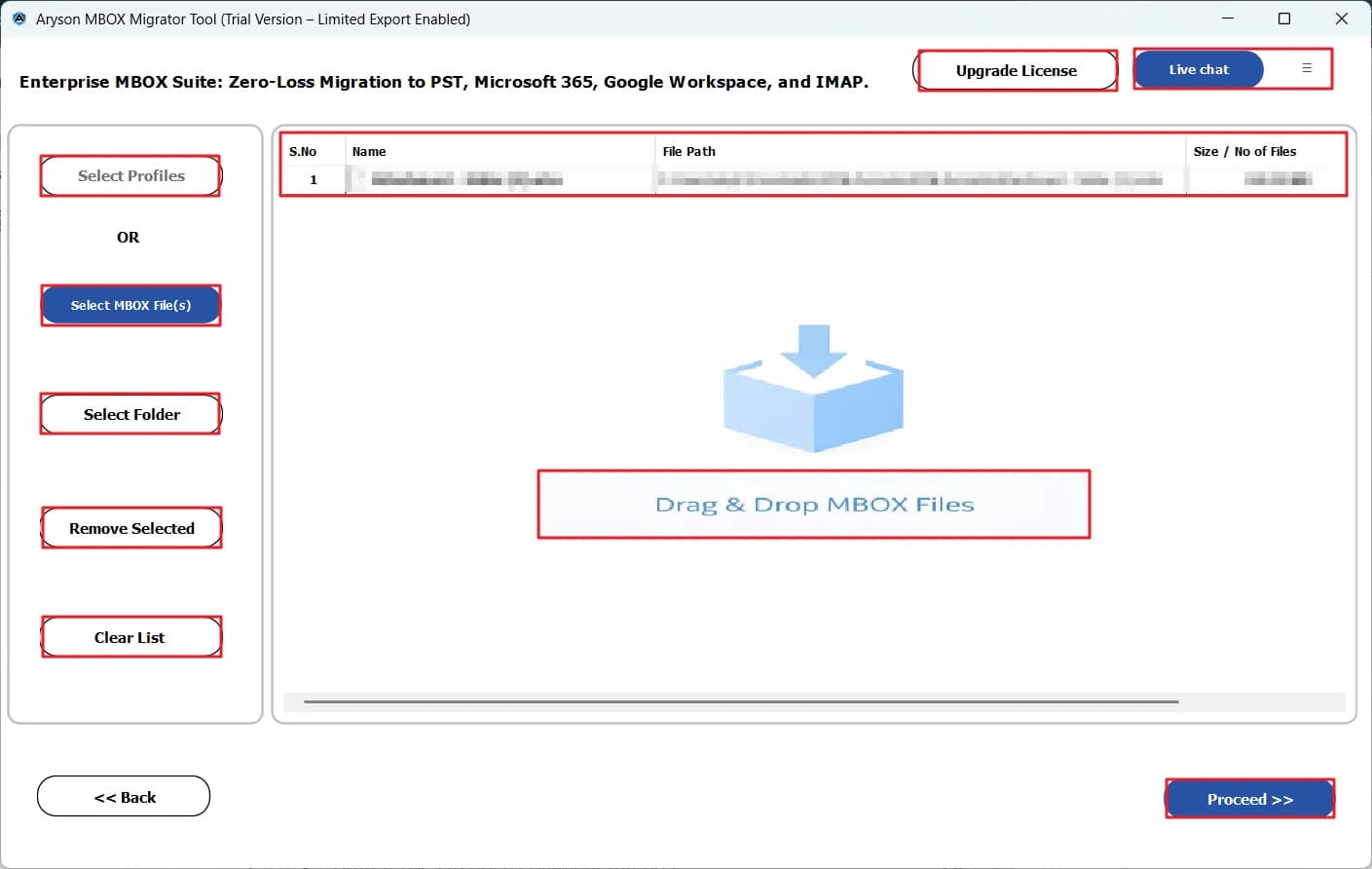
About this app
Aryson MBOX to PST Converter is a reliable desktop utility designed to help IT professionals, system administrators, and individuals migrate email data from MBOX-based clients like Thunderbird, Apple Mail, and Google Takeout to Outlook PST and other formats. The software stands out with its ability to batch convert multiple MBOX files without size limitations, preview emails before conversion, and maintain original folder structures and metadata. Advanced features include splitting large PST files, removing duplicates, filtering by date range, and skipping already converted items. The tool supports various output formats including PST, MSG, EML, PDF, CSV, and direct migration to Office 365, Google Workspace, IMAP, and more. With a user-friendly interface and a free trial that converts up to 50 emails per folder, Aryson MBOX to PST Converter simplifies complex email migration tasks while ensuring data integrity and security.
Key features
- 1Batch convert multiple MBOX files (Thunderbird, Apple Mail, Google Takeout, Eudora, and more) with no file size limit.
- 2Output to PST, MSG, EML, MBOX, PDF, CSV, or migrate directly to Office 365, Google Workspace, IMAP, and Gmail.
- 3Split large PST files by size, remove duplicates by To/From/Subject, filter by date, and skip already-converted items.
- 4Preview emails with attachments, headers, and metadata before conversion; free trial converts 50 emails per folder.
Target customer profile
Drawn from the product itself, not from a survey.
Demographic
IT administrators and system administrators in SMBs and enterprises
Pain points
Manual MBOX to PST conversion is time-consuming and prone to errors; need to maintain data integrity during migrations.
Primary needs
Batch conversion, folder structure preservation, support for large files, and compatibility with various MBOX sources.
Demographic
Professionals migrating from Thunderbird, Apple Mail, or Google Takeout to Outlook
Pain points
Loss of email formatting, attachments, and metadata during conversion; difficulty in selectively migrating emails.
Primary needs
Accurate preservation of email properties, preview before conversion, and selective conversion by date or folder.
Demographic
Small business owners and individuals with limited technical expertise
Pain points
Complex migration tools with steep learning curves; expensive software for occasional conversion needs.
Primary needs
Simple, intuitive interface, affordable pricing, and a free trial to test functionality before purchase.
Scout Review
Written by AI from measured evidence, scored out of 100.
Aryson MBOX to PST Converter is a competent, long-running migration utility (domain live since 2013) wrapped in a dated, overstuffed marketing page. The engineering underneath is fine — the site is fast (Lighthouse 97 mobile / 99 desktop) and the security headers are complete (12/12) — but the design is stuck in 2016, the accessibility audit has real failures behind its 91 score, and the compliance story stops at 'fully secured software.' The product itself does what it says: batch MBOX conversion without size limits, PST splitting, deduplication, and direct migration to Office 365 and IMAP, with a 50-email free trial. Against SysTools, Stellar, and Kernel it's on par on features and behind on polish and trust signals. Buy it if you need the job done cheaply; don't expect the site to sell it for you.
Measure by measure
Usability
58Download is reachable fast and the desktop app's single 'Proceed' flow is beginner-friendly, but duplicate CTAs and a dense, multi-colored bullet list make the page harder to scan than it needs to be. The 50-email trial limit is buried in small print.
Design
46Dated homepage: a support popup clips the hero headline, badges and duplicate CTAs crowd the fold, and button styles (blue vs orange-red) lack a clear system. The tabbed format-explorer is the one genuinely well-structured section.
Speed
88Lighthouse mobile 97/100 (LCP 1.9s, CLS 0, TBT 102ms) and desktop 99/100. The marketing site is genuinely fast and stable, with no layout shift and no lag complaints in the collected evidence.
Security
74Full security-header stack (HSTS, CSP, frame protection, Referrer-Policy, Permissions-Policy) plus SPF and DMARC — 12/12 on the probe. No published SOC 2, ISO, pen-test or bug-bounty page found, so compliance depth is unverified.
Accessibility
70Lighthouse a11y 91/100, but real failures remain: insufficient color contrast, non-sequential heading order, undersized touch targets, and a missing main landmark. No WCAG statement or accessibility page found on the site.
Growth
58Real, recurring migration problem with a specific audience (Thunderbird/Apple Mail/Google Takeout → Outlook) and concrete differentiators: batch without size limits, PST splitting, dedup, direct O365/IMAP migration. Solid niche, crowded field.
Improvement areas
- Homepage design is dated: floating popup covers the hero headline and duplicate CTAs dilute the primary action.
- No published SOC 2, ISO 27001, pen-test summary, or bug-bounty program to back the 'fully secured' claim.
- Accessibility audit failures (contrast, heading order, touch targets, main landmark) with no WCAG statement.
- The 50-email free-trial limit is buried in small print instead of being a clear decision point.
Design & Usability
The homepage reads like it was designed by committee in 2016 and never revisited: a support popup clips the hero headline, three award badges and two download buttons fight for the fold, and the button palette (solid blue, orange-red outline, orange-red solid) has no visible hierarchy. The one bright spot is the tabbed 'Supported MBOX Formats' module, which is genuinely well-organized. Usability is better than the design suggests — the desktop app's single 'Proceed' action and large labelled controls are beginner-friendly, and the download path is reachable in one click. But the 50-email trial limit, the single most important fact for a buyer, is buried in small print, and the 15-item bullet list mixes blue links, orange links, and bold text with no logic, so scanning is work.
Speed & Security
Speed is the standout: Lighthouse mobile 97/100 with LCP 1.9s, CLS 0, and TBT 102ms, and desktop 99/100. The marketing site is genuinely snappy and stable, and nothing in the collected evidence suggests lag complaints. Security is solid on the infrastructure side — HTTPS enforced, HSTS, CSP, frame protection, X-Content-Type-Options, Referrer-Policy, Permissions-Policy, plus SPF and DMARC for a clean 12/12 on the header probe. What's missing is the compliance layer buyers in IT actually ask about: no published SOC 2, ISO 27001, pen-test summary, or bug-bounty program surfaced in the collected evidence, and the 'fully secured software' line is marketing, not a certificate. For an SMB tool that's defensible; for the enterprise admins the site claims to serve, it's a gap.
Accessibility & Growth
Accessibility lands at 70: Lighthouse scores 91/100, but the failing audits are real — insufficient color contrast, non-sequential heading order, undersized touch targets, and a missing main landmark — and there's no WCAG conformance statement or accessibility page anywhere on the site. Growth is the more interesting question. The problem is real and recurring (MBOX files from Thunderbird, Apple Mail, and Google Takeout simply don't open in Outlook), the audience is specific, and the feature set has genuine differentiators: batch conversion without size limits, PST splitting, deduplication, skip-existing exports, and direct migration to Office 365, Google Workspace, and IMAP. The limit is the category itself — SysTools, Stellar, and Kernel all sell the same migration with the same bullet list, and Aryson's wedge is price and breadth rather than anything structurally hard to copy. It can grow steadily inside a niche; it won't run away with the market.
Conclusion
The honest verdict: this is a workhorse tool with a brochure problem. If you're an IT admin with a stack of Thunderbird or Google Takeout MBOX files and an Outlook deadline, the 50-email trial is enough to prove it works before you pay, and the feature list (PST splitting, dedup, skip-existing, direct O365 migration) covers the real-world edge cases. What it won't do is reassure a procurement team — no SOC 2, no pen-test, no accessibility statement — so enterprise buyers will need to do their own due diligence. Fix the homepage (kill the popup, pick one button color, surface the trial limit) and publish a trust page, and this jumps a full tier without touching the converter itself.
Suggestions for improvement
- Remove or reposition the floating support popup so it stops covering the hero headline on load.
- Consolidate the duplicate Download/Purchase CTAs into one clear primary action with a single button style.
- Publish a trust page with SOC 2 / ISO status, pen-test summary, and a security contact or bug-bounty channel.
- Add a WCAG conformance statement and fix the failing contrast, heading-order, and touch-target audits.
Alternatives comparison
Named competitors, point by point. Nobody paid to appear here or to be left out.
 Aryson MBOX to PST Converter |  SysTools MBOX to PST Converter |  Stellar MBOX to PST Converter |  Kernel for MBOX to PST | |
|---|---|---|---|---|
| Free trial limit | 50 emails per folder | Limited free trial (typically 25 items per folder) | Free trial converts a limited number of items per file | Free demo converts a limited number of items per file |
| Batch conversion without size limits | Yes — batch with no file size limitation | Yes — batch conversion supported | Yes — batch conversion supported | Yes — batch conversion supported |
| Split large PST files | Yes — split by specified size limit | Yes — PST splitting supported | Yes — split PST by size | Yes — split PST option available |
| Direct migration to Office 365 / IMAP | Yes — Office 365, Google Workspace, IMAP, Gmail, GoDaddy | Yes — Office 365 and IMAP migration supported | Yes — Office 365 migration supported | Yes — Office 365 migration supported |
| Deduplication and skip-existing | Yes — dedup by To/From/Subject and Skip Existing Exports | Yes — duplicate removal and skip options | Partial — duplicate removal available | Yes — duplicate removal supported |
| Preview before conversion | Yes — preview emails with attachments, headers, metadata | Yes — preview supported | Yes — preview supported | Yes — preview supported |
SysTools MBOX to PST Converter
A popular tool for converting MBOX files to PST with support for batch conversion and preview features.
Stellar MBOX to PST Converter
Offers conversion of MBOX files to PST and other formats with a focus on data integrity and ease of use.
Kernel for MBOX to PST
A reliable converter that supports multiple MBOX variants and provides options for filtering and splitting PST files.
Comparing options? See Aryson MBOX to PST Converter alternatives, scored side by side
More Productivity apps
View all Productivity
Qamarero
92An all-in-one hospitality software for restaurants and ba...

Puzzly – B2B Lead Generation & Sales Intelligence Platform
92Puzzly is an all-in-one B2B lead generation platform that...

The Stack Newsletter
92A weekly newsletter delivering curated tech jobs, intervi...

StoryPad
92Privacy-first open source journal app with a continuous t...

Vibe Coding Agent Skills
92A free, open-source platform offering 110 AI agent skills...

Notion
92All-in-one AI workspace for docs, projects, and knowledge...

EmbedMyReviews
92White-label reputation management software for agencies s...

QRBliss
91Branded QR codes with AI Brand Sync, 15 free dynamic code...

Strukchad Property Management
91Property management for Kenyan letting agents: rent invoices raised every month, M-Pesa rent prompts to tenants, arrears tracking and landlord statements.

CC Switch
91Open-source desktop app for switching AI coding providers...

Gerty
91Private, local AI assistant for Mac that runs offline

BACKLNK
90Backlnk is a free SEO and AI visibility website: 15 website checks, a full audit as a PDF report, and guides to get found in search and AI answers.


A platform dedicated to providing unbiased reviews of newly launched applications, analyzing everything from their features to their full potential.
info@scoutforge.net© 2026 Scoutforge. All rights reserved.
