Cycling through all six. Tap any point to stop.
Measured on six things
Enterprise tenant-to-tenant migration for Microsoft 365 m...
Design
57Competent but dated software-vendor look: disciplined three-up service cards and consistent typography, undermined by a chat popup clipping the hero, mixed emoji/line icons, and stacked competing CTAs.
Screenshots
1 / 1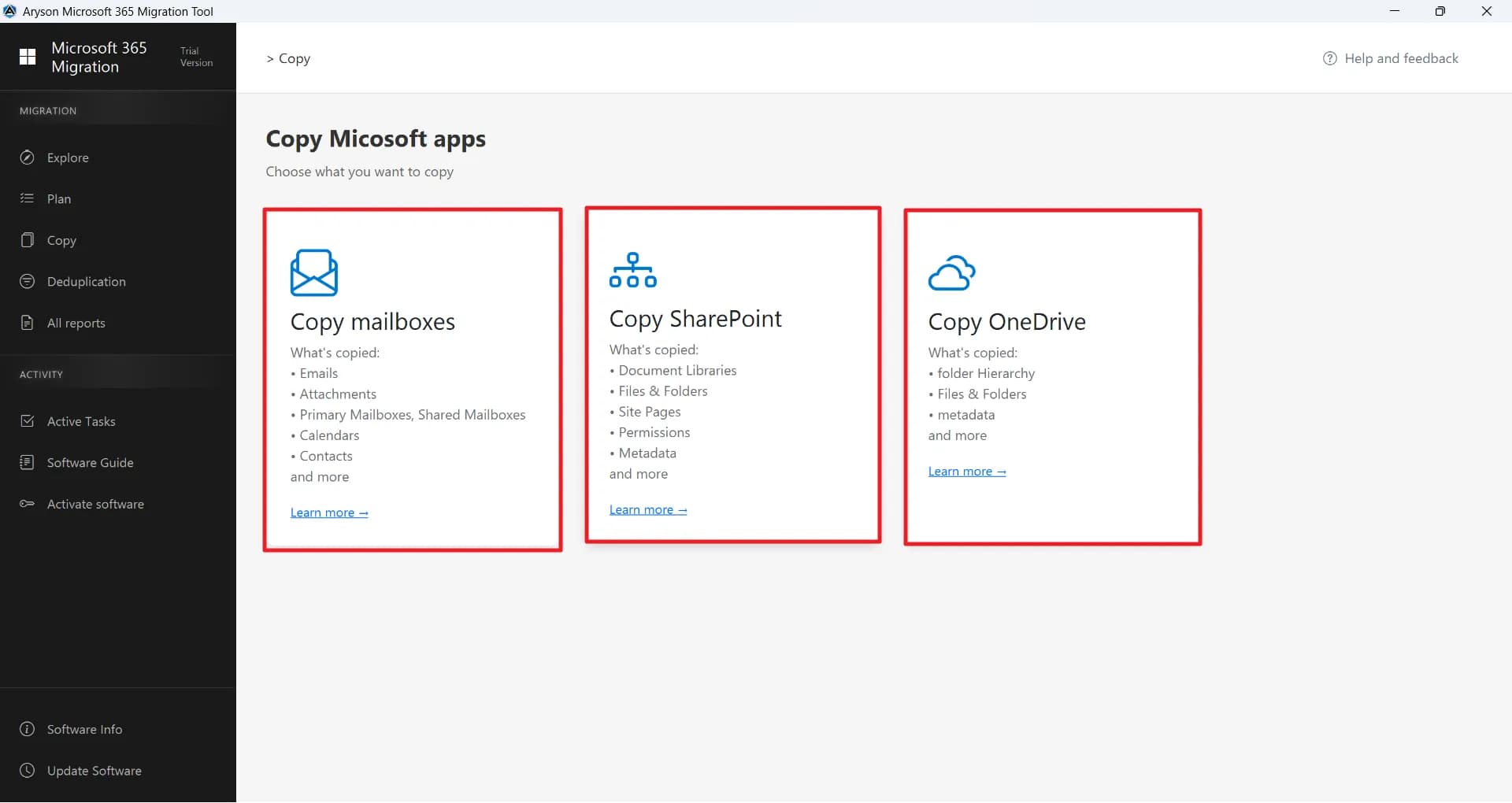
About this app
Aryson Microsoft 365 Migration Tool is a powerful, enterprise-grade solution designed to simplify and secure tenant-to-tenant migrations for Microsoft 365 (formerly Office 365). Built for IT administrators and large organizations, it offers API-based migration of mailboxes, SharePoint Online sites, and OneDrive for Business data with a strong focus on data integrity, compliance, and scalability. The tool supports modern authentication (OAuth 2.0), incremental migrations to skip previously migrated items, and granular filtering by date range, file size, file extension, and content type. A standout feature is its built-in deduplication suite that identifies and removes duplicate emails, SharePoint files, and OneDrive items using hash-based scanning, helping optimize storage. Aryson also provides user-friendly mapping of source and destination accounts, detailed migration reports, and real-time task monitoring. While the free trial is limited (e.g., 50 emails per folder, 20 MB file siz...
Key features
- 1API-based tenant-to-tenant migration of Microsoft 365 mailboxes, SharePoint Online and OneDrive with OAuth 2.0.
- 2Hash-based deduplication suite to detect and remove duplicate emails, SharePoint files and OneDrive items.
- 3Incremental migration plus granular filters by date range, file size, extension and content type.
Target customer profile
Drawn from the product itself, not from a survey.
Demographic
IT Infrastructure Managers at large enterprises
Pain points
Complex tenant-to-tenant migrations, risk of data loss, downtime during migration.
Primary needs
Secure, automated migration with minimal disruption, detailed reporting, and compliance.
Demographic
Microsoft 365 Consultants and Solution Architects
Pain points
Manual mapping errors, handling large data volumes, ensuring permission and metadata preservation.
Primary needs
Granular filters, incremental migration, deduplication, and support for modern authentication.
Demographic
Small to mid-sized businesses undergoing M&A or restructuring
Pain points
Limited IT resources, budget constraints, need to consolidate multiple tenants quickly.
Primary needs
Affordable, easy-to-use tool with bulk migration, trial version, and reliable support.
Scout Review
Written by AI from measured evidence, scored out of 100.
Aryson Microsoft 365 Migration Tool is a mature, fast-loading vendor page for a genuinely useful enterprise product. The site is technically excellent — 97 mobile performance, a full security-header checklist, SPF/DMARC — and the product claims are specific: API-based tenant-to-tenant migration for mailboxes, SharePoint and OneDrive, OAuth 2.0, incremental transfers, granular filters, and a hash-based deduplication suite. Where it stumbles is presentation and proof: a cluttered hero with a chat popup covering the headline, a wall of same-weight bullets, no accessibility statement despite real a11y audit failures, and no published compliance certifications for a tool that touches corporate mailboxes. The idea holds up; the packaging and the trust signals need work.
Measure by measure
Usability
60Clear primary download path with social proof and self-serve tabs (Screenshots, Video, Guide, FAQs). But ~15 same-weight bullets and a 50-email/20MB trial cap make real evaluation harder than it should be.
Design
57Competent but dated software-vendor look: disciplined three-up service cards and consistent typography, undermined by a chat popup clipping the hero, mixed emoji/line icons, and stacked competing CTAs.
Speed
88Lighthouse mobile 97/100 (LCP 1.2s, CLS 0.001, TBT 168ms) and desktop 91/100. Genuinely fast marketing page with no lag complaints in the evidence.
Security
76Full 12/12 header checklist (HSTS, CSP, frame protection, Referrer/Permissions-Policy), SPF and DMARC set, OAuth 2.0 claimed. No SOC 2/ISO/pen-test report surfaced, so compliance depth is unverified.
Accessibility
68Lighthouse 91/100 but real failures: insufficient contrast, non-sequential headings, small touch targets, no main landmark, role conflicts. No WCAG statement published.
Growth
58Real, recurring enterprise need (M&A, tenant consolidation) with concrete wedges — hash-based dedup, incremental migration, granular filters. But it's a crowded field with a free native option.
Improvement areas
- No published SOC 2/ISO certification or dedicated security/compliance page for enterprise buyers.
- Accessibility audit failures (contrast, heading order, touch targets, no main landmark) and no WCAG statement.
- Cluttered hero with overlapping chat popup and competing CTAs; dense same-weight feature bullets.
Design & Usability
The site is a conventional software-vendor page that mostly works: a clear blue download button under the value prop, 1.5M downloads and a 4.9 rating as social proof, and self-serve tabs for screenshots, video, guide and FAQs. The three-up Mailbox/SharePoint/OneDrive cards are the tidiest thing on the page. But the hero is crowded — two download CTAs plus a purchase button, a red fine-print line, and a floating chat popup that clips the subheadline on first load. The feature list runs to roughly fifteen same-weight bolded bullets, so nothing stands out and skimming is a chore. The trial cap (50 emails per folder, 20 MB files) limits how much a buyer can actually prove before paying.
Speed & Security
Speed is the standout: Lighthouse mobile 97/100 with LCP 1.2s, CLS 0.001 and TBT 168ms; desktop 91/100. No lag complaints in the evidence. Security is solid on the fundamentals — HTTPS enforced with HSTS, CSP, frame protection, X-Content-Type-Options, Referrer-Policy and Permissions-Policy all present (12/12), plus SPF and DMARC. The product claims OAuth 2.0 modern authentication and admin impersonation. What's missing is the paper trail enterprises actually ask for: no SOC 2, ISO 27001 or pen-test report surfaced, and no dedicated security/compliance page in the collected content. For a tool handling mailbox and SharePoint data, that's the gap to close.
Accessibility & Growth
Accessibility scores 91/100 on Lighthouse but the failing audits are real: insufficient color contrast, non-sequential heading order, undersized touch targets, no main landmark, and role=none/presentation conflicts. There's no WCAG conformance statement, and the visual audit flagged small, low-contrast nav tab labels. Growth is a judgement on the idea: tenant-to-tenant Microsoft 365 migration is a genuine, recurring enterprise need driven by M&A and consolidation, and Aryson names concrete differentiators — hash-based deduplication, incremental migration, granular date/size/extension filters, OAuth 2.0. The problem is the field: Microsoft's Migration Manager is free and native, MigrationWiz owns large-scale projects, and Mover covers file migration. Aryson's wedge is the dedup suite and price point for mid-sized shops; that's a real but narrow lane.
Conclusion
If you're an IT admin weighing a tenant-to-tenant migration, Aryson is worth a look — the dedup and incremental features are real differentiators against a free native tool. But do your diligence: ask for a security questionnaire response, confirm OAuth scopes and data handling in writing, and test the trial against your actual mailbox sizes before committing, because 50 emails per folder won't tell you much. The site loads fast and the claims are specific, which is more than many competitors manage. The next step for Aryson is turning those claims into verifiable proof — a compliance page, an accessibility statement, and a hero that doesn't hide behind a chat widget.
Suggestions for improvement
- Publish a security/compliance page with SOC 2 or ISO status, data-handling details, and OAuth scope documentation.
- Fix the accessibility audit failures: contrast, heading order, touch targets, and add a main landmark.
- Reposition the hero: one primary CTA, remove the chat popup overlap, and lead with the dedup differentiator.
- Expand the free trial beyond 50 emails/20 MB so buyers can validate against realistic data volumes.
Alternatives comparison
Named competitors, point by point. Nobody paid to appear here or to be left out.
 Aryson Microsoft 365 Migration Tool |  Microsoft 365 Migration Manager |  MigrationWiz | Mover | |
|---|---|---|---|---|
| Tenant-to-tenant mailbox migration | Yes — API-based, OAuth 2.0, incremental | Basic mailbox migration; limited cross-tenant | Yes — broad source/destination support | Limited mailbox migration support |
| Built-in deduplication | Yes — hash-based across mail, SharePoint, OneDrive | No | Not a core feature | No |
| Incremental migration | Yes — skips previously migrated items | Limited | Yes — delta passes | Incremental file sync |
| Granular filters (date, size, extension, content type) | Yes — all four filter types | Minimal | Yes — filtering supported | Basic file filters |
| Pricing model | Perpetual license, limited free trial | Free with M365 subscription | Per-user licensing; costly at scale | Free (Microsoft-owned) |
Microsoft 365 Migration Manager
Microsoft's native migration tool that provides basic migration capabilities for mailboxes and SharePoint, but lacks advanced deduplication and incremental migration features.
MigrationWiz
BitTitan's cloud-based migration solution supporting a wide range of sources and destinations, known for its scalability and minimal setup, but often more expensive for large-scale projects.
Mover
A cloud file migration service (now part of Microsoft) that offers fast and secure OneDrive and SharePoint migrations, but with limited mailbox migration support.
Comparing options? See Aryson Microsoft 365 Migration Tool alternatives, scored side by side
More Productivity apps
View all Productivity
Qamarero
92An all-in-one hospitality software for restaurants and ba...

Puzzly – B2B Lead Generation & Sales Intelligence Platform
92Puzzly is an all-in-one B2B lead generation platform that...

The Stack Newsletter
92A weekly newsletter delivering curated tech jobs, intervi...

StoryPad
92Privacy-first open source journal app with a continuous t...

Vibe Coding Agent Skills
92A free, open-source platform offering 110 AI agent skills...

Notion
92All-in-one AI workspace for docs, projects, and knowledge...

EmbedMyReviews
92White-label reputation management software for agencies s...

QRBliss
91Branded QR codes with AI Brand Sync, 15 free dynamic code...

Strukchad Property Management
91Property management for Kenyan letting agents: rent invoices raised every month, M-Pesa rent prompts to tenants, arrears tracking and landlord statements.

CC Switch
91Open-source desktop app for switching AI coding providers...

Gerty
91Private, local AI assistant for Mac that runs offline

BACKLNK
90Backlnk is a free SEO and AI visibility website: 15 website checks, a full audit as a PDF report, and guides to get found in search and AI answers.


A platform dedicated to providing unbiased reviews of newly launched applications, analyzing everything from their features to their full potential.
info@scoutforge.net© 2026 Scoutforge. All rights reserved.
