Cycling through all six. Tap any point to stop.
Measured on six things
Export Mac Outlook OLM contacts to vCard, CSV, PST, and m...
Design
46Dated homepage with a crowded hero: four-plus competing download/purchase buttons and a chat popup covering the product description. Feature card grid and annotated tutorial screenshot are the tidy parts.
Screenshots
1 / 1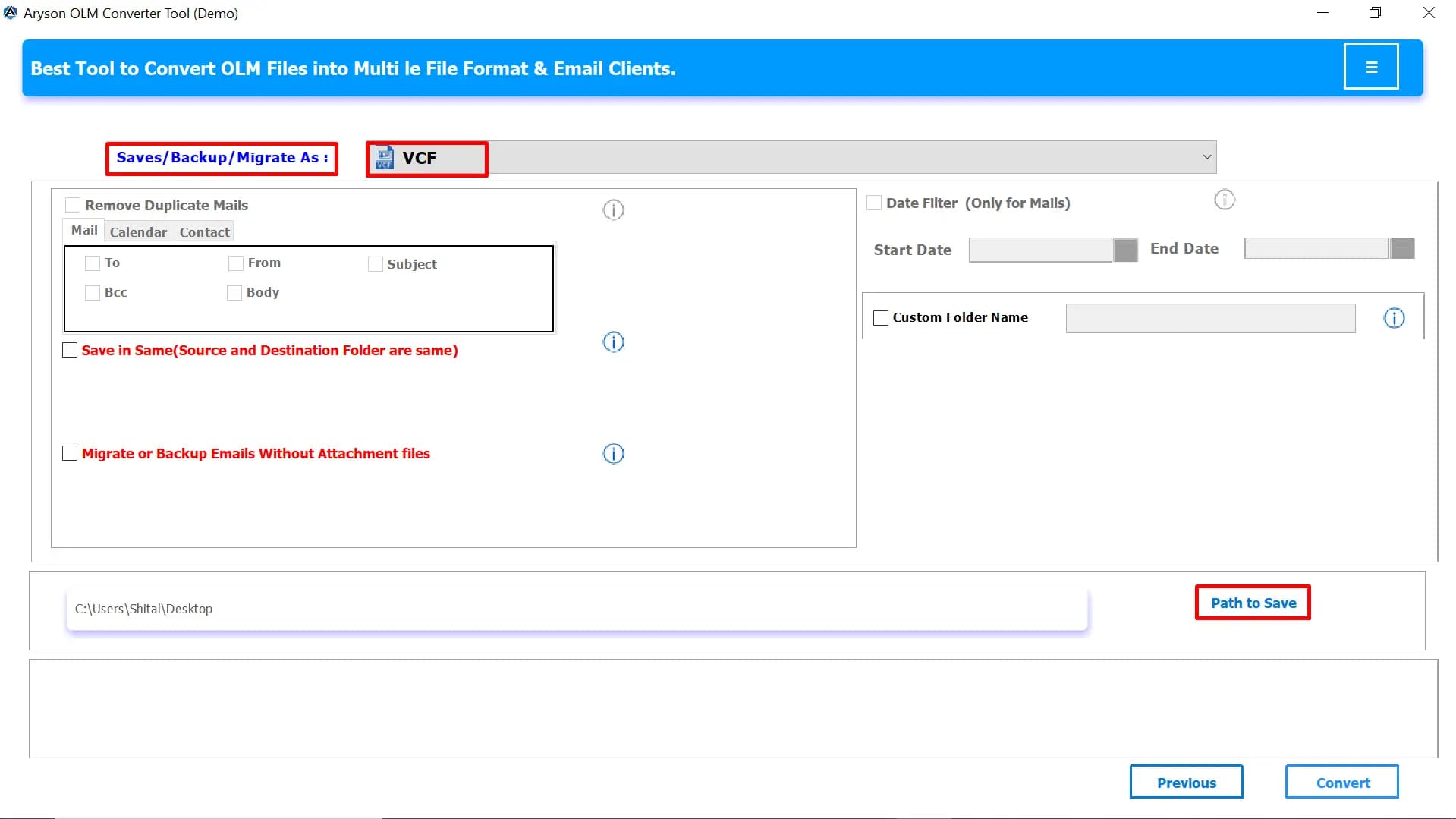
About this app
Aryson OLM Contact Migrator is a specialized utility designed to export and convert contacts stored in Mac Outlook OLM files into universally accessible formats like vCard, CSV, PST, MSG, and more. It also supports migrating emails, calendars, and other mailbox items, making it a comprehensive solution for Mac Outlook data migration. The tool preserves all contact details, including names, phone numbers, email addresses, physical addresses, notes, and profile images, ensuring zero data loss. With its intuitive interface, both technical and non-technical users can perform bulk migrations of thousands of contacts quickly and accurately. Advanced features include duplicate removal, date range filters, exclusion of attachments, custom folder naming, and splitting of large PST files. The software is standalone and does not require Outlook to be installed, and it supports direct migration to cloud platforms like Office 365, Gmail, iCloud, and more. Available for Windows, Mac, and Linux, A...
Key features
- 1Bulk export OLM contacts to vCard, CSV, PST, MSG, PDF, ICS, EML, HTML and more
- 2Preserves names, phone numbers, emails, addresses, notes and profile images with zero data loss
- 3Duplicate removal, date range filters, attachment exclusion, custom folder naming and PST splitting
- 4Direct import of converted contacts into Gmail, Office 365, iCloud, Android and iPhone
- 5Standalone — no Outlook installation required; Windows, Mac and Linux builds
Target customer profile
Drawn from the product itself, not from a survey.
Demographic
IT administrators in enterprises
Pain points
Migrating large volumes of Mac Outlook contacts to Windows or cloud platforms efficiently without data loss.
Primary needs
Bulk migration, preservation of contact details, and support for multiple formats and cloud services.
Demographic
Technical consultants and migration specialists
Pain points
Handling diverse client data and ensuring error-free conversion across various formats.
Primary needs
Reliable performance, advanced filtering, and support for multiple output formats.
Demographic
Small business owners and non-technical users
Pain points
Complex migration processes and fear of losing important contact information.
Primary needs
Simple, user-friendly interface with preview and guided steps for safe migration.
Scout Review
Written by AI from measured evidence, scored out of 100.
Aryson OLM Contact Migrator is a workmanlike utility with a genuinely fast site and a clean security header stack, wrapped in a dated, cluttered homepage that hides its own product description behind a chat popup. The feature set is real — bulk contact export to vCard/CSV/PST/MSG, duplicate removal, date filters, attachment exclusion, PST splitting and cloud import — and the free demo lowers the barrier to trying it. The problem is differentiation: against SysTools and Stellar it offers the same core promise with no visible compliance story and a marketing page that buries the value under twenty bullets and four competing CTAs.
Measure by measure
Usability
58Clear nav (Features, Specs, Screenshots, Video, FAQs), a free demo download and a step-by-step tutorial help. But the ~20-line hero bullet wall and OS radio selector bury the actual path to value.
Design
46Dated homepage with a crowded hero: four-plus competing download/purchase buttons and a chat popup covering the product description. Feature card grid and annotated tutorial screenshot are the tidy parts.
Speed
88Lighthouse mobile 100/100 (LCP 1.1s, CLS 0.003, TBT 40ms) and desktop 91/100. Genuinely fast, lightweight marketing page with no lag complaints in the collected evidence.
Security
76Full HTTP security stack verified: HTTPS enforced, HSTS, CSP, frame protection, Referrer-Policy, Permissions-Policy, SPF and DMARC — 12/12 checklist points. No published SOC 2/ISO or audit claims found.
Accessibility
70Lighthouse a11y 91/100, but failing contrast, non-sequential headings, small touch targets, missing main landmark and role=presentation conflicts. No WCAG statement or multi-language support found.
Growth
56Real, narrow problem (Mac Outlook OLM contacts) with a specific wedge: contacts-first export to vCard/CSV/PST plus cloud import. Crowded by SysTools and Stellar; 13-year domain and claimed 1.5M downloads are context, not the score.
Improvement areas
- Hero is cluttered with four-plus competing CTAs and a chat popup covering the product description
- No published security/compliance documentation (SOC 2, ISO, pen-test) despite strong headers
- Accessibility gaps: contrast, heading order, touch targets, missing main landmark
- Weak differentiation vs. SysTools and Stellar; no segment-specific positioning
Design & Usability
The homepage reads like a spec sheet stapled to a storefront. The hero throws Win, Mac, Download Now, Purchase Now and a red demo line at you simultaneously, then a chat popup parks itself over the product description so you can't even read what it does. Below that, things improve: a consistent two-column feature card grid with clean line icons, and a tutorial section that pairs a real annotated screenshot with numbered steps — the one place the page shows the actual interface. Usability is competent but buried: nav, FAQs, a free demo and a step-by-step guide all exist, yet the ~20-line hero bullet wall and a tiny OS radio selector make the primary path harder to find than it should be.
Speed & Security
Speed is the standout. Lighthouse mobile scores a perfect 100/100 with LCP 1.1s, CLS 0.003 and TBT 40ms; desktop lands 91/100. The marketing page is genuinely lightweight and snappy, and no lag complaints surfaced in the collected evidence. Security is solid on the technical side: HTTPS enforced, HSTS, CSP, frame protection, X-Content-Type-Options, Referrer-Policy and Permissions-Policy all present, plus SPF and DMARC — a clean 12/12 on the header checklist. What's missing is the paperwork layer: no SOC 2, ISO 27001, pen-test summary or bug bounty found in the collected content, which matters for a tool that ingests an entire contact book.
Accessibility & Growth
Accessibility scores 91/100 on Lighthouse but still fails contrast, heading order, touch-target sizing, main-landmark presence and role=presentation conflicts — automated checks only cover part of WCAG, and there's no published a11y statement or multi-language support in the collected content. Growth is a judgement on the idea: OLM contact migration is a real, narrow problem with a specific wedge (contacts-first export to vCard/CSV/PST plus direct cloud import to Gmail, Office 365, iCloud). But the category is crowded by SysTools and Stellar with near-identical positioning, and nothing in the material shows a segment Aryson serves structurally better. The 13-year domain and claimed 1.5M downloads are context, not a moat.
Conclusion
If you need to pull contacts out of an OLM file and the free demo handles your volume, this will do the job — it's fast, secure on the wire, and the feature list is honest about what it converts. Before buying, test the demo against your largest OLM file and confirm the output format your target platform actually wants. And compare pricing directly against SysTools and Stellar, because on paper the three are close enough that the deciding factor will be which one's trial doesn't choke on your data.
Suggestions for improvement
- Collapse the hero to one primary CTA and move the OS selector into the download button as a dropdown.
- Fix the chat popup so it never overlaps the hero description on first load.
- Break the ~20-line hero bullet wall into 4-6 grouped benefit cards with clear hierarchy.
- Publish a security/compliance page (SOC 2 status, data handling, no-telemetry claims) to back the 12/12 headers.
Alternatives comparison
Named competitors, point by point. Nobody paid to appear here or to be left out.
 Aryson OLM Contact Migrator |  SysTools OLM to PST Converter |  Stellar OLM to PST Converter | |
|---|---|---|---|
| Primary conversion target | Contacts-first: vCard, CSV, PST, MSG, PDF, ICS and more | OLM to PST primary, plus other formats | OLM to PST primary, plus other formats |
| Contact detail preservation (notes, images, custom fields) | Claims full preservation incl. profile images and notes | Preserves contacts, emails, calendars | Data integrity preservation claimed |
| Direct cloud import (Gmail, Office 365, iCloud) | Yes — Gmail, Office 365, iCloud, Android, iPhone | Not stated in provided description | Not stated in provided description |
| Advanced filters (duplicates, date range, attachments) | Duplicate removal, date range, exclude attachments, PST split | Bulk conversion support; filters not specified | Bulk conversion support; filters not specified |
| Free trial / demo available | Free demo download offered | Trial typically offered (not verified here) | Trial typically offered (not verified here) |
| Platform support | Windows, Mac, Linux | Windows (per typical listing) | Windows (per typical listing) |
SysTools OLM to PST Converter
A tool to convert OLM files to PST and other formats, with support for contacts, emails, and calendars.
Stellar OLM to PST Converter
Software to convert OLM files to PST and other formats, preserving data integrity and supporting bulk conversion.
Comparing options? See Aryson OLM Contact Migrator alternatives, scored side by side
More Productivity apps
View all Productivity
Qamarero
92An all-in-one hospitality software for restaurants and ba...

Puzzly – B2B Lead Generation & Sales Intelligence Platform
92Puzzly is an all-in-one B2B lead generation platform that...

The Stack Newsletter
92A weekly newsletter delivering curated tech jobs, intervi...

StoryPad
92Privacy-first open source journal app with a continuous t...

Vibe Coding Agent Skills
92A free, open-source platform offering 110 AI agent skills...

Notion
92All-in-one AI workspace for docs, projects, and knowledge...

EmbedMyReviews
92White-label reputation management software for agencies s...

QRBliss
91Branded QR codes with AI Brand Sync, 15 free dynamic code...

Strukchad Property Management
91Property management for Kenyan letting agents: rent invoices raised every month, M-Pesa rent prompts to tenants, arrears tracking and landlord statements.

CC Switch
91Open-source desktop app for switching AI coding providers...

Gerty
91Private, local AI assistant for Mac that runs offline

BACKLNK
90Backlnk is a free SEO and AI visibility website: 15 website checks, a full audit as a PDF report, and guides to get found in search and AI answers.


A platform dedicated to providing unbiased reviews of newly launched applications, analyzing everything from their features to their full potential.
info@scoutforge.net© 2026 Scoutforge. All rights reserved.
