Cycling through all six. Tap any point to stop.
Measured on six things
Add Bates numbers and stamps to PDFs without Adobe Acrobat.
Design
46Functional but dated: boxed-software hero, five competing CTAs, a chat popup clipping the copy, and Windows 95/98 system requirements. The feature grid is the one disciplined, legible part.
Screenshots
1 / 1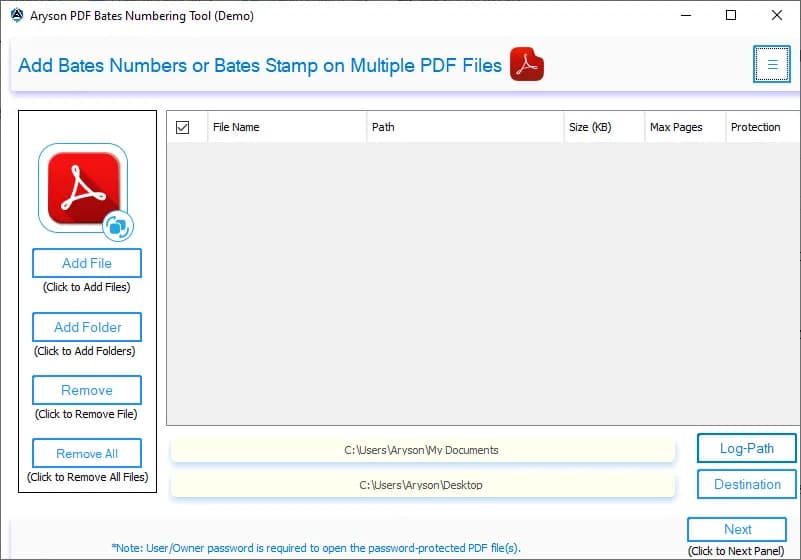
About this app
Aryson PDF Bates Numbering Tool is a desktop utility designed to automate the tedious task of adding Bates numbers and custom stamps to PDF documents. It is particularly useful for legal professionals, e-discovery teams, and corporate legal departments that need to organize and track large volumes of documents. The software allows users to apply sequential numbering across multiple PDF files simultaneously, with options to add prefixes, suffixes, and custom formats. Beyond basic numbering, it supports advanced features like adding confidential text, date stamps, background images, and adjusting page margins and orientation. The tool can process password-protected PDFs, preview the output before finalizing, and optionally apply or remove encryption. It operates independently of Adobe Acrobat, making it a cost-effective solution for legal indexing and document management. The interface is user-friendly, and the tool is compatible with all versions of Windows. A free demo version is av...
Key features
- 1Batch Bates numbering across multiple PDFs with custom prefixes, suffixes, and digit counts.
- 2Works on password-protected PDFs; can add or remove encryption on output.
- 3Custom stamps: confidential text, date stamps, background text/images, adjustable margins and orientation.
Target customer profile
Drawn from the product itself, not from a survey.
Demographic
Legal professionals (lawyers, paralegals, litigation support)
Pain points
Manual Bates numbering is time-consuming and error-prone; need for consistent formatting across large document sets.
Primary needs
Batch processing of PDFs, custom prefixes/suffixes, compatibility with protected PDFs, and precise placement of Bates numbers.
Demographic
E-discovery specialists and litigation support teams
Pain points
Managing digital evidence with unique identifiers; ensuring compliance and audit trails; handling encrypted PDFs.
Primary needs
Ability to process password-protected files, add date stamps and confidential text, and maintain document integrity.
Demographic
Corporate legal departments and compliance officers
Pain points
Organizing and tracking legal documents for audits and compliance; need for uniform branding and confidentiality markings.
Primary needs
Customizable Bates settings, background text/image for branding, and the ability to add/remove encryption.
Demographic
Small law firms and solo practitioners
Pain points
Limited budget for expensive legal software; need for an easy-to-use tool without Adobe Acrobat dependency.
Primary needs
Affordable one-time purchase, intuitive interface, and essential Bates numbering features without steep learning curve.
Scout Review
Written by AI from measured evidence, scored out of 100.
Aryson PDF Bates Numbering Tool is a competent, narrowly-scoped Windows utility for legal indexing, and its website is a time capsule. The technical bones are good — 99/100 Lighthouse performance and a clean 12/12 security-header sweep — but the presentation undercuts it: a dated boxed-software hero, five competing CTAs, a chat popup clipping the copy, and Windows 95 in the system requirements. The feature set is real and relevant (batch numbering, prefixes/suffixes, confidential text, date stamps, password-protected PDFs, preview, add/remove encryption, no Acrobat needed), and the one-time-purchase positioning is a genuine wedge against subscription suites. Accessibility is the weak spot, with several concrete Lighthouse failures and no WCAG statement.
Measure by measure
Usability
58Clear nav (Features, Specs, Screenshots, Video, FAQs, Guide) and a real demo, but the hero forces a free-vs-paid-vs-store decision and the demo's watermark limit is buried below the fold.
Design
46Functional but dated: boxed-software hero, five competing CTAs, a chat popup clipping the copy, and Windows 95/98 system requirements. The feature grid is the one disciplined, legible part.
Speed
90Lighthouse 99/100 on both mobile and desktop, LCP 1.1s, CLS 0.003, TBT 98ms. Genuinely snappy for a page this content-heavy — the one dimension where it clearly leads.
Security
76Full header hygiene: HTTPS enforced, HSTS, CSP, frame protection, Referrer-Policy, Permissions-Policy, SPF and DMARC — 12/12 on the probe. No published SOC 2/ISO or bug bounty found.
Accessibility
58Lighthouse 83/100 with real failures: low contrast, skipped heading levels, images missing alt, unnamed links, small touch targets, no main landmark. No WCAG statement on site.
Growth
54Real, recurring legal workflow with a clear wedge — one-time price, no Acrobat needed, batch + protected PDFs. But it's a narrow single-purpose tool against full suites.
Improvement areas
- Dated site design with five competing hero CTAs and a popup clipping the copy.
- Accessibility failures: missing alt text, low contrast, skipped headings, unnamed links.
- No published security/compliance documentation (SOC 2, ISO, data handling) for legal buyers.
Design & Usability
The homepage reads like a boxed software product from another decade: a 3D box mockup, a chat widget clipping the hero copy, and system requirements that name Windows 95. Five download/purchase CTAs compete in the first viewport with no clear default, so a first-time visitor has to guess whether to grab the free demo, buy, or hit the Microsoft Store. The mid-page feature grid is the redeeming part — eight consistent cards with clean line icons and bold headings that scan well. Navigation is solid (Features, Specifications, Screenshots, Video, FAQs, Guide, EULA) and a real demo exists, but its watermark limitation is only explained well below the CTA, so the demo's constraints arrive late.
Speed & Security
Speed is the standout: Lighthouse 99/100 on both mobile and desktop, LCP 1.1s, CLS 0.003, TBT 98ms — impressive for a page carrying this much text and imagery. Security hygiene is also strong on the technical side, with HTTPS enforced plus HSTS, CSP, frame protection, X-Content-Type-Options, Referrer-Policy, Permissions-Policy, SPF and DMARC all present (12/12 on the probe). What's missing is the compliance paperwork legal buyers actually ask for: no published SOC 2, ISO 27001, penetration test, or bug bounty surfaced in the site content. For a tool handling confidential and password-protected legal PDFs, that gap matters more than it would for a consumer app.
Accessibility & Growth
Accessibility lands at 83/100 on Lighthouse with concrete failures: insufficient color contrast, non-sequential heading order, images missing alt attributes, links without discernible names, undersized touch targets, no main landmark, and role=presentation conflicts. There's no WCAG statement or accessibility page, which is a miss for a product sold to compliance-minded legal teams. On growth, the idea is sound: Bates numbering is a real, recurring, audit-driven workflow, and Aryson's wedge — one-time purchase, no Adobe Acrobat dependency, batch processing of password-protected PDFs — is specific and demonstrable. The limit is scope: it's a narrow single-purpose utility competing against full PDF suites (Acrobat Pro, Nuance Power PDF, Foxit) that bundle numbering as one feature among dozens.
Conclusion
If you're a small firm or solo practitioner who needs Bates numbering without an Acrobat subscription, this does the job and does it fast. If you're a corporate legal department that needs vendor security documentation, SSO, or accessibility compliance, look elsewhere or ask Aryson directly — none of that is published. The product is more credible than its website suggests; the website is doing it no favors.
Suggestions for improvement
- Collapse the five hero CTAs into one primary 'Download Free Demo' with a secondary 'Buy' link.
- Update the system requirements — Windows 95/98/NT/XP and Core 2 Duo signal an abandoned product.
- Fix the chat/query popup so it stops overlapping and clipping the hero description.
- Publish a security page (SOC 2 status, data handling, encryption) and an accessibility statement.
Alternatives comparison
Named competitors, point by point. Nobody paid to appear here or to be left out.
 Aryson PDF Bates Numbering Tool |  Adobe Acrobat Pro |  Nuance Power PDF |  Foxit PDF Editor | |
|---|---|---|---|---|
| Bates numbering support | Yes — core purpose, batch across multiple PDFs | Yes — built-in | Yes | Yes |
| Pricing model | One-time purchase, free watermarked demo | Subscription | One-time license | Perpetual or subscription |
| Requires Adobe Acrobat | No — standalone | Is Acrobat | No — standalone suite | No — standalone suite |
| Scope | Single-purpose Bates numbering utility | Full PDF editor suite | Full PDF editing suite | Full PDF editor suite |
| Password-protected PDF handling | Yes — processes protected PDFs, can add/remove encryption | Yes | Yes | Yes |
Adobe Acrobat Pro
Industry-standard PDF editor with built-in Bates numbering, but requires a subscription and may be overkill for simple numbering tasks.
Nuance Power PDF
PDF editing suite with Bates numbering capabilities, offering a one-time license and advanced features for legal professionals.
Foxit PDF Editor
Feature-rich PDF editor with Bates numbering support, available as a perpetual license or subscription, and known for its performance.
Comparing options? See Aryson PDF Bates Numbering Tool alternatives, scored side by side
More Productivity apps
View all Productivity
Qamarero
92An all-in-one hospitality software for restaurants and ba...

Puzzly – B2B Lead Generation & Sales Intelligence Platform
92Puzzly is an all-in-one B2B lead generation platform that...

The Stack Newsletter
92A weekly newsletter delivering curated tech jobs, intervi...

StoryPad
92Privacy-first open source journal app with a continuous t...

Vibe Coding Agent Skills
92A free, open-source platform offering 110 AI agent skills...

Notion
92All-in-one AI workspace for docs, projects, and knowledge...

EmbedMyReviews
92White-label reputation management software for agencies s...

QRBliss
91Branded QR codes with AI Brand Sync, 15 free dynamic code...

Strukchad Property Management
91Property management for Kenyan letting agents: rent invoices raised every month, M-Pesa rent prompts to tenants, arrears tracking and landlord statements.

CC Switch
91Open-source desktop app for switching AI coding providers...

Gerty
91Private, local AI assistant for Mac that runs offline

BACKLNK
90Backlnk is a free SEO and AI visibility website: 15 website checks, a full audit as a PDF report, and guides to get found in search and AI answers.


A platform dedicated to providing unbiased reviews of newly launched applications, analyzing everything from their features to their full potential.
info@scoutforge.net© 2026 Scoutforge. All rights reserved.
