Cycling through all six. Tap any point to stop.
Measured on six things
Extract text, images, emails, attachments & metadata from...
Design
57Consistent blue branding and clear Download/Purchase CTAs, but the hero is text-heavy, a chat popup covers the intro, the CTA names 'Adobe Extractor', and the product name drifts across four variants. Dated app screenshot.
Screenshots
1 / 1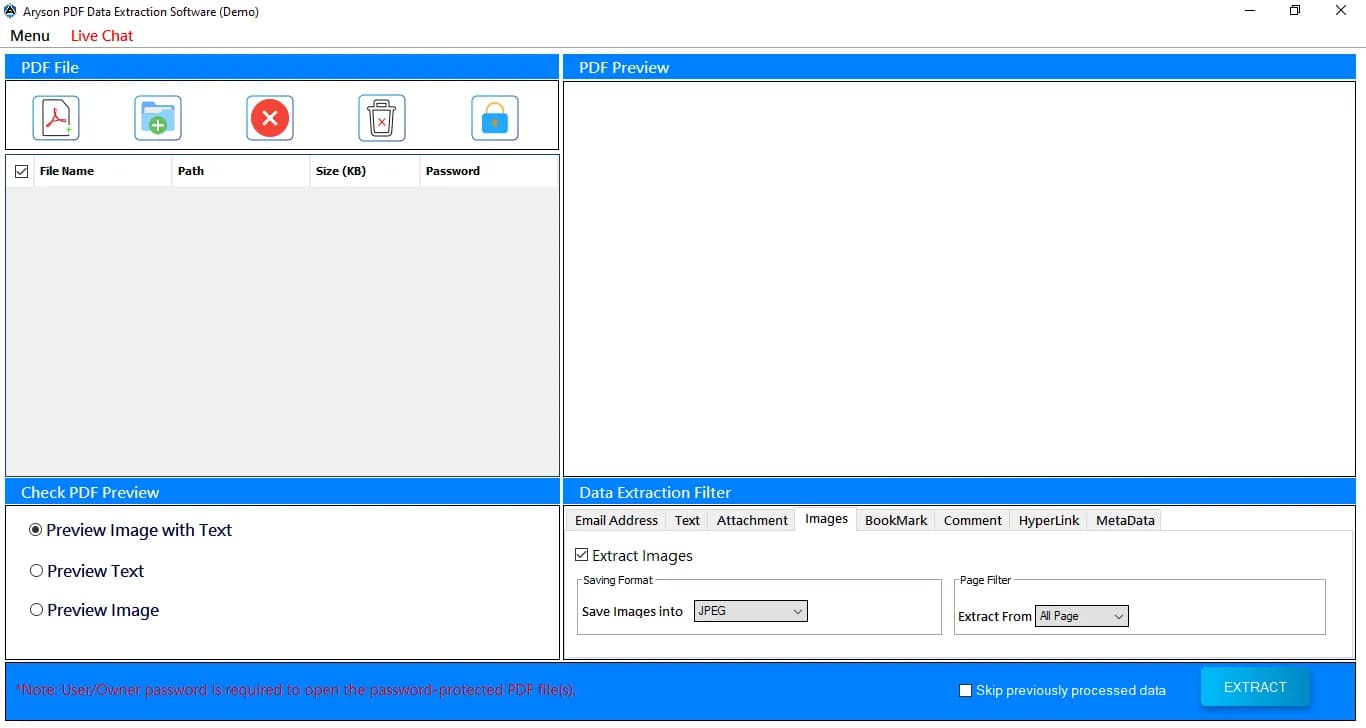
About this app
Aryson PDF Extractor is a robust, enterprise-grade utility designed to pull eight distinct data types out of PDF files—email addresses, attachments, text, images, bookmarks, comments, hyperlinks, and metadata—without ever touching a cloud server. Everything runs locally on Windows, macOS, or Linux, so sensitive documents stay on your machine. You can load individual files or entire folders, preview content in three modes (Image with Text, Text Only, Image Only), then apply page filters (all, even, odd, range, or specific page) to extract precisely what you need into over ten output formats including Excel, CSV, TXT, DOCX, HTML, JPG, PNG, and BMP. Password-protected PDFs are handled gracefully via a Password Pooling feature that lets you batch-unlock files with a list of passwords, and the Skip Previously Processed Data option prevents duplicate work on repeat runs. The performance gap versus manual copy‑paste is stark: what takes hours by hand can be done in minutes, with far fewer ...
Key features
- 1Extracts 8 data types (emails, attachments, text, images, bookmarks, comments, hyperlinks, metadata) into 10+ formats.
- 2Fully offline local processing on Windows, macOS and Linux — no cloud server involved.
- 3Password Pooling batch-unlocks protected PDFs; page filters and skip-processed options for repeat runs.
Target customer profile
Drawn from the product itself, not from a survey.
Demographic
IT administrators and consultants managing large PDF repositories
Pain points
Manually copying data from hundreds of PDFs is slow and error-prone; password-protected files complicate batch jobs.
Primary needs
Bulk extraction with page filters, password pooling, and folder-wise attachment export.
Demographic
Legal and compliance officers handling case files and audit records
Pain points
Metadata, comments, and bookmarks are buried inside PDFs; manual review is tedious and risks missing critical details.
Primary needs
Accurate extraction of metadata and annotations into TXT, PDF, or DOCX for documentation trails.
Demographic
Marketing and outreach teams building contact lists from PDFs
Pain points
Email addresses are scattered across brochures, forms, and reports; manual collection is impractical at scale.
Primary needs
Fast extraction of all email addresses into Excel or CSV for campaign use.
Demographic
Researchers and data analysts working with reference PDFs
Pain points
Extracting text and images for analysis requires repetitive copy-paste or screenshotting, losing quality and time.
Primary needs
Selective extraction of text and images from specific pages into editable formats like DOCX or JPG.
Scout Review
Written by AI from measured evidence, scored out of 100.
Aryson PDF Extractor is a Windows/macOS/Linux desktop utility for pulling eight categories of data out of PDFs — emails, attachments, text, images, bookmarks, comments, hyperlinks and metadata — into Excel, CSV, TXT, DOCX, HTML, JPG, PNG and more. It handles password-protected files via a Password Pooling feature, supports page filters and skips previously processed data on repeat runs. Everything runs locally, which matters for legal and compliance buyers. The marketing site is fast (Lighthouse 99 mobile) and secure (12/12 header checks), but the design has real cracks: a CTA that names a competitor, four different product names, and a chat popup covering the hero. The free demo caps at page one, and there's no published security certification.
Measure by measure
Usability
62Download and purchase sit above the fold with a platform selector, and Features/Specs/Video/FAQs/Guide nav exists. But the free demo caps at page one, the platform radios are tiny, and the same feature list is repeated four times.
Design
57Consistent blue branding and clear Download/Purchase CTAs, but the hero is text-heavy, a chat popup covers the intro, the CTA names 'Adobe Extractor', and the product name drifts across four variants. Dated app screenshot.
Speed
88Lighthouse mobile 99/100 (LCP 1.7s, CLS 0, TBT 72ms) and desktop 93/100. The marketing site is genuinely fast and snappy with no layout shift.
Security
76Full header stack verified: HTTPS, HSTS, CSP, frame protection, Referrer-Policy, Permissions-Policy, SPF and DMARC — 12/12 probe points. Offline local processing keeps data on-device. No published SOC 2/ISO audit found.
Accessibility
69Lighthouse a11y 91/100, but failing audits include insufficient color contrast, non-sequential heading order, small touch targets and no main landmark. No WCAG statement or a11y page found on the site.
Growth
58Real, specific problem (bulk PDF extraction) with concrete differentiators — 8 data categories, password pooling, page filters, fully offline. Niche but defensible; the wedge is narrow and the category is crowded.
Improvement areas
- CTA copy error names 'Adobe Extractor'; product name inconsistent across four variants on one page.
- Free demo limited to page one, which is too thin to evaluate bulk extraction.
- No published SOC 2/ISO/pen-test documentation to support the enterprise positioning.
Design & Usability
The marketing site has a coherent blue identity and a clear conversion path — Download and Purchase sit above the fold with a platform selector. But the polish breaks in the details: a chat popup covers the hero intro, the primary CTA literally reads 'Try Adobe Extractor Free Download', and the product is called PDF File Extractor, PDF Extractor, PDF Page Extractor and Data Extraction Software on the same page. The desktop app screenshot looks older than the site, with small type and large empty panels. Usability is competent: nav exposes Features, Specifications, Video, FAQs and a Guide, and the app workflow (Load → Preview → Filter → Extract) is legible. The free demo only extracts page one, and the platform radios are tiny.
Speed & Security
Speed is the standout. Lighthouse mobile scores 99/100 with LCP 1.7s, CLS 0 and TBT 72ms; desktop hits 93/100. The site is static-feeling and snappy with no layout shift. Security is solid on the transport layer: the HTTP probe confirms HTTPS enforcement, HSTS, CSP, frame protection, X-Content-Type-Options, Referrer-Policy and Permissions-Policy — 12/12 checklist points — plus SPF and DMARC. The product's core pitch is that everything runs locally, so documents never touch a cloud server, which is a real privacy advantage for legal and compliance buyers. What's missing is the paperwork enterprises ask for: no SOC 2, ISO 27001, pen-test summary or bug bounty was found in the collected content.
Accessibility & Growth
Accessibility lands at 69: the automated Lighthouse score is 91/100, but the failing audits are meaningful — insufficient color contrast, non-sequential heading order, undersized touch targets and a missing main landmark. No WCAG conformance statement or accessibility page was found. Growth is a judgement on the idea: bulk extraction of eight data types (emails, attachments, text, images, bookmarks, comments, hyperlinks, metadata) into 10+ formats, with page filters and password pooling, is a real and specific problem for IT admins, legal teams and outreach marketers. The offline-only processing is a genuine differentiator against cloud tools. The limit is the market: Adobe Acrobat Pro and PDFelement already bundle extraction into broader suites buyers may already own, and Tabula covers the free table-extraction case. The wedge is real but narrow.
Conclusion
If you're an IT admin or compliance officer drowning in PDFs and you specifically need offline bulk extraction with password pooling, Aryson does the job and keeps your documents on your machine. If you already pay for Acrobat Pro or PDFelement, check whether their export features cover your case before adding another license. And if you're evaluating the free demo, know that it only touches page one — you'll need the paid version to judge it on real workloads.
Suggestions for improvement
- Fix the 'Try Adobe Extractor Free Download' CTA — it names a competitor in your primary conversion area.
- Standardize the product name across the page; four variants erode trust and SEO.
- Reposition or dismiss the chat popup so it stops covering the hero intro paragraph.
- Publish a security/compliance page (SOC 2 status, data handling) to back the 'enterprise-grade' claim.
Alternatives comparison
Named competitors, point by point. Nobody paid to appear here or to be left out.
 Aryson PDF Extractor |  Adobe Acrobat Pro |  PDFelement |  Tabula | |
|---|---|---|---|---|
| Offline / local-only processing | Yes — core selling point, no cloud | Partial — desktop app, cloud features optional | Partial — desktop app with cloud options | Yes — runs locally |
| Bulk extraction across folders | Yes — single files or entire folders | Limited — action wizard, not folder-native | Limited — batch convert, not data extraction | No — one PDF at a time |
| Password-protected PDF handling (batch) | Yes — Password Pooling feature | Per-file password entry | Per-file password entry | No |
| Extraction categories supported | 8 (emails, attachments, text, images, bookmarks, comments, hyperlinks, metadata) | Broad export (text, images, tables) via full editor | Broad conversion and edit; some extraction | Tables only |
| Page filters (even/odd/range/specific) | Yes — 5 filter modes | Yes — page range selection | Yes — page range selection | Yes — page range |
| Pricing model | One-time license with free demo (page 1 only) | Subscription | Subscription / perpetual license options | Free, open source |
Adobe Acrobat Pro
Adobe’s full-featured PDF editor includes export and extraction capabilities, but it’s subscription-based and heavier than a dedicated extractor.
PDFelement
Wondershare’s PDFelement offers PDF editing, conversion, and some data extraction features with a more polished interface, though at a higher price point.
Tabula
An open-source tool focused on extracting tables from PDFs into CSV; it’s free but limited to tabular data and lacks support for images or metadata.
Comparing options? See Aryson PDF Extractor alternatives, scored side by side
More Productivity apps
View all Productivity
Qamarero
92An all-in-one hospitality software for restaurants and ba...

Puzzly – B2B Lead Generation & Sales Intelligence Platform
92Puzzly is an all-in-one B2B lead generation platform that...

The Stack Newsletter
92A weekly newsletter delivering curated tech jobs, intervi...

StoryPad
92Privacy-first open source journal app with a continuous t...

Vibe Coding Agent Skills
92A free, open-source platform offering 110 AI agent skills...

Notion
92All-in-one AI workspace for docs, projects, and knowledge...

EmbedMyReviews
92White-label reputation management software for agencies s...

QRBliss
91Branded QR codes with AI Brand Sync, 15 free dynamic code...

Strukchad Property Management
91Property management for Kenyan letting agents: rent invoices raised every month, M-Pesa rent prompts to tenants, arrears tracking and landlord statements.

CC Switch
91Open-source desktop app for switching AI coding providers...

Gerty
91Private, local AI assistant for Mac that runs offline

BACKLNK
90Backlnk is a free SEO and AI visibility website: 15 website checks, a full audit as a PDF report, and guides to get found in search and AI answers.


A platform dedicated to providing unbiased reviews of newly launched applications, analyzing everything from their features to their full potential.
info@scoutforge.net© 2026 Scoutforge. All rights reserved.
