Cycling through all six. Tap any point to stop.
Measured on six things
Convert PDFs to Excel (XLS/XLSX) with ease and accu...
Design
46A conventional software-download page with a clean Windows dialog screenshot, but the visual system is inconsistent: overlapping chat widgets clip the hero, section containers change style block to block, and the product name shifts between three variants.
Screenshots
1 / 1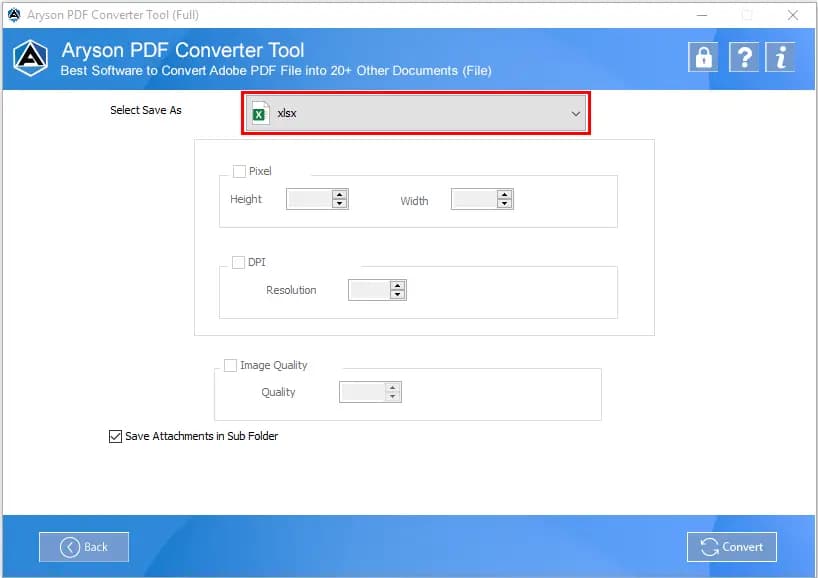
About this app
Aryson PDF to Excel Converter is a dedicated desktop tool for Windows that simplifies the process of turning Adobe PDF files into editable Excel spreadsheets. It stands out for its ability to handle password-protected and large PDF files without size limitations, preserving the original formatting, structure, and even attachments. The software supports batch conversion, allowing users to process multiple PDFs in one go, and offers output formats including XLS, XLSX, and even other document types like DOC, HTML, and images. With a user-friendly interface and high-end algorithms, it ensures data integrity throughout the conversion. Whether you're dealing with financial reports, data tables, or any PDF-based content, this tool provides a reliable and efficient way to make your data Excel-ready.
Key features
- 1Batch conversion of single or multiple Adobe PDFs to XLSX/XLS with formatting preserved.
- 2Handles password-protected PDFs (user password entered once) and large files with no size limit.
- 3Extra output formats beyond Excel: DOC, DOCX, PPT, HTML, EML, MSG, EPUB and image types.
Target customer profile
Drawn from the product itself, not from a survey.
Demographic
Accountants and financial analysts
Pain points
PDFs contain tables that can't be edited, manual data entry is error-prone
Primary needs
Accurate conversion of financial PDFs to Excel with formatting intact
Demographic
Data entry professionals and researchers
Pain points
Large PDF reports with data need to be analyzed in Excel, time-consuming manual transcription
Primary needs
Batch conversion of multiple PDFs, support for password-protected files
Demographic
Small business owners and administrators
Pain points
Invoices and receipts in PDF format need to be organized in spreadsheets for accounting
Primary needs
Easy-to-use tool to convert PDFs to Excel without losing data, affordable pricing
Scout Review
Written by AI from measured evidence, scored out of 100.
Aryson PDF to Excel Converter is a fast, secure-by-headers Windows utility with a dated, self-contradicting marketing page. The technical bones are good: 96/100 mobile performance, 12/12 security headers, 96/100 accessibility. The presentation is where it bleeds — overlapping widgets clip the hero, the visual system changes every section, the product answers to three different names, and the free-demo path is hidden in small red text while the trial limit sits in a table far below. The idea itself is legitimate: password-protected and large financial PDFs are a real pain, and batch conversion with formatting intact is a real differentiator. But it's a paid desktop install competing with a free browser tab and Adobe's bundle, and the site never shows the accuracy benchmark that would justify the price.
Measure by measure
Usability
54The primary Download/Purchase actions are clear and a screenshot shows the workflow at a glance, but the free-demo link is tiny red text, the trial limit hides in a table far down the page, and flat tabs make the page read like a file index.
Design
46A conventional software-download page with a clean Windows dialog screenshot, but the visual system is inconsistent: overlapping chat widgets clip the hero, section containers change style block to block, and the product name shifts between three variants.
Speed
88Lighthouse mobile 96/100 (LCP 1.8s, TBT 52ms, CLS 0.088) and desktop 95/100 — a genuinely fast, lightweight marketing page with no lag complaints in the evidence.
Security
74Full 12/12 header and DNS checklist: HTTPS enforced, HSTS, CSP, frame protection, Referrer-Policy, SPF and DMARC all present. But no SOC 2, ISO, pen-test or bug bounty is published — the '100% Safe & Secure' badge is a claim, not an audit.
Accessibility
80Lighthouse accessibility 96/100 with only two failing audits — insufficient color contrast and a missing main landmark. No WCAG statement or multi-language support, and the product is Windows-only, but the automated baseline is strong.
Growth
52A real, specific pain (financial PDFs to editable Excel, password-protected and large files) with named differentiators, but it's a paid desktop tool fighting a free online option and Adobe's bundle.
Improvement areas
- Fix the hero widget collision and unify the section container styles into one visual system.
- Standardize the product name across nav, hero, box art and footer; stop using 'Adobe' as the primary noun.
- Surface the free demo and trial limitation in the hero instead of burying them below the fold.
- Publish a verifiable accuracy benchmark and a real security page (audit or pen-test) to back the '100% Safe' claim.
Design & Usability
The homepage is built like a 2015 software download page and it shows. The Windows dialog screenshot is genuinely clean — clear labels, one highlighted control, the workflow legible in a glance — and that's the best design asset on the page. Everything around it fights itself: a chat bubble and a query popup overlap the hero and clip the subtitle, five different container styles march down the page with no shared system, and the product is called 'Aryson', 'Adobe PDF to Excel Converter', and 'Aryson PDF to Excel Converter' depending on where you look. Usability is competent but leaky: Download and Purchase are unmissable, the free demo is small red text, and the actual trial restriction is buried in a table far below the fold. A visitor deciding whether to download has to scroll past conflicting claims to find the real limit.
Speed & Security
Speed is the standout. Lighthouse mobile scores 96/100 with LCP 1.8s, TBT 52ms and CLS 0.088; desktop hits 95/100. This is a lightweight, snappy marketing page and there are no lag complaints anywhere in the evidence. Security is solid on the plumbing and thin on the proof: the HTTP probe returns a perfect 12/12 — HTTPS enforced, HSTS, CSP, frame protection, Referrer-Policy, Permissions-Policy, SPF and DMARC all present. What's missing is anything a buyer can verify: no SOC 2, no ISO, no pen-test report, no bug bounty, no security page. The '100% Safe & Secure' caption is a marketing line, not an audit. For a desktop tool that asks users to feed it password-protected financial documents, that gap matters more than it would for a brochure site.
Accessibility & Growth
Accessibility scores 96/100 on the Lighthouse axe audit, with only two failures: insufficient background/foreground contrast and a missing main landmark. Both are cheap to fix and both are the kind of thing a real screen-reader user notices immediately. There's no WCAG statement, no multi-language support, and the product is Windows-only, so the reach is narrow by design. Growth is a judgement on the idea: the problem is real and specific — accountants and analysts with financial PDFs that won't edit, password-protected files, large reports — and the site names concrete differentiators (no file size limit, batch conversion, extra output formats). But the competitive picture is brutal. Smallpdf converts PDF to Excel in a browser for free, and Adobe Acrobat Pro bundles it into a subscription most finance teams already pay for. A paid Windows desktop app has to win on accuracy, batch scale, or price, and the site argues all three without showing a benchmark. The domain is 13 years old, which says staying power, but the only social profile listed is YouTube — thin modern traction for a category where the free alternative is one tab away.
Conclusion
If you're an accountant or analyst drowning in password-protected financial PDFs and you need batch conversion with formatting intact, this is a plausible tool — the speed and security baseline are real, and the Windows dialog screenshot suggests a workflow that isn't painful. Download the free demo first and test it against your ugliest, most table-heavy PDF before you pay, because the site's accuracy claims are unverified and the trial limit is buried. If your needs are occasional or your files are small, Smallpdf in a browser is free and Adobe is probably already on your machine. Aryson's case rests on volume, password protection, and no size cap — make the demo prove those three things on your actual documents before the 30-day clock starts.
Suggestions for improvement
- Fix the hero collision: move the chat bubble and query popup out of the subtitle's space, or the first screen reads as broken.
- Unify the visual system — pick one container style and apply it across features, technical overview, prerequisites and FAQ.
- Settle on one product name everywhere (nav, hero, box art, footer) and stop using 'Adobe' as the primary noun.
- Surface the free demo and the trial limitation in the hero instead of burying the restriction in a table far down the page.
Alternatives comparison
Named competitors, point by point. Nobody paid to appear here or to be left out.
 Aryson PDF to Excel Converter |  Adobe Acrobat Pro |  Smallpdf | |
|---|---|---|---|
| PDF to Excel conversion | Yes — desktop Windows tool, XLSX/XLS output | Yes — high-accuracy conversion built into Acrobat Pro | Yes — browser-based conversion |
| Password-protected PDF support | Yes — user password entered once | Yes — opens protected PDFs with password | Limited — depends on plan and file |
| Batch conversion | Yes — Add Files / Add Folder | Yes — via Acrobat actions | Limited on free tier |
| File size limit | None claimed | No hard limit on desktop | File size limits on free tier |
| Pricing model | One-time purchase, 30-day money back, free demo | Subscription | Free tier with limits; paid subscription |
| Platform | Windows desktop only | Windows, macOS, web, mobile | Browser-based, cross-platform |
Adobe Acrobat Pro
Adobe's official PDF solution offers PDF to Excel conversion with high accuracy, but comes with a subscription cost and may require more system resources.
Smallpdf
An online PDF converter that supports PDF to Excel conversion, known for its simplicity and cross-platform accessibility, though it has file size limits for free users.
Comparing options? See Aryson PDF to Excel Converter alternatives, scored side by side
More Productivity apps
View all Productivity
Qamarero
92An all-in-one hospitality software for restaurants and ba...

Puzzly – B2B Lead Generation & Sales Intelligence Platform
92Puzzly is an all-in-one B2B lead generation platform that...

The Stack Newsletter
92A weekly newsletter delivering curated tech jobs, intervi...

StoryPad
92Privacy-first open source journal app with a continuous t...

Vibe Coding Agent Skills
92A free, open-source platform offering 110 AI agent skills...

Notion
92All-in-one AI workspace for docs, projects, and knowledge...

EmbedMyReviews
92White-label reputation management software for agencies s...

QRBliss
91Branded QR codes with AI Brand Sync, 15 free dynamic code...

Strukchad Property Management
91Property management for Kenyan letting agents: rent invoices raised every month, M-Pesa rent prompts to tenants, arrears tracking and landlord statements.

CC Switch
91Open-source desktop app for switching AI coding providers...

Gerty
91Private, local AI assistant for Mac that runs offline

BACKLNK
90Backlnk is a free SEO and AI visibility website: 15 website checks, a full audit as a PDF report, and guides to get found in search and AI answers.


A platform dedicated to providing unbiased reviews of newly launched applications, analyzing everything from their features to their full potential.
info@scoutforge.net© 2026 Scoutforge. All rights reserved.
