Cycling through all six. Tap any point to stop.
Measured on six things
Migrate Outlook PST files to cloud, webmail, and multiple...
Design
46Dated homepage with a chat popup colliding into the hero copy and two competing download-button clusters. The file-format icon grid is tidy, but small grey type and blurred link styling drag it down.
Screenshots
1 / 1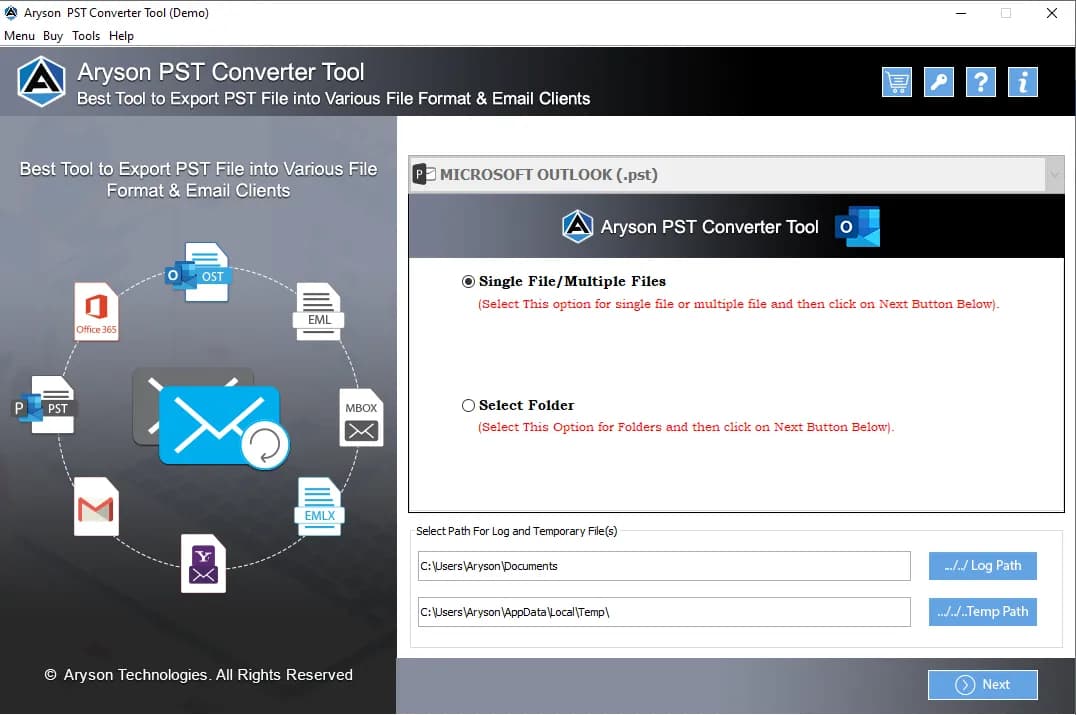
About this app
Aryson PST Migration Tool is a powerful and user-friendly software designed to simplify the complex process of migrating Outlook PST files. Whether you're moving to Office 365, Gmail, or another email platform, or need to convert PST data into formats like PDF, MBOX, or CSV, this tool handles it all with ease. It supports batch migration, selective data transfer with date filters, duplicate email removal, and maintains data integrity throughout. With a free demo version allowing 50 emails per folder, it's an accessible solution for both individuals and businesses looking to streamline their email migration without requiring Outlook or PowerShell.
Key features
- 1Batch migration of single or multiple PST files to Office 365, Gmail, IMAP, iCloud and 12+ formats without Outlook or PowerShell.
- 2Selective transfer with date filters and duplicate email removal, preserving emails, contacts, calendars, tasks and notes.
- 3Free demo converts 50 emails per folder; Windows, Mac and Linux builds available.
Target customer profile
Drawn from the product itself, not from a survey.
Demographic
IT Administrators in Enterprises
Pain points
Migrating large volumes of PST files manually is time-consuming and error-prone; risk of data loss.
Primary needs
Efficient batch migration with data integrity, duplicate removal, and support for multiple cloud platforms.
Demographic
Small Business Owners
Pain points
Limited technical expertise; need to move email data to cloud services like Office 365 or Gmail quickly.
Primary needs
User-friendly interface, no Outlook dependency, and cost-effective solution for email migration.
Demographic
Individual Users Upgrading Email Systems
Pain points
Switching from Outlook to webmail or Mac; need to preserve emails, contacts, and calendars.
Primary needs
Seamless conversion to formats like MBOX, EML, or direct migration to iCloud/Gmail without data loss.
Scout Review
Written by AI from measured evidence, scored out of 100.
Aryson PST Migration Tool is a competent, long-running utility in a crowded niche. The site is dated and cluttered at the top, but the underlying product claims are specific and the free demo is real. Speed and security headers are genuinely above average for this category — 94/100 mobile performance and 12/12 on the security probe are not nothing. Accessibility is close but has three fixable failures. The honest read: it works, it's fast, it's secure on the wire, and it will do the job — but nothing here explains why you'd pick it over Stellar or SysTools beyond price and format breadth.
Measure by measure
Usability
62Full self-serve path (Features, Specs, Screenshots, Video, FAQs) plus a 50-emails-per-folder free demo lowers the buy risk. The popup and a weak single-slide review carousel add friction on first contact.
Design
46Dated homepage with a chat popup colliding into the hero copy and two competing download-button clusters. The file-format icon grid is tidy, but small grey type and blurred link styling drag it down.
Speed
78Lighthouse mobile 94/100 with LCP 2.0s and TBT 116ms — genuinely snappy. Desktop drops to 85/100, so the win is real but not uniform across viewports.
Security
76Full header hygiene: HTTPS enforced, HSTS, CSP, frame protection, Referrer-Policy, Permissions-Policy, plus SPF and DMARC — 12/12 on the probe. No published audit or bug bounty found.
Accessibility
70Lighthouse a11y 94/100 with Windows, Mac and Linux coverage. Failing audits: low contrast text, non-sequential headings, no main landmark — real but fixable gaps.
Growth
58Real, recurring pain (PST-to-cloud without Outlook) with concrete differentiators — batch, dedupe, date filters, 50-email demo. But Stellar and SysTools sell the same thing with more brand trust.
Improvement areas
- Homepage hero is cluttered: chat popup overlaps the H1 and seven competing download CTAs split the primary action.
- No published security documentation (SOC 2, ISO, pen-test) despite strong header hygiene — blocks enterprise procurement.
- Accessibility gaps: low-contrast body text, non-sequential headings, missing main landmark.
Design & Usability
The homepage is doing too much at once. A chat popup lands on top of the H1 subtitle on first load, and the primary action is split across three OS buttons plus a separate Download Now / Purchase Now / Microsoft Store row — seven ways to click before you've read the pitch. The file-format grid is the one section with real discipline: even spacing, consistent icons, clean category labels. Usability is stronger than design: the nav covers Features, Specs, Screenshots, Video and FAQs, and the 50-emails-per-folder free demo is a genuine low-risk trial. The review carousel is the weak spot — one visible quote, dot pagination, no next control.
Speed & Security
Speed is the standout. Lighthouse mobile scores 94/100 with LCP at 2.0s, CLS 0.093 and TBT 116ms — the page feels immediate. Desktop slips to 85/100, so the win is real but not uniform. Security is unusually solid for this category: HTTPS enforced, HSTS, CSP, frame protection, X-Content-Type-Options, Referrer-Policy and Permissions-Policy all present, with SPF and DMARC configured — 12/12 on the header and DNS probe. What's missing is the paperwork enterprises ask for: no SOC 2, ISO 27001, pen-test summary or bug bounty surfaced in the collected content, so procurement will have questions the site doesn't answer.
Accessibility & Growth
Accessibility lands at 94/100 on Lighthouse with Windows, Mac and Linux coverage, but three real failures remain: insufficient color contrast on body text, a non-sequential heading order, and no main landmark. All three are cheap fixes and all three affect real users. Growth is a judgement call on the idea, not the traction. The problem is legitimate and recurring — moving PST data to Office 365, Gmail, IMAP or iCloud without Outlook or PowerShell — and the differentiators are concrete: batch migration, duplicate removal, date filters, 12+ output formats, and a free demo. The catch is the category: Stellar Converter for PST and SysTools PST Migration sell nearly the same promise with more established brand trust, so Aryson's wedge is price and breadth rather than anything structurally defensible.
Conclusion
If you're an IT admin with a pile of PST files and no appetite for PowerShell, this is a reasonable shortlist entry — the 50-email demo lets you test the actual migration before paying. If you're an enterprise buyer, budget time for a security questionnaire the site doesn't pre-answer. And if you're comparing on brand trust alone, Stellar and SysTools will win that argument. Aryson's case rests on breadth of output formats and a lower-friction trial, which is a real case, just not a dominant one.
Suggestions for improvement
- Fix the chat popup overlapping the hero H1 and subtitle — it's the first thing every visitor sees.
- Collapse the seven download CTAs into one primary action with OS auto-detection.
- Raise body text contrast and fix heading order plus add a main landmark — three cheap a11y wins.
- Publish a security page with SOC 2 status, data handling, and pen-test summary to unblock enterprise buyers.
Alternatives comparison
Named competitors, point by point. Nobody paid to appear here or to be left out.
 Aryson PST Migration Tool |  Stellar Converter for PST |  SysTools PST Migration | |
|---|---|---|---|
| Free trial / demo limit | 50 emails per folder | Free demo available (limited conversion) | Free demo available (limited items) |
| Direct migration to cloud platforms (O365, Gmail, IMAP) | Yes — O365, Gmail, G Suite, Yahoo, AOL, Hotmail, IMAP, Zoho, Yandex, iCloud | Yes — Office 365 and other platforms | Yes — Office 365, Gmail and others |
| Output file formats | PST, MBOX, MSG, EML, EMLX, HTML, PDF, DOC, DOCX, DOCM, CSV, VCF, ICS, JPG, PNG, GIF, TIFF, JSON | PST, MSG, EML, PDF, HTML, RTF, MBOX, Office 365 | PST, EML, MSG, MBOX, PDF, HTML and cloud targets |
| Batch processing of multiple PST files | Yes — simultaneous single or multiple PST migration | Yes — batch conversion supported | Yes — batch processing with filters |
| Requires Outlook installed | No — standalone, no Outlook or PowerShell | No — standalone converter | No — standalone migration tool |
| Duplicate email removal and date filters | Yes — duplicate removal plus date-range filters | Selective conversion; duplicate handling limited | Yes — advanced filtering and batch options |
Stellar Converter for PST
Converts PST files to various formats and migrates to Office 365, with a focus on email recovery.
SysTools PST Migration
Migrates PST files to Office 365, Gmail, and other platforms with advanced filtering and batch processing.
Comparing options? See Aryson PST Migration Tool alternatives, scored side by side
More Productivity apps
View all Productivity
Qamarero
92An all-in-one hospitality software for restaurants and ba...

Puzzly – B2B Lead Generation & Sales Intelligence Platform
92Puzzly is an all-in-one B2B lead generation platform that...

The Stack Newsletter
92A weekly newsletter delivering curated tech jobs, intervi...

StoryPad
92Privacy-first open source journal app with a continuous t...

Vibe Coding Agent Skills
92A free, open-source platform offering 110 AI agent skills...

Notion
92All-in-one AI workspace for docs, projects, and knowledge...

EmbedMyReviews
92White-label reputation management software for agencies s...

QRBliss
91Branded QR codes with AI Brand Sync, 15 free dynamic code...

Strukchad Property Management
91Property management for Kenyan letting agents: rent invoices raised every month, M-Pesa rent prompts to tenants, arrears tracking and landlord statements.

CC Switch
91Open-source desktop app for switching AI coding providers...

Gerty
91Private, local AI assistant for Mac that runs offline

BACKLNK
90Backlnk is a free SEO and AI visibility website: 15 website checks, a full audit as a PDF report, and guides to get found in search and AI answers.


A platform dedicated to providing unbiased reviews of newly launched applications, analyzing everything from their features to their full potential.
info@scoutforge.net© 2026 Scoutforge. All rights reserved.
