Cycling through all six. Tap any point to stop.
Measured on six things
Free file converter and PDF editor that runs in a browser
Design
58A tidy, scannable numbered tool directory with sensible category color coding, undermined by an unreadable hero mockup, clipped extension screenshot, and small low-contrast supporting text. Competent template, not distinctive.
Screenshots
1 / 1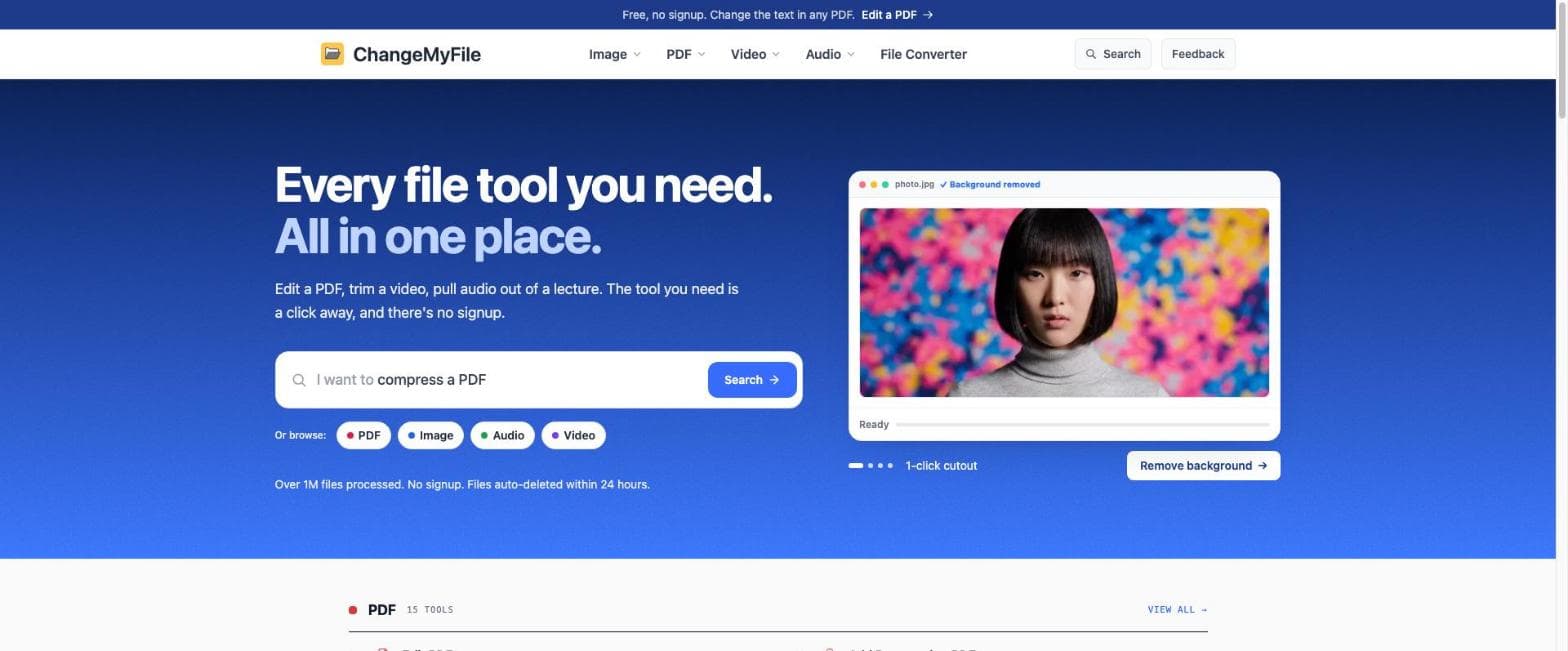
About this app
ChangeMyFile is a free file toolkit: a file converter and a PDF editor, with more tools for images, video and audio. A lot of it is built around files that come off a phone. iPhone photos arrive as HEIC and many upload forms reject them, so convert them to JPG. Screen recordings and clips can be compressed, cut or saved as MP4, and a voice memo in M4A can become an MP3 or a written transcript. When a phone scan of a document needs to go out as one file, merge the pages into a PDF and sign it. Each tool is its own page in a browser tab. It is paid for by ads and needs no account.
Key features
- 1PDF toolkit: edit in place, merge, split, compress, sign, redact, password-protect, convert to/from Word and Excel.
- 2Image and video tools: background remover, upscaler, restore, resize, crop; cut, compress, merge, rotate, extract audio, GIF.
- 3Audio and conversion: transcribe to text, voice recorder, 870+ format pairs including HEIC, AVIF, M4A and MIDI.
Target customer profile
Drawn from the product itself, not from a survey.
Demographic
Students and educators
Pain points
Need to convert and edit PDFs for assignments, often without paid software
Primary needs
Free, easy-to-use tools for PDF editing, conversion, and compression
Demographic
Content creators and social media managers
Pain points
Require quick image and video edits for posts without installing heavy apps
Primary needs
Online tools for background removal, video trimming, and format conversion
Demographic
Office workers and administrative staff
Pain points
Handle PDFs daily, need to merge, split, sign, and protect documents securely
Primary needs
No-signup PDF tools for merging, splitting, signing and adding passwords
Scout Review
Written by AI from measured evidence, scored out of 100.
ChangeMyFile is a free, no-signup file toolkit covering PDF, image, video, audio and conversion — roughly 40 tools across five categories, with a PDF editor, video cutting, background removal and audio transcription. It's fast (Lighthouse 98 on both platforms), reasonably secure (9/12 headers, documented data handling), and accessible apart from a contrast problem it hasn't fixed. Design is competent but generic, and the hero mockup fails at its one job. The business model is ads against a free product in a crowded category, which is the real constraint on where this goes.
Measure by measure
Usability
68Search-first entry, format pills, no signup, and ~40 tools one scroll away. Changelog shows real usability fixes (whole-word search, drop-anywhere, per-tool size limits). Density and buried 'Popular' tags are the weak spots.
Design
58A tidy, scannable numbered tool directory with sensible category color coding, undermined by an unreadable hero mockup, clipped extension screenshot, and small low-contrast supporting text. Competent template, not distinctive.
Speed
88Lighthouse 98/100 on both mobile and desktop, LCP 2.0s, CLS 0, TBT 132ms. Browser-side processing for many tools keeps the front end light. Genuinely fast, backed by measured numbers.
Security
72HTTPS enforced with HSTS, frame protection, SPF and DMARC; 9/12 header checklist. Site documents container isolation, 1-hour download expiry and 24-hour deletion. No CSP, no Permissions-Policy, no published audits.
Accessibility
78Lighthouse a11y 96/100 with one failing contrast audit, independently confirmed by the visual review flagging small grey text in hero, About and footer. No WCAG statement or multi-language support found.
Growth
58Real, specific pain (HEIC, M4A, phone scans) across three named segments, differentiated by breadth and no signup. But the category is commoditized and ad-supported free caps the ceiling.
Improvement areas
- Contrast failures in hero subcopy, About body and footer links, flagged by both Lighthouse and the visual audit.
- Hero PDF editor mockup is illegible at desktop width; Chrome extension screenshot is clipped at the section edges.
- No CSP or Permissions-Policy headers, and no published security page, audit or bug bounty.
- Tool directory gives ~40 tools equal weight and buries the most-used conversions under a small 'Popular' row.
Design & Usability
The homepage is a well-organized tool index: numbered rows, category dots, dashed dividers, and a search bar that puts the core action above the fold with PDF/Image/Audio/Video shortcuts. It's scannable and it works. What it isn't is memorable — the blue gradient hero and white tool list are the default SaaS template, and the one product-specific element, the PDF editor mockup, is rendered too small to read at desktop width. The Chrome extension screenshot is clipped mid-image. Usability is stronger than design: no signup, ~40 tools one scroll away, and a changelog that shows genuine fixes — whole-word search, drop-anywhere upload, per-file batch formats, a Help page with per-tool size limits. The weakness is hierarchy: everything is weighted equally, and the eight most-used conversions sit at the bottom under a small 'Popular' label.
Speed & Security
Speed is the standout. Lighthouse scores 98/100 on both mobile and desktop with LCP 2.0s, CLS 0 and TBT 132ms — measured, not claimed. The architecture supports it: many tools run in-browser, and server jobs go through FFmpeg in isolated containers. Security is solid for the stage: HTTPS enforced, HSTS, frame protection, X-Content-Type-Options, Referrer-Policy, SPF and DMARC all present, 9 of 12 checklist points. The gaps are CSP and Permissions-Policy, and there's no published audit, SOC 2 or bug bounty. The site does document its data handling clearly — container isolation, one-hour download expiry, 24-hour deletion, no account records — which is more transparency than most free tools bother with.
Accessibility & Growth
Accessibility scores 96/100 on Lighthouse with a single failing audit: color contrast. The independent visual review found the same problem in three places — hero subcopy, About body, footer links — so it's a real, repeated issue rather than a false positive. There's no WCAG statement and no multi-language support, which is normal at this stage but limits the score. Growth is a judgement on the idea: the pain is real and specific (iPhone HEIC rejected by upload forms, M4A voice memos, phone-scanned documents needing merge-and-sign), and three segments are named. The differentiator against Smallpdf and ILovePDF is breadth plus no signup plus free. That's a genuine wedge, but a shallow one — the category is commoditized, ad-supported free caps revenue, and 'we're also free' is copyable. Domain registered 2022, 1M+ files processed claimed, five social profiles: context, not a moat.
Conclusion
For a student converting HEIC photos or an office worker merging a scanned PDF, this does the job in one tab with no account and no watermark — and it does it fast. The gaps are fixable: raise the contrast, enlarge the hero mockup, publish a security page, and give the most-used tools real prominence instead of burying them under a 'Popular' row. The harder question is differentiation. Against Smallpdf and ILovePDF, breadth and no-signup are real but thin advantages. Worth using today; worth watching to see whether the ad-supported model funds the depth that would make it the default.
Suggestions for improvement
- Fix the contrast failures in hero subcopy, About body and footer links — Lighthouse and the visual audit both flag them.
- Enlarge the hero PDF editor mockup so its labels are legible at desktop width; it currently reads as texture, not a demo.
- Move the eight most-used conversions above the tool directory instead of burying them under a small 'Popular' row.
- Publish a security page documenting container isolation, deletion windows and headers, and add CSP and Permissions-Policy.
Alternatives comparison
Named competitors, point by point. Nobody paid to appear here or to be left out.
 ChangeMyFile |  Smallpdf |  ILovePDF | |
|---|---|---|---|
| Free tier without an account | Yes — all tools free, no signup, ad-supported | Limited — several tools require a subscription | Yes — free with no account for most PDF tools |
| PDF editing and signing | In-place text edit, sign, redact, stamp, draw, reorder pages | Full PDF editor and e-sign, gated behind subscription tiers | Merge, split, compress, sign; limited in-place text editing |
| Audio and video tools | Cut, compress, merge, rotate video; transcribe audio, voice recorder | Not offered — PDF-focused toolkit | Not offered — limited audio/video capabilities |
| Format coverage | 870+ format pairs including HEIC, AVIF, M4A, MIDI | PDF-centric conversions plus common image formats | Broad PDF and image conversion; no audio/video formats |
| Data handling transparency | Container isolation, 1-hour download expiry, 24-hour deletion, no account records | Published privacy and security documentation; ISO/SOC claims | Files deleted after processing; privacy policy published |
Smallpdf
A popular online PDF toolkit with similar features, but some tools require a subscription.
ILovePDF
Free online PDF tools with a user-friendly interface, but limited audio/video capabilities.
Comparing options? See ChangeMyFile alternatives, scored side by side
More Productivity apps
View all Productivity
Qamarero
92An all-in-one hospitality software for restaurants and ba...

Puzzly – B2B Lead Generation & Sales Intelligence Platform
92Puzzly is an all-in-one B2B lead generation platform that...

The Stack Newsletter
92A weekly newsletter delivering curated tech jobs, intervi...

StoryPad
92Privacy-first open source journal app with a continuous t...

Vibe Coding Agent Skills
92A free, open-source platform offering 110 AI agent skills...

Notion
92All-in-one AI workspace for docs, projects, and knowledge...

EmbedMyReviews
92White-label reputation management software for agencies s...

QRBliss
91Branded QR codes with AI Brand Sync, 15 free dynamic code...

Strukchad Property Management
91Property management for Kenyan letting agents: rent invoices raised every month, M-Pesa rent prompts to tenants, arrears tracking and landlord statements.

CC Switch
91Open-source desktop app for switching AI coding providers...

Gerty
91Private, local AI assistant for Mac that runs offline

BACKLNK
90Backlnk is a free SEO and AI visibility website: 15 website checks, a full audit as a PDF report, and guides to get found in search and AI answers.


A platform dedicated to providing unbiased reviews of newly launched applications, analyzing everything from their features to their full potential.
info@scoutforge.net© 2026 Scoutforge. All rights reserved.
