Cycling through all six. Tap any point to stop.
Measured on six things
Contact manager syncing Google, iCloud and Outlook, with a Slack app and Chrome Contact Grabber to save people you find. Try it free.
Growth
63Real, specific problem — contacts split across Google, iCloud and Outlook — with a genuine wedge in per-account sync direction, automatic dedupe with undo and enrichment. Mature product (domain from 1998, iOS since 2012), but the category is crowded and the wedge is copyable.
Screenshots
1 / 1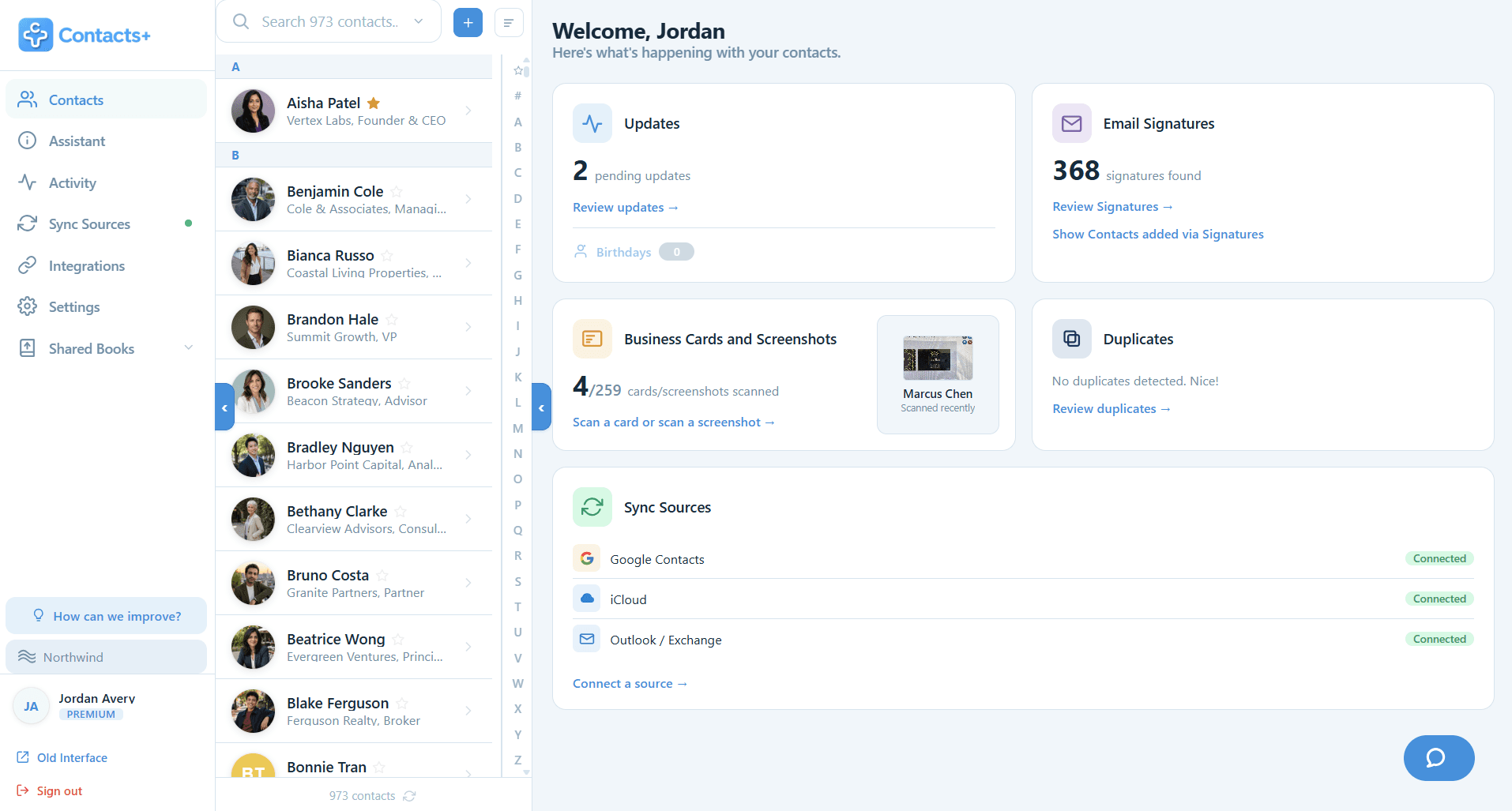
About this app
ContactsPlus is a contact manager and personal CRM for contacts scattered across several accounts. Connect Google, iCloud and Microsoft/Outlook and choose a sync direction per account. Free syncs one account and up to 1,000 contacts daily. Premium syncs up to five accounts with Quick Sync about every 15 minutes, holds 25,000 contacts, and adds automatic duplicate merge with undo, contact enrichment and a business card scanner. Every contact can carry notes, tags, documents and follow-up reminders. Runs on the web, iOS and Android. ContactsPlus for Slack works on every plan: type /contacts to look up a person, add a note or save a contact, privately. Contact Grabber, a free Chrome extension, saves contact details from web pages, Gmail or Outlook (15 new contacts on Free, unlimited on Premium).
Key features
- 1Multi-account sync across Google, iCloud and Microsoft/Outlook with per-account sync direction; Premium syncs up to 5 accounts every ~15 minutes.
- 2Automatic duplicate detection and merge with one-click undo, plus contact enrichment for photos, titles, locations and social profiles.
- 3AI business-card scanning, follow-up reminders with calendar sync, notes/tags/documents, and an Activity feed with filterable undo.
- 4AI-assistant connectors for ChatGPT, Claude, Gemini and Grok with approval-gated writes; Slack /contacts command and a Chrome Contact Grabber extension.
Target customer profile
Drawn from the product itself, not from a survey.
Scout Review
Written by AI from measured evidence, scored out of 100.
ContactsPlus is a mature, genuinely useful contact manager that has been quietly shipping since 2012 and now runs on web, iOS, Android, Chrome and Mac. Its core promise — one clean address book across Google, iCloud and Outlook, with per-account sync direction, automatic dedupe with undo, enrichment and business-card scanning — is real and demonstrated on the site rather than asserted. The free tier is honest but tight (one account, 1,000 contacts, daily sync); Premium at $9.99/user/month annual unlocks five accounts, 25,000 contacts, ~15-minute Quick Sync and the AI-assistant connectors, which are the most forward-looking thing here. Execution is above average: desktop performance is excellent, mobile LCP needs work, security headers are mostly there minus CSP, and accessibility is strong on automated checks but single-language. The design has an editorial voice the store listing fails to showcase. This is a competent product in a crowded category, differentiated by breadth of account support and a smart AI integration play.
Measure by measure
Usability
74Low-friction signup (email + button, no card), a clear three-tier pricing table with a full feature compare, and clients on web, iOS, Android, Chrome and Mac. 4.5/5 from 5,817 iOS ratings over a decade of updates backs the day-to-day experience.
Design
71Judging the app UI and store material: the dashboard is cleanly organised with a sidebar, list and card grid, and the homepage has a distinct editorial serif voice. Store screenshots lean on marketing cards over stock phone frames rather than real UI.
Speed
68Desktop Lighthouse 93/100 is genuinely quick; mobile lands at 79/100 with CLS 0 and TBT 183ms, but LCP 4.8s is nearly double the 'good' threshold. The site is fast once it paints — it just takes too long to paint on a phone.
Security
76HTTPS enforced with HSTS, frame protection, nosniff and Referrer-Policy set — 9/12 on the header checklist, plus SPF and DMARC. Missing CSP and Permissions-Policy, and no published SOC 2 or pen-test claim in the collected content.
Accessibility
80Lighthouse accessibility 97/100 with a single failing audit for insufficient colour contrast. Responsive across web, iOS and Android, but the app ships in only one language and the site makes no WCAG conformance claim.
Growth
63Real, specific problem — contacts split across Google, iCloud and Outlook — with a genuine wedge in per-account sync direction, automatic dedupe with undo and enrichment. Mature product (domain from 1998, iOS since 2012), but the category is crowded and the wedge is copyable.
Improvement areas
- Mobile Lighthouse LCP of 4.8s is roughly double the 'good' threshold — preload hero assets and defer non-critical JS.
- Missing CSP and Permissions-Policy headers on a service that holds Google, iCloud and Microsoft credentials.
- App Store listing uses marketing cards over stock phone frames instead of showing the actual app interface.
- Single-language localization and no published WCAG conformance statement despite a 97/100 automated audit.
Design & Usability
The homepage has an actual point of view — serif headlines, restrained palette, real dashboard mockups instead of abstract illustration — and the app UI itself is organised into a clear sidebar, contact list and card grid with three view modes. Usability is the stronger half: signup is one email field with no card required, pricing is a clean three-tier table with a full compare grid, and the product ships on web, iOS, Android, Chrome and Mac. A 4.5/5 from 5,817 iOS ratings across more than a decade of updates is the kind of evidence most indie tools can't produce. The weak spots are cosmetic and fixable: the ghosted 'in sync.' fragment behind the hero reads as a rendering bug, the lower homepage repeats the same light-grey section rhythm until it drags, and the App Store listing spends its eleven screenshots on marketing cards rather than showing the interface people are actually buying.
Speed & Security
Speed splits cleanly by device. Desktop Lighthouse comes in at 93/100 — genuinely snappy — while mobile sits at 79/100 with a 4.8s LCP, roughly double the 'good' threshold, though CLS is a perfect 0 and TBT is a modest 183ms. The page is fast once it paints; it just takes too long to get there on a phone, which matters for a product whose pitch is 'works in your phone's browser.' Security is solid rather than exceptional: HTTPS enforced with HSTS, frame protection, nosniff and Referrer-Policy all present, SPF and DMARC configured, 9/12 on the header checklist. The gaps are CSP and Permissions-Policy — notable for a service that asks users to hand over Google, iCloud and Microsoft credentials. No SOC 2, ISO or pen-test claim appears in the collected material, which is normal for a product at this stage but leaves the compliance story unverified.
Accessibility & Growth
Accessibility scores 97/100 on the automated Lighthouse audit with exactly one failure: insufficient background/foreground contrast. That's a good result and an easy fix, but automated checks cover maybe a third of WCAG — there's no published conformance statement, no accessibility page, and the app is localized in a single language, which caps reach. Growth is the more interesting question. The problem is real and specific: contacts scattered across Google, iCloud and Outlook with no single source of truth. The wedge is concrete — per-account sync direction, automatic duplicate merge with undo, enrichment, business-card scanning, and unusually, connectors that let ChatGPT, Claude, Gemini and Grok query your address book with approval-gated writes. That last one is the differentiated bet. The limit is the category: Google Contacts is free and preinstalled, and Monica, Dex and Clay all occupy the personal-CRM lane. ContactsPlus can win a loyal multi-account niche; breaking out of it requires the AI angle to become the headline rather than a feature bullet.
Conclusion
If your contacts live in three ecosystems and you've given up on reconciling them, ContactsPlus is a reasonable $9.99/month to stop thinking about it — the dedupe-with-undo alone earns its keep for anyone who has ever bulk-merged iCloud contacts and immediately regretted it. The AI-assistant connectors are the part worth watching: letting Claude or ChatGPT answer 'who do I know at Accel' with approval-gated writes is a genuinely useful primitive that most CRMs haven't shipped. What would move this from good to excellent: fix the 4.8s mobile LCP, add a CSP, publish an accessibility statement, and put the real app UI in the App Store screenshots instead of marketing cards. None of those are hard. All of them are the difference between a product people trust and a product people tolerate.
Suggestions for improvement
- Cut mobile LCP from 4.8s toward 2.5s — preload the hero image and defer non-critical JS; desktop is already at 93.
- Add a Content-Security-Policy and Permissions-Policy header; you're at 9/12 and the missing two matter for a credential-holding service.
- Replace the App Store marketing cards with real app screenshots — you have 11 slots and a genuinely clean UI to show.
- Fix the hero's ghosted 'in sync.' fragment and the contrast failure flagged by Lighthouse; both are one-line fixes.
Alternatives comparison
Named competitors, point by point. Nobody paid to appear here or to be left out.
 ContactsPlus |  | |
|---|---|---|
| Multi-account contact sync (Google, iCloud, Outlook) | Yes — Free syncs 1 account; Premium syncs 5; Teams syncs 10 | Not specified in provided details |
| Automatic duplicate merge with undo | Yes — automatic detection and merge, one-click undo | Not specified in provided details |
| Free tier limits | 1 account, 1,000 contacts, daily sync, no credit card | Not specified in provided details |
| Paid pricing | Premium $9.99/user/mo annual ($13.99 monthly); Teams $12.99/user/mo annual | Not specified in provided details |
| Platform coverage | Web, iOS, Android, Chrome extension, Mac, Slack app | Not specified in provided details |
| AI assistant integration | Yes — ChatGPT, Claude, Gemini, Grok with approval-gated writes | Not specified in provided details |
Comparing options? See ContactsPlus alternatives, scored side by side
More Productivity apps
View all Productivity
Qamarero
92An all-in-one hospitality software for restaurants and ba...

Puzzly – B2B Lead Generation & Sales Intelligence Platform
92Puzzly is an all-in-one B2B lead generation platform that...

The Stack Newsletter
92A weekly newsletter delivering curated tech jobs, intervi...

StoryPad
92Privacy-first open source journal app with a continuous t...

Vibe Coding Agent Skills
92A free, open-source platform offering 110 AI agent skills...

Notion
92All-in-one AI workspace for docs, projects, and knowledge...

EmbedMyReviews
92White-label reputation management software for agencies s...

QRBliss
91Branded QR codes with AI Brand Sync, 15 free dynamic code...

Strukchad Property Management
91Property management for Kenyan letting agents: rent invoices raised every month, M-Pesa rent prompts to tenants, arrears tracking and landlord statements.

CC Switch
91Open-source desktop app for switching AI coding providers...

Gerty
91Private, local AI assistant for Mac that runs offline

username.md
90One verified handle for your online identity, readable by...


A platform dedicated to providing unbiased reviews of newly launched applications, analyzing everything from their features to their full potential.
info@scoutforge.net© 2026 Scoutforge. All rights reserved.
