

A platform dedicated to providing unbiased reviews of newly launched applications, analyzing everything from their features to their full potential.
info@scoutforge.net© 2026 Scoutforge. All rights reserved.
A platform dedicated to providing unbiased reviews of newly launched applications, analyzing everything from their features to their full potential.
info@scoutforge.net© 2026 Scoutforge. All rights reserved.
A platform dedicated to providing unbiased reviews of newly launched applications, analyzing everything from their features to their full potential.
info@scoutforge.net© 2026 Scoutforge. All rights reserved.
Cycling through all six. Tap any point to stop.
Measured on six things
Instant online tool to make any PDF fillable with fields,...
Critical gap: no HTTPS enforcement, no HSTS, CSP, or any security headers (0/12). Local processing claim is good, but the transport layer is wide open.
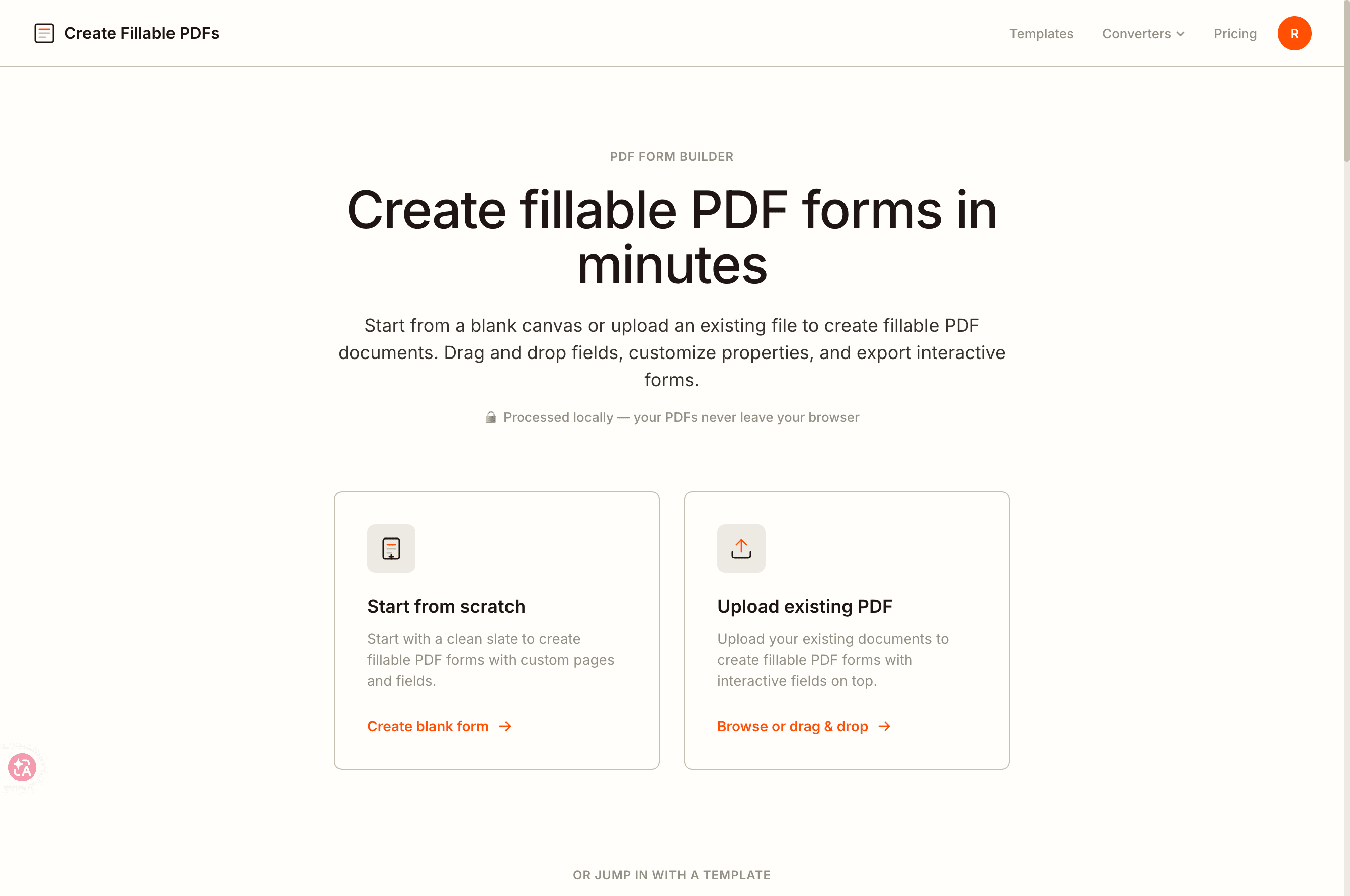
Create Fillable PDFs is a free, web-based PDF form builder that lets you transform any static PDF into an interactive form in just a few clicks. Whether you need to add text fields, checkboxes, dropdowns, or signature lines, this tool handles it all directly in your browser. The best part? Your files never leave your device—everything is processed locally, ensuring total privacy and security. It's incredibly user-friendly, perfect for professionals, small business owners, and individuals who need to create forms quickly without complicated software. The interface is clean, responsive, and requires no sign-up, making it a breeze to use on any device. Whether you're turning a contract into a fillable agreement or creating a feedback form, Create Fillable PDFs offers a straightforward solution that saves you time and hassle. It's a great alternative to paid software like Adobe Acrobat, especially if you need a simple, fast, and secure way to create PDF forms.
Drawn from the product itself, not from a survey.
Demographic
Small business owners (25-55) managing HR documents, onboarding forms, or client contracts without advanced tech skills.
Pain points
Need to create professional fillable forms but find Adobe Acrobat too expensive or complicated. Concerned about privacy when uploading sensitive documents online.
Primary needs
Quick and easy form creation, low cost, secure local processing, and professional-looking results.
Demographic
Freelancers and consultants (20-50) who often send contracts, proposals, or intake forms to clients.
Pain points
Spending too much time on administrative tasks, lacking a reliable tool for one-off forms, and facing compatibility issues with PDF editors.
Primary needs
Time-saving solution, flexibility to create custom forms on the fly, client-friendly output, and no subscription commitments.
Demographic
Educators and administrators (30-60) in schools or training centers needing to create registration forms, permission slips, or evaluation sheets.
Pain points
Limited IT resources, budget constraints, and the need for a tool that is accessible to non-technical staff and students.
Primary needs
Simplicity, cost-effectiveness, reliability, and the ability to handle multiple PDFs without technical glitches.
Demographic
Legal and real estate professionals (30-65) who need to create fillable agreements and disclosure forms regularly.
Pain points
High-volume form processing, strict confidentiality requirements, and the need for precise field placement.
Primary needs
Security, accuracy, speed, and the ability to process documents without cloud storage risks.
Written by AI from measured evidence, scored out of 100.
Create Fillable PDFs is a promising early-stage tool with a clean design, fast performance, and a strong privacy pitch. The no-sign-up, local-processing approach is genuinely user-friendly and addresses a real pain point for SMBs and freelancers who find Adobe Acrobat overkill. However, the security posture is a critical weakness—no HTTPS enforcement or security headers is unacceptable for a tool handling sensitive documents. Accessibility has minor gaps, and the lack of documentation leaves users stranded. Growth potential is real but constrained by a crowded market and the need to prove reliability. If the team fixes the security issues and adds basic help resources, this could carve out a solid niche. As it stands, it's a solid idea with execution gaps that need closing.
No sign-up, two clear paths, and minimal nav make it easy to start. But no docs, help center, or tutorial means users are on their own after the first click.
Clean, modern landing page with consistent orange accents and clear entry paths. Low-contrast template label and generic card borders hold it back slightly.
Fast and snappy: mobile 87/100 with solid LCP and TBT, desktop 99/100. No lag complaints found. Performance is a clear strength.
Critical gap: no HTTPS enforcement, no HSTS, CSP, or any security headers (0/12). Local processing claim is good, but the transport layer is wide open.
Lighthouse 94/100 with three failing audits: contrast, heading order, and accessible names. No WCAG statement or multi-language support found. Solid baseline, but gaps remain.
Real problem, clear wedge: free local processing vs. paid Acrobat. But crowded category and no demonstrated traction yet.
Create Fillable PDFs presents a clean, modern interface with a consistent orange accent that guides users to primary actions. The two equal-weight entry cards—'start from scratch' or 'upload'—make the core workflow obvious within seconds, and the minimal three-link nav keeps distractions low. The local-processing claim sits right under the hero, reinforcing the privacy pitch immediately. However, the template section's low-contrast label and generic card borders suggest a design that's functional but not distinctive. Usability is strong on entry: no sign-up, clear paths, and high-contrast CTAs reduce friction. Yet the absence of any documentation, help center, or tutorial means users who get stuck have no lifeline. For a tool aimed at non-technical SMB owners and educators, this is a notable gap. The onboarding is fast, but the learning curve is unassisted.
Speed is a clear win. Lighthouse scores of 87/100 mobile and 99/100 desktop reflect a lightweight, well-optimized site. LCP at 3.4s and TBT at 49ms are solid, and CLS at 0.067 is acceptable. No user complaints about lag surfaced in research, and the static nature of the site keeps it snappy. Security, however, is the elephant in the room. The HTTP header probe found zero compliance points: no HTTPS enforcement, no HSTS, no CSP, and no frame protection. For a tool that promises 'your files never leave your device,' the lack of transport-layer security is a glaring contradiction. The local-processing claim is a strong privacy feature, but it's undermined by an insecure connection. There's no SOC 2 or ISO report to fall back on, and the absence of SPF/DMARC leaves the domain vulnerable to spoofing. This is a critical area that needs immediate attention.
Accessibility is a mixed bag. The Lighthouse score of 94/100 is commendable, but three failing audits—contrast ratio, heading order, and accessible names—indicate real issues. The low-contrast template label and non-sequential headings could trip up screen readers and low-vision users. No WCAG statement or multi-language support was found, which limits the tool's reach. Growth potential is moderate. The problem is real: SMBs, freelancers, and educators need quick, private form creation without Adobe's cost. The local-processing differentiator is compelling and addresses a genuine privacy concern. However, the category is crowded with free tools like PDFescape and Jotform, and the domain is only 0.3 years old with no visible traction. The wedge is clear, but it's a narrow one—privacy-focused users might switch, but the lack of advanced features and security headers could cap adoption.
Conclusion
For a free tool, Create Fillable PDFs delivers a lot: speed, simplicity, and a privacy-first approach that's rare in this space. The design is clean, and the core workflow is intuitive. But the security flaws are a dealbreaker for the very users it targets—legal pros and educators handling sensitive data. Fix the HTTPS and headers, add a help page, and this could be a go-to for quick form creation. Until then, it's a promising prototype with a serious Achilles' heel. Worth a try for non-sensitive forms, but proceed with caution for anything confidential.
Named competitors, point by point. Nobody paid to appear here or to be left out.
 Create Fillable PDFs Create Fillable PDFs |  Adobe Acrobat Pro Adobe Acrobat Pro |  PDFescape PDFescape |  Jotform Jotform |  DocuPhase DocuPhase | |
|---|---|---|---|---|---|
| Pricing model | Free, no sign-up | Subscription-based (paid) | Free with limited features | Freemium with pricing tiers | Enterprise pricing (custom) |
| Data processing location | Local (browser only) | Cloud-based (with local options) | Cloud-based (upload required) | Cloud-based | Cloud-based (enterprise) |
| Ease of use for non-technical users | High—no sign-up, two clear paths | Moderate—steep learning curve | Low—less intuitive interface | Moderate—learning curve for PDF features | Low—enterprise complexity |
| Security features | Local processing, but no HTTPS enforcement | Enterprise-grade security, encryption | HTTPS, but cloud storage risks | HTTPS, GDPR compliance | Enterprise security, compliance-focused |
Adobe Acrobat Pro
The industry standard for PDF editing and form creation, offering advanced features like OCR and e-signature integration, but requires a subscription.
PDFescape
A free online PDF editor that allows form filling and creation, but with limited features and a less intuitive interface.
Jotform
A powerful form builder that can generate fillable PDFs, but with a learning curve and pricing tiers.
DocuPhase
An enterprise-level document automation tool with advanced form capabilities, geared towards larger organizations.
Comparing options? See Create Fillable PDFs alternatives, scored side by side

An all-in-one hospitality software for restaurants and ba...

A weekly newsletter delivering curated tech jobs, intervi...

White-label reputation management software for agencies s...

Privacy-first open source journal app with a continuous t...

Puzzly is an all-in-one B2B lead generation platform that...

All-in-one AI workspace for docs, projects, and knowledge...

A free, open-source platform offering 110 AI agent skills...

Open-source desktop app for switching AI coding providers...

One verified handle for your online identity, readable by...

Frame-perfect video-to-GIF maker that runs entirely in yo...

White-label website audits that close deals for digital a...

Automated quote follow-up for trades and service businesses.
A platform dedicated to providing unbiased reviews of newly launched applications, analyzing everything from their features to their full potential.
info@scoutforge.net© 2026 Scoutforge. All rights reserved.
