Cycling through all six. Tap any point to stop.
Measured on six things
Backup IMAP emails to PST, MBOX, PDF, OLM, Office 365, Gmail, Yahoo Mail, and more.
Speed
44Lighthouse mobile performance 46/100 with a brutal 20.2s LCP and 12.6s FCP; desktop is 66/100. The long, image-heavy landing page is the bottleneck, not the desktop app itself.
Screenshots
1 / 1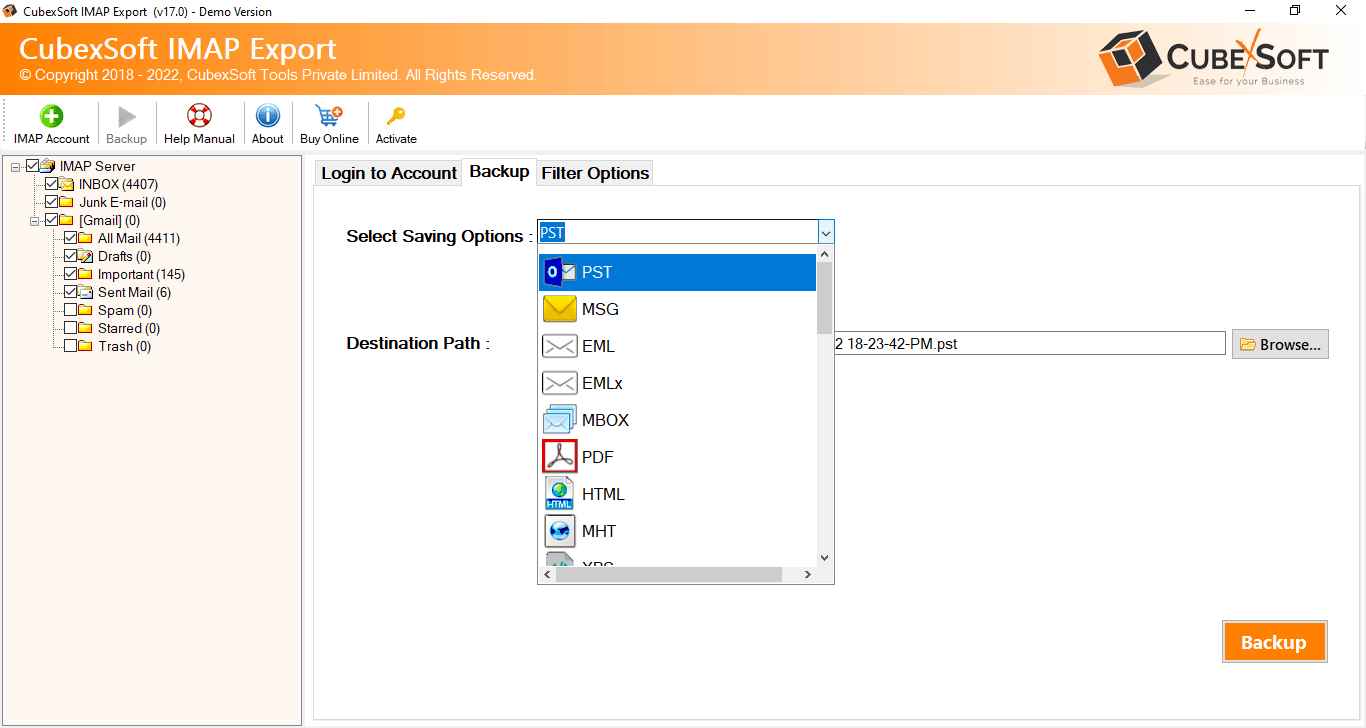
About this app
IMAP Backup Tool is a robust solution for backing up emails from any IMAP server to local formats and cloud services. It supports batch backup of multiple accounts, selective filtering, and preserves email integrity. The tool is compatible with Windows and Mac, offering a user-friendly interface and a free demo. Whether you need to migrate to Outlook, save emails as PDF, or move to Gmail, this tool handles it all efficiently. With positive user reviews and a 30-day money-back guarantee, it's a reliable choice for both personal and professional use.
Key features
- 1Backup IMAP mailboxes to 30+ formats including PST, MBOX, EML, MSG, PDF and HTML
- 2Direct migration from IMAP to Gmail, Office 365, Exchange, Yahoo and other cloud/webmail accounts
- 3Batch backup of multiple IMAP accounts via CSV credential upload, with date/subject/from/to filtering
Target customer profile
Drawn from the product itself, not from a survey.
Demographic
IT Administrators
Pain points
Need to backup multiple email accounts efficiently without data loss.
Primary needs
Batch backup, support for various formats, and cloud migration.
Demographic
Small Business Owners
Pain points
Limited budget for email backup solutions, need for easy-to-use tools.
Primary needs
Affordable, comprehensive backup with cloud support and selective options.
Demographic
Legal Professionals
Pain points
Require secure and accurate email archiving for compliance.
Primary needs
PDF export, attachment extraction, and detailed backup reports.
Scout Review
Written by AI from measured evidence, scored out of 100.
CubexSoft IMAP Backup Tool is a competent, long-running desktop utility for backing up IMAP mailboxes to local formats or cloud services. Its strengths are real: broad format support (PST, MBOX, EML, MSG, PDF and more), direct migration to Gmail/Office 365/Exchange, batch backup of multiple accounts, and a security posture that's genuinely solid on the header side (10/12 checklist, HTTPS, HSTS, CSP). Its weaknesses are equally real: a slow, dated marketing site (mobile Lighthouse 46/100, 20.2s LCP), a UI that looks years behind modern tools, a clunky CSV-based batch workflow, missing DMARC, no published compliance certifications, and accessibility failures on its own site. Against MailStore Home (free) and Aid4Mail, it competes on breadth rather than price or polish. It works, it's safe, and it's unremarkable.
Measure by measure
Usability
58Free demo, guide, docs and a knowledgebase are all present, and batch CSV import is a genuine power feature. But CSV-authoring credentials by hand is clunky, and the workflow assumes you already know IMAP host and port.
Design
52The site is a dense, dated feature-list landing page; the real product is the desktop app, whose three-pane UI looks functional but years behind modern mail tools. Marketing craft is serviceable, not polished.
Speed
44Lighthouse mobile performance 46/100 with a brutal 20.2s LCP and 12.6s FCP; desktop is 66/100. The long, image-heavy landing page is the bottleneck, not the desktop app itself.
Security
74Strong header hygiene: HTTPS enforced, HSTS, CSP, frame protection, X-Content-Type-Options, Referrer-Policy, SPF (10/12). Missing DMARC and Permissions-Policy, and no published SOC 2/ISO or bug bounty.
Accessibility
70Lighthouse accessibility 91/100, but three real failures: aria-* role mismatches, insufficient color contrast, and no main landmark. No WCAG statement, and the desktop app is Windows/Mac only.
Growth
58A real, recurring problem — email archiving for compliance and migration — with a genuine wedge: 30+ formats plus direct cloud/webmail migration in one tool. But it's a crowded, commoditized category.
Improvement areas
- Mobile page speed: Lighthouse 46/100 with 20.2s LCP and 12.6s FCP on the landing page
- Security gaps: DMARC and Permissions-Policy headers missing; no published SOC 2/ISO or bug bounty
- Accessibility: aria-* role mismatches, insufficient color contrast, and no main landmark on the site
Design & Usability
CubexSoft IMAP Backup Tool is a Windows/Mac desktop utility, so the website is marketing and the app is the product. The site is a long, dense feature-list page — screenshots, a video, guide and docs tabs — that gets the job done without any design ambition. The app UI itself, judging from the screenshots, is a classic three-pane mail client layout: functional, familiar, and visually stuck a decade ago. Usability is where it earns some credit: there's a free demo, a guide, docs, a knowledgebase, and a genuinely useful batch mode for backing up multiple IMAP accounts at once. The catch is that batch mode requires you to hand-author a CSV of login credentials, and the whole flow assumes you already know your IMAP host and port. For an IT admin, that's fine. For the small business owner in the target list, it's a wall.
Speed & Security
Speed is the weak spot. Lighthouse mobile performance lands at 46/100 with an LCP of 20.2 seconds and FCP of 12.6 seconds — that's a genuinely painful first paint, driven by a long, image-heavy landing page. Desktop fares better at 66/100, and the desktop app itself isn't what's being measured here, but the marketing site is slow enough to cost conversions. Security is a different story and clearly the strongest dimension: the HTTP probe found HTTPS enforced, HSTS, CSP, frame protection, X-Content-Type-Options, Referrer-Policy and SPF, scoring 10/12 on the checklist. The gaps are DMARC (missing) and Permissions-Policy (absent). There's no published SOC 2, ISO certification, pen-test report or bug bounty that I could find in the collected content — for a tool that handles email credentials and archives, that's a meaningful trust gap, though not unusual for a vendor at this scale.
Accessibility & Growth
Accessibility scores 91/100 on Lighthouse, which sounds great until you read the failures: aria-* attributes that don't match their roles, insufficient color contrast, and a missing main landmark. Those are real, fixable issues, and there's no accessibility statement or WCAG conformance claim anywhere on the site. The product is also desktop-only — Windows and Mac, no mobile, no multi-language UI evidence. Growth is a judgement on the idea, not the traction. The problem is real and recurring: email archiving for compliance, migration, and legal hold. The wedge is breadth — 30+ export formats plus direct migration to Gmail, Office 365, Exchange and others in a single tool. That's a legitimate differentiator. But the category is crowded and commoditized, and MailStore Home does the core archiving job for free, which caps how much pricing power this has. The domain has been registered since 2016, so the vendor isn't a flash in the pan, but the idea itself is a solid, unspectacular 58.
Conclusion
If you're an IT admin who needs to bulk-export IMAP mailboxes into a dozen different formats and you already know your way around IMAP settings, this tool will do the job reliably and the security headers suggest the vendor takes infrastructure seriously. If you're a small business owner who just wants their email backed up, the free demo is worth trying before you pay, because the CSV batch workflow and the dated interface will test your patience. The 30-day money-back guarantee softens the risk. Just don't expect the website to load quickly while you decide.
Suggestions for improvement
- Fix the mobile page speed — 20.2s LCP is costing you conversions; compress images and lazy-load the long feature sections.
- Add DMARC and a Permissions-Policy header to close the two gaps in an otherwise strong security posture.
- Replace the CSV-upload batch workflow with an in-app multi-account form so non-technical users can actually use it.
- Publish a WCAG conformance statement and fix the three Lighthouse failures: aria roles, contrast, and the missing main landmark.
Alternatives comparison
Named competitors, point by point. Nobody paid to appear here or to be left out.
 CubexSoft IMAP Backup Tool |  MailStore Home |  Aid4Mail | |
|---|---|---|---|
| Pricing model | Paid license with free demo and 30-day money-back guarantee | Free for private and business use | Paid license, tiered by edition |
| Export formats supported | 30+ formats: PST, MBOX, EML, EMLx, MSG, PDF, HTML, CSV, OLM | Proprietary archive store plus export to common formats | Wide format support including PST, MBOX, EML, MSG, PDF |
| Batch / multi-account backup | Yes — batch mode via CSV upload of multiple IMAP credentials | Multiple accounts supported, primarily single-user archiving | Batch and multi-account migration supported in higher editions |
| Platform support | Windows and Mac desktop applications | Windows desktop (Home edition) | Windows and Mac desktop applications |
| Cloud / webmail migration | Direct migration to Gmail, Office 365, Exchange, Yahoo, AWS WorkMail | Archives IMAP/POP3; cloud migration limited in Home edition | Migration to Office 365, Gmail and other IMAP targets |
MailStore Home
Free email archiving software for private and business use, supports IMAP and POP3.
Aid4Mail
Email conversion and migration tool that supports IMAP, Outlook, and various formats.
Comparing options? See CubexSoft IMAP Backup Tool alternatives, scored side by side
More Productivity apps
View all Productivity
StoryPad
92Privacy-first open source journal app with a continuous t...

The Stack Newsletter
92A weekly newsletter delivering curated tech jobs, intervi...

Qamarero
92An all-in-one hospitality software for restaurants and ba...

Vibe Coding Agent Skills
92A free, open-source platform offering 110 AI agent skills...

Puzzly – B2B Lead Generation & Sales Intelligence Platform
92Puzzly is an all-in-one B2B lead generation platform that...

Notion
92All-in-one AI workspace for docs, projects, and knowledge...

EmbedMyReviews
92White-label reputation management software for agencies s...

QRBliss
91Branded QR codes with AI Brand Sync, 15 free dynamic code...

CC Switch
91Open-source desktop app for switching AI coding providers...

Strukchad Property Management
91Property management for Kenyan letting agents: rent invoices raised every month, M-Pesa rent prompts to tenants, arrears tracking and landlord statements.

Gerty
91Private, local AI assistant for Mac that runs offline

username.md
90One verified handle for your online identity, readable by...


A platform dedicated to providing unbiased reviews of newly launched applications, analyzing everything from their features to their full potential.
info@scoutforge.net© 2026 Scoutforge. All rights reserved.
