

A platform dedicated to providing unbiased reviews of newly launched applications, analyzing everything from their features to their full potential.
info@scoutforge.net© 2026 Scoutforge. All rights reserved.
A platform dedicated to providing unbiased reviews of newly launched applications, analyzing everything from their features to their full potential.
info@scoutforge.net© 2026 Scoutforge. All rights reserved.
A platform dedicated to providing unbiased reviews of newly launched applications, analyzing everything from their features to their full potential.
info@scoutforge.net© 2026 Scoutforge. All rights reserved.
Cycling through all six. Tap any point to stop.
Measured on six things
Batch video editor for automated resizing, captioning, an...
HTTPS enforced with HSTS, plus SPF and DMARC records. But no CSP, frame protection, or other hardening headers, and no published SOC 2, ISO, or security page. Solid basics, thin on transparency — typical for an early-stage tool.
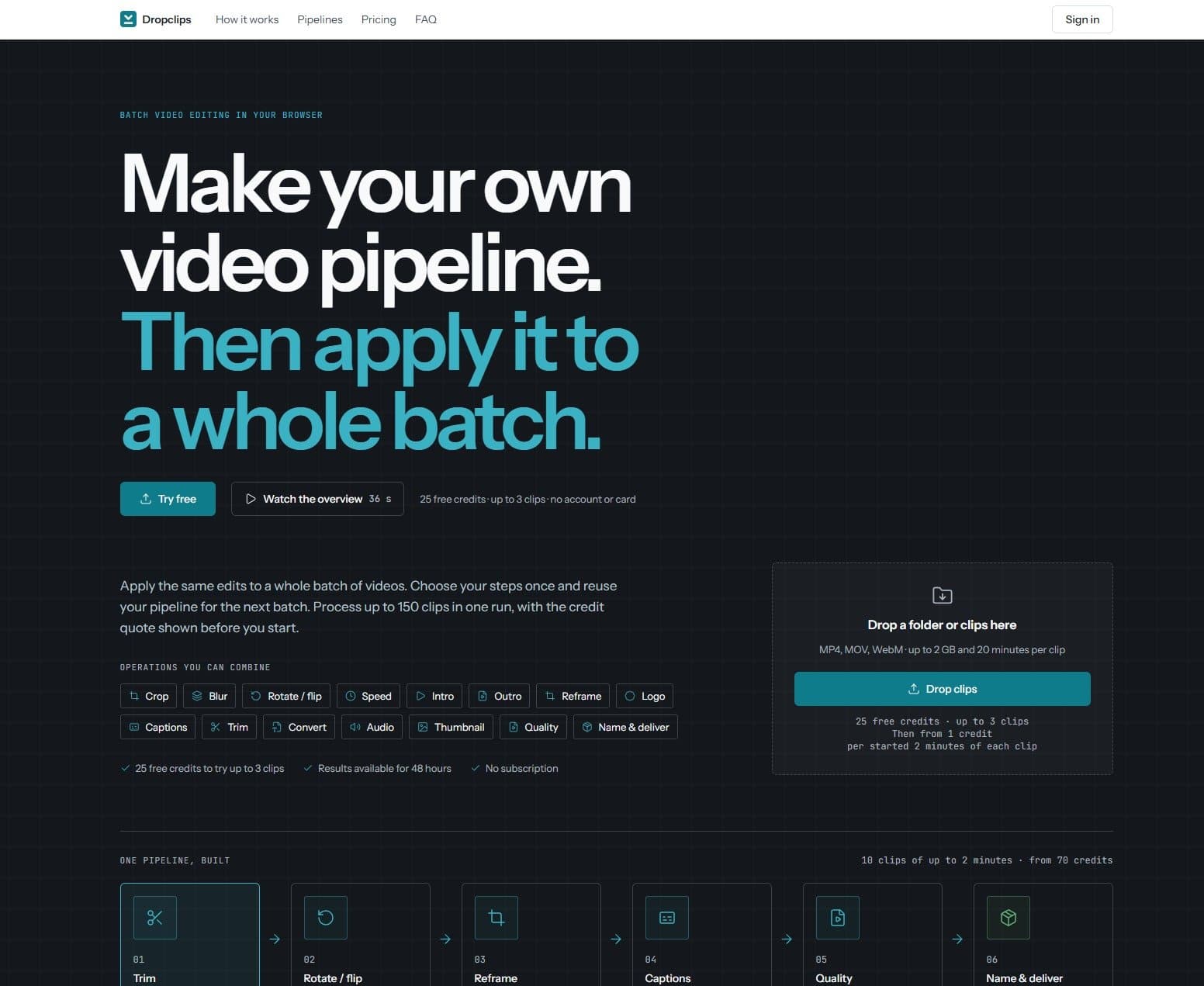
Dropclips is a browser-based batch video editor that lets you automate repetitive editing tasks. Upload clips, build a pipeline of operations (trim, crop, reframe, add captions, logo, etc.), and apply it to an entire batch. Use cases include creating multiple aspect ratio versions, adding captions, and converting formats. It offers 16 steps, 25 free credits to try, and credit-based pricing with no subscription. Files are processed in the cloud with results available for 48 hours.
Drawn from the product itself, not from a survey.
Demographic
Social media managers
Pain points
Manually resizing and captioning each video for multiple platforms is time-consuming and error-prone.
Primary needs
Efficiently create multiple aspect ratio versions with captions from a single source video.
Demographic
Content creators and influencers
Pain points
Editing videos for different platforms and adding branding elements like logos and intros is repetitive.
Primary needs
Automate editing tasks such as adding logos, intros/outros, and captions to focus on content creation.
Demographic
Marketing teams
Pain points
Producing consistent, branded video assets at scale for campaigns is resource-intensive.
Primary needs
Batch process videos to ensure brand consistency and save time on manual editing.
Written by AI from measured evidence, scored out of 100.
Dropclips is a browser-based batch video editor that turns repetitive editing tasks — resizing, captioning, branding — into a saved pipeline you run on a whole folder. It's fast (Lighthouse 95 mobile / 100 desktop), reasonably well-designed, and has a genuinely low-friction free trial with 25 credits and no signup. The 16-step pipeline model is powerful but adds complexity. Security is basic — HTTPS and HSTS but no CSP or published compliance. Accessibility scores 96 on automated checks with one contrast failure. Growth positioning is solid: a specific pain, a clear differentiator, and credit pricing as a wedge against subscription competitors. It's a competent, focused tool that knows exactly what it's for.
25 free credits with no account or card needed is genuinely low-friction onboarding. The 16-step pipeline model is well-documented on the homepage with a worked pricing example. Saved pipelines reduce repeat setup, which is the core usability win.
Clean, modern dark-themed landing page with clear pipeline diagrams and specific, benefit-led copy. The numbered step cards and before/after export section communicate the product well. Not exceptional, but polished and above-average for an indie tool.
Lighthouse mobile 95/100 and desktop 100/100 with LCP 2.9s, CLS 0, and TBT 11ms. The site is genuinely fast, and cloud processing keeps heavy video work off the browser. Strong measured performance.
HTTPS enforced with HSTS, plus SPF and DMARC records. But no CSP, frame protection, or other hardening headers, and no published SOC 2, ISO, or security page. Solid basics, thin on transparency — typical for an early-stage tool.
Lighthouse accessibility 96/100 with only one failing audit: insufficient color contrast. No a11y statement or multi-language support found. Strong automated score, but unverified beyond that.
Real, specific pain (batch resizing and captioning for social teams), a clear pipeline differentiator, and credit pricing as a wedge against subscription incumbents. Solid positioning, though the category is crowded.
Dropclips presents a clean, dark-themed landing page that communicates its core value — batch video editing via saved pipelines — with specific, benefit-led copy rather than generic SaaS filler. The numbered step cards, pipeline diagram, and before/after export section do real work explaining a product that could easily be confusing. Usability is where it earns its keep: 25 free credits with no account or card required is genuinely low-friction, and the 16 documented operations with a saved-pipeline model mean you set up once and reuse. The pricing page explains credit costs per operation with a worked example (7 credits for three aspect ratios plus captions), which is more transparency than most competitors offer. The main weakness is that the pipeline builder itself is a lot of surface area — 16 steps is powerful but potentially overwhelming for a first-time user, and there's no visible onboarding walkthrough beyond the 36-second overview video.
Speed is Dropclips' strongest measured dimension: Lighthouse mobile performance 95/100 and desktop 100/100, with LCP 2.9s, CLS 0, and TBT 11ms. The site is genuinely fast, and the architecture offloads heavy video processing to the cloud, so the browser stays responsive. Security is more mixed. HTTPS is enforced with HSTS, and SPF and DMARC records are present, which covers the basics. But the HTTP probe found no Content-Security-Policy, no frame protection, no X-Content-Type-Options, no Referrer-Policy, and no Permissions-Policy — a 6/12 checklist score. There's also no published SOC 2, ISO certification, security page, or bug bounty program. For an early-stage tool handling user video uploads, that's not alarming, but it's also not reassuring. Files are processed in the cloud and results are available for 48 hours, which is a reasonable retention window, but there's no detailed data-handling transparency on the site.
Accessibility scores well on automated checks: Lighthouse gives 96/100 with only one failing audit — insufficient background/foreground color contrast. That's a real but fixable flaw. Beyond the automated score, there's no accessibility statement, no WCAG conformance claim, and no multi-language support mentioned, so the picture is incomplete. Keyboard navigation and screen reader support are unverified. On growth, Dropclips targets a real and specific pain: social media managers and content creators manually resizing and captioning the same video for multiple platforms. The differentiator is the saved-pipeline batch model — set up once, apply to a whole folder — which is narrower and more focused than Kapwing or InVideo. Credit-based pricing with no subscription is a concrete wedge against subscription incumbents. The category is crowded, but the batch-first positioning and the no-subscription pricing give it a plausible reason to exist. The honest limit is that the pipeline builder's complexity could cap adoption among casual users.
Conclusion
If you're a social media manager or content creator who spends hours resizing and captioning the same clip for five platforms, Dropclips is worth the 25 free credits. The pipeline model is the real value — set it up once, reuse it forever. Just don't expect enterprise-grade security documentation or a polished onboarding flow. It's an indie tool that does one thing well, and for the price of a coffee, that's a fair trade.
Named competitors, point by point. Nobody paid to appear here or to be left out.
 Dropclips Dropclips |  Kapwing Kapwing |  InVideo InVideo |  Adobe Premiere Pro Adobe Premiere Pro | |
|---|---|---|---|---|
| Pricing model | Credit-based, no subscription. €9 for 75 credits, credits never expire | Freemium with subscription tiers; free plan has watermarks and limits | Subscription-based with free tier; paid plans start around $15/month | Subscription only, ~$22.99/month for Premiere Pro |
| Batch processing | Core feature: saved pipelines applied to entire folders of clips | Batch resizing and captioning available, but less pipeline-oriented | Template-based automation, not true batch folder processing | Batch processing via Adobe Media Encoder, requires separate tool |
| Browser-based (no install) | Fully browser-based, no install required | Fully browser-based | Fully browser-based | Desktop application, requires install |
| Free trial / free tier | 25 free credits, no account or card needed, up to 3 clips | Free plan with watermarks and export limits | Free plan with watermarks and limited exports | 7-day free trial, no permanent free tier |
| Aspect ratio reframing | Built-in reframe step creates multiple ratio versions in one batch | Resize feature supports multiple aspect ratios | Template-based, aspect ratios set per template | Manual reframing via sequence settings and effects |
Kapwing
Online video editor with batch resizing and captioning features.
InVideo
Video creation platform with automation and template-based editing.
Adobe Premiere Pro
Professional video editing software with batch processing capabilities.
Comparing options? See Dropclips alternatives, scored side by side

An all-in-one hospitality software for restaurants and ba...

A weekly newsletter delivering curated tech jobs, intervi...

White-label reputation management software for agencies s...

Privacy-first open source journal app with a continuous t...

Puzzly is an all-in-one B2B lead generation platform that...

All-in-one AI workspace for docs, projects, and knowledge...

A free, open-source platform offering 110 AI agent skills...

Open-source desktop app for switching AI coding providers...

One verified handle for your online identity, readable by...

Frame-perfect video-to-GIF maker that runs entirely in yo...

White-label website audits that close deals for digital a...

Automated quote follow-up for trades and service businesses.
A platform dedicated to providing unbiased reviews of newly launched applications, analyzing everything from their features to their full potential.
info@scoutforge.net© 2026 Scoutforge. All rights reserved.
