Cycling through all six. Tap any point to stop.
Measured on six things
Convert Outlook MSG files to PST, PDF, EML and 15+ formats.
Design
44Dated, template-like landing page. Clear hero hierarchy and consistent blue palette, but copy errors ('Import MSG Filento'), a mismatched product-box URL, an unreadable 'Simple Steps' screenshot, and a demo-labeled app shot undercut polish.
Screenshots
1 / 1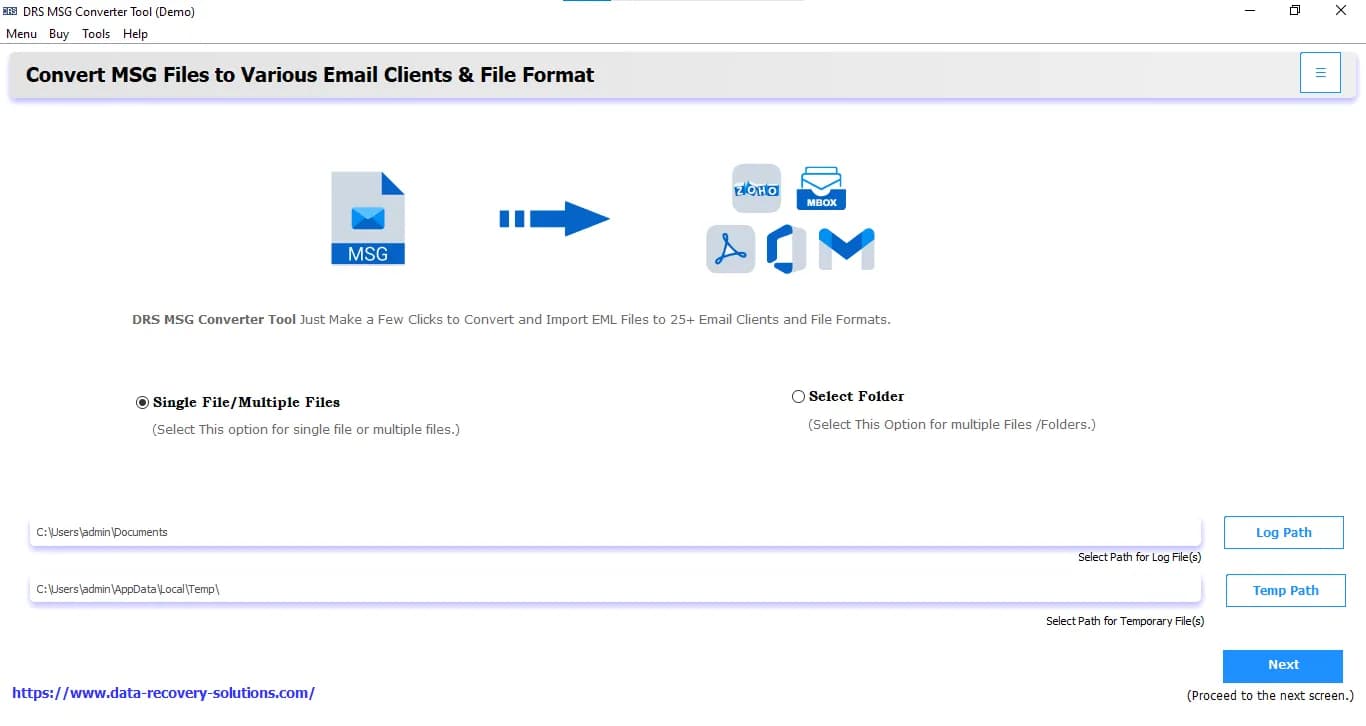
About this app
I've tested a fair share of email conversion utilities over the years, and the DRS Softech MSG Converter genuinely surprised me with how much it crams into a clean, uncluttered interface. It takes those stubborn Outlook MSG files and turns them into just about anything you'd need — PST, PDF, EML, MBOX, CSV, HTML, plus image and doc formats like JPG, PNG, TIFF, DOCX, and JSON. What I appreciate most is the batch conversion engine: I threw a folder of several hundred messages at it and it churned through them without breaking a sweat. The preview panel lets you inspect messages and attachments before committing, which saved me from converting junk more than once. During MSG-to-PST work you get the option to split the resulting file by size, and there's a duplicate-removal filter that checks To, From, Bcc, Body, and Subject fields. A date-range filter handles selective exports, and you can even push MSG data straight into Gmail, Yahoo, Office 365, Thunderbird, IMAP, Zoho, or iCloud. Th...
Key features
- 1Batch conversion of MSG files to 15+ formats including PST, PDF, EML, MBOX, CSV, HTML, JSON, DOCX, and images.
- 2Direct migration of MSG emails into Gmail, Office 365, Yahoo, Thunderbird, IMAP, Zoho, iCloud, and more.
- 3PST splitting by size, duplicate removal across To/From/Bcc/Body/Subject, and date-range filtering.
Target customer profile
Drawn from the product itself, not from a survey.
Demographic
IT administrators managing enterprise email archives
Pain points
Oversized PST files and messy MSG archives that are hard to migrate or back up
Primary needs
Bulk MSG conversion with PST splitting and duplicate removal
Demographic
Legal and compliance teams preserving email evidence
Pain points
Need to convert MSG emails into shareable, tamper-evident PDF documents
Primary needs
Metadata-preserving MSG to PDF conversion with attachments
Demographic
Small business owners switching email platforms
Pain points
Stuck with legacy MSG files that won't import into Gmail or Office 365
Primary needs
Direct MSG migration to cloud email clients without data loss
Demographic
Freelancers and consultants archiving client correspondence
Pain points
Scattered MSG files from Outlook that are hard to organize and store
Primary needs
Affordable batch conversion to PDF, HTML, or EML with naming conventions
Scout Review
Written by AI from measured evidence, scored out of 100.
DRS Softech MSG Converter is a competent, feature-dense utility with a dated marketing site. The conversion engine claims are broad — 15+ formats, batch processing, PST splitting, duplicate removal, and direct migration to Gmail, Office 365, and a dozen other clients — and the free demo lets you verify before buying. The site itself is fast (92 mobile Lighthouse) and accessible (98), with solid security headers, but it's held back by copy errors, a mismatched product render, and a crowded competitive field. If you need bulk MSG conversion with PST splitting and don't want to pay SysTools prices, it's worth a demo. If you need enterprise compliance paperwork, look elsewhere first.
Measure by measure
Usability
58CTAs and section nav are easy to find, a free demo exists, and the demo limit is stated plainly. But no pricing in the hero, dense small-type copy, and an unattributed logo wall make the page tiring to scan.
Design
44Dated, template-like landing page. Clear hero hierarchy and consistent blue palette, but copy errors ('Import MSG Filento'), a mismatched product-box URL, an unreadable 'Simple Steps' screenshot, and a demo-labeled app shot undercut polish.
Speed
79Lighthouse mobile 92/100 (LCP 2.4s, CLS 0.02, TBT 51ms) and desktop 95/100. Genuinely snappy for a marketing page; no lag complaints found. Sits at the upper end of the measured band.
Security
74Strong header hygiene: HTTPS enforced, HSTS, CSP, frame protection, and 10/12 checklist points. But SPF and DMARC are missing, and no SOC 2, ISO, or audit claims were found — solid, not certified.
Accessibility
82Lighthouse accessibility 98/100 with only one failing audit (missing main landmark). Responsive Windows/Mac coverage and readable contrast. No WCAG statement or multi-language support found, so not top of band.
Growth
60Real, specific problem (legacy MSG archives that won't import to Gmail/365, legal PDF preservation) with concrete differentiators: PST splitting, duplicate removal, 15+ client migrations. Crowded category caps the ceiling.
Improvement areas
- Landing page copy contains visible typos and a product render pointing at a different domain.
- No SPF or DMARC records published; no SOC 2, ISO, or bug-bounty program documented.
- No WCAG conformance statement and no multi-language UI support.
- No pricing shown in the hero; trust signals (logo wall, awards) lack attribution.
Design & Usability
The landing page does the fundamentals: a clear hero, a visible rating, a free demo, and a section nav that lets a visitor jump straight to specs or the manual. The problem is craft. Copy errors like 'Import MSG Filento' and 'Proficient Key Features' sit right next to the buy button, the product-box render points at a different domain than the brand, and the step-by-step screenshot is too small to actually follow. Information density is the other issue — an 11-bullet feature list and an 8-card grid in small type make the page read like a spec sheet rather than a pitch. It works, but it doesn't persuade.
Speed & Security
Speed is the standout: Lighthouse mobile 92/100 with a 2.4s LCP, 51ms TBT, and a near-perfect 0.02 CLS, plus 95/100 on desktop. For a marketing page with a logo wall and multiple screenshots, that's genuinely well-built. Security is strong on transport and headers — HTTPS enforced, HSTS, CSP, frame protection, and 10 of 12 checklist points — but the domain is missing SPF and DMARC, which matters for a tool that handles email data and could be spoofed in phishing. No SOC 2, ISO, or bug-bounty program is published, so buyers in legal and compliance should ask for a security questionnaire before trusting it with evidence archives.
Accessibility & Growth
Accessibility is a real strength: 98/100 on Lighthouse with a single failing audit (no main landmark), responsive Windows/Mac coverage, and readable contrast throughout. The gaps are documentation-level — no WCAG conformance statement and no multi-language UI. Growth is the more interesting question. The problem is real and specific: legacy MSG archives that won't import into Gmail or Office 365, plus legal teams needing tamper-evident PDFs. The differentiators are concrete — batch conversion, PST splitting by size, duplicate removal across five fields, and direct migration to 15+ clients. But the category is crowded with SysTools, Stellar, and Aid4Mail, all with stronger brand recognition. The wedge is price and feature breadth, not a structural advantage.
Conclusion
The honest verdict: this is a workmanlike tool in a category where workmanlike is table stakes. The speed and accessibility scores are genuinely above average, and the feature list is longer than most competitors'. But the landing page undersells it — typos next to the buy button, a demo screenshot still labeled '(Demo)', and a logo wall with no attribution all signal a company that ships features faster than it polishes presentation. Try the free demo with a real archive before you commit. If the batch engine handles your volume cleanly, the price is likely the deciding factor. If you need SOC 2 or a signed DPA for legal evidence work, ask hard questions first.
Suggestions for improvement
- Fix the visible copy errors ('Import MSG Filento', 'Proficient Key Features') and proofread the hero before the next campaign.
- Replace the product-box render that shows 'data-recovery-solutions.com' with one matching the DRS Softech brand.
- Publish SPF and DMARC records for the domain — critical for a tool handling email data and phishing exposure.
- Add a WCAG conformance statement and a main landmark to close the last accessibility gap.
Alternatives comparison
Named competitors, point by point. Nobody paid to appear here or to be left out.
 DRS Softech MSG Converter |  SysTools MSG Converter |  Aid4Mail |  Stellar Converter for MSG | |
|---|---|---|---|---|
| Formats supported | 15+ formats: PST, PDF, EML, MBOX, CSV, HTML, JSON, DOCX, DOCM, JPG, PNG, TIFF, GIF, MHTML | PST, PDF, EML, and cloud migration formats | MSG-to-EML and MBOX focus, plus broad archival formats | MSG-to-PST and MSG-to-EML primary; selective conversion |
| Batch conversion | Yes — handles large volumes of MSG files simultaneously | Yes — batch conversion supported | Yes — batch processing is a core strength | Yes — batch conversion with preview |
| PST splitting by size | Yes — split output PST by MB or GB | Yes — PST splitting supported | Not a primary advertised feature | Yes — split PST by size |
| Duplicate removal | Yes — checks To, From, Bcc, Body, Subject | Yes — duplicate removal supported | Limited / not a headline feature | Yes — duplicate removal available |
| Direct cloud/email client migration | Gmail, Yahoo, Office 365, Thunderbird, IMAP, Zoho, iCloud, Yandex, GoDaddy, HostGator, Amazon WorkMail, Opera | Cloud migration supported (Gmail, Office 365, etc.) | IMAP and major cloud targets supported | Cloud migration supported |
| Free demo / trial | Yes — free demo with 50-item limit | Yes — free trial available | Yes — trial available | Yes — free demo version |
SysTools MSG Converter
Popular MSG conversion suite supporting PST, PDF, EML, and cloud migration with a strong support ecosystem.
Aid4Mail
Lightweight email conversion and archival tool known for fast MSG-to-EML and MBOX processing.
Stellar Converter for MSG
Reliable MSG-to-PST and MSG-to-EML utility from a well-known data recovery brand, with preview and selective conversion.
Comparing options? See DRS Softech MSG Converter alternatives, scored side by side
More Productivity apps
View all Productivity
Qamarero
92An all-in-one hospitality software for restaurants and ba...

Puzzly – B2B Lead Generation & Sales Intelligence Platform
92Puzzly is an all-in-one B2B lead generation platform that...

The Stack Newsletter
92A weekly newsletter delivering curated tech jobs, intervi...

StoryPad
92Privacy-first open source journal app with a continuous t...

Vibe Coding Agent Skills
92A free, open-source platform offering 110 AI agent skills...

Notion
92All-in-one AI workspace for docs, projects, and knowledge...

EmbedMyReviews
92White-label reputation management software for agencies s...

QRBliss
91Branded QR codes with AI Brand Sync, 15 free dynamic code...

Strukchad Property Management
91Property management for Kenyan letting agents: rent invoices raised every month, M-Pesa rent prompts to tenants, arrears tracking and landlord statements.

CC Switch
91Open-source desktop app for switching AI coding providers...

Gerty
91Private, local AI assistant for Mac that runs offline

username.md
90One verified handle for your online identity, readable by...


A platform dedicated to providing unbiased reviews of newly launched applications, analyzing everything from their features to their full potential.
info@scoutforge.net© 2026 Scoutforge. All rights reserved.
