Cycling through all six. Tap any point to stop.
Measured on six things
Repair corrupt Outlook PST files and recover emails, cont...
Design
58Consistent royal-blue branding and a clearly ranked CTA pair, but the page is a monotonous stack of card grids and bullet walls, and the bundled app screenshot shows an empty interface with no sample data.
Screenshots
1 / 1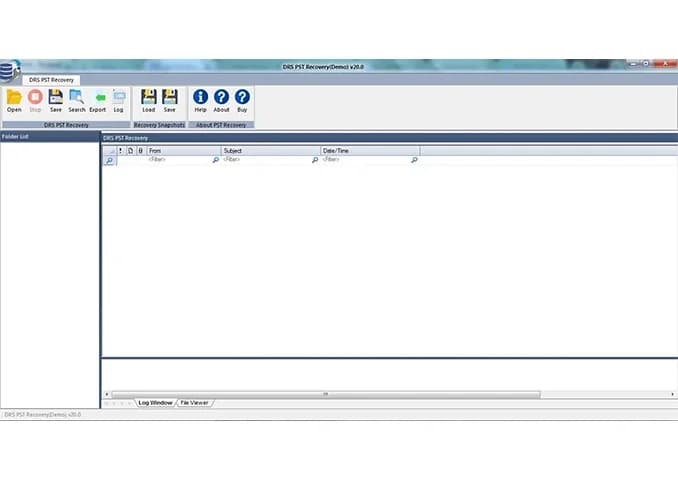
About this app
DRS Softech PST Recovery Tool is a Windows utility built to repair damaged or corrupted Outlook PST files and salvage the mailbox data inside them. It's aimed at Outlook users who've hit the dreaded 'cannot open PST file' or 'file is corrupt' errors, or who've found Scanpst.exe simply isn't up to the job. The tool offers three scan modes — Standard for light corruption, Advanced for moderate damage, and Deep for severely wrecked files — so you're not forced to run a heavy scan on a file with a minor glitch. Once scanned, everything is previewed before you commit: emails, attachments, sender details, subject lines, calendars, contacts, and tasks. From there you can export to a fresh PST or into EML, MSG, HTML, PDF, MBOX, RTF, and CSV (for contacts). It handles both ANSI and Unicode PST formats, supports password-protected files (as long as you know the password), and even lets you flip on a 'handle alignment errors' option for files with media corruption or header misalignment. A sna...
Key features
- 1Three scan modes (Standard, Advanced, Deep) matched to corruption severity, plus alignment-error handling for media/header damage.
- 2Preview-before-purchase in the free version, with Load & Save snapshots to skip re-scanning.
- 3Export recovered data to PST, EML, MSG, HTML, PDF, MBOX, RTF, and CSV, with password-protected PST support.
Target customer profile
Drawn from the product itself, not from a survey.
Demographic
IT administrators at small-to-mid-sized businesses managing Outlook mailboxes
Pain points
PST corruption causes data loss, and Scanpst.exe fails on severe damage
Primary needs
Reliable bulk PST repair with export to multiple formats and snapshot rescanning
Demographic
Individual Outlook users (freelancers, consultants, home office) with large local PST archives
Pain points
Emails and contacts become inaccessible after a crash or file error
Primary needs
Affordable, easy-to-use recovery that previews data before purchase
Demographic
Forensic and compliance teams needing to extract mailbox data for legal review
Pain points
Corrupted or password-protected PST files resist standard recovery methods
Primary needs
Deep scan mode, date-range filtering, and export to PDF/HTML/CSV for reporting
Scout Review
Written by AI from measured evidence, scored out of 100.
DRS Softech PST Recovery Tool is a competent, fast-loading Windows utility for repairing corrupted Outlook PST files, with a genuinely useful feature set: three scan modes, preview-before-purchase, password-protected file support, alignment-error handling, Load & Save snapshots, and broad export formats. The site is technically strong — 95 mobile Lighthouse performance, 97 accessibility, and 10/12 security header checks — but visually it's a template stack with an empty product screenshot and a bullet wall where a feature section should be. Against Stellar and Kernel it holds its own on features but doesn't clearly win on positioning; against free Scanpst.exe it wins on capability but has to justify the price. A solid mid-tier tool that would benefit from sharper design, a real demo screenshot, and DMARC.
Measure by measure
Usability
62Preview-before-purchase, three scan modes, and a Load & Save snapshot feature are genuinely useful, but two competing nav layers and dense ungrouped copy slow the path from landing to understanding.
Design
58Consistent royal-blue branding and a clearly ranked CTA pair, but the page is a monotonous stack of card grids and bullet walls, and the bundled app screenshot shows an empty interface with no sample data.
Speed
90Lighthouse mobile 95/100 with 1.8s LCP and 0.01 CLS; desktop 91/100. The site is genuinely fast and stable, with no lag complaints in the collected evidence.
Security
72Strong header hygiene — HSTS, CSP, frame protection, and Permissions-Policy all set (10/12 checks) — but SPF and DMARC are missing and there are no published audits or compliance certifications.
Accessibility
82Lighthouse a11y 97/100 with only two failing audits (heading order, missing main landmark). No WCAG statement published, but the automated baseline is strong.
Growth
58A real, recurring pain with concrete differentiators (three scan modes, password-protected PSTs, multi-format export), but the category is crowded and the wedge is incremental, not structural.
Improvement areas
- Homepage design is a template stack with an empty product screenshot and a 14-bullet text wall.
- Missing SPF and DMARC records leave the domain open to spoofing; no published security or compliance page.
- Two competing navigation layers and dense copy slow the path from landing to understanding the product.
Design & Usability
The homepage is competently built: royal-blue branding runs consistently from header to comparison table, the CTA hierarchy is clear (filled Purchase over outlined Free Download), and trust signals — 26K+ downloads, 4.9 stars, 875 reviews, Google 4.2, Capterra 4.7 — sit above the fold. But the page is a template stack: card grid, icon row, bullet wall, repeat. The 'Numerous Advantages' section is ~14 ungrouped bullets in small type, and the bundled app screenshot shows an empty Windows Forms interface with no sample data, which actively undercuts the 'user-friendly' pitch. Usability is helped by real substance — preview before purchase, three scan modes, Load & Save snapshots — but hurt by two competing navigation layers and dense copy that makes scanning slow.
Speed & Security
Speed is the standout: Lighthouse mobile 95/100 with LCP 1.8s, CLS 0.01, TBT 115ms, and desktop 91/100. The site loads fast and stays stable, with no lag complaints in the collected evidence. Security is solid on headers — HTTPS enforced, HSTS, CSP, frame protection, X-Content-Type-Options, Referrer-Policy, and Permissions-Policy all present (10/12 checks) — but SPF and DMARC are missing, which leaves the domain open to spoofing. There is no published SOC 2, ISO, or pen-test report and no security page, which is normal for a tool at this stage but caps the score. For a utility handling sensitive mailbox data, adding DMARC and a short data-handling page would be cheap, high-value wins.
Accessibility & Growth
Accessibility scores 97/100 on Lighthouse with only two failing audits: heading elements not in sequentially-descending order, and no main landmark. Both are quick fixes. No WCAG conformance statement is published, so the score rests on the automated baseline rather than a declared commitment. Growth is a judgement on the idea: PST corruption is a real, recurring problem, and Scanpst.exe genuinely fails on severe damage, so the pain is legitimate. The differentiators — three scan modes, password-protected PST support, alignment-error handling, Load & Save snapshots, and export to EML/MSG/HTML/PDF/MBOX/RTF/CSV — are concrete but incremental. Against Stellar, Kernel, and free Scanpst.exe, the wedge is 'more formats and a snapshot feature,' which is real but not structural. The category has headroom (mailbox data keeps growing), but the product needs a sharper segment story — forensic/compliance export workflows look like the most defensible angle.
Conclusion
If you're an IT admin or power user staring at a 'cannot open PST file' error and Scanpst.exe already failed, this tool does what it says: scan, preview, export. The free version lets you verify recovery before paying, which is the right call for a category full of overpromisers. The gaps are fixable — publish a real screenshot with sample data, group the advantages list, add DMARC, and declare WCAG conformance. None of those are hard. The bigger question is positioning: with Stellar and Kernel already established and Scanpst.exe free, DRS Softech needs a clearer reason to be chosen, and forensic/compliance export looks like the most promising lane.
Suggestions for improvement
- Replace the empty Windows Forms screenshot with a populated demo showing recovered emails, attachments, and the export dialog.
- Group the ~14 'Numerous Advantages' bullets into 3-4 themed sections with headers to break the text wall.
- Add SPF and DMARC DNS records to close the domain-spoofing gap flagged in the security probe.
- Fix heading order and add a <main> landmark to clear the two remaining Lighthouse accessibility failures.
Alternatives comparison
Named competitors, point by point. Nobody paid to appear here or to be left out.
 DRS Softech PST Recovery Tool |  Stellar Repair for Outlook |  Kernel for Outlook PST Repair |  Microsoft Scanpst.exe (Inbox Repair Tool) | |
|---|---|---|---|---|
| Scan modes | Standard, Advanced, Deep | Multiple scan modes | Deep scanning | Single basic scan |
| Preview before purchase | Yes, free version | Yes, trial version | Yes, demo version | N/A (free tool) |
| Export formats | PST, EML, MSG, HTML, PDF, MBOX, RTF, CSV | PST, EML, MSG, HTML, PDF, RTF, MBOX | PST, EML, MSG, Office 365 | PST only |
| Password-protected PST support | Yes (with password) | Yes | Yes | No |
| Price | Free preview; paid license | Paid license | Paid license | Free |
Stellar Repair for Outlook
A well-established PST repair tool from Stellar Data Recovery with similar scan modes, preview, and multi-format export options.
Kernel for Outlook PST Repair
Kernel's PST repair utility offers deep scanning, mailbox item recovery, and export to PST, EML, MSG, and Office 365.
Microsoft Scanpst.exe (Inbox Repair Tool)
Microsoft's free built-in tool for minor PST corruption, though it lacks deep recovery and export options.
Comparing options? See DRS Softech PST Recovery Tool alternatives, scored side by side
More Productivity apps
View all Productivity
Qamarero
92An all-in-one hospitality software for restaurants and ba...

Puzzly – B2B Lead Generation & Sales Intelligence Platform
92Puzzly is an all-in-one B2B lead generation platform that...

The Stack Newsletter
92A weekly newsletter delivering curated tech jobs, intervi...

StoryPad
92Privacy-first open source journal app with a continuous t...

Vibe Coding Agent Skills
92A free, open-source platform offering 110 AI agent skills...

Notion
92All-in-one AI workspace for docs, projects, and knowledge...

EmbedMyReviews
92White-label reputation management software for agencies s...

QRBliss
91Branded QR codes with AI Brand Sync, 15 free dynamic code...

Strukchad Property Management
91Property management for Kenyan letting agents: rent invoices raised every month, M-Pesa rent prompts to tenants, arrears tracking and landlord statements.

CC Switch
91Open-source desktop app for switching AI coding providers...

Gerty
91Private, local AI assistant for Mac that runs offline

BACKLNK
90Backlnk is a free SEO and AI visibility website: 15 website checks, a full audit as a PDF report, and guides to get found in search and AI answers.


A platform dedicated to providing unbiased reviews of newly launched applications, analyzing everything from their features to their full potential.
info@scoutforge.net© 2026 Scoutforge. All rights reserved.
