Is this your app?
Claim FileMinutes to manage its page, add your badge and see your traffic — free, and it stays free.
Cycling through all six. Tap any point to stop.
Measured on six things
A sophisticated macOS file search app that enhances productivity with advanced search, keyboard navigation, and robust privacy features.
Accessibility
60Basic compliance but limited screen reader support and English-only language options
Screenshots
1 / 1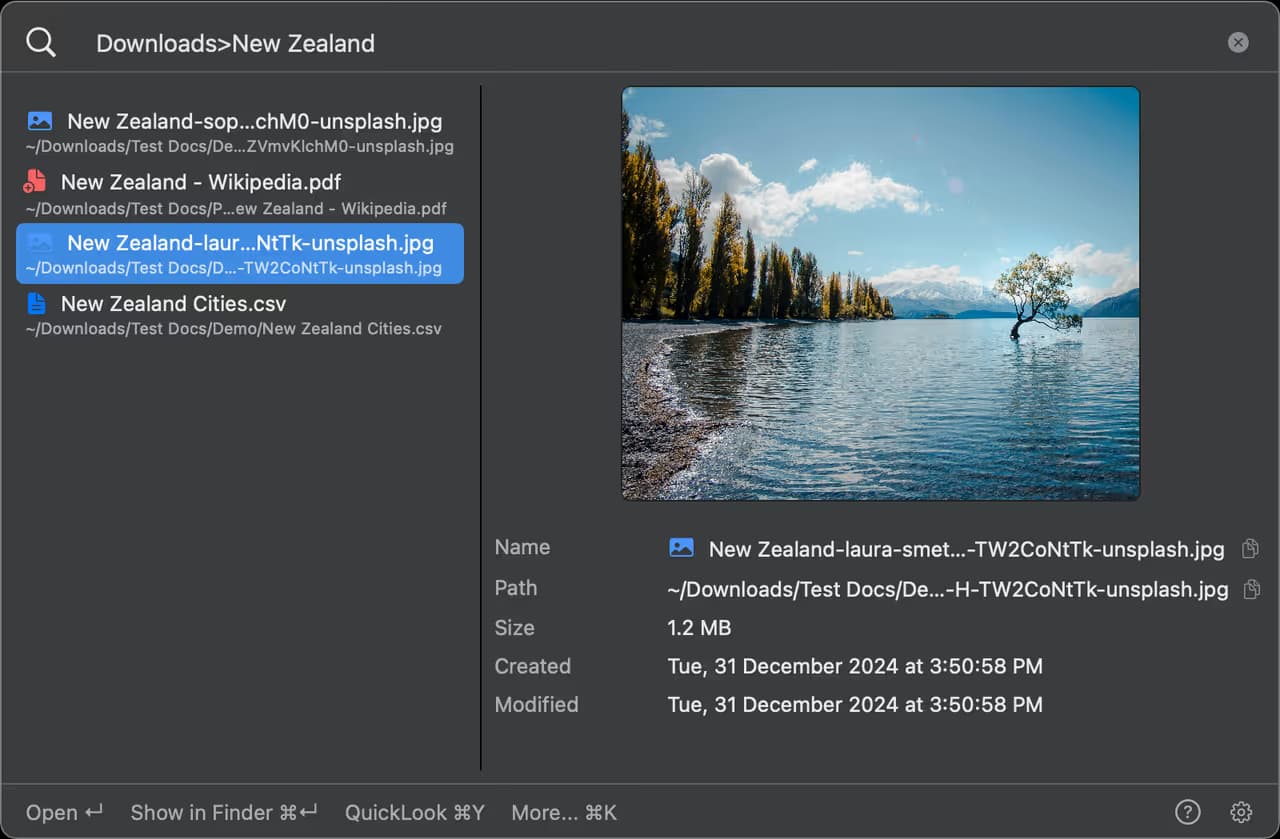
About this app
FileMinutes is a powerful macOS application designed to overcome the limitations of native tools like Finder and Spotlight. It offers advanced search capabilities, including unique syntax for folder-specific and global searches, making it ideal for power users, developers, and professionals who need efficient file management. With a clean, minimalist interface, excellent keyboard navigation, and local-only processing for enhanced privacy, it delivers faster performance and better usability. While it excels in speed and security, it has some accessibility limitations, such as limited screen reader support and English-only language options. Overall, it's a must-try for anyone frustrated with macOS's default file search tools.
Key features
- 1Superior keyboard navigation with intuitive shortcuts and fluid workflow for power users
- 2Near-instant search results faster than native macOS tools with minimal system impact
- 3Excellent privacy-focused approach with local-only processing and Apple Notarization
Target customer profile
Drawn from the product itself, not from a survey.
Demographic
Mac power users and professionals
Pain points
Slow Finder searches, limited search syntax, inefficient file navigation
Primary needs
Rapid file access, advanced search capabilities, keyboard-driven workflow
Demographic
Developers and technical users
Pain points
Inability to search specific folders quickly, poor content search performance
Primary needs
Precise file targeting, content search, integration with development workflows
Demographic
Students and researchers
Pain points
Difficulty organizing large document collections, losing track of files
Primary needs
Easy file categorization, quick access to recent files, affordable pricing
Scout Review
Written by AI from measured evidence, scored out of 100.
FileMinutes is a thoughtfully crafted solution that addresses genuine pain points in macOS file management. It excels where Apple's native tools fall short, particularly in search speed, advanced syntax, and privacy protection. The app clearly understands its target audience of power users, developers, and professionals who value efficiency over flashy features.
Measure by measure
Usability
90Superior keyboard navigation with intuitive search syntax and fluid workflow for power users
Design
80Clean, minimalist interface prioritizing functionality over aesthetics with excellent dark/light mode support
Speed
94Noticeably faster than native macOS tools with near-instant results and minimal system impact
Security
96Excellent privacy-focused approach with local-only processing and Apple Notarization
Accessibility
60Basic compliance but limited screen reader support and English-only language options
Growth
80Strong foundation with room for expanded features, platform support, and market reach
Improvement areas
- Limited screen reader support and English-only language options for accessibility
- Lack of comprehensive accessibility features like high-contrast modes and multi-language support
- Potential for expansion to support network drives, cloud storage, and Windows compatibility
Design & Usability
FileMinutes delivers a clean, minimalist interface that puts functionality front and center. The design prioritizes the search bar as the hero element, making it immediately clear what the app does best. Keyboard navigation is exceptionally well-executed with arrow keys for browsing, intuitive shortcuts, and tab completion that creates a fluid, almost command-line-like experience. The dark/light mode support follows macOS system preferences seamlessly, and the layout efficiently displays file metadata without visual clutter. While the learning curve is minimal for tech-savvy users, the unique folder>query syntax might require a brief adjustment period for those accustomed to traditional search interfaces.
Speed & Security
Where FileMinutes truly shines is in its performance and security approach. Search results appear near-instantly, noticeably outperforming macOS's native Finder and Spotlight. The content search functionality operates efficiently without significant system resource consumption. From a security perspective, the app operates entirely locally with zero data collection or tracking - a privacy advocate's dream. Apple Notarization ensures malware-free operation, and the local-only processing means your file data never leaves your device. This combination of speed and security makes it ideal for professionals handling sensitive documents.
Accessibility & Growth
Accessibility represents FileMinutes' most significant area for improvement. While the keyboard-centric design benefits users with motor impairments, the app lacks comprehensive screen reader support and offers only English language options. Basic color contrast meets standards, but there are no high-contrast modes for visually impaired users. Growth potential is strong however - the core technology could expand to support network drives, cloud storage integration, and even Windows compatibility. The current foundation supports additional features like saved search profiles and advanced filtering that would make it even more powerful.
Conclusion
If you're tired of waiting for Finder searches or struggling with Spotlight's limitations, FileMinutes is absolutely worth trying. The free trial makes risk-free testing easy, and the student discounts ensure accessibility. For anyone who spends significant time searching and organizing files on macOS, this app could become an indispensable productivity booster.
Suggestions for improvement
- To reach its full potential, FileMinutes should prioritize comprehensive screen reader support and multi-language localization.
- Custom keyboard shortcut customization would enhance accessibility further.
- Expanding to support network drives and cloud storage integration would make it more versatile for enterprise users.
- Developing a Windows version could significantly expand market reach.
- Finally, adding advanced filtering options and saved search profiles would make an already powerful tool even more indispensable.
Alternatives comparison
Named competitors, point by point. Nobody paid to appear here or to be left out.
 FileMinutes FileMinutes |  macOS Finder macOS Finder | Spotlight Search |  Alfred Alfred | |
|---|---|---|---|---|
| Search Speed Performance | Near-instant results with minimal system impact | Slow and often laggy performance | Moderate speed with system-wide impact | Fast but less focused on file management |
| Advanced Search Syntax | Folder-specific and global search filtering | Basic search with limited filtering | Simple natural language search | Workflow-focused but less file-specific |
| Privacy & Data Security | Local-only processing, no data collection | System-level access, Apple ecosystem | System-level with some cloud features | Optional cloud sync, mixed privacy |
| Keyboard Navigation | Excellent keyboard-first design | Basic keyboard support | Moderate keyboard integration | Good keyboard shortcuts |
macOS Finder
Apple's native file manager with basic search functionality and slower performance
Spotlight Search
System-wide search tool that lacks advanced filtering and folder-specific search capabilities
Alfred
Productivity app with file search features but less focused on dedicated file management
Comparing options? See FileMinutes alternatives, scored side by side
More Productivity apps
View all Productivity
Vibe Coding Agent Skills
92A free, open-source platform offering 110 AI agent skills...

Puzzly – B2B Lead Generation & Sales Intelligence Platform
92Puzzly is an all-in-one B2B lead generation platform that...

Qamarero
92An all-in-one hospitality software for restaurants and ba...

StoryPad
92Privacy-first open source journal app with a continuous t...

The Stack Newsletter
92A weekly newsletter delivering curated tech jobs, intervi...

Notion
92All-in-one AI workspace for docs, projects, and knowledge...

EmbedMyReviews
92White-label reputation management software for agencies s...

QRBliss
91Branded QR codes with AI Brand Sync, 15 free dynamic code...

CC Switch
91Open-source desktop app for switching AI coding providers...

Gerty
91Private, local AI assistant for Mac that runs offline

username.md
90One verified handle for your online identity, readable by...

BACKLNK
90Backlnk is a free SEO and AI visibility website: 15 website checks, a full audit as a PDF report, and guides to get found in search and AI answers.


A platform dedicated to providing unbiased reviews of newly launched applications, analyzing everything from their features to their full potential.
info@scoutforge.net© 2026 Scoutforge. All rights reserved.
