Cycling through all six. Tap any point to stop.
Measured on six things
A Windows utility for seamless cloud-to-cloud email migration
Security
40HTTPS is enforced and SPF is set, but there's no HSTS, CSP, frame protection, or DMARC — 3/13 on the header checklist. No SOC 2, ISO, or pen-test page found. The tool asks for full login credentials of both mail accounts with no OAuth flow described, which is a real trust question for a migration tool.
Screenshots
1 / 3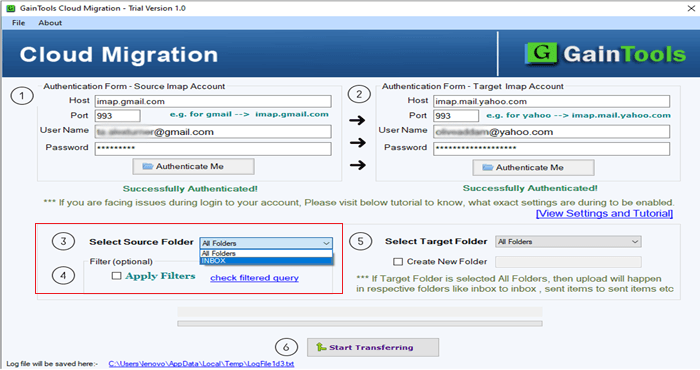
About this app
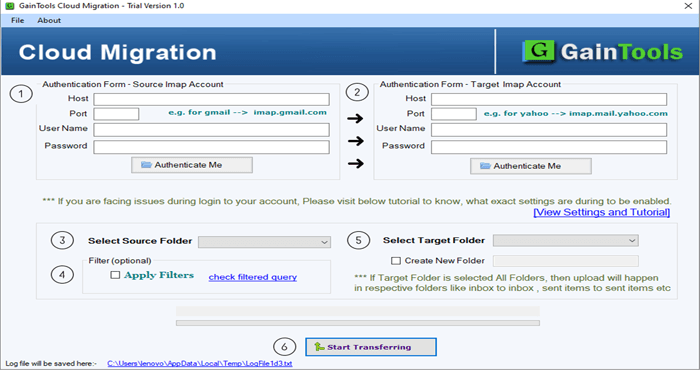
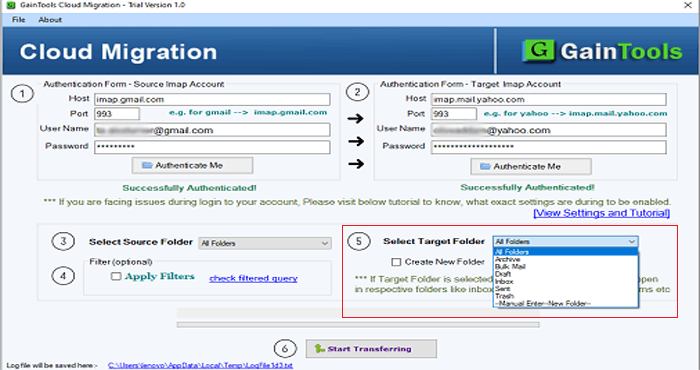
GainTools Cloud Migration is a Windows-based tool developed to let users move emails across IMAP-capable accounts. It makes it easier to migrate mailbox data from one cloud-based email provider to another for individuals and businesses. The application supports major IMAP-compatible services, including Gmail, Yahoo Mail, Office 365, Hotmail, AOL, and Google Workspace. Whether you want to switch email providers, merge your mailboxes, or migrate your business communications to a new account, the tool helps you complete the migration without any hassle. Its simple interface allows even non-technical users to seamlessly perform mailbox migrations with full data integrity. It provides a free trial version that allows users to try its features and evaluate its capabilities before buying the complete license.
Key features
- 1IMAP-to-IMAP cloud email migration across Gmail, Yahoo, Office 365, Hotmail, AOL, and Google Workspace
- 2Selective folder migration with metadata and folder-structure preservation
- 3Unlimited batch migration with advance filters and user-chosen backup folder
- 4Windows desktop app (4.17 MB) with a 10-email free demo and $99 lifetime license
Target customer profile
Drawn from the product itself, not from a survey.
Demographic
IT administrators in small to medium-sized businesses
Pain points
Manual email migration is time-consuming and error-prone; risk of data loss during transfers.
Primary needs
A reliable tool to migrate large volumes of emails between different cloud platforms quickly and securely.
Demographic
Individual users switching email providers
Pain points
Lack of technical expertise; fear of losing important emails and attachments during migration.
Primary needs
An easy-to-use, affordable solution to transfer all email data from one account to another without hassle.
Demographic
Freelancers and consultants managing multiple client email accounts
Pain points
Need to consolidate emails from various clients into a single account; managing multiple migrations efficiently.
Primary needs
A tool that supports batch migration and selective folder transfer to streamline client onboarding and offboarding.
Scout Review
Written by AI from measured evidence, scored out of 100.
GainTools Cloud Migration is a Windows desktop tool for moving email between IMAP accounts, sold at $99 lifetime with a 10-email free demo. The marketing site is fast (Lighthouse 87 mobile / 95 desktop) but dated in design and thin on security transparency — no HSTS, CSP, or DMARC, and no published audits despite handling login credentials. The product itself addresses a real, annoying problem with a specific feature set (selective folders, metadata preservation, unlimited batch), but it's competing against free native tools and imapsync in a category with no defensible moat.
Measure by measure
Usability
58Free trial is genuinely frictionless (4.17 MB, no registration) and the Features/Guide/FAQs tabs organize content well. But the red Buy Now button fights the free CTA, the demo caps at 10 emails, and there's no visible help center or live support beyond a 24/7 claim.
Design
46Dated 2008-style boxed-product hero with v1.0 badges, duplicated pen icons across eight benefit cards, a staggered grid that reads as a layout bug, and four different names for the same tool. Clear hierarchy and a restrained palette, but the craft is stuck a decade back.
Speed
71Lighthouse mobile 87/100 (LCP 3.9s, CLS 0, TBT 108ms, FCP 1.1s) and desktop 95/100 — a genuinely fast marketing site. The 4.17 MB installer is light for a desktop migration tool. LCP at 3.9s on mobile is the one soft spot.
Security
40HTTPS is enforced and SPF is set, but there's no HSTS, CSP, frame protection, or DMARC — 3/13 on the header checklist. No SOC 2, ISO, or pen-test page found. The tool asks for full login credentials of both mail accounts with no OAuth flow described, which is a real trust question for a migration tool.
Accessibility
78Lighthouse accessibility 95/100 with only two failing audits (unnamed buttons, mismatched visible labels). But the hero pills and card body copy are small and low-contrast, and there's no accessibility statement or WCAG mention anywhere on the site. English-only.
Growth
54Real, recurring pain (IMAP-to-IMAP migration is genuinely miserable) with a specific wedge: GUI, selective folders, metadata preservation, $99 lifetime. But the category is crowded by free native tools and imapsync, and nothing here is defensible long-term.
Improvement areas
- No OAuth flow — users must enter full login credentials for both source and destination accounts
- Missing security headers (HSTS, CSP, DMARC) and no published SOC 2 / ISO / pen-test documentation
- Dated design: 2008-style boxed-product hero, duplicated icons, staggered benefit grid, inconsistent product naming
- 10-email demo cap is too small to evaluate a real mailbox migration
Design & Usability
The site looks like it was designed in 2014 and never revisited: a boxed-product hero with v1.0 badges, eight benefit cards sharing one pen icon, and a staggered grid that reads as a bug. Four different names for the same tool across one page is a clarity problem, not a keyword strategy. Usability is better than design — the free trial is genuinely frictionless at 4.17 MB with no registration, and the Features/Guide/FAQs tabs work. But the red Buy Now button competes with the free CTA, the demo caps at 10 emails (useless for evaluating a real migration), and there's no visible help center beyond a 24/7 claim.
Speed & Security
Speed is the strongest dimension: Lighthouse mobile 87/100 (LCP 3.9s, CLS 0, TBT 108ms) and desktop 95/100, with a light 4.17 MB installer. Security is the weakest. HTTPS is enforced and SPF is set, but there's no HSTS, CSP, frame protection, or DMARC — 3/13 on the header checklist — and no SOC 2, ISO, or pen-test page anywhere. For a tool that asks users to hand over full login credentials for two mail accounts with no OAuth flow described, that's a real trust gap, not just a missing badge.
Accessibility & Growth
Accessibility scores well on automation (95/100) with only two failing audits — unnamed buttons and mismatched visible labels — but the hero pills and card copy are small and low-contrast, and there's no accessibility statement or WCAG mention. Growth is a judgment call: the problem is real and recurring, and the wedge (GUI, selective folders, metadata preservation, $99 lifetime) is specific. But the category is crowded by free native provider tools and open-source imapsync, and nothing here compounds — no network effects, no data advantage, just a Windows app competing on convenience and price.
Conclusion
If you're an IT admin or freelancer who needs to move a mailbox once and wants a GUI instead of a command line, the $99 lifetime price and 4.17 MB installer make this a reasonable one-time purchase — provided you're comfortable handing over credentials to a vendor with no published security audits. If you migrate regularly or handle sensitive client data, the missing OAuth flow and absent compliance documentation are real reasons to look at imapsync or your provider's native migration tool first. The 10-email demo won't tell you much; budget for the money-back window if you buy.
Suggestions for improvement
- Publish a security page with OAuth support, HSTS/CSP headers, and at least a third-party pen-test summary — credential-handling tools need this.
- Raise the demo cap from 10 emails to something that actually proves the tool works on a real folder (e.g. 100 emails or one full folder).
- Unify the product name across the site — 'Cloud Migration Tool', 'IMAP Migration Tool', and 'Webmail Migration Tool' on one page is confusing.
- Fix the design: replace the eight identical pen icons, align the staggered benefit grid, and swap the 2008 boxed-product hero for real UI screenshots.
Alternatives comparison
Named competitors, point by point. Nobody paid to appear here or to be left out.
 GainTools Cloud Migration Tool | ||
|---|---|---|
| Pricing model | $99 lifetime license; free 10-email demo | Not provided in app details |
| Platform | Windows desktop application | Not provided in app details |
| Supported email providers | All IMAP servers: Gmail, Yahoo, Office 365, Hotmail, AOL, Google Workspace | Not provided in app details |
| Selective folder migration | Yes — choose desired folders, exclude others | Not provided in app details |
| Free trial / demo | Yes — 10 emails per demo run | Not provided in app details |
| Authentication method | Manual login credentials for both accounts (no OAuth described) | Not provided in app details |
Comparing options? See GainTools Cloud Migration Tool alternatives, scored side by side
More Productivity apps
View all Productivity
Qamarero
92An all-in-one hospitality software for restaurants and ba...

Puzzly – B2B Lead Generation & Sales Intelligence Platform
92Puzzly is an all-in-one B2B lead generation platform that...

The Stack Newsletter
92A weekly newsletter delivering curated tech jobs, intervi...

StoryPad
92Privacy-first open source journal app with a continuous t...

Vibe Coding Agent Skills
92A free, open-source platform offering 110 AI agent skills...

Notion
92All-in-one AI workspace for docs, projects, and knowledge...

EmbedMyReviews
92White-label reputation management software for agencies s...

QRBliss
91Branded QR codes with AI Brand Sync, 15 free dynamic code...

Strukchad Property Management
91Property management for Kenyan letting agents: rent invoices raised every month, M-Pesa rent prompts to tenants, arrears tracking and landlord statements.

CC Switch
91Open-source desktop app for switching AI coding providers...

Gerty
91Private, local AI assistant for Mac that runs offline

username.md
90One verified handle for your online identity, readable by...


A platform dedicated to providing unbiased reviews of newly launched applications, analyzing everything from their features to their full potential.
info@scoutforge.net© 2026 Scoutforge. All rights reserved.
