Cycling through all six. Tap any point to stop.
Measured on six things
Effortlessly remove duplicate rows and columns from CSV f...
Design
45Dated, incoherent homepage: stacked blue bars, clip-art hero, Mac/Windows tabs on a Mac-only product, and competing CTAs. The desktop app itself is clean and uncluttered.
Screenshots
1 / 3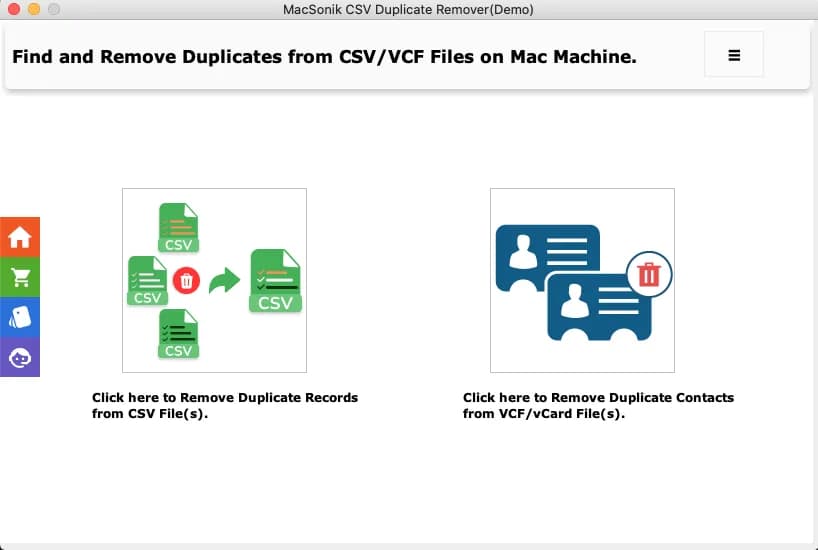
About this app
MacSonik CSV Duplicate Remover is a specialized utility designed to identify and eliminate duplicate records from CSV files, as well as VCF/vCard files, on macOS. It caters to data analysts, IT professionals, and businesses that regularly work with large datasets and need to maintain clean, accurate data. The tool supports batch processing, allowing users to add multiple CSV files or entire folders at once, and provides a preview of duplicates before removal. With a user-friendly interface, it ensures no data alteration during the deduplication process. The software is compatible with all macOS versions, including the latest, and offers a free demo version that saves up to 25 unique records. Standout features include the ability to remove duplicates from multiple files simultaneously, support for VCF/vCard files, and a straightforward three-step process: add files, select duplicates, and remove. The tool also includes options to customize destination paths and maintains data integri...
Key features
- 1Batch deduplication of multiple CSV files or entire folders at once on macOS.
- 2VCF/vCard duplicate contact removal alongside CSV support.
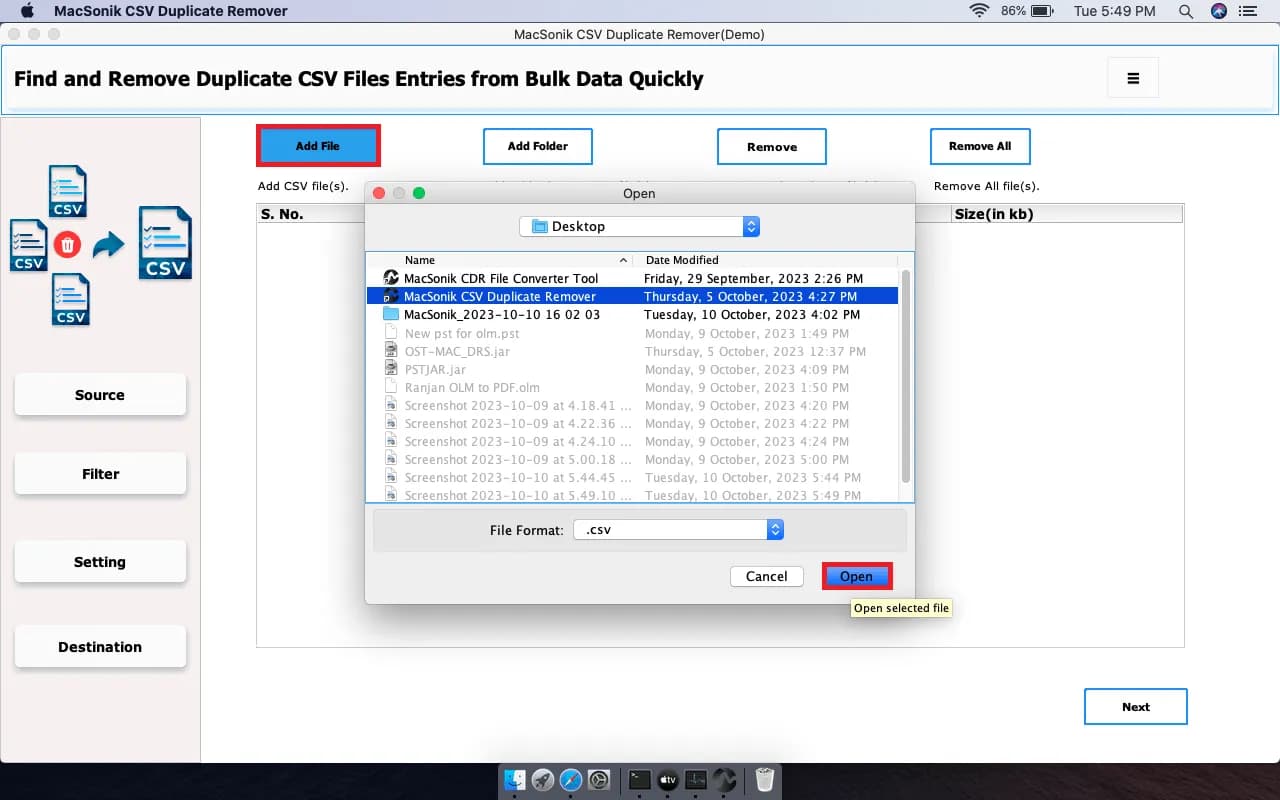
- 3Preview of duplicates before removal, with customizable destination paths and no data alteration.
- 4Free demo version that saves up to 25 unique records for evaluation.
Target customer profile
Drawn from the product itself, not from a survey.
Demographic
Data analysts and IT professionals
Pain points
Manually removing duplicates is time-consuming and error-prone
Primary needs
Efficient, accurate deduplication of large CSV files
Demographic
Small business owners and office managers
Pain points
Duplicate entries in contact lists cause communication errors
Primary needs
Clean CSV and VCF files to maintain accurate customer databases
Demographic
Researchers and academics
Pain points
Duplicate rows in datasets skew analysis results
Primary needs
Reliable tool to clean CSV data without altering original content
Scout Review
Written by AI from measured evidence, scored out of 100.
MacSonik CSV Duplicate Remover is a competent, narrowly-scoped macOS utility wrapped in a dated, over-stuffed marketing site. The app itself is clean and the three-step workflow is documented, and the site is genuinely fast with a solid security-header stack. The weak spots are the homepage design (incoherent visual language, Mac/Windows tabs on a Mac-only product, competing CTAs) and accessibility (66/100 with eight failing audits and no a11y statement). Growth is the real question: the problem is real, the VCF angle is a genuine differentiator, but a paid dedupe tool competes with free one-liners and has limited room to compound.
Measure by measure
Usability
58Clear three-step workflow and a documented guide, with download/purchase always reachable. Support paths (chat, phone, FAQ) compete for attention and body text is small grey on white.
Design
45Dated, incoherent homepage: stacked blue bars, clip-art hero, Mac/Windows tabs on a Mac-only product, and competing CTAs. The desktop app itself is clean and uncluttered.
Speed
78Lighthouse mobile 91/100 (LCP 2.9s, TBT 186ms) and desktop 99/100. The site is genuinely snappy with near-zero layout shift.
Security
74Full security-header stack (HSTS, CSP, frame protection, Referrer-Policy, Permissions-Policy) plus SPF and DMARC, 12/12 checklist. No published audits or bug bounty found.
Accessibility
46Lighthouse a11y 66/100 with 8 failing audits: low contrast, missing alt text, broken heading order, ARIA role misuse, color-only links. No accessibility statement or WCAG mention.
Growth
52Real problem (dirty CSV/VCF data) with a specific wedge: batch multi-file processing plus VCF support on macOS. But it's a one-shot utility with thin moat against free scripts.
Improvement areas
- Homepage design: incoherent visual language, Mac/Windows tabs on a Mac-only product, competing CTAs.
- Accessibility: 66/100 Lighthouse with eight failing audits and no a11y statement.
- Trust signals: no published SOC 2, ISO, pen-test, or bug bounty despite solid header hygiene.
- Positioning: thin moat against free scripts; needs a sharper reason to pay beyond VCF support.
Design & Usability
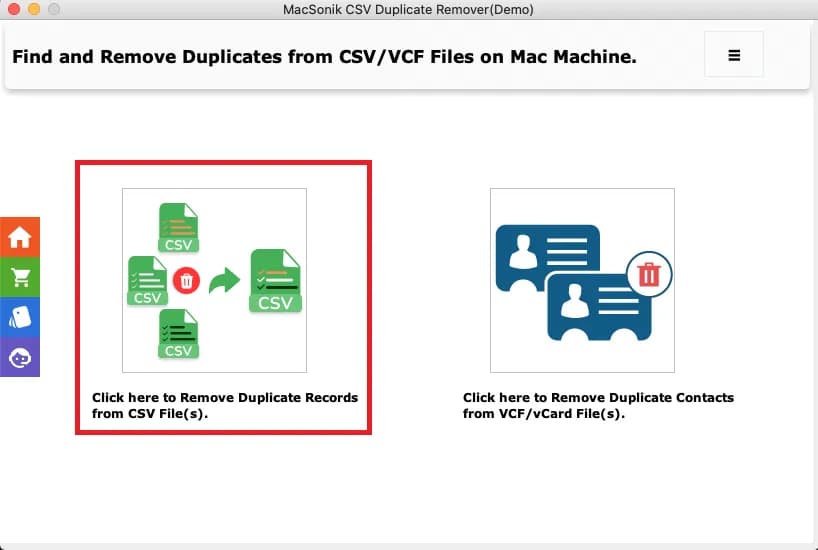
The desktop app is the best-looking thing here: two big labeled tiles that map directly to the two jobs, no clutter. The homepage is where it falls apart — a blue utility bar, a white header, a mid-blue section bar, a pale trust strip, and grey panels stacked with no shared visual language. The hero shows Mac and Windows tabs for a Mac-only product and puts Download and Purchase side by side at near-identical weight, so there's no clear primary action. Usability is better than design: the three-step workflow is documented with screenshots, download and purchase are reachable at every scroll position, and there are several support paths. But those paths (live chat, phone, floating Guide/FAQ tabs) fight for attention, and the feature copy is small grey text on white that's tiring to read.
Speed & Security
Speed is the standout. Lighthouse gives the site 91/100 on mobile (LCP 2.9s, TBT 186ms, CLS 0.001) and 99/100 on desktop — genuinely snappy with no layout shift, and no user complaints about lag surfaced in the collected evidence. Security is quietly competent on the technical side: HTTPS enforced, HSTS, CSP, frame protection, X-Content-Type-Options, Referrer-Policy and Permissions-Policy all present, plus SPF and DMARC, for a clean 12/12 on the header checklist. What's missing is the paperwork layer — no published SOC 2, ISO 27001, pen-test summary, or bug bounty that we could find — which is normal for a small utility vendor but caps how far the score can go.
Accessibility & Growth
Accessibility is the weakest measured dimension: Lighthouse scores 66/100 with eight failing axe audits, including insufficient color contrast, images without alt attributes, non-sequential heading order, ARIA roles missing required children, and links distinguishable only by color. There's no accessibility statement or WCAG reference anywhere on the site, and the interface is English-only. Growth is a judgement on the idea: the problem — dirty CSV and VCF data — is real and the target customer (analysts, IT, small businesses, researchers) is specific. The wedge is batch multi-file/folder processing plus VCF/vCard support on macOS, which free scripts don't package nicely. But it's a one-shot utility with a thin moat: `pandas.drop_duplicates()` is free, and the category has little room for a paid single-purpose tool to compound. Domain age (2020) and a lone YouTube profile are context, not the score.
Conclusion
If you regularly wrangle large CSV or VCF files on a Mac and want a GUI that previews duplicates before deleting them, this does the job and the free demo (25 records) lets you test it. If you're comfortable with a script, `pandas` or `csvkit` will do the same for free. The vendor would do well to fix the homepage — drop the Windows tabs, pick one primary CTA, and clean up contrast and alt text — because right now the marketing undersells a tool that actually works.
Suggestions for improvement
- Remove the Mac/Windows tabs from the hero — the product is Mac-only and the tabs undermine trust.
- Pick one primary CTA (Download or Purchase) and demote the other to a secondary style.
- Fix the eight failing axe audits: add alt text, raise contrast, repair heading order and ARIA roles.
- Publish a short accessibility statement and a security page (even without SOC 2) to lift trust signals.
Alternatives comparison
Named competitors, point by point. Nobody paid to appear here or to be left out.
 MacSonik CSV Duplicate Remover | Dedupe | CSV Duplicate Remover by PCVARE | |
|---|---|---|---|
| Platform | macOS only | Cross-platform (Python library) | Windows and Mac |
| Interface | GUI desktop app | Python API / code | GUI desktop app |
| VCF/vCard support | Yes | No (CSV-focused) | Not advertised |
| Batch multi-file processing | Yes (files and folders) | Yes (via script) | Yes |
| Free tier | Demo saves 25 unique records | Open source, free | Free trial available |
| Preview before removal | Yes | Yes (in code) | Yes |
Dedupe
An open-source Python library for fuzzy matching and deduplication of CSV files.
CSV Duplicate Remover by PCVARE
A tool to remove duplicates from CSV files on Windows and Mac.
Comparing options? See MacSonik CSV Duplicate Remover alternatives, scored side by side
More Productivity apps
View all Productivity
Qamarero
92An all-in-one hospitality software for restaurants and ba...

Puzzly – B2B Lead Generation & Sales Intelligence Platform
92Puzzly is an all-in-one B2B lead generation platform that...

The Stack Newsletter
92A weekly newsletter delivering curated tech jobs, intervi...

StoryPad
92Privacy-first open source journal app with a continuous t...

Vibe Coding Agent Skills
92A free, open-source platform offering 110 AI agent skills...

Notion
92All-in-one AI workspace for docs, projects, and knowledge...

EmbedMyReviews
92White-label reputation management software for agencies s...

QRBliss
91Branded QR codes with AI Brand Sync, 15 free dynamic code...

Strukchad Property Management
91Property management for Kenyan letting agents: rent invoices raised every month, M-Pesa rent prompts to tenants, arrears tracking and landlord statements.

CC Switch
91Open-source desktop app for switching AI coding providers...

Gerty
91Private, local AI assistant for Mac that runs offline

BACKLNK
90Backlnk is a free SEO and AI visibility website: 15 website checks, a full audit as a PDF report, and guides to get found in search and AI answers.


A platform dedicated to providing unbiased reviews of newly launched applications, analyzing everything from their features to their full potential.
info@scoutforge.net© 2026 Scoutforge. All rights reserved.
