Cycling through all six. Tap any point to stop.
Measured on six things
Save Gmail emails as PDFs securely on Mac—bulk export, no...
Design
46Dated two-column template with a boxed 3D product cover and low-contrast trust badges. The app UI looks like a different, older product than the marketing page, and copy errors ('License Tyes') plus a Mac/Windows contradiction undercut polish.
Screenshots
1 / 2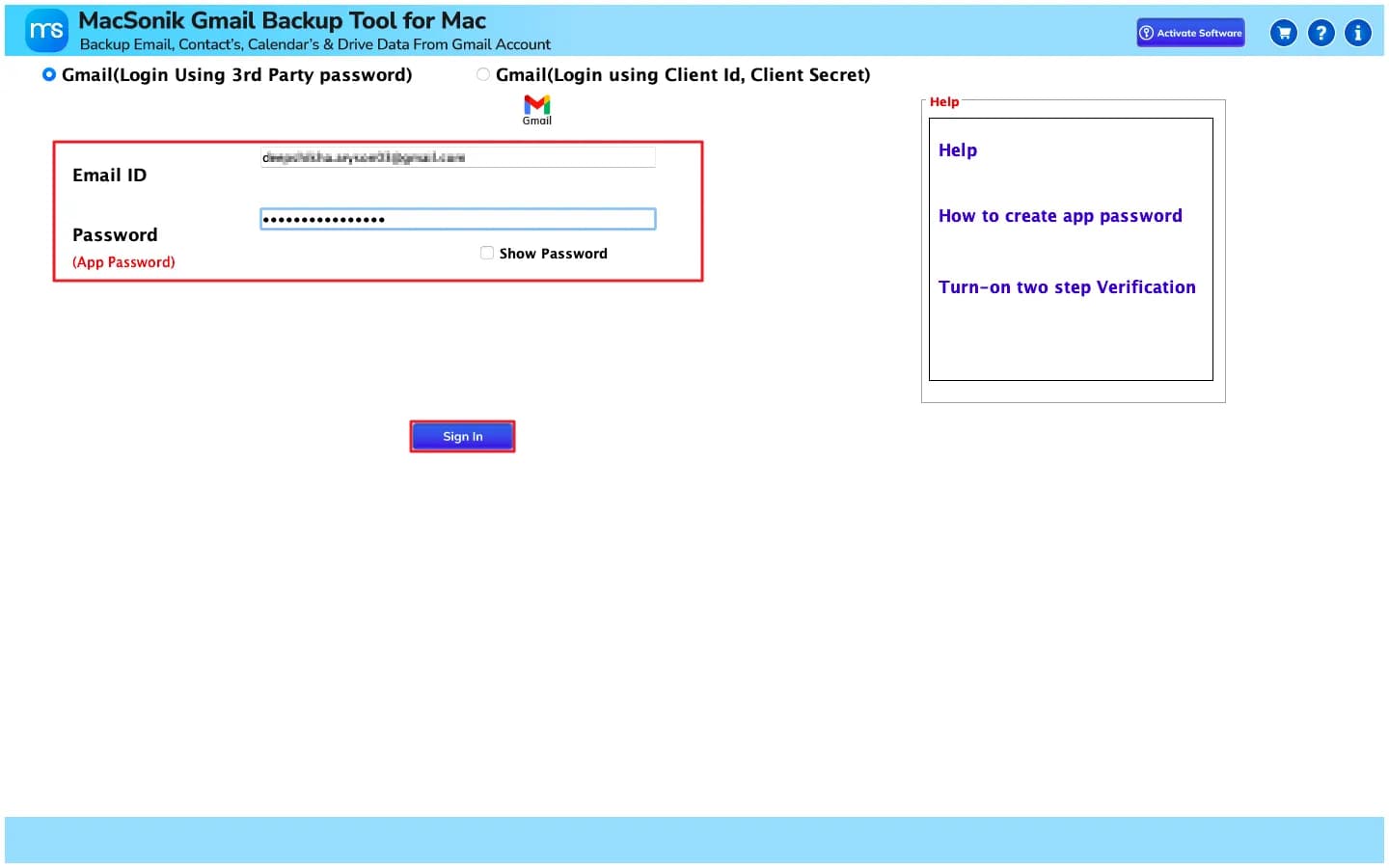
About this app
MacSonik Gmail to PDF Converter for Mac is a purpose-built utility for turning Gmail messages into tidy, portable PDF files—no manual printing, no copy-paste gymnastics. It's aimed at anyone wrestling with a bloated Gmail inbox or a strict archival requirement: students, compliance-focused businesses, freelancers, and everyday users who want a clean offline record of important threads. The tool signs into Gmail directly (using an app password), lets you preview and pick mailboxes, then exports in bulk while preserving folder structure and data integrity. Standout features include date-range filtering, a duplicate-remover that flags identical emails by To/From/Subject/Bcc/Body, the option to convert with or without attachments, and a separate folder to stash attachments as PDFs. You can name the output and choose the save path, so files land exactly where you expect. It supports macOS and Windows, runs on Apple Silicon (M1 through M4 and newer), and claims 24/7 support with a 30-day ...
Key features
- 1Bulk Gmail-to-PDF export with optional attachment inclusion and separate attachment-as-PDF folder.
- 2Duplicate removal based on To/From/Subject/Bcc/Body, plus date-range filtering.
- 3Native macOS app with Apple Silicon (M1–M4+) support, custom naming and save path.
Target customer profile
Drawn from the product itself, not from a survey.
Demographic
Students and researchers archiving email correspondence
Pain points
Gmail storage fills up; need offline copies for citations and record-keeping
Primary needs
Bulk export of selected date ranges to PDF with attachments preserved
Demographic
Small business owners and compliance officers
Pain points
Regulatory requirements to retain email records; manual printing is error-prone
Primary needs
Duplicate removal, consistent naming, and secure local PDF archives
Demographic
Freelancers and consultants with overflowing inboxes
Pain points
Important client threads buried in Gmail; storage quotas hit quickly
Primary needs
Quick, selective exports of key threads as portable PDFs without attachments clutter
Demographic
IT admins supporting Mac users in mixed environments
Pain points
Users need simple tools that work across macOS versions and Apple Silicon
Primary needs
Reliable, low-support utility with clear UI and broad OS compatibility
Scout Review
Written by AI from measured evidence, scored out of 100.
MacSonik Gmail to PDF Converter is a purpose-built desktop utility for turning Gmail into PDFs with attachments, date filters and duplicate removal. The marketing site is fast (Lighthouse mobile 90) and the security headers are complete (12/12), but the design is dated, the app UI doesn't match the marketing page, copy errors and a Mac/Windows contradiction undercut trust, and the Gmail auth relies on an app password rather than OAuth. Usability is competent — clear CTAs, a legible Free vs Full table, a 13-step guide — but the folder screen is cramped. Accessibility is decent on automated checks but fails on contrast, heading order and link names. Growth is the real question: the problem is real, but Google Takeout and MailStore Home are free, so the paid wedge is narrow.
Measure by measure
Usability
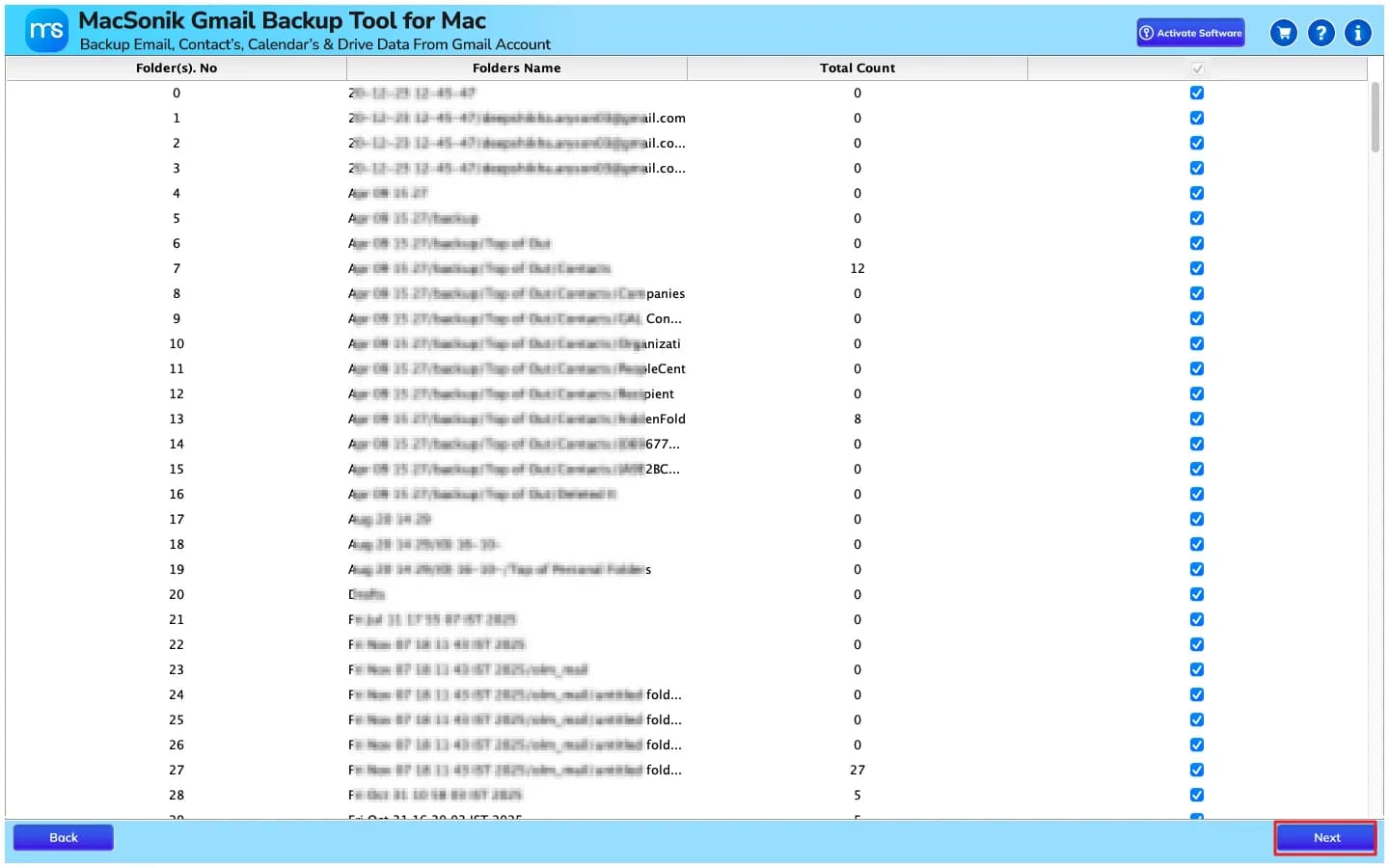
58Clear purchase path with Free Download and Buy Now repeated above the fold, a legible Free vs Full table (50 emails/folder cap), and a 13-step screenshot guide. But the folder screen is cramped with truncated names, and the app-password login has no inline help beyond a tiny label.
Design
46Dated two-column template with a boxed 3D product cover and low-contrast trust badges. The app UI looks like a different, older product than the marketing page, and copy errors ('License Tyes') plus a Mac/Windows contradiction undercut polish.
Speed
82Lighthouse mobile 90/100 with LCP 925ms, TBT 14ms and CLS 0.034; desktop 85/100. The marketing site is genuinely snappy — a lightweight page that loads fast on both form factors.
Security
70Full 12/12 header checklist: HTTPS enforced, HSTS, CSP, frame protection, SPF and DMARC all set. But Gmail auth runs on a third-party app password rather than OAuth, and no SOC 2, ISO, pen-test or bug bounty is published.
Accessibility
68Lighthouse a11y 90/100, but failing audits include insufficient color contrast, non-sequential heading order, links without discernible names and a missing main landmark. No WCAG statement, no multi-language support, and the product is macOS-only despite the Windows claim.
Growth
55A real, narrow problem (Gmail archival to PDF) with a specific wedge: native Mac app, Apple Silicon support, duplicate removal, date filters, attachments-as-PDF. But Google Takeout is free and MailStore Home is free — the paid wedge is thin.
Improvement areas
- Replace Gmail app-password auth with OAuth 2.0 for stronger, modern credential handling.
- Unify app and marketing design; fix copy errors and the Mac/Windows spec contradiction.
- Improve folder-screen readability and add inline help for the app-password login.
- Publish a WCAG accessibility statement and fix contrast, heading order and unnamed links.
Design & Usability
Design and usability pull in opposite directions. The homepage is a conventional two-column template with a boxed 3D product cover, low-contrast trust badges and a saturated navy comparison table — functional but visibly dated. Worse, the app UI is branded 'Gmail Backup Tool for Mac' and looks like a different, older product than the marketing page, so the experience reads as two products stitched together. Copy errors ('License Tyes') and a Mac/Windows contradiction on a macOS-only spec sheet erode trust. Usability is better: the purchase path is clear, Free Download and Buy Now repeat above the fold, the Free vs Full table makes the 50-emails-per-folder cap legible, and a 13-step screenshot guide walks through the flow. But the folder screen is cramped with truncated names, and the app-password login offers no inline help beyond a tiny label.
Speed & Security
Speed is the standout. Lighthouse mobile scores 90/100 with LCP 925ms, TBT 14ms and CLS 0.034; desktop lands 85/100. The marketing site is a lightweight page that loads fast on both form factors — no heavy SPA, no lag complaints in the collected evidence. Security is solid on the surface: the HTTP probe returns a full 12/12 checklist — HTTPS enforced, HSTS, CSP, frame protection, X-Content-Type-Options, Referrer-Policy, Permissions-Policy, plus SPF and DMARC. The gap is the credential model: the app signs into Gmail with a third-party app password rather than OAuth, which is a weaker and more fragile auth pattern. No SOC 2, ISO 27001, pen-test report or bug bounty is published, so enterprise-grade assurance is unverified. For a desktop utility handling email archives, the headers are excellent and the auth story is the weak link.
Accessibility & Growth
Accessibility scores 90/100 on Lighthouse but the failing audits are telling: insufficient color contrast, non-sequential heading order, links without discernible names, and a missing main landmark. There is no WCAG statement and no multi-language support, and the product is macOS-only despite the 'Mac and Windows' marketing line. Growth is a judgement on the idea: Gmail-to-PDF archival is a real, narrow problem with a specific wedge — native Mac app, Apple Silicon support, duplicate removal, date-range filtering, and attachments exported as separate PDFs. But the category is crowded with free options: Google Takeout exports Gmail for free (as MBOX), MailStore Home is free on Windows, and SysTools is an established paid player. The paid wedge here is thin — 'it's a Mac app' is a feature, not a moat. The domain dates to 2020 and the site claims 4.5/5 from 668 ratings, but those are context, not a growth engine.
Conclusion
If you need a Mac-native, Apple Silicon-ready tool that bulk-exports Gmail to PDF with duplicate removal and attachment handling, this does the job and the site is fast and well-secured at the header level. But before paying, weigh it against free options: Google Takeout exports your Gmail for nothing (as MBOX, needing conversion), and MailStore Home is free on Windows. The 50-emails-per-folder free tier is enough to test whether the workflow fits. The biggest fixes needed are OAuth instead of app passwords, a design refresh that unifies the app and marketing page, and a real accessibility pass on contrast and link names.
Suggestions for improvement
- Replace Gmail app-password auth with OAuth 2.0 to match modern security expectations.
- Unify the app UI and marketing page — same branding, same visual system, no 'Gmail Backup Tool' vs 'Gmail to PDF Converter' split.
- Fix copy errors ('License Tyes') and resolve the Mac/Windows contradiction on the spec sheet.
- Add a WCAG accessibility statement and fix contrast, heading order and unnamed links.
Alternatives comparison
Named competitors, point by point. Nobody paid to appear here or to be left out.
 MacSonik Gmail to PDF Converter |  SysTools Gmail Backup Tool |  Google Takeout |  MailStore Home | |
|---|---|---|---|---|
| Primary export format | PDF (with/without attachments) | PDF, PST and multiple formats | MBOX (needs third-party conversion to PDF) | PDF and other formats |
| Platform support | macOS (Apple Silicon M1–M4+); Windows claimed but spec lists macOS only | Windows | Web (any browser) | Windows |
| Price | Paid (free tier: 50 emails per folder) | Paid | Free | Free |
| Duplicate removal | Yes (To/From/Subject/Bcc/Body) | Yes (date filters, bulk export) | No | Not a primary feature |
| Date-range filtering | Yes (start/end dates) | Yes | Limited (export scope selection) | Yes (import filters) |
SysTools Gmail Backup Tool
Backs up Gmail emails to multiple formats including PDF and PST, with date filters and bulk export options; widely used for email archival.
Google Takeout
Google's free native export tool that downloads Gmail data as MBOX; requires third-party conversion to reach PDF, but no cost.
MailStore Home
Free email archiving software for Windows that can import Gmail and export to PDF; good for personal archives but less Mac-native.
Comparing options? See MacSonik Gmail to PDF Converter alternatives, scored side by side
More Productivity apps
View all Productivity
Qamarero
92An all-in-one hospitality software for restaurants and ba...

Puzzly – B2B Lead Generation & Sales Intelligence Platform
92Puzzly is an all-in-one B2B lead generation platform that...

The Stack Newsletter
92A weekly newsletter delivering curated tech jobs, intervi...

StoryPad
92Privacy-first open source journal app with a continuous t...

Vibe Coding Agent Skills
92A free, open-source platform offering 110 AI agent skills...

Notion
92All-in-one AI workspace for docs, projects, and knowledge...

EmbedMyReviews
92White-label reputation management software for agencies s...

QRBliss
91Branded QR codes with AI Brand Sync, 15 free dynamic code...

Strukchad Property Management
91Property management for Kenyan letting agents: rent invoices raised every month, M-Pesa rent prompts to tenants, arrears tracking and landlord statements.

CC Switch
91Open-source desktop app for switching AI coding providers...

Gerty
91Private, local AI assistant for Mac that runs offline

BACKLNK
90Backlnk is a free SEO and AI visibility website: 15 website checks, a full audit as a PDF report, and guides to get found in search and AI answers.


A platform dedicated to providing unbiased reviews of newly launched applications, analyzing everything from their features to their full potential.
info@scoutforge.net© 2026 Scoutforge. All rights reserved.
