Cycling through all six. Tap any point to stop.
Measured on six things
Convert MBOX files to multiple formats & email clients on...
Design
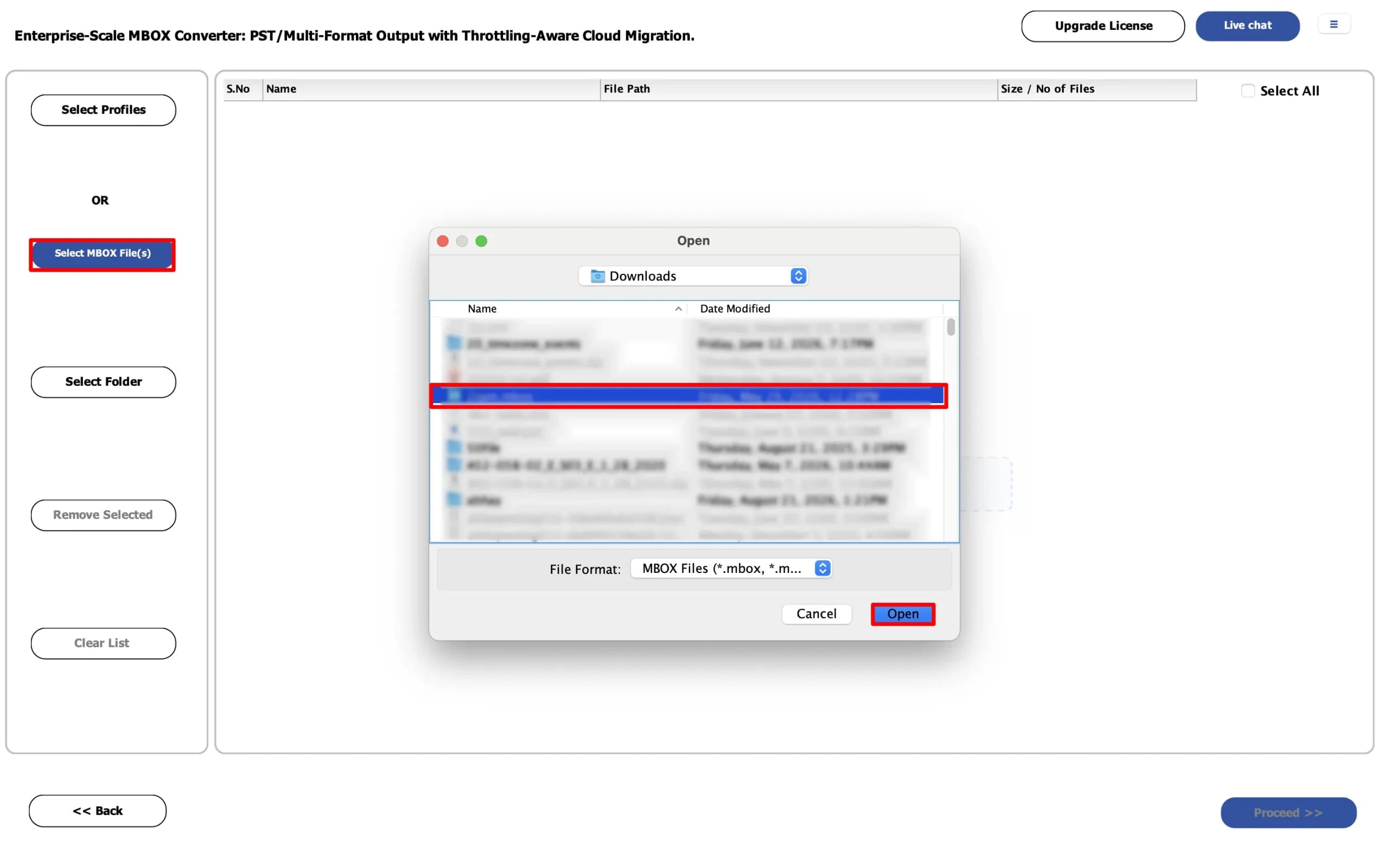
44Store listing and screenshots read dated: blurred app captures, red annotation boxes over buttons, and a macOS dialog in a Windows product. The four-step workflow strip is the one clean piece.
Screenshots
1 / 2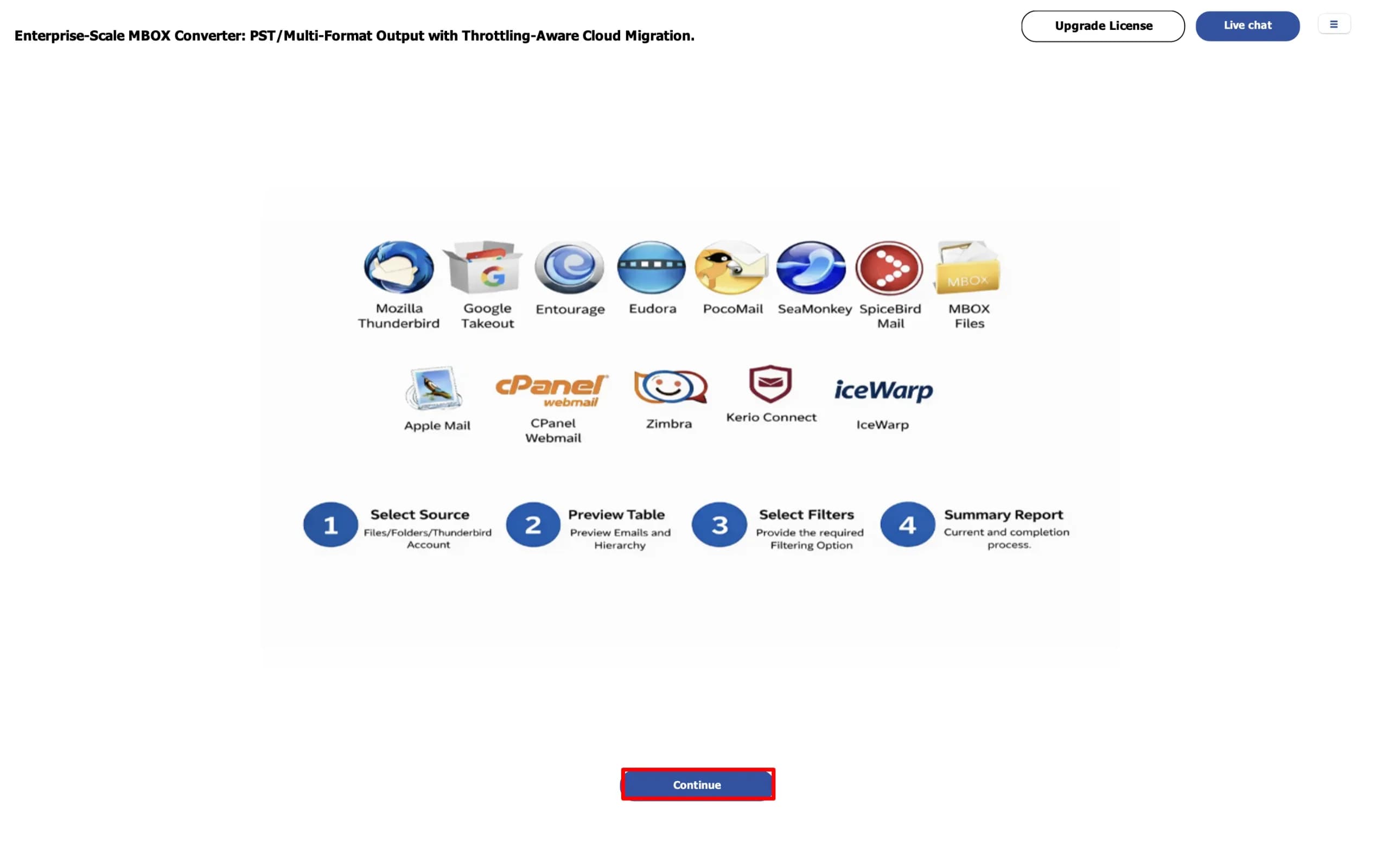
About this app
MacSonik MBOX Converter Tool for Windows is a dedicated utility for converting MBOX email archives into various file formats and email clients while preserving data integrity. It supports MBOX files from Apple Mail, Thunderbird, Eudora, Opera Mail, and others, and maintains folder hierarchy, email formatting, attachments, metadata, and embedded images. Key features include advanced filters for selective conversion, duplicate email removal, date-based migration, and preview before export. It handles single or multiple MBOX files in batch, compatible with latest Windows versions. The demo version converts up to 50 emails; the full version unlocks unlimited conversions. Ideal for personal users, IT professionals, legal teams, and enterprises needing efficient MBOX conversion and migration.
Key features
- 1Batch conversion of single or multiple MBOX files with folder hierarchy and metadata preserved.
- 2Advanced filters for selective conversion, date-based migration, and duplicate email removal.
- 3Preview before export, with support for Apple Mail, Thunderbird, Eudora, Opera Mail, and others.
Target customer profile
Drawn from the product itself, not from a survey.
Demographic
IT professionals and system administrators
Pain points
Migrating large volumes of MBOX emails across platforms without data loss or corruption
Primary needs
Batch conversion with folder hierarchy preservation and duplicate removal
Demographic
Legal teams and e-discovery professionals
Pain points
Extracting and converting email evidence from MBOX archives while maintaining metadata integrity
Primary needs
Selective conversion with date filters and preview before export
Demographic
Personal users switching from Apple Mail or Thunderbird
Pain points
Exporting MBOX emails to Windows-compatible formats or other email clients
Primary needs
Simple, user-friendly conversion tool that preserves attachments and formatting
Scout Review
Written by AI from measured evidence, scored out of 100.
MacSonik MBOX Migration Tool is a competent, narrowly-scoped Windows utility for converting MBOX archives to PST and other formats. Its workflow is legible and its feature set — batch conversion, hierarchy preservation, dedupe, date filters, preview — maps directly to what migration and e-discovery users need. The 50-email demo is a sensible trial. What holds it back is presentation: dated, blurred screenshots with annotation boxes, a macOS dialog in a Windows product, and a store listing that greets visitors with a region modal. Security headers are solid but no audit claims exist for a tool handling sensitive mail.
Measure by measure
Usability
58Clear left-column actions and a correctly disabled Proceed button make the workflow legible, and the 50-email demo lets buyers test first. The region modal and cookie banner add friction before value.
Design
44Store listing and screenshots read dated: blurred app captures, red annotation boxes over buttons, and a macOS dialog in a Windows product. The four-step workflow strip is the one clean piece.
Speed
58Lighthouse mobile 73/100 and desktop 70/100, with a 5.6s LCP dragging the score down despite a 6ms TBT and 1.2s FCP. Heavy hero assets are the bottleneck, not scripting.
Security
72HTTPS enforced with HSTS, CSP, and 10/12 security headers; SPF and DMARC in place. Frame protection and Referrer-Policy are missing, and no SOC 2 or audit claims were found.
Accessibility
80Lighthouse accessibility 98/100 with one failing audit: non-sequential heading order. No WCAG statement or multi-language support found, and the product is Windows-only.
Growth
54A real, specific need — MBOX migration and e-discovery — with concrete differentiators like batch conversion, hierarchy preservation, and date filters. But the category is crowded with near-identical converters.
Improvement areas
- Dated, blurred store screenshots with annotation boxes and a macOS dialog in a Windows product.
- Missing frame protection and Referrer-Policy headers; no published security or compliance page.
- Single failing accessibility audit (heading order) and no WCAG statement or multi-language support.
Design & Usability
The product's interface is a plain grey-and-white utility with a clear left-to-right logic: source actions on the left, file list in the centre, Proceed at the bottom right. The four-step workflow strip explains the process at a glance, and the disabled Proceed button in the empty state is correct. But the presentation undermines it: screenshots are blurred, red annotation boxes are drawn over buttons, and a macOS-style dialog appears in a Windows product. The store listing opens with a region modal and a cookie banner before any value is shown.
Speed & Security
Lighthouse mobile performance lands at 73/100 with a 5.6s LCP — the largest contentful paint is the weak point, while TBT of 6ms and FCP of 1.2s show the scripting is lean. Desktop scores 70/100. On security, HTTPS is enforced with HSTS, CSP, X-Content-Type-Options and Permissions-Policy, plus SPF and DMARC, for 10/12 checklist points. Frame protection and Referrer-Policy are absent, and no SOC 2, ISO, or pen-test claims were found — notable for a tool aimed at legal e-discovery.
Accessibility & Growth
Accessibility scores 98/100 on Lighthouse with a single failing audit: heading elements are not in sequentially-descending order. No WCAG statement or multi-language support was found, and the product is Windows-only. On growth, the idea targets a real, specific need — MBOX migration and e-discovery — with concrete differentiators: batch conversion, folder hierarchy preservation, duplicate removal, date filters, and preview before export. The category is crowded, with Aid4Mail owning the forensics segment and numerous dedicated MBOX-to-PST converters competing on price.
Conclusion
If you need to move MBOX archives into Outlook or another client and you want folder structure and metadata intact, this does the job and the demo lets you verify it on your own files first. Buy it for the function, not the storefront. Before committing to a legal or enterprise workflow, ask the vendor directly about data handling and any security certifications — the headers are good, but the compliance story isn't published.
Suggestions for improvement
- Replace the blurred screenshots with crisp, readable captures and remove the red annotation boxes.
- Fix the heading hierarchy to sequential order to clear the single Lighthouse accessibility failure.
- Add frame protection and Referrer-Policy headers to reach 12/12 on the security checklist.
- Publish a short security/data-handling page — critical for legal and enterprise e-discovery buyers.
Alternatives comparison
Named competitors, point by point. Nobody paid to appear here or to be left out.
 MacSonik MBOX Migration Tool |  Aid4Mail | MBOX to PST Converter | |
|---|---|---|---|
| MBOX to PST conversion | Yes | Yes | Yes |
| Batch conversion of multiple MBOX files | Yes | Yes | Limited |
| Duplicate email removal | Yes | Yes | Not stated |
| Date-based filtering | Yes | Yes | Yes |
| Forensics / e-discovery features | Basic | Advanced | No |
| Free trial / demo | 50 emails | Yes | Yes |
Aid4Mail
A powerful email conversion and forensics tool that supports MBOX and many other formats, with advanced filtering and batch processing.
MBOX to PST Converter
A dedicated tool to convert MBOX files to Outlook PST format, often used for email migration.
Comparing options? See MacSonik MBOX Migration Tool alternatives, scored side by side
More Productivity apps
View all Productivity
Qamarero
92An all-in-one hospitality software for restaurants and ba...

Puzzly – B2B Lead Generation & Sales Intelligence Platform
92Puzzly is an all-in-one B2B lead generation platform that...

The Stack Newsletter
92A weekly newsletter delivering curated tech jobs, intervi...

StoryPad
92Privacy-first open source journal app with a continuous t...

Vibe Coding Agent Skills
92A free, open-source platform offering 110 AI agent skills...

Notion
92All-in-one AI workspace for docs, projects, and knowledge...

EmbedMyReviews
92White-label reputation management software for agencies s...

QRBliss
91Branded QR codes with AI Brand Sync, 15 free dynamic code...

Strukchad Property Management
91Property management for Kenyan letting agents: rent invoices raised every month, M-Pesa rent prompts to tenants, arrears tracking and landlord statements.

CC Switch
91Open-source desktop app for switching AI coding providers...

Gerty
91Private, local AI assistant for Mac that runs offline

BACKLNK
90Backlnk is a free SEO and AI visibility website: 15 website checks, a full audit as a PDF report, and guides to get found in search and AI answers.


A platform dedicated to providing unbiased reviews of newly launched applications, analyzing everything from their features to their full potential.
info@scoutforge.net© 2026 Scoutforge. All rights reserved.
