Cycling through all six. Tap any point to stop.
Measured on six things
Convert Outlook MSG files to EML, PST, and more on Mac & ...
Design
46Dated template-style landing page: repeated hero copy, spec typos ('ntel® Core™', 'Processor:Apple Silicon'), and a raw /var/folders Temp Path in the app window. The Free vs Full table is the one clean structure.
Screenshots
1 / 2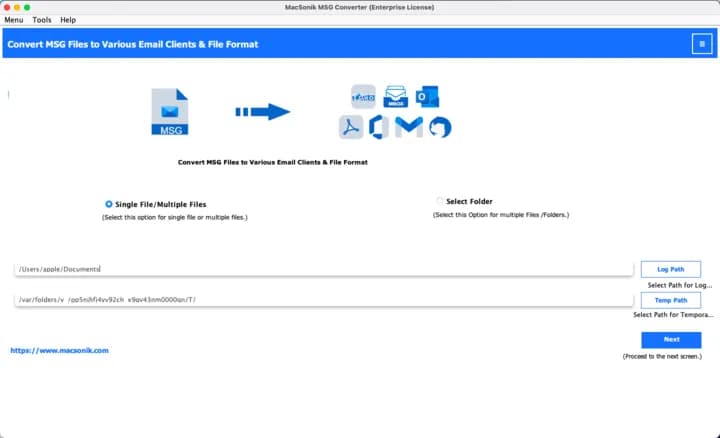
About this app
MacSonik MSG to EML Converter is a dedicated email migration tool that simplifies the process of converting Outlook MSG files into EML format, as well as other formats like PST, EMLX, MBOX, PDF, and more. Built for both macOS and Windows, the software is designed to handle bulk conversions without compromising data integrity, attachments, or folder structure. Whether you're an IT administrator managing thousands of MSG files or an individual switching from Outlook to Apple Mail or Thunderbird, this tool streamlines the migration with features like date range filters, duplicate email removal, and attachment skipping. The free trial version allows you to test all features with a limit of 50 emails per folder, making it a risk-free way to evaluate the tool's performance. Backed by a 30-day money-back guarantee and 24/7 customer support, MacSonik offers a reliable and secure solution for email format conversion.
Key features
- 1Bulk MSG to EML conversion on Mac and Windows with folder structure and attachment preservation
- 2Date range filters, duplicate email removal, and skip-attachments option for selective conversion
- 3Free trial capped at 50 emails per folder, plus 30-day money-back guarantee and 24/7 support
Target customer profile
Drawn from the product itself, not from a survey.
Demographic
IT administrators and system administrators
Pain points
Managing large volumes of MSG files, ensuring data integrity during migration
Primary needs
Bulk conversion, duplicate removal, folder structure preservation
Demographic
Business professionals switching from Outlook to Mac
Pain points
Incompatibility of MSG files with Apple Mail, loss of attachments
Primary needs
Seamless conversion to EML, attachment preservation, easy import
Demographic
Freelance IT consultants and email migration specialists
Pain points
Handling diverse client email data, time-consuming manual conversions
Primary needs
Date range filters, batch processing, support for multiple formats
Scout Review
Written by AI from measured evidence, scored out of 100.
MacSonik MSG to EML Converter is a workmanlike email migration tool with a genuinely fast site and a clean security-header posture, wrapped in a dated landing page that undercuts the product. The Free vs Full table and numbered software guide do the heavy lifting on usability; the repeated hero copy, spec typos and raw Temp Path do the opposite for design. Accessibility is decent but not clean. Growth is the honest question mark: the problem is real and the buyer is specific, but the niche is crowded and the product's own material doesn't explain why anyone should pick it over Aid4Mail or SysTools.
Measure by measure
Usability
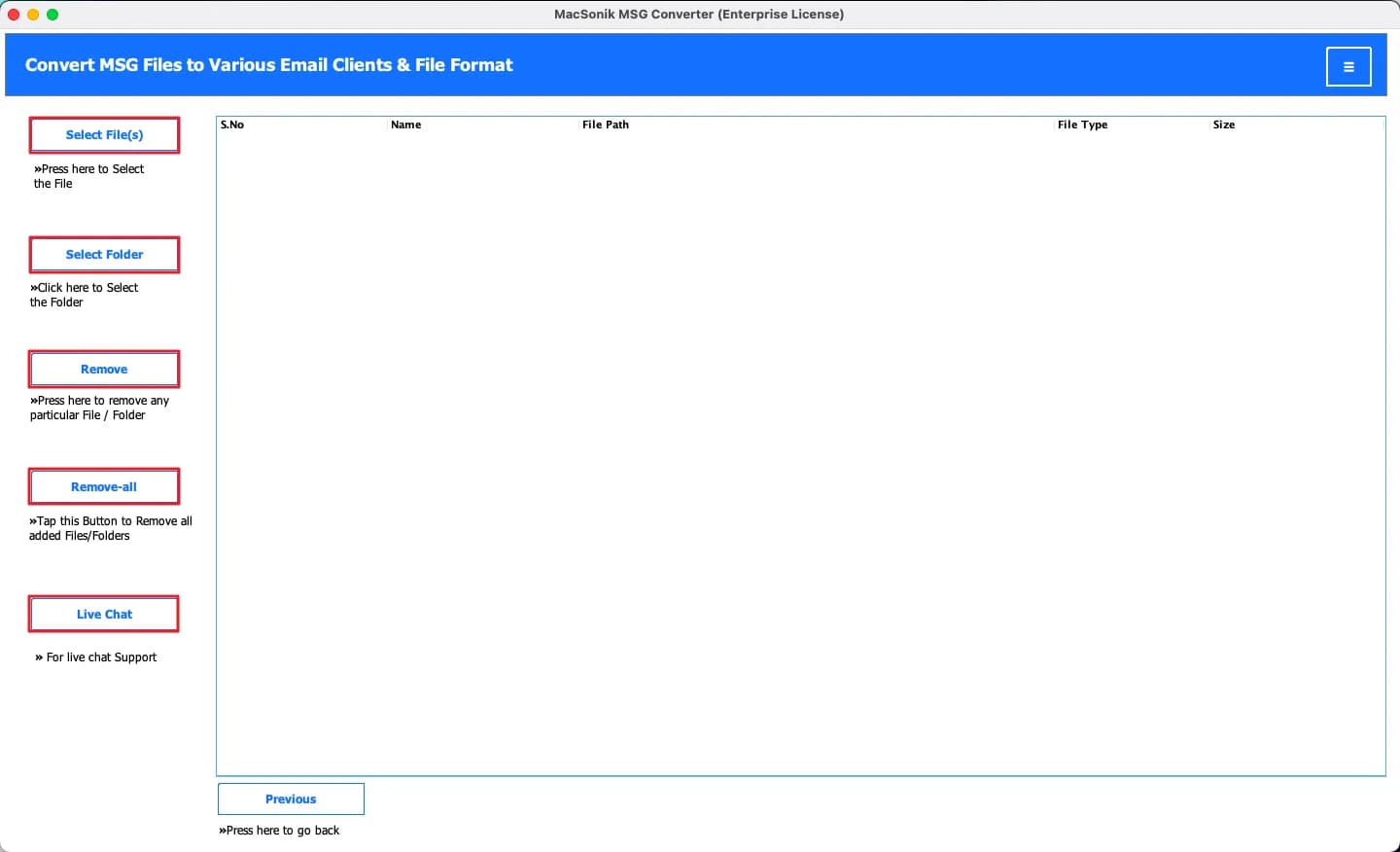
58Clear above-the-fold CTAs and a genuinely useful Free vs Full table, plus a numbered step-by-step guide. Undermined by an empty file table with no guidance and dense small-text specs/FAQs below.
Design
46Dated template-style landing page: repeated hero copy, spec typos ('ntel® Core™', 'Processor:Apple Silicon'), and a raw /var/folders Temp Path in the app window. The Free vs Full table is the one clean structure.
Speed
88Lighthouse mobile 98/100 (LCP 1.8s, CLS 0.02, TBT 98ms) and desktop 88/100. Genuinely fast for a software-download page with this much content stacked on it.
Security
78Full 12/12 header checklist: HTTPS enforced, HSTS, CSP, frame protection, Referrer-Policy, Permissions-Policy, SPF and DMARC all present. No SOC 2/ISO/pen-test claims found.
Accessibility
70Lighthouse 90/100 with real failures: contrast ratio, non-sequential headings, unnamed links, missing main landmark. No accessibility statement or WCAG mention found.
Growth
56Real, specific problem (Outlook MSG → Mac/EML migration) with a defined buyer and a 50-email free trial. But it's a crowded niche against Aid4Mail and SysTools with no visible wedge.
Improvement areas
- Landing page design: repeated hero copy, spec typos, raw Temp Path, and dated template feel
- Accessibility: four failing Lighthouse audits and no accessibility statement or WCAG mention
- Compliance transparency: no SOC 2, ISO 27001, pen-test report or bug bounty program surfaced
- Positioning: no clear wedge against Aid4Mail, SysTools or GainTools in a crowded niche
Design & Usability
The page reads as a standard software-download template rather than a designed product page. The hero repeats 'Mac & Windows' and 'Convert Outlook MSG Files to EML' in several places, the paragraph duplicates the bullet list beneath it, and the spec section ships typos like 'ntel® Core™' and 'Processor:Apple Silicon' with a missing space. The app window shows a raw '/var/folders/...' Temp Path, which looks unpolished. On usability the fundamentals are better: CTAs sit above the fold and are clearly differentiated (solid Free Download vs outlined Purchase Now), the Free vs Full comparison table answers 'what do I get for free?' in one glance, and the software guide documents the conversion flow in numbered steps. The weak spots are the empty file-selection table with no guidance until a file is added, and the dense small-text specs and FAQ accordions that make the lower half of the page slow to scan.
Speed & Security
Speed is the standout: Lighthouse mobile 98/100 with LCP 1.8s, CLS 0.02 and TBT 98ms, and desktop 88/100 — genuinely fast for a page carrying this much stacked content. Security is solid on the technical layer: the HTTP probe returned 12/12 checklist points with HTTPS enforced, HSTS, CSP, frame protection, X-Content-Type-Options, Referrer-Policy, Permissions-Policy, SPF and DMARC all present. What's missing is the compliance layer — no SOC 2, ISO 27001, pen-test report or bug bounty program surfaced in the collected evidence. For a tool that handles email archives and attachments, that's the gap worth closing; the headers are table stakes, the audit is the differentiator.
Accessibility & Growth
Accessibility lands at 90/100 on Lighthouse but the failing audits are real: insufficient background/foreground contrast, headings not in sequential order, links without discernible names, and no main landmark. There's no accessibility statement or WCAG mention on the site. Growth is a judgement call on the idea: MSG-to-EML conversion for Outlook-to-Mac switchers is a real, specific problem with a defined buyer (IT admins, migration consultants) and a sensible 50-email free trial. But the category is crowded — Aid4Mail, SysTools and GainTools all do the same job — and nothing in the product's own material names a segment or workflow it serves better than those. The domain is 6.6 years old and the only listed social profile is YouTube, which is context on traction, not a reason to score it down. The wedge is thin; the execution is competent.
Conclusion
If you're an IT admin with a pile of MSG files and a Mac migration on the calendar, the 50-email free trial is a low-risk way to see whether the output quality holds up — and the 30-day money-back guarantee covers the rest. Go in expecting a functional tool rather than a polished product experience, and verify the output on a sample folder before committing to a bulk run. The speed and header hygiene suggest the engineering is competent; the marketing page is the part that needs work.
Suggestions for improvement
- Fix the spec typos ('ntel® Core™', 'Processor:Apple Silicon') and replace the raw /var/folders Temp Path with a friendly default.
- Add an accessibility statement and fix the four failing Lighthouse audits: contrast, heading order, link names, main landmark.
- Publish a security page with SOC 2 / ISO status or a pen-test summary — headers alone don't reassure buyers handling email archives.
- Sharpen the positioning: name the specific segment (e.g. MSPs doing Outlook-to-Google Workspace migrations) and say why this beats Aid4Mail.
Alternatives comparison
Named competitors, point by point. Nobody paid to appear here or to be left out.
 MacSonik MSG to EML Converter |  Aid4Mail |  SysTools MSG Converter |  GainTools MSG to EML Converter | |
|---|---|---|---|---|
| MSG to EML conversion | Yes, bulk conversion on Mac and Windows | Yes, MSG to EML plus many other formats | Yes, MSG to EML, PST, PDF and more | Yes, dedicated MSG to EML utility |
| Bulk conversion | Yes, single or hundreds of MSG files | Yes, batch processing | Yes, bulk conversion | Yes, batch conversion |
| Attachment preservation | Yes, all attachments carried over | Yes | Yes | Yes |
| Free trial limit | 50 emails per folder | Trial available | Trial available | Trial available |
| Platform support | macOS 10.13+ and Windows 7/8/10/11 | Windows | Windows | Windows |
Aid4Mail
Aid4Mail is a versatile email conversion tool that supports MSG to EML conversion, along with many other formats, and offers batch processing and filtering options.
SysTools MSG Converter
SysTools MSG Converter is a professional tool to convert MSG files to EML, PST, PDF, and more, with features like bulk conversion and selective export.
GainTools MSG to EML Converter
GainTools MSG to EML Converter is a dedicated utility for converting Outlook MSG files to EML format with support for batch conversion and attachment preservation.
Comparing options? See MacSonik MSG to EML Converter alternatives, scored side by side
More Productivity apps
View all Productivity
Qamarero
92An all-in-one hospitality software for restaurants and ba...

Puzzly – B2B Lead Generation & Sales Intelligence Platform
92Puzzly is an all-in-one B2B lead generation platform that...

The Stack Newsletter
92A weekly newsletter delivering curated tech jobs, intervi...

StoryPad
92Privacy-first open source journal app with a continuous t...

Vibe Coding Agent Skills
92A free, open-source platform offering 110 AI agent skills...

Notion
92All-in-one AI workspace for docs, projects, and knowledge...

EmbedMyReviews
92White-label reputation management software for agencies s...

QRBliss
91Branded QR codes with AI Brand Sync, 15 free dynamic code...

Strukchad Property Management
91Property management for Kenyan letting agents: rent invoices raised every month, M-Pesa rent prompts to tenants, arrears tracking and landlord statements.

CC Switch
91Open-source desktop app for switching AI coding providers...

Gerty
91Private, local AI assistant for Mac that runs offline

BACKLNK
90Backlnk is a free SEO and AI visibility website: 15 website checks, a full audit as a PDF report, and guides to get found in search and AI answers.


A platform dedicated to providing unbiased reviews of newly launched applications, analyzing everything from their features to their full potential.
info@scoutforge.net© 2026 Scoutforge. All rights reserved.
