Cycling through all six. Tap any point to stop.
Measured on six things
Convert Outlook for Mac OLM files to PST, PDF, MBOX, and ...
Design
46Dated packaged-software aesthetic: box art, tiny award hexagons, a dense 4-column spec table in small grey type. Version numbers disagree (26.6 vs 26.06) and one table row reads like unedited placeholder copy.
Screenshots
1 / 3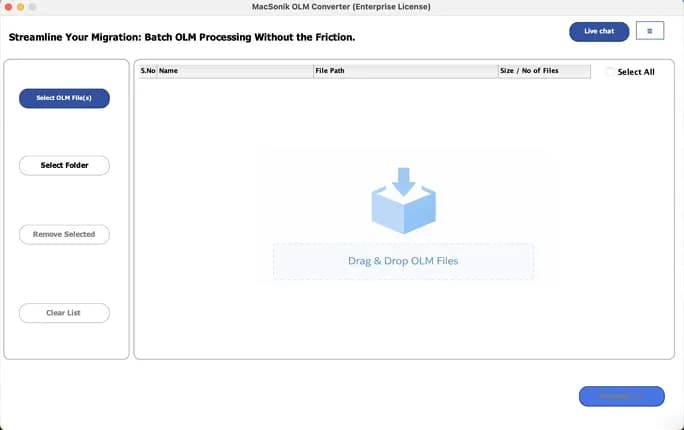
About this app
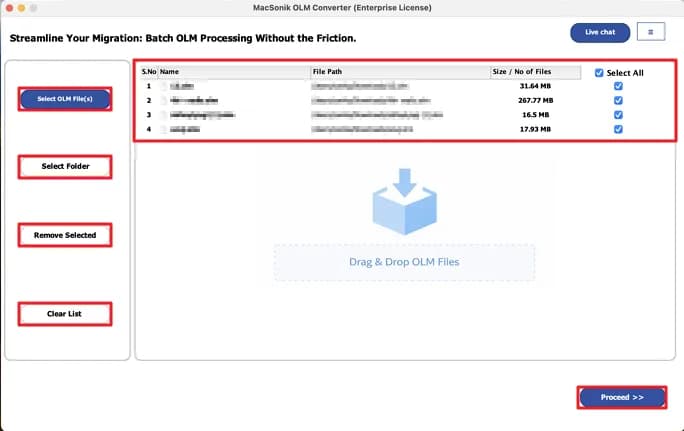
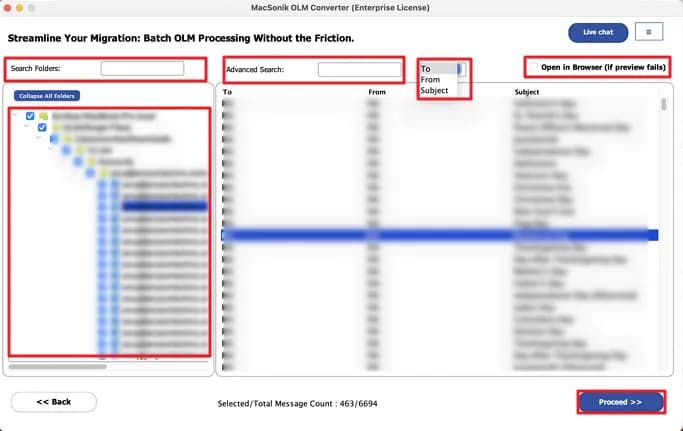
MacSonik OLM Converter is a specialized Mac utility that exports Outlook for Mac OLM files into over 20 formats and email clients, including PST, PDF, MBOX, EML, MSG, CSV, DOCX, Gmail, and Microsoft 365. It works without needing Outlook installed, using a proprietary parsing engine that preserves email metadata, folder hierarchy, attachments, and Unicode content. Version 26.6 adds faster scanning for large (50GB+) mailboxes, duplicate detection, PST splitting, and direct cloud migration via secure APIs. The tool is built for IT admins, MSPs, legal teams, and businesses migrating off Mac Outlook, offering batch conversion, mailbox mapping, and offline processing for privacy. A free trial caps exports at 50 emails per folder.
Key features
- 1Converts OLM to 20+ formats (PST, PDF, MBOX, EML, MSG, CSV, DOCX) without Outlook for Mac installed.
- 2Direct cloud migration to Microsoft 365 and Google Workspace with one-to-one through many-to-many mailbox mapping.
- 3Batch processing with duplicate detection by Message-ID, PST splitting, attachment handling, and full metadata preservation.
Target customer profile
Drawn from the product itself, not from a survey.
Demographic
IT administrators and enterprise IT teams managing bulk Mac Outlook migrations
Pain points
Manual OLM-to-PST or cloud migration is slow, error-prone, and risks data loss
Primary needs
Automated batch conversion with intact folder hierarchy and metadata for Microsoft 365 or Google Workspace
Demographic
Legal and compliance teams archiving email for audits and investigations
Pain points
OLM files are hard to read in standard tools and must be preserved with full fidelity
Primary needs
Convert OLM to PDF, PST, or EML with message-ID, headers, and attachment integrity
Demographic
Managed service providers (MSPs) handling multiple client email migrations
Pain points
Repetitive manual work across clients eats billable hours and delays projects
Primary needs
Bulk OLM processing, duplicate removal, and direct cloud upload to cut project time
Demographic
Businesses switching from Outlook for Mac to Google Workspace, Microsoft 365, or Thunderbird
Pain points
Cross-platform migration causes downtime and risks losing calendar and contact data
Primary needs
Seamless one-to-one or many-to-many mailbox mapping with recurring event and contact preservation
Scout Review
Written by AI from measured evidence, scored out of 100.
MacSonik OLM Converter is a competent, unglamorous utility aimed at a real problem: OLM files are unreadable without Outlook for Mac, and enterprises migrating to Microsoft 365 or Google Workspace need them converted with folder structure and metadata intact. The feature list is substantive — batch conversion, duplicate detection by Message-ID, PST splitting, attachment handling, Unicode support, and mailbox mapping from one-to-one up to many-to-many. Offline processing is a genuine privacy advantage. The site is fast and the security headers are complete. What drags the score down is presentation and proof: a dated landing page with contradictory version numbers and unedited table copy, six failing accessibility audits with no conformance statement, and no SOC 2 or pen-test disclosure for a tool handling corporate mail archives. The 50-email trial cap is the sharpest practical limitation — it verifies the parser but can't validate a real migration.
Measure by measure
Usability
63The guide page is a real 7-step walkthrough with screenshots and settings explained, and the Mac/Windows toggle sits right above the download buttons. Undercut by a 50-email trial cap and support that's chat-or-phone only.
Design
46Dated packaged-software aesthetic: box art, tiny award hexagons, a dense 4-column spec table in small grey type. Version numbers disagree (26.6 vs 26.06) and one table row reads like unedited placeholder copy.
Speed
71Lighthouse mobile 89/100 with LCP 1.8s and TBT 39ms — genuinely snappy for a marketing page. Desktop drops to 77 and CLS 0.198 means the page visibly jumps as it loads.
Security
76Full 12/12 header checklist: HSTS, CSP, frame protection, Referrer-Policy, SPF and DMARC all set. Offline local processing is a real privacy win. No SOC 2, ISO, or pen-test disclosure published.
Accessibility
58Lighthouse 85/100 but six failing audits: contrast, heading order, missing alt text, unnamed links, no main landmark, mismatched accessible names. No WCAG statement anywhere on the site.
Growth
62Real, narrow pain — OLM has no native reader — with a genuine wedge: direct M365/Workspace migration and many-to-many mailbox mapping that pure file converters don't offer. Ceiling is the migration-project market.
Improvement areas
- Free trial caps at 50 emails per folder — too small to validate a real migration before purchase.
- No SOC 2, ISO 27001, or pen-test disclosure for a tool handling corporate mail archives.
- Six failing Lighthouse accessibility audits with no WCAG conformance statement on the site.
- Landing page copy inconsistencies: version mismatch (26.6 vs 26.06), truncated Release Date, unedited table rows.
Design & Usability
The site reads like software from 2015 that never got the redesign memo: box art, hexagonal award badges, and a four-column capabilities table set in grey micro-type. Copy discipline is the real problem — the hero says version 26.6, the spec sheet says 26.06, the Release Date line is truncated, and the Parsing Engine row lists 'dependency' as a user benefit. Usability is the stronger half: the guide page is a genuine seven-step walkthrough with screenshots, covering file selection, preview, format choice, and both General and Advanced settings. The Mac/Windows toggle sits directly above the download buttons. What holds it back is the trial — 50 emails per folder is enough to confirm the parser works and nowhere near enough to finish a migration — plus support that's live chat or a phone number with no knowledge base behind it.
Speed & Security
Speed is the cleanest win here. Lighthouse mobile scores 89/100 with LCP 1.8s, FCP 1.8s and TBT 39ms — the page is light, static, and responds immediately. Desktop slips to 77 and CLS 0.198 means content shifts as it settles, which is the one metric worth fixing. Security is strong on the transport layer: the probe found HTTPS enforced with HSTS, CSP, frame protection, X-Content-Type-Options, Referrer-Policy and Permissions-Policy all present, plus SPF and DMARC configured — 12/12 on the checklist. The product's own privacy story is genuinely good, since all conversion happens locally with nothing uploaded. What's missing is the paperwork enterprise buyers ask for: no SOC 2, no ISO 27001, no published pen-test, no bug bounty. For a tool that IT admins point at a corporate mail archive, that gap matters more than the headers.
Accessibility & Growth
Accessibility is the weakest verified dimension. Lighthouse scores 85/100, but the failing audits are the ones that actually bite: insufficient color contrast, headings out of sequence, images with no alt attributes, links with no discernible name, no main landmark, and visible labels that don't match accessible names. There's no WCAG conformance statement on the site to indicate any of this is tracked. On growth, the idea holds up better than the execution. OLM is a proprietary format with no native reader, and every organization leaving Mac Outlook faces the same problem. The wedge is real: direct migration into Microsoft 365 and Google Workspace with one-to-one through many-to-many mailbox mapping goes beyond what SysTools and Stellar do, which is mostly file-format conversion. The limit is that this is project work, not recurring revenue — migrations finish, and the market is bounded by how many organizations still hold OLM archives.
Conclusion
If you're an IT admin with a stack of OLM files and a deadline, this will probably do the job — the parsing engine, metadata preservation and cloud mapping are the features that matter, and they're all present. Go in expecting to buy before you can properly test, and expect to do your own due diligence on compliance, because the site won't hand it to you. Compare the trial limits against SysTools and Stellar before committing; a competitor that lets you convert a full mailbox for free is worth an afternoon. The product is real. The marketing around it is doing it no favors.
Suggestions for improvement
- Raise the trial cap to at least one full mailbox so buyers can validate a real migration before purchasing.
- Fix the copy inconsistencies: reconcile 26.6 vs 26.06, repair the truncated Release Date, and rewrite the Parsing Engine row.
- Publish a security page with SOC 2 status, data-handling details, and a pen-test summary — enterprise buyers will ask.
- Address the six Lighthouse accessibility failures: alt text, link names, heading order, contrast, and a main landmark.
Alternatives comparison
Named competitors, point by point. Nobody paid to appear here or to be left out.
 MacSonik OLM Converter |  SysTools OLM Converter |  Stellar Converter for OLM |  Aid4Mail | |
|---|---|---|---|---|
| Platform support | Mac and Windows | Windows and Mac | Windows and Mac | Windows and Mac |
| Direct cloud migration (M365 / Google Workspace) | Yes, with one-to-one through many-to-many mailbox mapping | Limited; primarily file-format conversion | Not a core feature; file-format focused | Yes, via IMAP-based account-to-account transfer |
| Output formats | 20+ including PST, PDF, MBOX, EML, MSG, CSV, DOCX, ICS, VCF | PST, MSG, EML, PDF and more | PST, EML, MSG, RTF, HTML, PDF | MBOX, EML, PST and many other mailbox formats |
| Duplicate detection and PST splitting | Both included (dedupe by Message-ID, user-defined PST split size) | Filtering options; PST splitting available | Selective conversion; splitting not a headline feature | Deduplication available; PST splitting limited |
| Free trial limit | 50 emails per folder | Limited item count per folder | Preview and limited conversion | Full-featured trial period |
| Offline / local processing | Yes, all conversion performed locally | Yes, desktop conversion | Yes, desktop conversion | Yes, desktop conversion |
SysTools OLM Converter
A well-known Windows and Mac utility for converting OLM files to PST, MSG, EML, and PDF, with batch mode and mail filtering options.
Stellar Converter for OLM
Converts Outlook for Mac OLM files to PST, EML, MSG, RTF, HTML, and PDF, with preview and selective conversion for damaged mailboxes.
Aid4Mail
A general-purpose email conversion suite that can export OLM and other mailbox formats to MBOX, EML, PST, and more.
Comparing options? See MacSonik OLM Converter alternatives, scored side by side
More Productivity apps
View all Productivity
Qamarero
92An all-in-one hospitality software for restaurants and ba...

Puzzly – B2B Lead Generation & Sales Intelligence Platform
92Puzzly is an all-in-one B2B lead generation platform that...

The Stack Newsletter
92A weekly newsletter delivering curated tech jobs, intervi...

StoryPad
92Privacy-first open source journal app with a continuous t...

Vibe Coding Agent Skills
92A free, open-source platform offering 110 AI agent skills...

Notion
92All-in-one AI workspace for docs, projects, and knowledge...

EmbedMyReviews
92White-label reputation management software for agencies s...

QRBliss
91Branded QR codes with AI Brand Sync, 15 free dynamic code...

Strukchad Property Management
91Property management for Kenyan letting agents: rent invoices raised every month, M-Pesa rent prompts to tenants, arrears tracking and landlord statements.

CC Switch
91Open-source desktop app for switching AI coding providers...

Gerty
91Private, local AI assistant for Mac that runs offline

BACKLNK
90Backlnk is a free SEO and AI visibility website: 15 website checks, a full audit as a PDF report, and guides to get found in search and AI answers.


A platform dedicated to providing unbiased reviews of newly launched applications, analyzing everything from their features to their full potential.
info@scoutforge.net© 2026 Scoutforge. All rights reserved.
