Cycling through all six. Tap any point to stop.
Measured on six things
Convert Mac Outlook OLM emails to PDF with attachments, b...
Growth
54Real, specific niche (Mac Outlook OLM → PDF for legal/IT archiving) with named features, but no wedge beyond a checklist Aid4Mail and SysTools already match. Competent, not differentiated.
Screenshots
1 / 2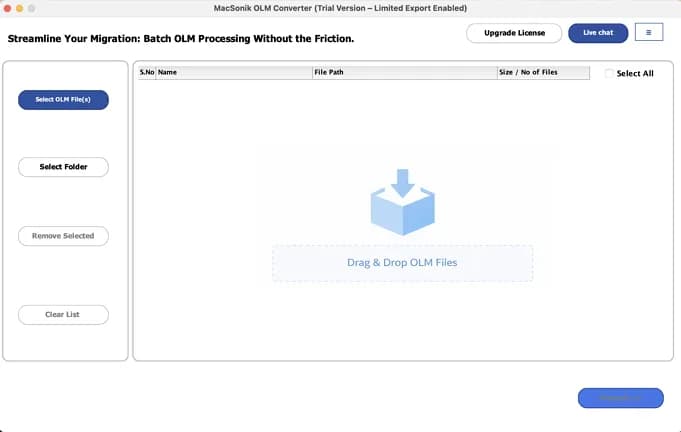
About this app
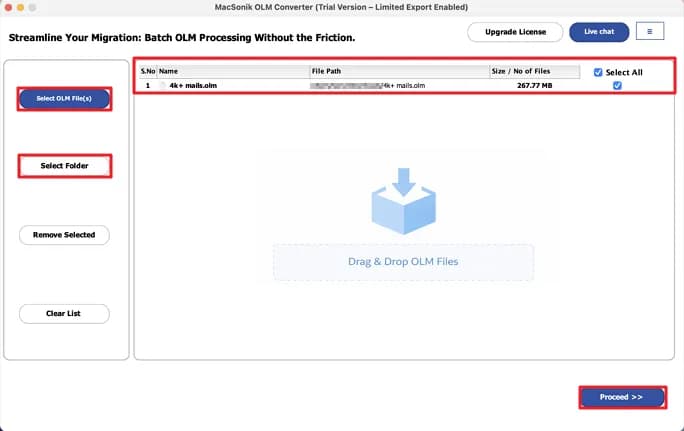
MacSonik OLM to PDF Converter is a specialized utility designed to export emails from Mac Outlook's OLM files into PDF format. It caters to both individual users and organizations needing to archive, share, or legally preserve email communications in a universally accessible format. The tool supports batch conversion, allowing multiple OLM files to be processed simultaneously, and includes advanced features like selective conversion via date filters, duplicate email removal, and optional attachment exclusion. Users can preview emails before conversion and retain the original folder hierarchy. The software also supports importing OLM files to various email clients and other formats like PST, EML, and MSG. With a free demo version and 24/7 support, it's a practical solution for data migration and backup.
Key features
- 1Batch OLM to PDF conversion with folder hierarchy retention and preview before conversion.
- 2Selective export via date-range filters, duplicate email removal, and optional attachment exclusion.
- 3Additional output formats (PST, EML, MSG, MBOX) and import to Office 365, Gmail, Yahoo Mail.
Target customer profile
Drawn from the product itself, not from a survey.
Demographic
IT administrators in small to mid-sized enterprises
Pain points
Need to migrate or archive large volumes of Mac Outlook emails efficiently
Primary needs
Batch conversion, centralized data management, and compliance with data retention policies
Demographic
Legal professionals (lawyers, paralegals)
Pain points
Require tamper-proof, easily shareable email records for litigation or client communication
Primary needs
Accurate conversion preserving metadata, selective export, and secure storage
Demographic
Freelancers and consultants using Mac Outlook
Pain points
Struggle to back up or share important client emails in a universal format
Primary needs
Simple interface, affordable pricing, and reliable conversion with attachments
Scout Review
Written by AI from measured evidence, scored out of 100.
MacSonik OLM to PDF Converter is a competent, narrowly-scoped utility with a fast site, a clean comparison table, and a documented workflow. The technical security headers are genuinely above average for a product this size. The weak spots are craft and differentiation: copy typos, a truncated review section, five accessibility failures, no published compliance certifications, and a feature set that mirrors both named competitors without a clear reason to choose it. It works; it just doesn't argue for itself.
Measure by measure
Usability
62Above-the-fold CTAs, accordion FAQs, and a guide page that walks through every button make the path to purchase clear. The 50-email demo cap and lack of a live web trial keep it from feeling frictionless.
Design
58Conventional but coherent landing page: clear two-column hero, trust badges, and a genuinely scannable Demo-vs-Full comparison table. Undone by copy typos ('License Tyes'), repetitive headings, and a truncated review card that looks unfinished.
Speed
88Lighthouse mobile 100/100 (LCP 1.0s, TBT 13ms, CLS 0.016) and desktop 95/100. Genuinely fast, lightweight pages with no observed lag complaints.
Security
76Full security header stack (HSTS, CSP, frame protection, Permissions-Policy) and 12/12 checklist points, plus SPF/DMARC. No SOC 2, ISO, or pen-test claims found, so it sits at the top of the typical band rather than above it.
Accessibility
58Lighthouse 85/100 with five failing audits: contrast, heading order, missing alt text, unnamed links, and no main landmark. No WCAG statement or multi-language support found. Solid base, real gaps.
Growth
54Real, specific niche (Mac Outlook OLM → PDF for legal/IT archiving) with named features, but no wedge beyond a checklist Aid4Mail and SysTools already match. Competent, not differentiated.
Improvement areas
- Copy quality: typos ('License Tyes'), repetitive headings, and a truncated review card.
- Accessibility: five failing Lighthouse audits and no WCAG statement.
- Compliance transparency: no SOC 2, ISO, or pen-test documentation for legal/IT buyers.
- Differentiation: feature set mirrors Aid4Mail and SysTools without a clear wedge.
Design & Usability
The landing page is conventional and mostly works: a two-column hero with a product card and trust badges, a clear Mac/Windows toggle, and a Demo-vs-Full comparison table that is genuinely the best-designed section on the page. The problems are craft-level — 'License Tyes' in the system requirements, repeated 'Best OLM to PDF Converter' headings, and a review card under 'Trusted by Customers Worldwide' that's truncated mid-content. Usability is stronger: CTAs sit above the fold, FAQs collapse cleanly, and the guide page documents the workflow button by button. The friction is the 50-email demo cap and the absence of a live web trial — you commit before you really know.
Speed & Security
Speed is the standout: Lighthouse mobile 100/100 with LCP 1.0s and TBT 13ms, desktop 95/100. The pages are lightweight and snappy, and no lag complaints surfaced in the collected evidence. Security is solid on the technical side — HTTPS enforced, HSTS, CSP, frame protection, Permissions-Policy, and 12/12 checklist points, plus SPF and DMARC. What's missing is the paperwork: no SOC 2, ISO 27001, pen-test summary, or bug bounty found. For a tool that handles legal and compliance email archives, that's a gap worth naming, even if the headers themselves are better than most peers.
Accessibility & Growth
Accessibility lands at 85/100 on Lighthouse with five failing audits — insufficient contrast, non-sequential headings, missing alt text, links without discernible names, and no main landmark. No WCAG statement or multi-language support was found. Growth is a judgment call: the niche is real and specific (Mac Outlook OLM → PDF for legal and IT archiving), and the feature set — batch conversion, date filters, duplicate removal, attachment exclusion, folder hierarchy retention — is concrete. But Aid4Mail and SysTools already offer the same checklist, and nothing on the site explains why a buyer picks MacSonik over either. The domain dates to 2020 and the only listed social channel is YouTube; the 4.5/5 from 2,113 ratings is a self-reported claim, not independently verified.
Conclusion
If you need OLM-to-PDF conversion on Mac and you value a fast, well-documented workflow, this is a reasonable pick — the demo lets you test 50 emails before committing. If you need compliance certifications or a clear reason to pick it over Aid4Mail or SysTools, the site doesn't give you one. Try the demo, compare against the alternatives, and decide on the workflow rather than the marketing.
Suggestions for improvement
- Fix the copy: 'License Tyes' → 'License Types', and cut the repeated 'Best OLM to PDF Converter' headings.
- Repair or remove the truncated review card under 'Trusted by Customers Worldwide' — it reads as broken.
- Add a WCAG accessibility statement and fix the five failing Lighthouse audits (contrast, alt text, landmarks, link names, heading order).
- Publish a security/compliance page (SOC 2 status, data handling, pen-test summary) — critical for legal and IT buyers.
Alternatives comparison
Named competitors, point by point. Nobody paid to appear here or to be left out.
 MacSonik OLM to PDF Converter |  Aid4Mail |  SysTools OLM to PDF Converter | |
|---|---|---|---|
| Batch OLM to PDF conversion | Yes — single and multiple OLM files | Yes — batch processing supported | Yes — batch conversion |
| Selective conversion (date filters) | Yes — mail filter with custom start/end dates | Yes — filtering supported | Yes — date range filters |
| Duplicate email removal | Yes — by To, From, Subject, Date | Not listed as a named feature | Not listed as a named feature |
| Attachment exclusion option | Yes — save without attachments | Yes — attachment handling options | Yes — attachment options |
| Free demo / trial | Free demo — 50 emails | Trial available | Demo version available |
Aid4Mail
Aid4Mail is a versatile email conversion tool that supports OLM to PDF, among many other formats. It offers batch processing, filtering, and a user-friendly interface.
SysTools OLM to PDF Converter
SysTools provides a dedicated OLM to PDF converter with features like batch conversion, preview, and attachment options. It's a known name in the email migration space.
Comparing options? See MacSonik OLM to PDF Converter alternatives, scored side by side
More Productivity apps
View all Productivity
Qamarero
92An all-in-one hospitality software for restaurants and ba...

Puzzly – B2B Lead Generation & Sales Intelligence Platform
92Puzzly is an all-in-one B2B lead generation platform that...

The Stack Newsletter
92A weekly newsletter delivering curated tech jobs, intervi...

StoryPad
92Privacy-first open source journal app with a continuous t...

Vibe Coding Agent Skills
92A free, open-source platform offering 110 AI agent skills...

Notion
92All-in-one AI workspace for docs, projects, and knowledge...

EmbedMyReviews
92White-label reputation management software for agencies s...

QRBliss
91Branded QR codes with AI Brand Sync, 15 free dynamic code...

Strukchad Property Management
91Property management for Kenyan letting agents: rent invoices raised every month, M-Pesa rent prompts to tenants, arrears tracking and landlord statements.

CC Switch
91Open-source desktop app for switching AI coding providers...

Gerty
91Private, local AI assistant for Mac that runs offline

BACKLNK
90Backlnk is a free SEO and AI visibility website: 15 website checks, a full audit as a PDF report, and guides to get found in search and AI answers.


A platform dedicated to providing unbiased reviews of newly launched applications, analyzing everything from their features to their full potential.
info@scoutforge.net© 2026 Scoutforge. All rights reserved.
