Cycling through all six. Tap any point to stop.
Measured on six things
Split oversized Outlook PST files on Mac safely and effic...
Design
44Dated 2010s template: clip-art hero, overlapping chat widget and pinned tabs, dense grey body copy, and a feature block that claims the tool 'downloads emails from Yandex Mail'. The four 'Need to Use' cards are the one tidy section.
Screenshots
1 / 3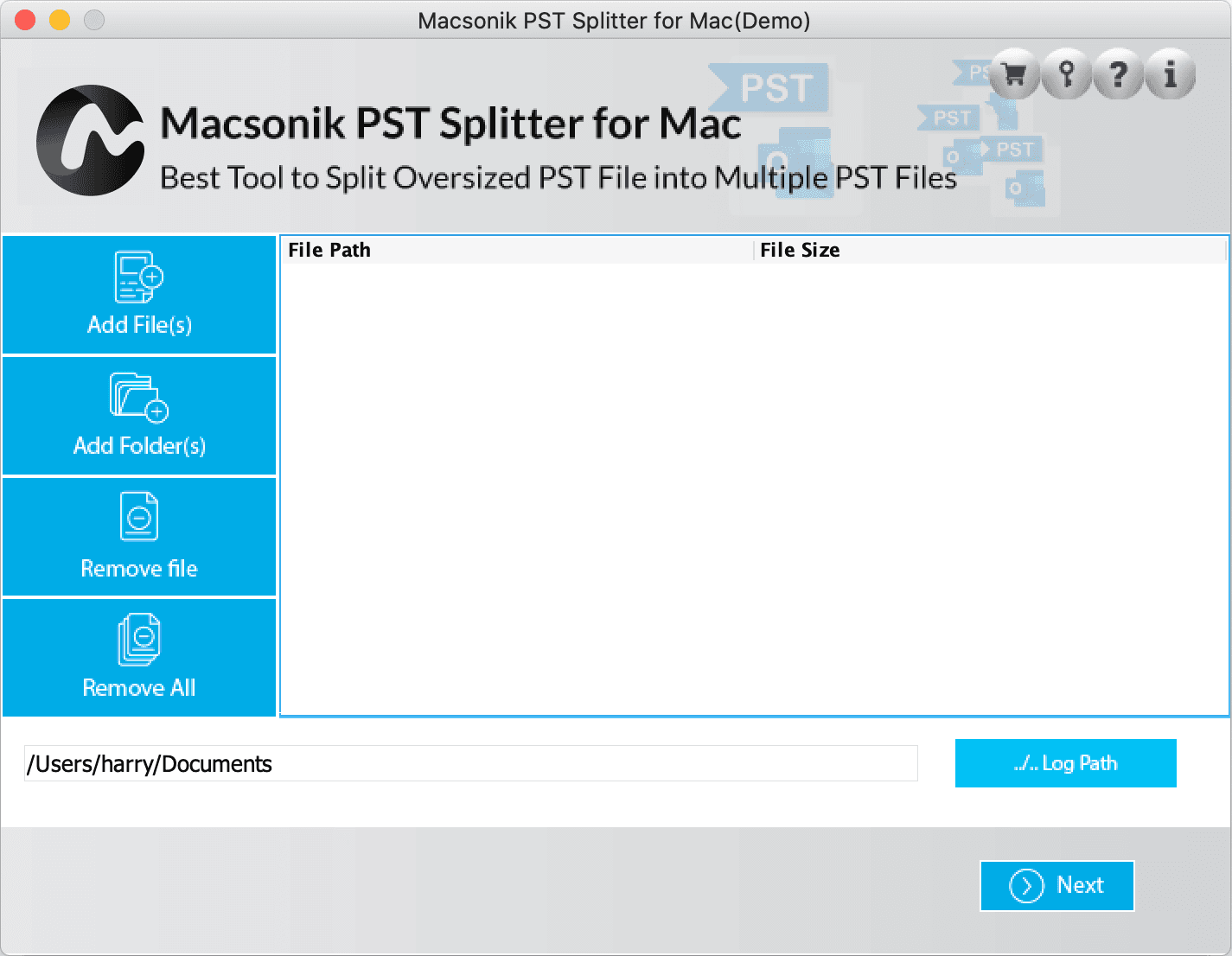
About this app
MacSonik PST Splitter is a dedicated macOS utility designed to tackle the common problem of oversized Outlook PST files that slow down email, cause send/receive failures, and increase the risk of data corruption. Unlike generic file splitters, this tool understands the PST format and lets you divide large files by size, date, sender email address, or folder — without losing email properties, attachments, or folder structure. It supports both Unicode and ANSI PST files, handles password-protected archives, and can process single or multiple files in batch. A tree-structure preview lets you select exactly which folders to split, and you can ignore duplicate emails, apply a password to the resulting files, and choose custom output locations. The free demo version lets you test the waters by splitting only 50 emails per folder, while the full version removes all limits and comes with a 30-day money-back guarantee. It runs natively on Apple Silicon (M1 through M5) and Intel Macs (no Rose...
Key features
- 1Split oversized PST files by size, date, sender email address, or folder on macOS.
- 2Tree-structure preview to select exactly which folders to split, with duplicate-email removal.
- 3Password-protect output PSTs, batch-process multiple files, and run natively on Apple Silicon and Intel Macs.
Target customer profile
Drawn from the product itself, not from a survey.
Demographic
IT administrators managing Outlook archives on Macs
Pain points
PST files exceed size limits, causing email failures and corruption risks
Primary needs
Batch split multiple PSTs by size/date while preserving folder structure
Demographic
Long-time Outlook users with decades of archived emails
Pain points
Outlook slows down or crashes when handling multi-GB PST files
Primary needs
Reliable splitting without data loss, plus duplicate removal
Demographic
Legal and compliance teams archiving email evidence
Pain points
Password-protected PSTs and strict chain-of-custody requirements
Primary needs
Split encrypted PSTs and apply passwords to output files
Scout Review
Written by AI from measured evidence, scored out of 100.
MacSonik PST Splitter is a macOS utility for breaking oversized Outlook PST files into smaller ones by size, date, sender, or folder — with duplicate removal, password protection on output, and batch processing. The marketing site is fast (Lighthouse 94 mobile) and well-secured at the header level (12/12 probe), but visually dated, riddled with copy errors (a feature block claiming it 'downloads emails from Yandex Mail'), and weak on accessibility (77/100, seven failing audits). The 50-email demo cap is buried in a comparison table. The underlying idea is the strongest part: every direct competitor in the alternatives list is Windows-only or a general converter, so a native Mac PST splitter is a real gap. Execution on the site doesn't match the quality of the wedge.
Measure by measure
Usability
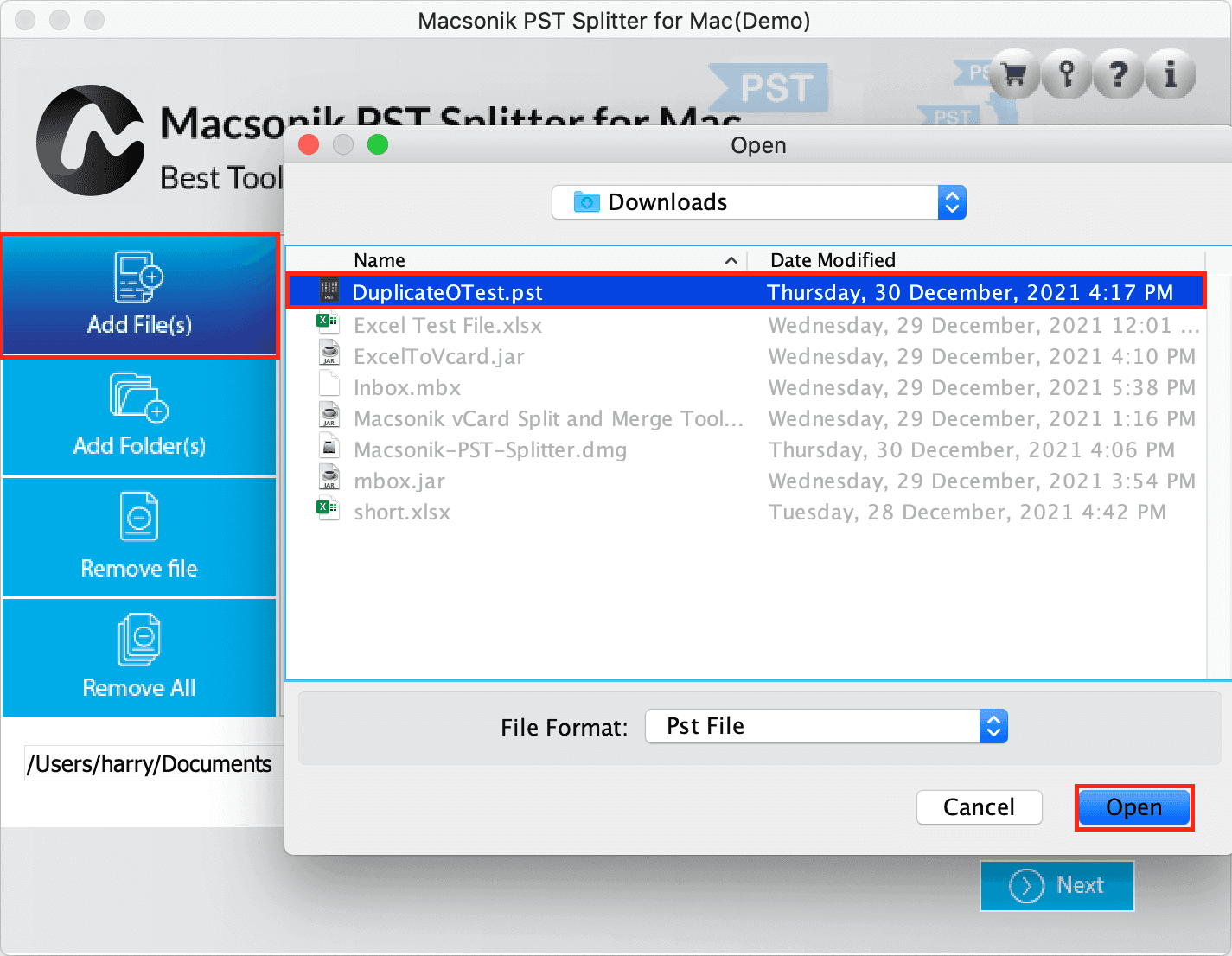
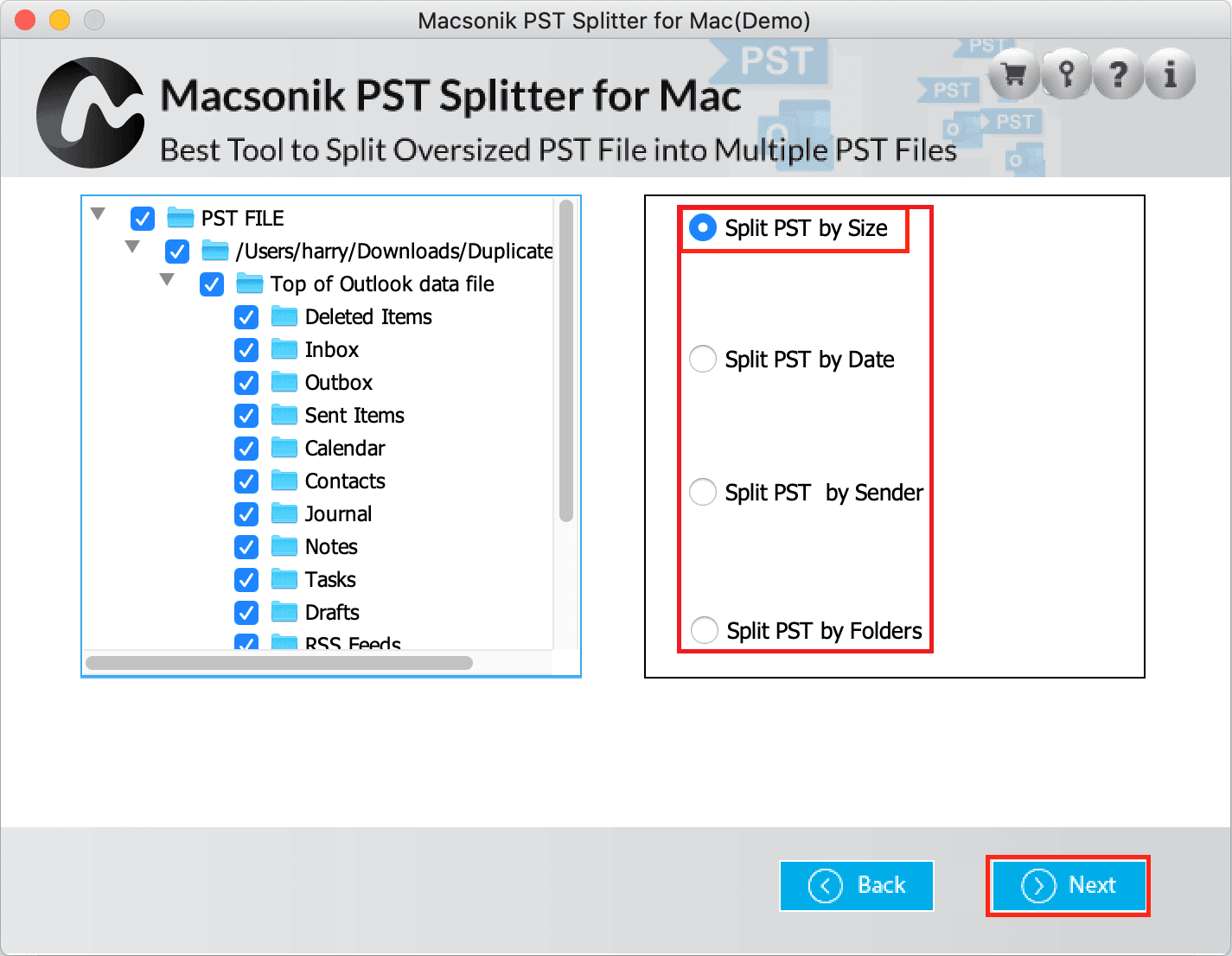
58Guide page walks through the split flow step by step and the app's three-step UI is legible in screenshots. But the 50-email demo cap is buried in a comparison table row, and the screenshots show a hardcoded /Users/harry path — a demo build shipped as marketing.
Design
44Dated 2010s template: clip-art hero, overlapping chat widget and pinned tabs, dense grey body copy, and a feature block that claims the tool 'downloads emails from Yandex Mail'. The four 'Need to Use' cards are the one tidy section.
Speed
78Lighthouse mobile 94/100 (LCP 2.7s, CLS 0, TBT 101ms) and desktop 92/100. The marketing site is genuinely fast — static-feeling pages, no layout shift, no lag complaints in the collected evidence.
Security
72Full header hygiene — HTTPS, HSTS, CSP, frame protection, Referrer-Policy, Permissions-Policy, SPF and DMARC all present (12/12 probe checklist). No published SOC 2, ISO, pen-test or bug bounty, which is typical for a small utility vendor.
Accessibility
57Lighthouse a11y 77/100 with seven failing audits: contrast, heading order, missing alt text, color-only links, unnamed links, small touch targets, no main landmark. No accessibility statement or WCAG claim anywhere on the site.
Growth
62Real, specific pain (oversized PSTs breaking Outlook on Mac) with a genuine wedge: SysTools and Stellar are Windows-only, Aid4Mail is a general converter. Native Mac PST splitting is underserved — the ceiling is a niche IT/compliance buyer, not a mass market.
Improvement areas
- Fix the 'downloads emails from Yandex Mail' copy error and clean up the crowded, dated hero layout.
- Surface the 50-emails-per-folder demo limit prominently instead of burying it in a comparison table.
- Address seven failing accessibility audits (alt text, heading order, contrast, link names, touch targets).
- Publish a trust artifact — pen-test summary, security page, or independent reviews — to back the safety claims.
Design & Usability
The homepage reads like a 2010s template that got a fresh coat of paint and no editor. A clip-art hero, a floating chat widget parked on the illustration, pinned Guide/FAQ tabs, and a feature block that claims the tool 'downloads emails from Yandex Mail' — on a desktop PST splitter. The four 'Need to Use' cards are the one section with real rhythm. Usability is better than design: the guide page walks through the split flow cleanly, the app's three-step UI is legible in screenshots, and the split-by-size/date/sender/folder options are clearly enumerated. The problems are disclosure and polish — the 50-email demo cap is buried in a comparison table row, and the screenshots still show a hardcoded /Users/harry path. Competent utility, careless marketing.
Speed & Security
Speed is the standout: Lighthouse mobile 94/100 with LCP 2.7s, CLS 0 and TBT 101ms; desktop 92/100. The marketing site loads like a static page and there are no lag complaints in the collected evidence. Security is solid on the plumbing — HTTPS enforced, HSTS, CSP, frame protection, Referrer-Policy, Permissions-Policy, SPF and DMARC all present, a clean 12/12 on the header probe. What's missing is the paperwork: no SOC 2, no ISO, no pen-test summary, no bug bounty. For a small utility vendor handling email archives that's not unusual, but it's also not a selling point. The site's own '100% Safe & Secure' badge is doing more work than any audit behind it.
Accessibility & Growth
Accessibility is the weakest measured dimension: Lighthouse 77/100 with seven failing audits — insufficient contrast, non-sequential headings, missing alt attributes, color-only links, unnamed links, small touch targets, and no main landmark. There's no accessibility statement or WCAG claim on the site, so this isn't a case of overpromising; it's a case of not trying. Growth is the more interesting question. The problem is real and specific — oversized PST files break Outlook on Mac, and the alternatives list confirms the wedge: SysTools and Stellar are Windows-only, Aid4Mail is a general conversion tool that happens to split. A native Mac PST splitter aimed at IT admins and legal/compliance teams is a genuinely underserved niche. The ceiling is that niche: this is a tool bought by a specific buyer with a specific problem, not a category that compounds. The idea earns a solid score; the site's copy errors and buried demo limits are what keep it from going higher.
Conclusion
If you're an IT admin or compliance lead stuck with multi-GB PST files on a Mac, this is one of the few tools aimed at exactly that problem — and the guide page shows the split flow is straightforward. Test the demo first (50 emails per folder is enough to confirm it reads your PST correctly), and treat the 4.8/2112 review count on the homepage as the vendor's own number until you find it independently. The site needs an editor and an accessibility pass, but the core utility is aimed at a real gap that the Windows-only competition leaves open.
Suggestions for improvement
- Fix the 'downloads emails from the Yandex Mail account' copy in the feature block — it contradicts the product's entire purpose.
- Surface the 50-emails-per-folder demo limit in the hero or a dedicated callout instead of burying it in a comparison table row.
- Run an accessibility pass: add alt text, fix heading order, raise contrast, and give links discernible names (Lighthouse is at 77/100).
- Publish at least one trust artifact — a pen-test summary, a security page, or an independent review source — to back the '100% Safe & Secure' badge.
Alternatives comparison
Named competitors, point by point. Nobody paid to appear here or to be left out.
 MacSonik PST Splitter |  SysTools PST Splitter |  Stellar Splitter for Outlook |  Aid4Mail PST Splitter | |
|---|---|---|---|---|
| Native macOS support | Yes — Apple Silicon (M1–M5) and Intel | No — Windows only | No — Windows only | Yes — Mac-compatible |
| Split criteria (size / date / sender / folder) | Size, date, sender email, folder | Size, date, year, folder | Size, date, year | Size-based splitting within broader conversion tool |
| Password-protected PST input / output | Yes — split encrypted PSTs, apply password to output | Yes — password-protected PST support | Yes — password-protected PST support | Limited — conversion tool, not a dedicated splitter |
| Free demo / trial | Free demo — 50 emails per folder | Free trial available | Free trial available | Free trial available |
SysTools PST Splitter
A Windows-only tool to split large PST files; lacks native Mac support.
Stellar Splitter for Outlook
Splits PST files by size, date, and year; available for Windows only.
Aid4Mail PST Splitter
A Mac-compatible email conversion tool that includes PST splitting features.
Comparing options? See MacSonik PST Splitter alternatives, scored side by side
More Productivity apps
View all Productivity
Qamarero
92An all-in-one hospitality software for restaurants and ba...

Puzzly – B2B Lead Generation & Sales Intelligence Platform
92Puzzly is an all-in-one B2B lead generation platform that...

The Stack Newsletter
92A weekly newsletter delivering curated tech jobs, intervi...

StoryPad
92Privacy-first open source journal app with a continuous t...

Vibe Coding Agent Skills
92A free, open-source platform offering 110 AI agent skills...

Notion
92All-in-one AI workspace for docs, projects, and knowledge...

EmbedMyReviews
92White-label reputation management software for agencies s...

QRBliss
91Branded QR codes with AI Brand Sync, 15 free dynamic code...

Strukchad Property Management
91Property management for Kenyan letting agents: rent invoices raised every month, M-Pesa rent prompts to tenants, arrears tracking and landlord statements.

CC Switch
91Open-source desktop app for switching AI coding providers...

Gerty
91Private, local AI assistant for Mac that runs offline

BACKLNK
90Backlnk is a free SEO and AI visibility website: 15 website checks, a full audit as a PDF report, and guides to get found in search and AI answers.


A platform dedicated to providing unbiased reviews of newly launched applications, analyzing everything from their features to their full potential.
info@scoutforge.net© 2026 Scoutforge. All rights reserved.
