Cycling through all six. Tap any point to stop.
Measured on six things
Clean duplicate VCF contacts on Mac with precision and ease.
Design
46Dated corporate template: top phone bar, two clashing blues, chat bubble overlapping the hero art, clipped Guide/FAQ tabs. The app's own three-step sidebar is the one genuinely clean piece.
Screenshots
1 / 2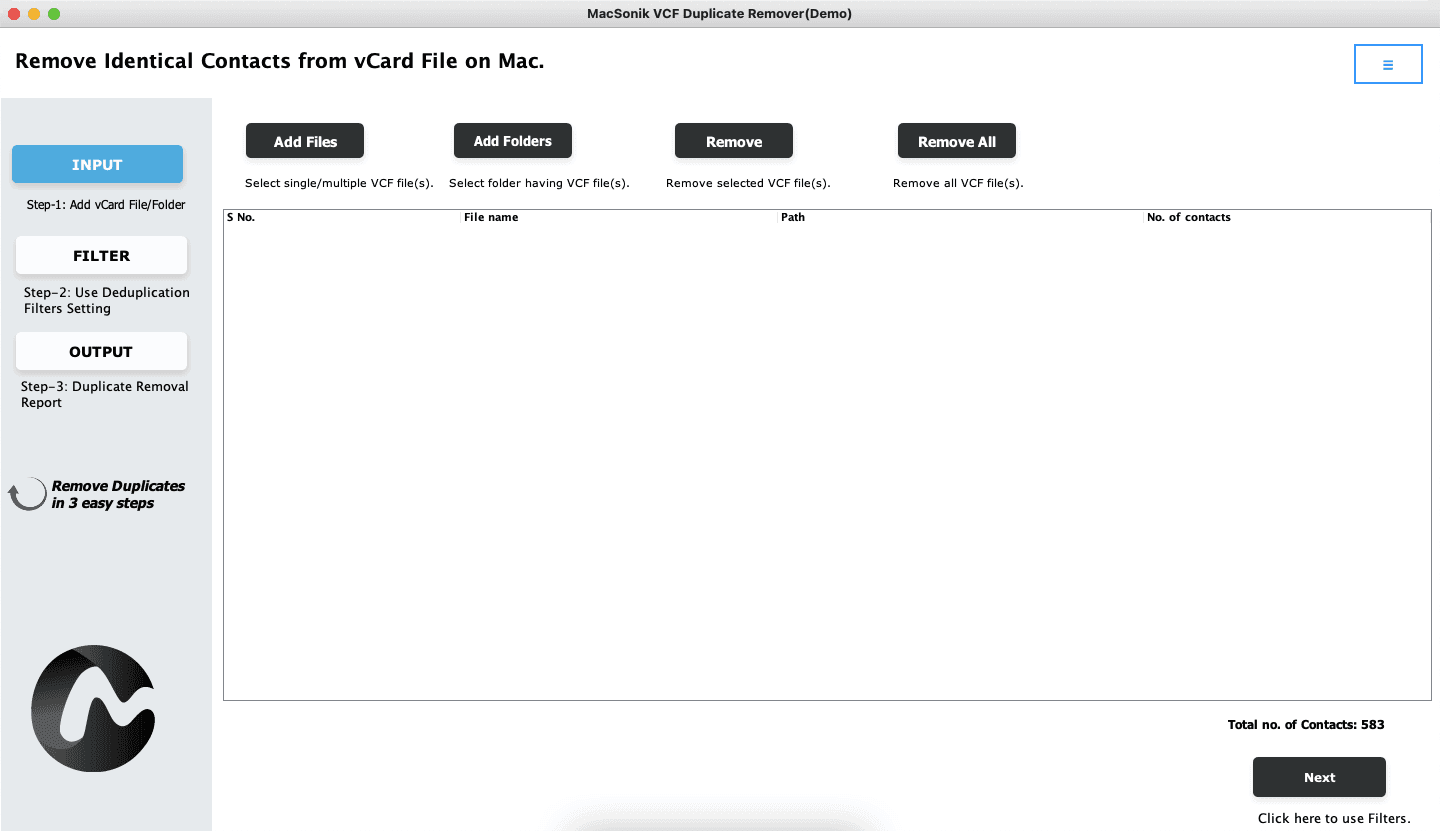
About this app
MacSonik vCard Duplicate Remover is a dedicated macOS utility designed to eliminate duplicate contacts from VCF (vCard) files. It caters to individuals and professionals who struggle with bloated, disorganized contact lists. The tool supports bulk processing, allowing you to add multiple VCF files or entire folders at once. You can define duplicate criteria based on First Name, Last Name, Mobile Number, or Email Address, and the software intelligently filters out identical entries. A standout feature is the flexibility in saving results: you can merge all contacts into a single VCF file or save each contact separately, with naming options based on contact details or the original file name. The interface is clean and intuitive, making it accessible even for non-technical users. A free trial version lets you test the waters by processing up to 10 VCF files and saving 25 unique contacts per file. With compatibility across all major macOS versions (including Ventura and Sonoma) and supp...
Key features
- 1Bulk deduplication of VCF files with criteria on First Name, Last Name, Mobile Number, or Email Address.
- 2Save output as a single merged VCF or as separate per-contact files, named by field or source file.
- 3Free trial processes 10 VCF files and saves 25 unique contacts per file; 30-day money-back guarantee.
Target customer profile
Drawn from the product itself, not from a survey.
Demographic
IT administrators and support teams in enterprises
Pain points
Managing thousands of duplicate contacts across employee exports; manual deduplication is error-prone and time-consuming.
Primary needs
Bulk removal of duplicates from multiple VCF files with customizable criteria and centralized output.
Demographic
Sales and marketing professionals
Pain points
Contact lists become bloated with duplicates from multiple sources, leading to inefficient outreach and wasted resources.
Primary needs
Quick, accurate deduplication based on email or phone to maintain a clean CRM and improve campaign effectiveness.
Demographic
Individual Mac users with multiple devices
Pain points
Contacts synced from iPhone, iPad, and Mac often contain duplicates, causing confusion and storage bloat.
Primary needs
Simple, one-click solution to merge and deduplicate VCF files without technical expertise.
Scout Review
Written by AI from measured evidence, scored out of 100.
MacSonik vCard Duplicate Remover is a functional macOS utility wrapped in a dated marketing site. The app's three-step workflow and 9-step guide are genuinely usable, and the security headers are better than most indie Mac tools bother with. But the design reads as a legacy template, accessibility fails eight Lighthouse audits, and the free trial's 25-contact cap is too tight to prove the tool on a real cleanup. Against DupContacts and Contacts Cleaner, it doesn't name a segment it serves better — it just does the same job with more chrome around it.
Measure by measure
Usability
58Clear three-step workflow and a real 9-step guide, but the free trial caps at 10 files / 25 contacts, and help is sprayed everywhere — top bar, chat, Guide, FAQ, manual — instead of one clear path.
Design
46Dated corporate template: top phone bar, two clashing blues, chat bubble overlapping the hero art, clipped Guide/FAQ tabs. The app's own three-step sidebar is the one genuinely clean piece.
Speed
71Lighthouse mobile 86/100 (LCP 3.8s, CLS 0, TBT 102ms) and desktop 93/100. Snappy enough for a marketing site; the 3.8s mobile LCP is the only real drag.
Security
76Full 12/12 header checklist: HSTS, CSP, frame protection, Referrer-Policy, Permissions-Policy, SPF and DMARC all set. No SOC 2, ISO or pen-test published — normal for this vendor size, but not a verified audit.
Accessibility
46Lighthouse 66/100 with 8 failing audits: low contrast, missing alt text, broken heading order, links with no discernible name, and ARIA role violations. No accessibility statement or WCAG claim anywhere.
Growth
52Real but narrow problem: duplicate VCF cleanup is a periodic chore, and DupContacts and Contacts Cleaner already cover it. No named segment this serves better — competent, not differentiated.
Improvement areas
- Trial cap of 25 contacts per file is too tight to evaluate the tool on a real cleanup.
- Eight failing Lighthouse accessibility audits: alt text, contrast, heading order, link names, ARIA roles.
- No published security documentation beyond headers — no SOC 2, ISO, pen-test, or data-handling page.
- Dated site design with clashing palette, overlapping chat bubble, and clipped navigation tabs.
Design & Usability
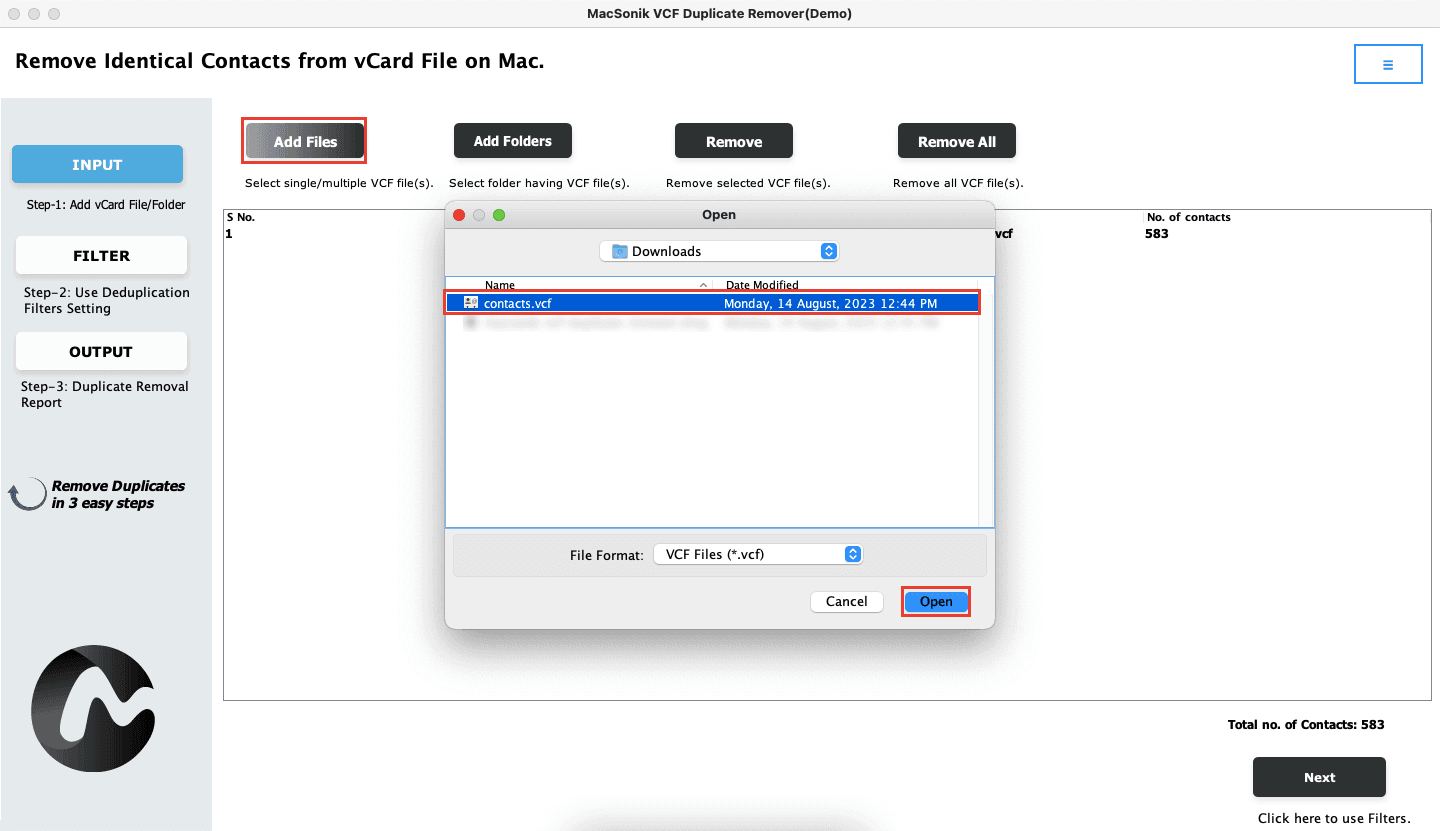
The site is a legacy corporate template wearing a 2023 badge: a phone-number utility bar, two competing blues, a chat bubble parked on the hero art, and Guide/FAQ tabs clipped at the edge. The app itself is better than its marketing — the three-step INPUT/FILTER/OUTPUT sidebar gives the workflow a clear spine, and the 9-step guide with screenshots is genuinely usable. The problem is the trial: 10 VCF files and 25 saved contacts per file is enough to confirm the tool runs, not enough to finish a real cleanup. Help is also sprayed across five entry points with no single clear path, which reads as clutter rather than support.
Speed & Security
Speed is the strongest measured dimension: Lighthouse mobile 86/100 with CLS 0 and TBT 102ms, desktop 93/100. The only drag is a 3.8s mobile LCP, which is a hero-image problem, not a stack problem. Security is solid on the transport layer — HTTPS enforced, HSTS, CSP, frame protection, Referrer-Policy, Permissions-Policy, SPF and DMARC all present, 12/12 on the header checklist. What's missing is anything beyond headers: no SOC 2, no ISO 27001, no pen-test report, no bug bounty. For a utility that touches contact data, that's a gap worth naming, though it's a normal one at this vendor size.
Accessibility & Growth
Accessibility is the weakest measured dimension: Lighthouse 66/100 with eight failing audits, including insufficient color contrast, missing image alt attributes, non-sequential heading order, links without discernible names, and ARIA role violations. There's no accessibility statement or WCAG claim on the site, so this isn't a case of a stated standard being missed — it's a case of no standard being set. Growth is a judgement call on the idea: duplicate VCF cleanup is a real but periodic chore, and the two listed alternatives (DupContacts, Contacts Cleaner) already cover the same job. Nothing in the product's own material names a segment it serves better than those peers, which caps the growth story at 'competent, not differentiated.'
Conclusion
If you have a one-off VCF mess and want a guided Mac app to walk you through it, this works and the money-back window is real. If you clean contacts regularly, or you care about accessibility and a modern UI, the alternatives are cheaper and cleaner. The tool is fine; the presentation is the problem.
Suggestions for improvement
- Raise the trial cap to something that lets a user finish one real cleanup — 25 contacts per file proves nothing.
- Consolidate help into one searchable knowledge base instead of five redundant entry points.
- Fix the eight failing Lighthouse a11y audits: alt text, contrast, heading order, link names, ARIA roles.
- Publish a short security page stating data handling and whether contact data ever leaves the machine.
Alternatives comparison
Named competitors, point by point. Nobody paid to appear here or to be left out.
 MacSonik vCard Duplicate Remover | DupContacts | Contacts Cleaner | |
|---|---|---|---|
| Platform | macOS desktop app (also offers Windows build) | Native Mac app | Web-based online tool |
| Bulk VCF processing | Yes — multiple files or entire folders | Yes — multiple sources | Limited batch processing |
| Custom duplicate criteria | First Name, Last Name, Mobile, Email | Finds and merges duplicates in address book | Basic deduplication |
| Output options | Single merged VCF or separate files, named by field or source | Merges into address book | Exports cleaned vCard |
| Free trial | 10 VCF files, 25 contacts saved per file | Not specified in collected evidence | Online tool, free to use |
DupContacts
A Mac app that finds and merges duplicate contacts in your address book, with support for multiple sources.
Contacts Cleaner
An online tool to deduplicate vCard files, but with limited batch processing and no Mac-specific features.
Comparing options? See MacSonik vCard Duplicate Remover alternatives, scored side by side
More Productivity apps
View all Productivity
Qamarero
92An all-in-one hospitality software for restaurants and ba...

Puzzly – B2B Lead Generation & Sales Intelligence Platform
92Puzzly is an all-in-one B2B lead generation platform that...

The Stack Newsletter
92A weekly newsletter delivering curated tech jobs, intervi...

StoryPad
92Privacy-first open source journal app with a continuous t...

Vibe Coding Agent Skills
92A free, open-source platform offering 110 AI agent skills...

Notion
92All-in-one AI workspace for docs, projects, and knowledge...

EmbedMyReviews
92White-label reputation management software for agencies s...

QRBliss
91Branded QR codes with AI Brand Sync, 15 free dynamic code...

Strukchad Property Management
91Property management for Kenyan letting agents: rent invoices raised every month, M-Pesa rent prompts to tenants, arrears tracking and landlord statements.

CC Switch
91Open-source desktop app for switching AI coding providers...

Gerty
91Private, local AI assistant for Mac that runs offline

BACKLNK
90Backlnk is a free SEO and AI visibility website: 15 website checks, a full audit as a PDF report, and guides to get found in search and AI answers.


A platform dedicated to providing unbiased reviews of newly launched applications, analyzing everything from their features to their full potential.
info@scoutforge.net© 2026 Scoutforge. All rights reserved.
