Cycling through all six. Tap any point to stop.
Measured on six things
AI interview prep and mock interviews tailored to your re...
Design
57Clean dark hero with a clear single CTA and trust checkmarks, but a broken demo embed and blank video placeholder undercut the product showcase. Dense app screenshots render too small to read.
Screenshots
1 / 1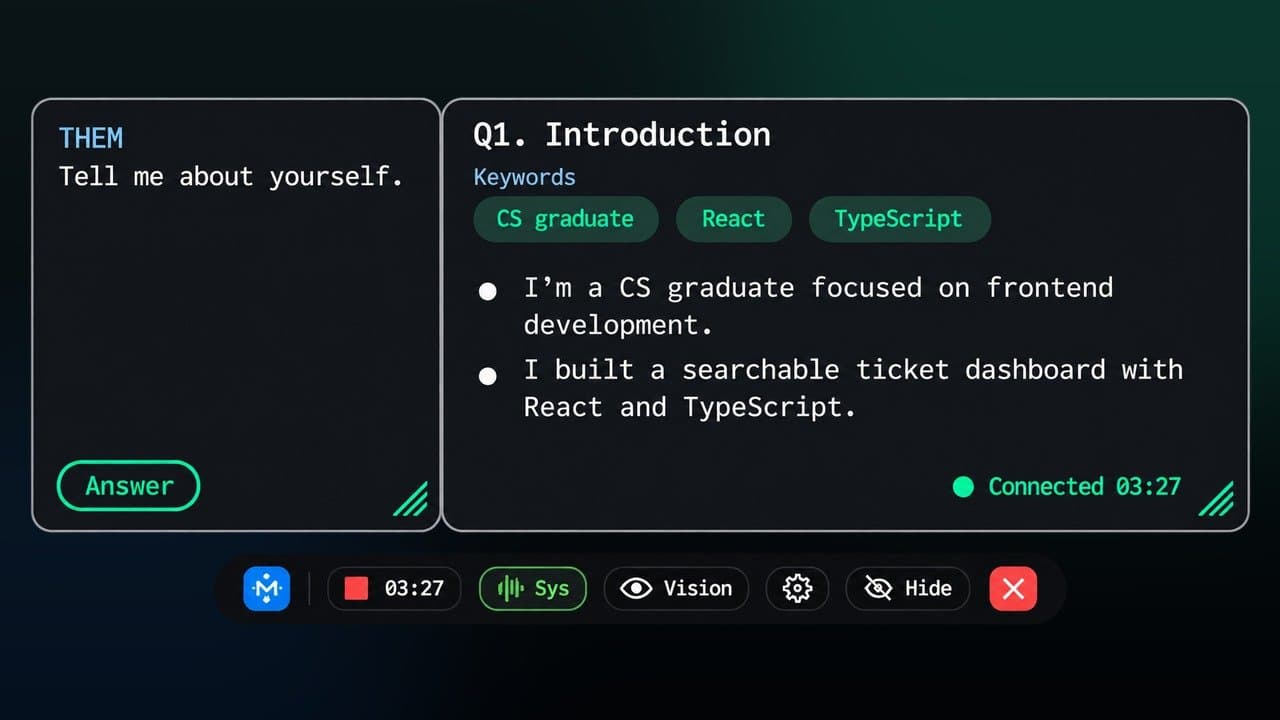
About this app
MiPrep AI is a job-interview preparation platform built for software and technical roles, engineered by people with 20+ years of U.S. industry experience. It turns your resume and a job description into relevant talking points, then lets you rehearse answers out loud in mock interviews on desktop or phone. The desktop app runs alongside Zoom, Meet, or Teams, and a Glance Reader feature helps you read prepared answers while keeping your eyes on camera. Vision lets MiPrep read a coding or system-design question from a window you select and surface an approach with the reasoning behind it, while follow-up answers carry conversation context forward so your next point connects to the last. Preparation is free; only live interview time draws from your plan balance, and a one-hour free allowance is available for new accounts with no credit card. Plans range from Basic ($19.99/mo, 1 hour) to Unlimited ($149.99/mo, 100-hour fair use), with a MiPrep number add-on at $29.99/mo for Call Mode. E...
Key features
- 1Resume + job-description grounded talking points, rehearsed out loud in mock interviews on desktop or phone.
- 2Glance Reader lets you read prepared answers while keeping your eyes on camera during live calls.
- 3Vision reads a coding or system-design question from a window you select and surfaces an approach with reasoning.
- 4Follow-up answers carry conversation context forward so each point connects to the last.
- 5Desktop app runs alongside Zoom, Meet, or Teams; one balance shared across desktop and phone.
Target customer profile
Drawn from the product itself, not from a survey.
Demographic
Software engineers and developers prepping for technical rounds
Pain points
Struggling to articulate coding and system-design reasoning under pressure
Primary needs
Realistic mock interviews with follow-up questions and structured talking points
Demographic
Career switchers and bootcamp grads entering tech roles
Pain points
Limited interview experience and unclear how to frame existing background
Primary needs
Resume-grounded answers they can rehearse out loud until confident
Demographic
Experienced professionals in active interview cycles
Pain points
Juggling multiple rounds across companies with little prep time
Primary needs
Fast, organized prep that shares hours across desktop and phone
Demographic
Remote candidates interviewing over Zoom, Meet, or Teams
Pain points
Nervous delivery and losing train of thought on camera
Primary needs
On-screen talking points and glance-friendly reading during calls
Scout Review
Written by AI from measured evidence, scored out of 100.
MiPrep AI is a technical-interview prep platform with a genuinely differentiated feature set — resume-grounded talking points, Glance Reader, Vision window-reading, and follow-up context — wrapped in a homepage that undercuts itself with a broken demo and a blank hero video. Speed and accessibility are strong (91 mobile performance, 100 a11y), security is solid-but-unremarkable (10/13 headers, Stripe checkout, no published audits), and usability is good where it counts but cluttered by four-tier pricing. The idea is real and the wedges are clever; execution on the marketing surface is what's holding the score back.
Measure by measure
Usability
63Obvious path to value: free session buttons everywhere, 'No credit card' repeated at decision points, real troubleshooting docs. The broken demo and four-tier pricing with per-card add-ons add friction.
Design
57Clean dark hero with a clear single CTA and trust checkmarks, but a broken demo embed and blank video placeholder undercut the product showcase. Dense app screenshots render too small to read.
Speed
78Lighthouse mobile 91/100 and desktop 99/100, with CLS 0 and TBT 6ms. LCP 3.2s on mobile is the one soft spot, just over the 'good' line, but the site is otherwise snappy.
Security
74HTTPS+HSTS, frame protection, Referrer and Permissions policies, SPF and DMARC all set, and Stripe handles checkout. Missing CSP and secure-cookie flag; no SOC 2/ISO/pen-test claims published.
Accessibility
80Lighthouse accessibility 100/100 with only one flagged audit (visible text labels lacking matching accessible names). No WCAG statement or multi-language support found, but the automated baseline is strong.
Growth
60Real, paying problem (technical interview prep) with concrete wedges — Glance Reader, Vision, follow-up context, shared desktop/phone balance. Differentiated, but the live-assist category is crowded and trust-sensitive.
Improvement areas
- Broken demo embed and blank hero video undermine trust at the exact moment visitors evaluate the product.
- No Content-Security-Policy header and no secure-cookie flag; no published SOC 2, ISO, or pen-test signals.
- Four-tier pricing with per-card add-on checkboxes makes plan comparison unnecessarily effortful.
- No accessibility statement or WCAG conformance level published despite a 100/100 automated score.
Design & Usability
The homepage is competently built: a tight dark hero, one obvious blue CTA, and 'No credit card / Cancel anytime' checkmarks right where hesitation lives. The problem is the showcase. The hero video is an empty navy block, and the core feature demo literally reads 'This demo could not load' in the middle of the page — the exact spot where a skeptical visitor decides whether to trust you. App screenshots are dense and rendered small, so the real interface is hard to read. Usability is better than design: free-session buttons appear in the header, hero, and pricing, and there are real troubleshooting docs. But four pricing tiers with a per-card '+$29.99 number' checkbox make comparison a chore.
Speed & Security
Speed is a genuine strength. Lighthouse gives 91/100 on mobile and 99/100 on desktop, with CLS 0 and TBT 6ms — the page is stable and responsive. The one blemish is a 3.2s mobile LCP, just past the 'good' threshold, likely the heavy hero media. Security is solid-but-unremarkable: HTTPS with HSTS, frame protection, Referrer and Permissions policies, SPF and DMARC all present, and Stripe handles payments. Missing a Content-Security-Policy and a secure-cookie flag, and there are no published SOC 2, ISO, pen-test, or bug-bounty signals — normal for an early product, but it caps the score.
Accessibility & Growth
Accessibility scores a clean 100/100 on the Lighthouse audit, with only one flagged item — visible text labels without matching accessible names. No WCAG statement or multi-language support is published, so the automated baseline is strong but the documented commitment is thin. Growth is the interesting question: MiPrep names a real, paying problem (technical interview prep) and has concrete differentiators — Glance Reader for eye-contact reading, Vision reading a question from a selected window, follow-up context carried forward, and one balance across desktop and phone. That's more than a wrapper. The limit is the category: live-assist interview copilots are crowded and trust-sensitive, and the domain is only months old, so the wedge has to prove itself fast.
Conclusion
If you're prepping for technical rounds and want on-screen support that reads your resume and follows the conversation, MiPrep's feature set is worth a free hour. But fix the demo first — a 'could not load' panel in the middle of your core pitch is the single cheapest, highest-impact thing you can do this week. Add a CSP, publish an a11y statement, and simplify the pricing grid, and this jumps a tier.
Suggestions for improvement
- Fix the broken demo embed and replace the blank hero video with real product footage — it's the highest-leverage fix on the site.
- Add a Content-Security-Policy header and set the secure-cookie flag to close the two remaining security gaps.
- Publish an accessibility statement and WCAG conformance level to back up the 100/100 automated score.
- Simplify the four-tier pricing grid — move the MiPrep number add-on out of each card into a single toggle.
Alternatives comparison
Named competitors, point by point. Nobody paid to appear here or to be left out.
 MiPrep AI |  Interview Warmup by Google |  Final Round AI |  Interviewer.AI | |
|---|---|---|---|---|
| Resume and job-description grounded answers | Yes — talking points built from resume, JD, and notes | No — generic practice questions, not resume-tailored | Yes — resume-aware real-time assistance | Partial — video mock sessions with analytics, less JD-specific |
| Live in-interview on-screen assistance | Yes — Glance Reader, Vision, follow-up context | No — practice only | Yes — real-time interview copilot | No — practice/assessment platform |
| Free tier / trial | Free prep + one-hour free live allowance, no card | Fully free | Limited free trial | Free trial available |
| Pricing model | $19.99–$149.99/mo by interview hours; +$29.99 number add-on | Free | Subscription tiers for copilot access | Subscription / per-interview pricing |
| Desktop + phone coverage | Mac/Windows desktop app + phone, shared balance | Browser-based only | Desktop-focused | Browser-based video platform |
Interview Warmup by Google
Free tool that generates practice questions and gives feedback on your spoken answers, though it's less tailored to specific resumes and job descriptions.
Final Round AI
AI interview copilot offering real-time assistance and mock interviews, similar in spirit to MiPrep's live-support approach.
Interviewer.AI
Video-based AI interview platform that scores candidates and provides practice mock sessions with analytics.
Comparing options? See MiPrep AI alternatives, scored side by side
More Productivity apps
View all Productivity
Qamarero
92An all-in-one hospitality software for restaurants and ba...

Puzzly – B2B Lead Generation & Sales Intelligence Platform
92Puzzly is an all-in-one B2B lead generation platform that...

The Stack Newsletter
92A weekly newsletter delivering curated tech jobs, intervi...

StoryPad
92Privacy-first open source journal app with a continuous t...

Vibe Coding Agent Skills
92A free, open-source platform offering 110 AI agent skills...

Notion
92All-in-one AI workspace for docs, projects, and knowledge...

EmbedMyReviews
92White-label reputation management software for agencies s...

QRBliss
91Branded QR codes with AI Brand Sync, 15 free dynamic code...

Strukchad Property Management
91Property management for Kenyan letting agents: rent invoices raised every month, M-Pesa rent prompts to tenants, arrears tracking and landlord statements.

CC Switch
91Open-source desktop app for switching AI coding providers...

Gerty
91Private, local AI assistant for Mac that runs offline

BACKLNK
90Backlnk is a free SEO and AI visibility website: 15 website checks, a full audit as a PDF report, and guides to get found in search and AI answers.


A platform dedicated to providing unbiased reviews of newly launched applications, analyzing everything from their features to their full potential.
info@scoutforge.net© 2026 Scoutforge. All rights reserved.
