Cycling through all six. Tap any point to stop.
Measured on six things
Free Online Tools — No Sign-up Needed
Growth
54Real problem, broad 13-tool surface, but no clear wedge against TinyPNG or SmallPDF beyond 'also free.' The InPage Urdu converter is the one genuinely underserved niche.
Screenshots
1 / 1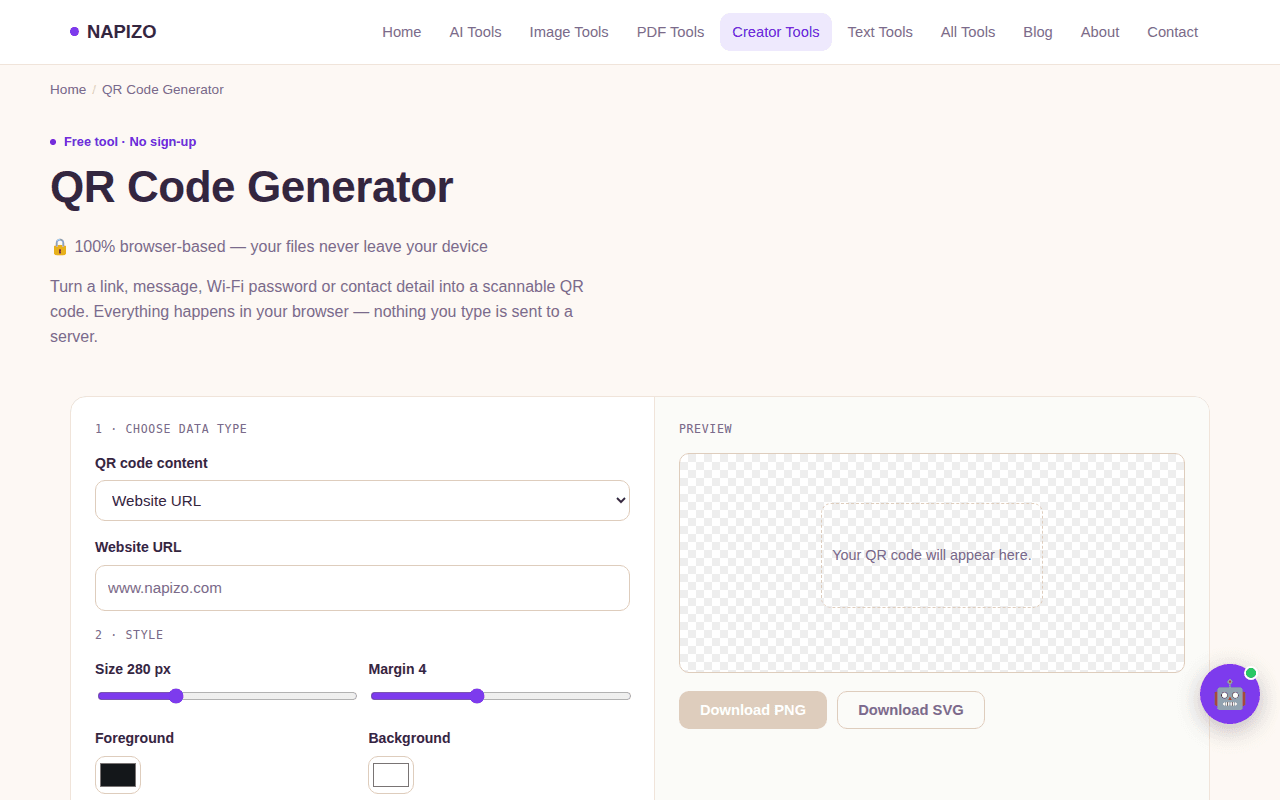
About this app
Napizo is a free suite of 13 online tools that run entirely in your browser: PDF to JPG, JPG to PDF, PDF merger, PDF splitter, PDF compressor, image compressor, image resizer, QR code generator, AI caption generator, InPage Urdu to Unicode converter, EPUB splitter, typing speed test and more. There is no sign-up, no install and no upload — your files never leave your device, so your documents and photos stay private. Every tool is free to use as often as you like, works on phone and desktop, and needs nothing more than a browser. Napizo is built for everyday jobs: shrinking a PDF before emailing it, turning phone photos into one PDF, splitting a big PDF into single pages, making a QR code for a Wi-Fi password, or writing Instagram captions with AI in seconds.
Key features
- 113 free browser-based tools: PDF to JPG, JPG to PDF, PDF merge/split/compress, image compress/resize, QR generator, AI captions, EPUB splitter, InPage Urdu converter, typing test.
- 2Local-only processing via Canvas API — files never uploaded to a server, no sign-up, no watermark.
- 3Works on mobile and desktop with no install; dark mode toggle and hero search for tool discovery.
Target customer profile
Drawn from the product itself, not from a survey.
Demographic
Freelance designers and content creators
Pain points
Slow desktop software and paid tools for basic image and PDF edits
Primary needs
Quick, free compression, resizing, and format conversion
Demographic
Students and office workers
Pain points
Large PDF/image files can't be emailed or uploaded to portals
Primary needs
Simple PDF merging, splitting, and compression without software
Demographic
Social media managers and small business owners
Pain points
Time-consuming caption writing and thumbnail hunting
Primary needs
Fast AI captions, QR codes, and YouTube thumbnail downloads
Scout Review
Written by AI from measured evidence, scored out of 100.
Napizo is a free, no-sign-up suite of 13 browser-based tools for PDFs, images, QR codes, AI captions and text conversion, with a genuine privacy angle: files are processed locally via the Canvas API and never uploaded. The pitch is honest and the execution is competent. Design is templated and repetitive, mobile speed is sluggish at 5.4s LCP, and security headers are mostly there but missing CSP and email authentication. Accessibility is strong at 96/100. The core problem is differentiation: against TinyPNG and SmallPDF, 'also free, also no sign-up' isn't a reason to switch. The InPage Urdu converter is the one tool here the big players won't build.
Measure by measure
Usability
68No sign-up, tools open instantly, search and CTAs are obvious, QR form is well-labelled. Cookie banner and chatbot collide with the footer.
Design
57Coherent palette and legible type, but the gradient is sprayed on every element, cards repeat, and the grid ends on an orphaned card. Template-built feel.
Speed
58Desktop Lighthouse 96 but mobile 72 with a 5.4s LCP — the hero gradient and card grid are heavy on phones. Local processing keeps file ops fast once loaded.
Security
63HTTPS + HSTS + frame protection + several headers in place; no CSP, no SPF/DMARC. Local-only processing is a real privacy win. No audits published.
Accessibility
80Lighthouse 96/100 with one failing audit (color-only links). Dark mode toggle and mobile-first layout help. No WCAG statement published.
Growth
54Real problem, broad 13-tool surface, but no clear wedge against TinyPNG or SmallPDF beyond 'also free.' The InPage Urdu converter is the one genuinely underserved niche.
Improvement areas
- Mobile performance: 5.4s LCP and 72/100 Lighthouse — the gradient hero and card grid are too heavy on phones.
- Security gaps: no Content-Security-Policy header and no SPF/DMARC DNS records.
- Design repetition: gradient applied everywhere, duplicate cards between Popular Tools and the grid, orphaned final card.
- No clear differentiation from TinyPNG/SmallPDF beyond 'also free' — the InPage Urdu niche is under-leveraged.
Design & Usability
Napizo's homepage is competent but templated: a saturated purple-magenta gradient is applied to the hero, every card stripe, every button and the footer, which flattens the visual hierarchy instead of emphasizing anything. The 13-tool grid is a wall of near-identical white cards, Image Compressor and Image Resizer repeat between Popular Tools and the grid below, and the list ends on a single orphaned Typing Speed Test card with an empty column beside it. Usability is the stronger half: no sign-up, tools open instantly, the hero search and two CTAs make entry obvious, and the QR tool's labelled form with live slider values is genuinely well-built. The cookie banner and chatbot bubble overlap the footer and clip a link — a small but visible sloppiness.
Speed & Security
Speed is split down the middle: desktop Lighthouse hits 96/100, but mobile lands at 72 with a 5.4s LCP and 2.6s FCP — the gradient hero and card grid are heavy on phones, exactly where the 'works on any device' pitch matters most. Once a tool is open, client-side Canvas processing means file operations are fast because nothing round-trips to a server. Security is a solid B: HTTPS enforced with HSTS, frame protection, X-Content-Type-Options, Referrer-Policy and Permissions-Policy all present, but no CSP and no SPF/DMARC records. The local-only processing claim is the real security story and it's a good one — no upload means no server-side breach surface for user files. No SOC 2, ISO or pen-test claims are published, which is normal for a tool at this stage.
Accessibility & Growth
Accessibility is Napizo's quiet strength: Lighthouse scores 96/100 with a single failing audit — links that rely on color alone to be distinguishable. A dark mode toggle and a mobile-first layout round it out, though there's no published WCAG conformance statement. Growth is where the picture gets murky. The problem is real — people do need to shrink a PDF before emailing it — but the 13-tool surface is broad and shallow, and nothing in the positioning explains why anyone picks Napizo over TinyPNG or SmallPDF, both of which have years of brand recognition. The InPage Urdu to Unicode converter is the one genuinely underserved niche here, aimed at Urdu publishing and office users the incumbents ignore. That's a wedge, but a narrow one. The domain is 0.1 years old, so traction is context only, not a verdict.
Conclusion
If you need a quick PDF merge or image compress and don't want to hand your files to a server, Napizo does the job cleanly and for free. The local-processing promise is the real product here, and it's worth taking seriously. But the site needs to pick a lane: either lean hard into the privacy-first angle as the differentiator, or double down on the underserved niches like InPage Urdu conversion where the incumbents structurally won't follow. Right now it's trying to be a smaller SmallPDF with a nicer privacy story, and that's a hard place to win from.
Suggestions for improvement
- Fix the mobile LCP (5.4s) — compress the hero gradient and lazy-load the card grid images.
- Add a Content-Security-Policy header and SPF/DMARC DNS records to close the security gaps.
- Fix the color-only link contrast issue flagged by Lighthouse to push accessibility past 96.
- Pick a wedge: either lead with privacy-first positioning or build out the InPage Urdu niche as the flagship.
Alternatives comparison
Named competitors, point by point. Nobody paid to appear here or to be left out.
 Napizo |  TinyPNG |  SmallPDF | |
|---|---|---|---|
| Price | Free, all 13 tools, no sign-up | Free tier with limits; paid Pro plan | Free tier with daily limits; paid Pro plan |
| File privacy (local processing) | Yes — Canvas API, files never uploaded | No — files uploaded to server | No — files uploaded to server |
| Sign-up required | No | No for basic use; account for Pro | No for basic use; account for Pro |
| Tool breadth | 13 tools: PDF, image, QR, AI captions, EPUB, InPage Urdu, typing test | Image compression only (JPG, PNG, WebP) | Broad PDF suite plus some image/convert tools |
| Brand recognition / maturity | New (domain 0.1 years old), no established brand | Established, widely known image compression brand | Established, widely known PDF suite brand |
TinyPNG
Popular online image compression tool for JPG, PNG, and WebP files.
SmallPDF
Suite of online PDF tools including compression, merging, and conversion.
Comparing options? See Napizo alternatives, scored side by side
More Productivity apps
View all Productivity
Qamarero
92An all-in-one hospitality software for restaurants and ba...

Puzzly – B2B Lead Generation & Sales Intelligence Platform
92Puzzly is an all-in-one B2B lead generation platform that...

The Stack Newsletter
92A weekly newsletter delivering curated tech jobs, intervi...

StoryPad
92Privacy-first open source journal app with a continuous t...

Vibe Coding Agent Skills
92A free, open-source platform offering 110 AI agent skills...

Notion
92All-in-one AI workspace for docs, projects, and knowledge...

EmbedMyReviews
92White-label reputation management software for agencies s...

QRBliss
91Branded QR codes with AI Brand Sync, 15 free dynamic code...

Strukchad Property Management
91Property management for Kenyan letting agents: rent invoices raised every month, M-Pesa rent prompts to tenants, arrears tracking and landlord statements.

CC Switch
91Open-source desktop app for switching AI coding providers...

Gerty
91Private, local AI assistant for Mac that runs offline

BACKLNK
90Backlnk is a free SEO and AI visibility website: 15 website checks, a full audit as a PDF report, and guides to get found in search and AI answers.


A platform dedicated to providing unbiased reviews of newly launched applications, analyzing everything from their features to their full potential.
info@scoutforge.net© 2026 Scoutforge. All rights reserved.
