Cycling through all six. Tap any point to stop.
Measured on six things
OpenCapture is a free, open-source browser extension for Chrome, Edge and Firefox that captures an entire web page as one image. Crop it, draw, add text, blur anything private, then export to PNG or PDF. Everything runs locally in your browser: nothing is uploaded and no account is needed.
Security
52HTTPS enforced with SPF and DMARC, and the local-only, no-upload, minimal-permission design is a real privacy strength. But the probe found no HSTS, CSP, frame protection, or Referrer-Policy — 4/12 checklist points, thin for a tool handling page content.
Screenshots
1 / 1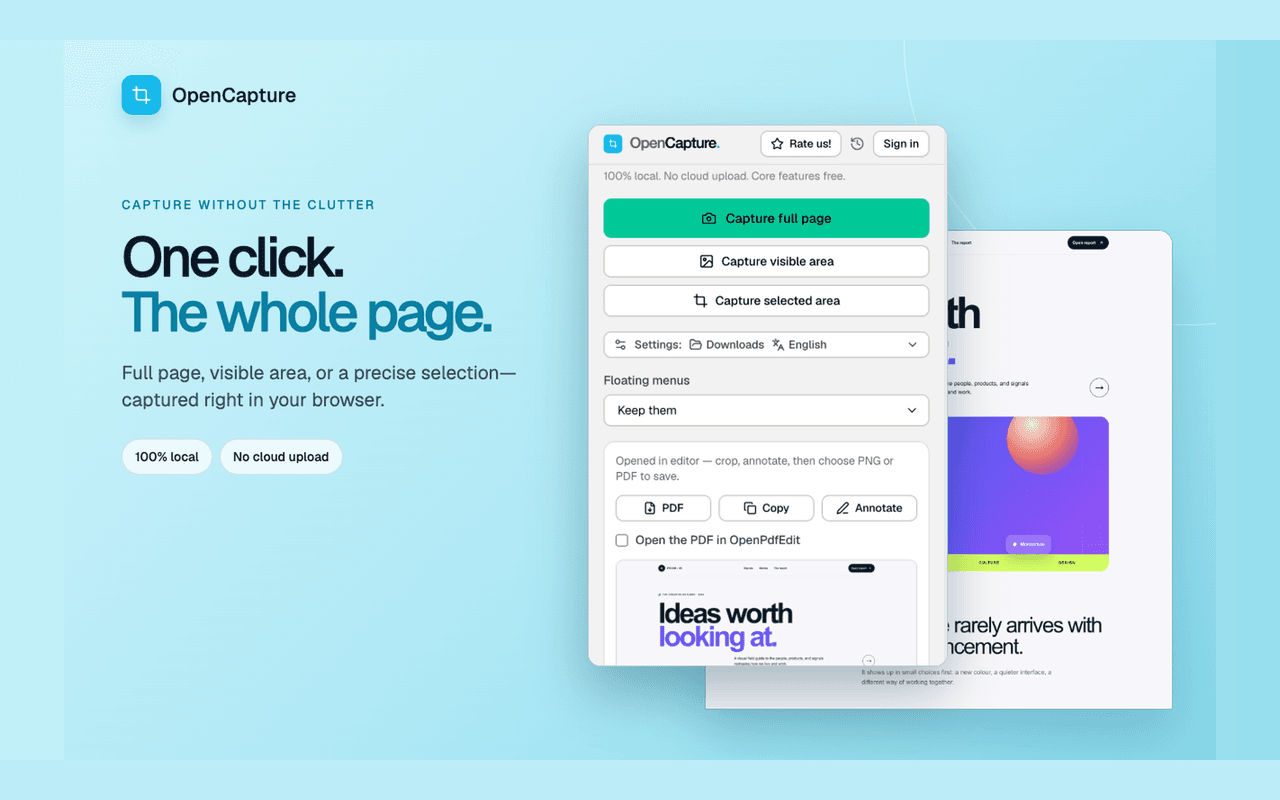
About this app
OpenCapture captures a whole web page, however long, and stitches it into a single PNG or PDF with no visible seams between the captured bands. You can also capture just the visible area or a region you drag. The built-in editor lets you crop to what matters, draw, add text and shapes, and blur or redact private details, with undo at every step before you export. Every capture and edit happens on your own device. Nothing is uploaded, and there is no account, cloud library or sync. The stitching engine is written in Rust and compiled to WebAssembly, and the extension asks only for the permissions it needs to capture the tab you are on. Everything is free except one optional feature: a tiled logo or text watermark, which costs US$5 for 1,000 credits, paid once. OpenCapture is open source under AGPL-3.0 and works on Chrome, Edge and Firefox.
Key features
- 1Full-page capture stitched into a single seamless PNG or PDF, plus visible-area and drag-to-select region modes.
- 2Built-in editor with crop, draw, text, shapes, blur/redact and unlimited undo before export.
- 3100% local processing via a Rust/WebAssembly stitching engine — no uploads, no account, no cloud library.
- 4Open source under AGPL-3.0 on GitHub; works on Chrome, Edge and Firefox under Manifest V3.
- 5Optional $5 one-time Supporter unlock for tiled logo/text watermark with custom opacity, position and angle.
Target customer profile
Drawn from the product itself, not from a survey.
Demographic
Small teams sharing web evidence
Pain points
Inconsistent screenshots and watermark costs across paid tools
Primary needs
Consistent one-image exports, optional watermark, no subscriptions
Scout Review
Written by AI from measured evidence, scored out of 100.
OpenCapture is a free, open-source full-page screenshot extension for Chrome, Edge and Firefox that stitches long pages into a single seamless PNG or PDF, with a built-in editor for cropping, drawing, text, shapes and blur — all processed locally in Rust-compiled WebAssembly with no uploads and no account. The only paid feature is a tiled watermark at $5 for 1,000 credits, one-time. The site is fast (94 mobile / 100 desktop Lighthouse) and well-typed, the accessibility audit is strong at 96, and the privacy design is more than marketing. The gaps are security headers (4/12 on the probe), a slightly over-complicated $5 payment flow, and a landing page whose annotate demo doesn't show the annotator.
Measure by measure
Usability
68Install path is obvious with browser-specific CTAs repeated top and bottom, and a 13-question FAQ plus guides cover the basics. The credit-based Supporter pricing takes a paragraph to parse, which is friction for a $5 unlock.
Design
71Disciplined grotesk type, deliberate hero line break, and real product mockups instead of abstract art. Undercut by a terminal-log 'annotate' demo, three competing accent colors, and faint gray body text on pale cyan.
Speed
82Lighthouse mobile 94/100 with LCP 910ms and TBT 0ms; desktop a clean 100/100. The only blemish is CLS 0.151, just over the 'good' threshold, so the mobile page shifts a little as it settles.
Security
52HTTPS enforced with SPF and DMARC, and the local-only, no-upload, minimal-permission design is a real privacy strength. But the probe found no HSTS, CSP, frame protection, or Referrer-Policy — 4/12 checklist points, thin for a tool handling page content.
Accessibility
79Lighthouse accessibility 96/100 with one failing audit — links lacking discernible names. Eight-language site coverage is genuinely strong. No WCAG conformance statement published, so the automated score is most of what we have.
Growth
58A real problem — full-page capture with clean stitching and local-only editing — with a clear wedge: free, open source, no account, versus GoFullPage and FireShot. The $5 one-time watermark is a sane anti-subscription pitch. Ceiling is limited by a crowded, commoditized category.
Improvement areas
- Security headers are thin: no HSTS, CSP, frame protection, X-Content-Type-Options or Referrer-Policy (4/12 probe points).
- The $5 Supporter unlock requires an account and a credit system with three payment rails — heavy for a one-time purchase.
- Landing page annotate demo shows a terminal log instead of the editor; three competing accent colors and faint body text.
- One failing Lighthouse accessibility audit (links without discernible names) and no published WCAG conformance statement.
Design & Usability
The landing page is better than most indie extension sites: a tight grotesk hierarchy, a hero that shows the actual product in a browser frame, and alternating feature rows with dark UI screenshots that pop against the pale cyan. The install path is unambiguous, with Chrome, Firefox and Edge CTAs in the hero and again near the footer, and a 13-question FAQ plus dedicated guides on full-page capture, PDF export and blurring. Where it slips: the 'annotate' demo shows a terminal log rather than the editor it's advertising, three accent colors compete on one screen, and body copy is small and faint. The Supporter pricing — credits, card/crypto/Lightning, sign-in — is a lot of ceremony for a $5 one-time unlock.
Speed & Security
Speed is the standout measured result: Lighthouse mobile 94/100 with LCP 910ms, TBT 0ms and FCP 910ms, and a perfect 100/100 on desktop. The one crack is CLS 0.151, just past the 'good' threshold, so the mobile page shifts slightly as it loads. Security is a split verdict. The product's design is genuinely privacy-forward — everything renders and edits locally, nothing is uploaded, no account is required, permissions are scoped to the active tab, and the code is AGPL-3.0 on GitHub where anyone can check it. But the HTTP probe found only 4/12 checklist points: HTTPS is enforced and SPF/DMARC are set, yet there's no HSTS, no CSP, no frame protection, no X-Content-Type-Options and no Referrer-Policy. For a tool that handles arbitrary page content, those are cheap wins left on the table.
Accessibility & Growth
Accessibility scores 96/100 on the Lighthouse audit with a single failing check — links without discernible names — and the site ships in eight languages, which is well above what most extensions bother with. There's no published WCAG conformance statement, so the automated score is doing most of the work, but the fundamentals look solid. Growth is a judgment on the idea: full-page capture with seamless stitching, local-only editing, and a free tier against GoFullPage and FireShot is a real problem with a real wedge — open source, no account, no subscription, with a $5 one-time watermark unlock as the only paid feature. The honest limit is the category itself: screenshot extensions are crowded and commoditized, and 'open source alternative to X' is a positioning many tools share. The local-only, no-upload angle is the sharper story and deserves to be the headline rather than a chip row.
Conclusion
If you want a screenshot extension that doesn't want your data, your account, or a monthly fee, OpenCapture is a credible pick and the open-source code backs up the claims. The free tier genuinely covers capture, crop, annotate, blur and export. Before you install, know that the paid unlock is a watermark tool, not a feature gate on the core product, and that the $5 flow asks for an account even though the free tier doesn't. The product is at its best when it leans on the local-only, no-upload design — that's the part competitors can't easily copy. Tighten the security headers, simplify the credit purchase, and fix the nameless links, and this moves from a good extension to a great one.
Suggestions for improvement
- Add HSTS, CSP, X-Content-Type-Options, Referrer-Policy and frame protection — the probe found only 4/12 security checklist points.
- Simplify the $5 Supporter purchase: a single card checkout without a credit abstraction would remove real friction.
- Replace the terminal-log 'annotate' demo with an actual editor screenshot so the feature row shows what it claims.
- Give the nameless links accessible labels to clear the one failing Lighthouse audit and reach a clean 100.
Alternatives comparison
Named competitors, point by point. Nobody paid to appear here or to be left out.
 OpenCapture |  Awesome Screenshot | |
|---|---|---|
| Pricing model | Free for all core features; $5 one-time for 1,000 watermark credits, no subscription | Freemium with paid tiers; many features gated behind accounts and cloud plans |
| Account requirement | No account for free tier; sign-in only for the paid watermark unlock | Account required for cloud storage, sharing and many features |
| Data handling | 100% local — captures rendered and edited on-device, nothing uploaded | Cloud-based storage and sharing; captures uploaded to servers |
| Open source | Yes — AGPL-3.0-or-later, code on GitHub | No — proprietary |
| Built-in annotation editor | Crop, draw, text, shapes, blur/redact, unlimited undo | Rich annotation, blur, arrows, shapes, plus cloud sharing tools |
| Browser support | Chrome, Edge, Firefox (Manifest V3) | Chrome, Firefox, Edge and others |
Comparing options? See OpenCapture alternatives, scored side by side
More Productivity apps
View all Productivity
Qamarero
92An all-in-one hospitality software for restaurants and ba...

Puzzly – B2B Lead Generation & Sales Intelligence Platform
92Puzzly is an all-in-one B2B lead generation platform that...

The Stack Newsletter
92A weekly newsletter delivering curated tech jobs, intervi...

StoryPad
92Privacy-first open source journal app with a continuous t...

Vibe Coding Agent Skills
92A free, open-source platform offering 110 AI agent skills...

Notion
92All-in-one AI workspace for docs, projects, and knowledge...

EmbedMyReviews
92White-label reputation management software for agencies s...

QRBliss
91Branded QR codes with AI Brand Sync, 15 free dynamic code...

Strukchad Property Management
91Property management for Kenyan letting agents: rent invoices raised every month, M-Pesa rent prompts to tenants, arrears tracking and landlord statements.

CC Switch
91Open-source desktop app for switching AI coding providers...

Gerty
91Private, local AI assistant for Mac that runs offline

BACKLNK
90Backlnk is a free SEO and AI visibility website: 15 website checks, a full audit as a PDF report, and guides to get found in search and AI answers.


A platform dedicated to providing unbiased reviews of newly launched applications, analyzing everything from their features to their full potential.
info@scoutforge.net© 2026 Scoutforge. All rights reserved.
