Cycling through all six. Tap any point to stop.
Measured on six things
Meeting notes without a bot joining your call
Speed
66Desktop Lighthouse is a clean 100/100 and mobile paints in 1.2s with 0ms TBT. But a mobile CLS of 0.998 means the page visibly jumps as it loads — the one metric dragging an otherwise fast site down.
Screenshots
1 / 1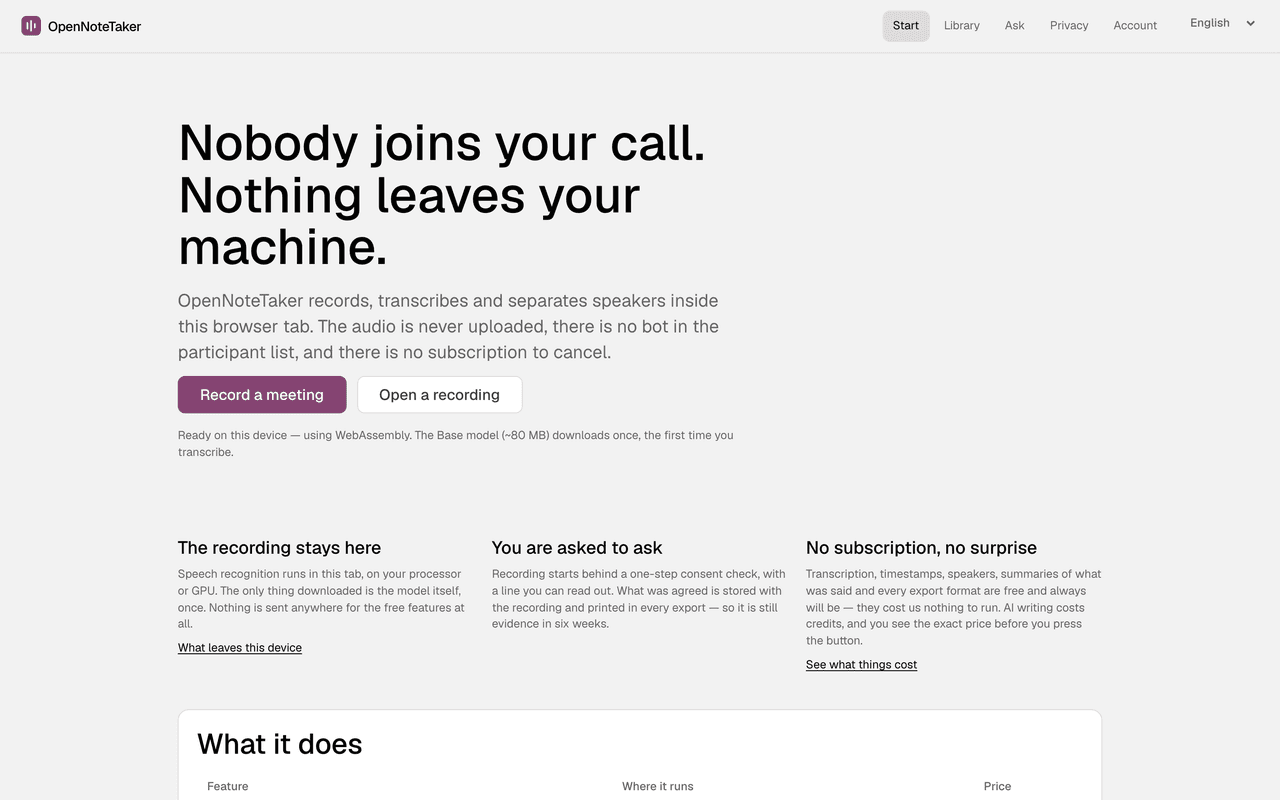
About this app
Most AI note takers send a bot into the meeting. It shows up in the participant list, someone has to admit it, and the audio is uploaded to the vendor's servers. OpenNoteTaker takes a different route: it records the audio already playing in your browser tab, together with your microphone, and transcribes it with Whisper compiled to WebAssembly, right in the tab. Nothing joins the call and the audio never leaves your computer. Every recording starts on a consent screen with words you can read out to the people on the call. Transcripts get speaker labels, a free on-device summary with decisions and action items, and search across your meetings. Export to TXT, Markdown, SRT, VTT, CSV, HTML or JSON. An optional Chrome and Edge extension notices Google Meet, Zoom, Microsoft Teams and VooV calls and offers to record them. It never starts a recording on its own. OpenNoteTaker is open source under MIT or Apache-2.0 and can be self-hosted.
Key features
- 1In-tab recording of browser audio plus microphone, with no bot joining the call and no audio uploaded.
- 2Whisper compiled to WebAssembly transcribes locally; speaker labels, on-device summary with decisions and action items.
- 3Cross-meeting search with meeting and timestamp context; export to TXT, Markdown, SRT, VTT, CSV, HTML or JSON.
- 4Optional Chrome/Edge extension detects Meet, Zoom, Teams and VooV calls and offers to record — never auto-starts.
- 5Open source under MIT or Apache-2.0 and self-hostable; mandatory consent screen before every recording.
Target customer profile
Drawn from the product itself, not from a survey.
Scout Review
Written by AI from measured evidence, scored out of 100.
OpenNoteTaker is a privacy-first AI note taker that records the audio already playing in your browser tab plus your microphone, then transcribes it with Whisper compiled to WebAssembly — in the tab, with no bot joining the call and no audio uploaded. It adds speaker labels, an on-device summary with decisions and action items, cross-meeting search, and export to TXT, Markdown, SRT, VTT, CSV, HTML or JSON. An optional Chrome/Edge extension detects Meet, Zoom, Teams and VooV calls and offers to record, but never starts one on its own. It's open source under MIT or Apache-2.0 and self-hostable. The site is well-designed and fast on desktop, the security model is genuinely differentiated, and accessibility is near-perfect. The rough edges are a mobile layout shift, low-contrast pricing labels, a missing HSTS header, and no published audit.
Measure by measure
Usability
68Clear dual CTAs, trust-first explainer columns and a no-account, no-subscription core flow. The optional extension is well-scoped and never auto-records. Small, light body copy and a low-contrast price column cost it points.
Design
71Restrained off-white/grey palette with one disciplined purple accent, confident hero typography and a genuinely useful Feature/Where-it-runs/Price table. Held back by low-contrast 'Credits' labels and stock-style participant photos in the hero.
Speed
66Desktop Lighthouse is a clean 100/100 and mobile paints in 1.2s with 0ms TBT. But a mobile CLS of 0.998 means the page visibly jumps as it loads — the one metric dragging an otherwise fast site down.
Security
78Strong header hygiene (CSP, frame protection, Referrer/Permissions-Policy, SPF, DMARC) and an architectural privacy story that beats most competitors: in-tab WebAssembly transcription, no audio upload, open source and self-hostable. HSTS is missing and no audit is published.
Accessibility
82Lighthouse accessibility lands at 98/100 with a single failing audit — non-sequential heading order. No WCAG statement or multi-language evidence found, but the automated baseline is strong and the site is responsive and keyboard-friendly.
Growth
68A real, specific wedge: no bot in the call, audio never leaves the device, open source and self-hostable. That's a structural advantage Otter, Fireflies and Read.ai can't copy without abandoning their server-side model.
Improvement areas
- Mobile CLS of 0.998 causes visible layout shift; reserve space for hero and table elements.
- Low-contrast, small 'Credits' price labels and footnotes make the paid tier hard to read.
- Missing HSTS header and no published security audit, pen-test or bug-bounty program.
- No accessibility statement or WCAG conformance claim despite a 98/100 Lighthouse score.
Design & Usability
The homepage is a genuinely well-crafted piece of editorial design: a disciplined off-white and grey palette with a single purple accent, a large tightly-tracked hero headline, and a Feature/Where-it-runs/Price table that makes the free-versus-credits split scannable. The three explainer columns answer the trust questions — where audio goes, consent, pricing — before the feature table, which is exactly the right order for a privacy-sensitive buyer. Usability is solid: dual CTAs, a no-account core flow, and an optional extension that never auto-records. The weak spots are consistent: small, light-grey body and footnote copy, and 'Credits' labels that are the least visually prominent thing in the price column — the one number a buyer most needs to read.
Speed & Security
Speed is a tale of two metrics. Desktop Lighthouse is a clean 100/100, mobile paints in 1.2s with 0ms total blocking time — and then CLS 0.998, meaning the mobile page visibly rearranges itself as it loads. That single number is what keeps an otherwise snappy site out of the top band. Security is the product's strongest story: the HTTP probe found CSP, frame protection, Referrer-Policy, Permissions-Policy, SPF and DMARC all in place (10/12 checklist points), and the architecture itself is the security model — Whisper compiled to WebAssembly transcribes in-tab, audio is never uploaded, and the code is open source under MIT or Apache-2.0 and self-hostable. The gaps are HSTS and the absence of any published audit or bug-bounty program.
Accessibility & Growth
Accessibility scores 98/100 on Lighthouse with one failing audit — headings that skip a level — which is a trivial fix. There's no WCAG conformance statement or multi-language evidence in the collected content, so the automated baseline is strong but the documented commitment is thin. Growth is where the idea earns its keep: Otter, Fireflies and Read.ai all send a bot into the call and upload audio to their servers. OpenNoteTaker's wedge — nothing joins, nothing uploads, works on anything with sound, open source and self-hostable — is a structural advantage incumbents can't copy without abandoning their own model. It targets a specific underserved segment (calls where IT blocks bots or external guests object) and the category has clear headroom as privacy scrutiny grows. The limit is distribution: a 0.2-year-old domain and a single Twitter profile mean the idea is better than its current reach.
Conclusion
If your meetings are the kind a bot can't get into — blocked by IT, awkward with external guests, or just not something you want on someone else's server — OpenNoteTaker is the most credible answer in this category, and the open-source, self-hostable angle means you're not betting on a vendor's goodwill. Fix the mobile CLS, bump the contrast on the Credits labels, add HSTS, and publish a security page, and this moves from 'promising' to 'recommended' without much effort.
Suggestions for improvement
- Fix the mobile CLS of 0.998 — reserve space for the hero illustration and table so the page stops jumping as it loads.
- Raise the contrast and size of the 'Credits' price labels and table footnote; the paid tier shouldn't be the least readable thing on the page.
- Add an HSTS header to close the last gap in an otherwise strong security-header set.
- Publish a short security/trust page and an accessibility statement so buyers don't have to infer compliance from headers and Lighthouse.
Alternatives comparison
Named competitors, point by point. Nobody paid to appear here or to be left out.
 OpenNoteTaker |  Otter.ai |  Fireflies.ai |  Read.ai | |
|---|---|---|---|---|
| How audio is captured | Records the audio already playing in your browser tab plus your microphone, in-tab | Bot joins the meeting as a participant and records server-side | Bot joins the meeting as a participant and records server-side | Bot joins by default in web mode; records server-side |
| Where transcription happens | Whisper compiled to WebAssembly, runs in the browser tab; audio never uploaded | Vendor servers | Vendor servers | Vendor servers |
| Account / subscription required | No account or subscription for on-device features; optional backend AI paid in credits | Account and subscription tiers | Account and subscription tiers | Account and subscription tiers |
| Open source / self-hostable | Yes — MIT or Apache-2.0, self-hostable | No | No | No |
| Speaker labels and meeting summary | Speaker labels from audio; free on-device summary with decisions and action items | Speaker labels and AI summary on paid tiers | Speaker labels and AI summary on paid tiers | Speaker labels and AI summary on paid tiers |
| Export formats | TXT, Markdown, SRT, VTT, CSV, HTML, JSON | TXT, PDF, DOCX, SRT and others depending on plan | PDF, DOCX, TXT, SRT and CRM integrations | PDF, DOCX, TXT and integrations depending on plan |
Comparing options? See OpenNoteTaker alternatives, scored side by side
More Productivity apps
View all Productivity
Qamarero
92An all-in-one hospitality software for restaurants and ba...

Puzzly – B2B Lead Generation & Sales Intelligence Platform
92Puzzly is an all-in-one B2B lead generation platform that...

The Stack Newsletter
92A weekly newsletter delivering curated tech jobs, intervi...

StoryPad
92Privacy-first open source journal app with a continuous t...

Vibe Coding Agent Skills
92A free, open-source platform offering 110 AI agent skills...

Notion
92All-in-one AI workspace for docs, projects, and knowledge...

EmbedMyReviews
92White-label reputation management software for agencies s...

QRBliss
91Branded QR codes with AI Brand Sync, 15 free dynamic code...

Strukchad Property Management
91Property management for Kenyan letting agents: rent invoices raised every month, M-Pesa rent prompts to tenants, arrears tracking and landlord statements.

CC Switch
91Open-source desktop app for switching AI coding providers...

Gerty
91Private, local AI assistant for Mac that runs offline

BACKLNK
90Backlnk is a free SEO and AI visibility website: 15 website checks, a full audit as a PDF report, and guides to get found in search and AI answers.


A platform dedicated to providing unbiased reviews of newly launched applications, analyzing everything from their features to their full potential.
info@scoutforge.net© 2026 Scoutforge. All rights reserved.
