Cycling through all six. Tap any point to stop.
Measured on six things
OpenPhotoId is a free, open-source passport photo maker for passport, visa and ID photos. Pick the document, take or choose a photo, and it crops to the published rules, runs eleven checks and exports a file sized for the upload portal or a print sheet. It runs in your browser, and nothing is uploaded.
Security
52HTTPS enforced, SPF and DMARC present, and the strongest real signal: photos never leave the device, so there's no server to breach. But HSTS, CSP, frame protection and Referrer-Policy are all missing — 4/12 on headers.
Screenshots
1 / 1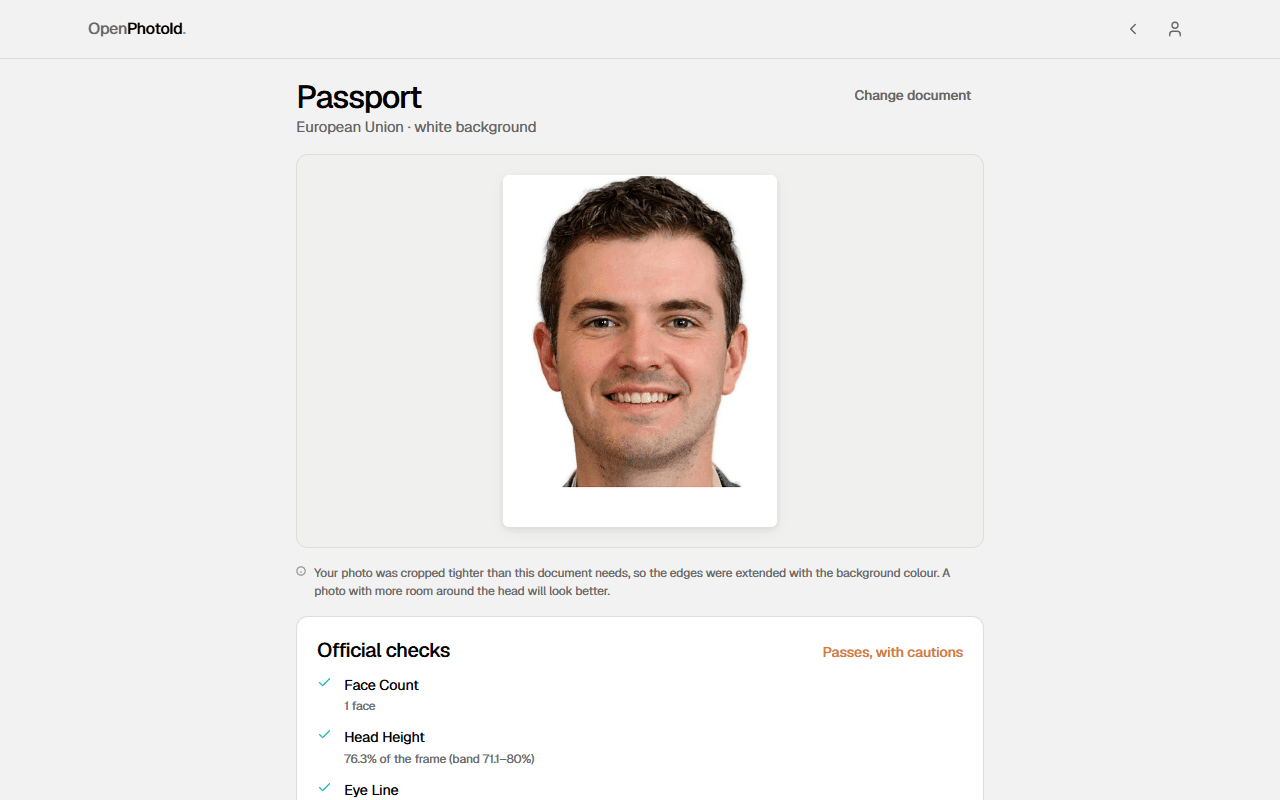
About this app
Most passport photo apps charge for the parts that matter: clean hair edges, the right background, a print sheet, and a file small enough for the upload portal. OpenPhotoId does all of it for free, inside your own browser. Choose from more than 20 passport, visa and ID photo specifications, then take a photo or pick one. OpenPhotoId finds the face, separates you from the background, and crops so that head height, eye line and centring sit inside each document's allowed band. Where a document asks for a background colour, it sets that colour; for documents that do not accept an edited photo, such as the US passport, it keeps and checks your photo's own background. Eleven checks then run on the finished file, each showing the value it measured and the limit it was judged against. Export a JPEG inside the portal's size limit, a PNG at the right DPI, or a 4×6, A4 or Letter print sheet with cutting guides. OpenPhotoId is open source under MIT or Apache-2.0.
Key features
- 125 passport, visa and ID documents across 16 countries and the EU, with per-document rules
- 2Twelve measured checks on every photo, each showing its value and the band it was judged against
- 3On-device processing via Rust/WebAssembly — photos never leave the browser, no sign-up, no watermark
- 4Export JPEG within portal size limits, lossless PNG at correct DPI, or 4×6/5×7/A4/Letter print sheets
- 5Batch mode with CSV report of which checks each photo passed
- 6Open source under MIT or Apache-2.0; web, macOS, Windows and Android builds
Target customer profile
Drawn from the product itself, not from a survey.
Scout Review
Written by AI from measured evidence, scored out of 100.
OpenPhotoId is a free, open-source passport photo maker that runs entirely in the browser, with 25 documents, twelve measured checks, and batch export. The web app is fast (Lighthouse 100/100), private by architecture (nothing uploaded), and visually disciplined. The weak points are small but real: a self-contradicting 'twelve checks' heading, tiny low-contrast value pills, missing security headers, a handful of accessibility failures, and a desktop build that is explicitly a stripped-down earlier version. For a free tool, it is unusually well-executed.
Measure by measure
Usability
68No sign-up, clear primary action, verdict stated in one line with the caveat explained. 25-document table is dense and hard to scan, and the desktop build is a stripped-down earlier version missing camera, backgrounds and batch.
Design
71Judging the web app UI: disciplined type hierarchy, one purple accent, hero card that doubles as a working upload tool. Monospace detail layer signals precision. Undercut by tiny low-contrast value pills and a 'twelve checks' heading that contradicts the brief.
Speed
88Lighthouse 100/100 on both mobile and desktop: LCP 963ms, CLS 0, TBT 26ms. Rust-to-WebAssembly with on-device neural nets means no upload round-trip. Genuinely among the fastest in the category.
Security
52HTTPS enforced, SPF and DMARC present, and the strongest real signal: photos never leave the device, so there's no server to breach. But HSTS, CSP, frame protection and Referrer-Policy are all missing — 4/12 on headers.
Accessibility
68Lighthouse 90/100 with 8 languages supported. Real gaps: non-sequential headings, unlabeled form elements, links distinguished by color alone, and light grey secondary text at small sizes.
Growth
62Real, specific problem with a clear wedge: free, open source, on-device, 25 documents, 12 measured checks, batch with CSV. Domain is 0.2 years old and only twitter is listed — early, but the idea has room.
Improvement areas
- Self-contradicting 'twelve checks' vs 'eleven checks' heading undermines trust in a precision tool
- Missing security headers (HSTS, CSP, frame protection, Referrer-Policy) — 4/12 on the probe
- Accessibility failures: unlabeled form elements, non-sequential headings, color-only link distinction
- Desktop build is a stripped-down earlier version missing camera, backgrounds, print sheets and batch
Design & Usability
The web app's interface is the strongest part of the product: a hero card that is itself a working upload tool, a restrained purple-on-grey system, and a checks list that pairs each rule with a monospace measured value. It reads as deliberate craft. The cracks are small but real — the heading says 'twelve checks' while the brief says eleven, the value pills are too small and too light to read comfortably, and the 'How it works' cards stretch to equal height leaving dead space. Usability is genuinely low-friction: no sign-up, one obvious primary action, and a result screen that states its verdict in a single line with the caveat explained. The 25-document table is the weak spot — dense, unemphasized, and slow to scan for a specific country. The desktop build is explicitly a simpler earlier version, which is honest but means the 'one engine everywhere' claim is doing heavy lifting.
Speed & Security
Speed is the standout measured result: Lighthouse 100/100 on both mobile and desktop, LCP 963ms, CLS 0, TBT 26ms. The architecture explains it — Rust compiled to WebAssembly, neural nets running on-device, no upload round-trip. There is nothing to complain about here. Security is a split verdict. The privacy design is genuinely strong: photos never leave the device, so there is no server to breach, and that is a real architectural advantage over cloud-based competitors. But the HTTP probe found only 4/12 checklist items — HTTPS and DMARC are there, while HSTS, CSP, frame protection, X-Content-Type-Options, Referrer-Policy and Permissions-Policy are all absent. For an open-source project that is understandable, but it is still a gap a security-conscious user will notice.
Accessibility & Growth
Accessibility lands at 90/100 on Lighthouse with eight languages supported, which is above average for an indie tool. The failing audits are concrete and fixable: heading order is not sequential, some form elements lack labels, and links rely on color alone to be distinguishable. Light grey secondary text at small sizes compounds the contrast issue. None of these are structural. Growth is a judgement on the idea, and the idea is solid: passport and visa photo specs are genuinely fiddly, paid apps gate the useful parts, and OpenPhotoId answers with free, open source, on-device processing, 25 documents, twelve measured checks, and batch export with a CSV report. That is a specific wedge against the paid alternatives. The limits are distribution — a 0.2-year-old domain, a single Twitter handle, a Play Store listing, and an iOS download that is 'coming back soon' — and the fact that the category has no network effects, so growth depends on word of mouth and SEO rather than compounding advantage.
Conclusion
If you need a passport or visa photo and don't want to pay an app or upload your face to a server, OpenPhotoId is the obvious first stop. The on-device architecture is the real differentiator, and the measured-checks approach is more honest than most competitors. Fix the heading, bump the pill contrast, add the missing headers, and label the form inputs — then this is a genuinely excellent free tool rather than a very good one with rough edges.
Suggestions for improvement
- Fix the 'twelve checks' vs 'eleven checks' contradiction — pick one number and use it everywhere.
- Increase the size and contrast of the monospace value pills in the checks list; they are the section's whole point.
- Add HSTS, CSP, X-Content-Type-Options, Referrer-Policy and frame protection headers — cheap wins on a 4/12 score.
- Label the form elements and fix heading order to clear the remaining Lighthouse accessibility failures.
Alternatives comparison
Named competitors, point by point. Nobody paid to appear here or to be left out.
 OpenPhotoId |  | |
|---|---|---|
| Price | Free, open source (MIT/Apache-2.0) | Not specified in provided details |
| Photo processing location | Entirely on-device in the browser (Rust/WASM) | Not specified in provided details |
| Document coverage | 25 documents, 16 countries and the EU | Not specified in provided details |
| Compliance checks | 12 measured checks, each showing value and allowed band | Not specified in provided details |
| Batch processing | Yes, with CSV report of checks per photo | Not specified in provided details |
| Print sheet export | 4×6, 5×7, A4 and Letter with cutting guides | Not specified in provided details |
| Sign-up required | No | Not specified in provided details |
| Platforms | Web, macOS, Windows, Android (iOS coming soon) | Not specified in provided details |
Comparing options? See OpenPhotoId alternatives, scored side by side
More Productivity apps
View all Productivity
Qamarero
92An all-in-one hospitality software for restaurants and ba...

Puzzly – B2B Lead Generation & Sales Intelligence Platform
92Puzzly is an all-in-one B2B lead generation platform that...

The Stack Newsletter
92A weekly newsletter delivering curated tech jobs, intervi...

StoryPad
92Privacy-first open source journal app with a continuous t...

Vibe Coding Agent Skills
92A free, open-source platform offering 110 AI agent skills...

Notion
92All-in-one AI workspace for docs, projects, and knowledge...

EmbedMyReviews
92White-label reputation management software for agencies s...

QRBliss
91Branded QR codes with AI Brand Sync, 15 free dynamic code...

Strukchad Property Management
91Property management for Kenyan letting agents: rent invoices raised every month, M-Pesa rent prompts to tenants, arrears tracking and landlord statements.

CC Switch
91Open-source desktop app for switching AI coding providers...

Gerty
91Private, local AI assistant for Mac that runs offline

BACKLNK
90Backlnk is a free SEO and AI visibility website: 15 website checks, a full audit as a PDF report, and guides to get found in search and AI answers.


A platform dedicated to providing unbiased reviews of newly launched applications, analyzing everything from their features to their full potential.
info@scoutforge.net© 2026 Scoutforge. All rights reserved.
