

A platform dedicated to providing unbiased reviews of newly launched applications, analyzing everything from their features to their full potential.
info@scoutforge.net© 2026 Scoutforge. All rights reserved.
A platform dedicated to providing unbiased reviews of newly launched applications, analyzing everything from their features to their full potential.
info@scoutforge.net© 2026 Scoutforge. All rights reserved.
A platform dedicated to providing unbiased reviews of newly launched applications, analyzing everything from their features to their full potential.
info@scoutforge.net© 2026 Scoutforge. All rights reserved.
Cycling through all six. Tap any point to stop.
Measured on six things
Convert Outlook Express DBX files to 20+ formats with ease.
Real problem, but a shrinking one: Outlook Express DBX files are a legacy format Microsoft retired years ago. Aid4Mail and SysTools already cover the same niche with broader format support, and nothing here names a segment it serves better.
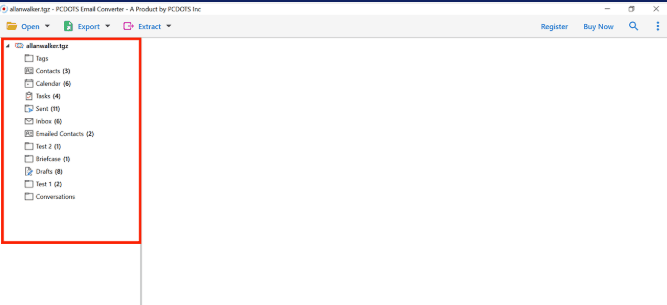
PCDOTS DBX Converter is a powerful, standalone tool designed to simplify the migration of Outlook Express DBX files. If you've ever been stuck with legacy .dbx files and no way to access them, this software is a lifesaver. It supports bulk conversion of DBX files to a wide range of formats including EML, PDF, CSV, and even direct export to Gmail, Yahoo, and other email clients. What sets it apart is its attention to data integrity. It preserves folder hierarchy, attachments, contacts, and metadata, ensuring zero data loss. The tool is incredibly user-friendly, with a clean interface that even non-technical users can navigate. Advanced features like selective conversion, email element extraction, and a quick search option make it a versatile choice for both personal and professional use. I was particularly impressed by its performance—converting large DBX files without any hiccups. The software is compatible with all major Windows versions, including Windows 11 and server edition...
Drawn from the product itself, not from a survey.
Demographic
IT professionals and system administrators
Pain points
Struggling with legacy DBX files, need to migrate data without loss
Primary needs
Reliable, bulk conversion tool with data integrity
Demographic
Small business owners
Pain points
Old Outlook Express emails inaccessible, need to archive or switch clients
Primary needs
Easy-to-use software to export emails to modern formats
Demographic
Individual users with old email backups
Pain points
Cannot open DBX files, fear of losing important emails and attachments
Primary needs
Affordable, one-time solution to convert and preserve emails
Written by AI from measured evidence, scored out of 100.
PCDOTS DBX Converter is a Windows-only utility for migrating legacy Outlook Express .dbx files to EML, PDF, CSV, Gmail and other targets, priced at $99 one-time with a refund policy. The measured evidence is genuinely strong on speed (Lighthouse mobile 96/100) and respectable on security (10/12 header checklist points, HTTPS enforced, offline-only design). The guide at /guide.html is thorough and covers four data-loading paths. Where it stumbles: the trial limits contradict each other (25 items/folder vs. 10 emails), accessibility has real gaps despite the 91 score, and the underlying category — DBX conversion — is a shrinking niche already served by Aid4Mail and SysTools. It works, it's fast, and it's priced fairly for what it does. Whether it's worth building a business on is a different question.
A real step-by-step guide at /guide.html covers loading from files, clients, accounts and servers plus export and extraction. Trial caps at 25 items/folder (or 10 emails, depending on which line you read) and the $99 license is one-time.
Long-form marketing page with feature bullets, awards row and a trial/full comparison table. Functional and on-brand for a Windows utility, but dated in style and no live UI screenshot was captured to judge the app itself.
Lighthouse mobile 96/100 (LCP 2.7s, CLS 0, TBT 84ms, FCP 1.2s) and desktop 83/100. The marketing site is genuinely fast and lightweight for a download-portal-style product page.
HTTPS enforced with HSTS, CSP, frame protection, X-Content-Type-Options, Referrer-Policy and SPF (10/12 probe points). Permissions-Policy and DMARC are missing; no SOC 2, ISO or pen-test page found.
Lighthouse accessibility 91/100, but failing audits include insufficient color contrast, no main landmark, unnamed ARIA progressbar and SVGs without alt text. No WCAG statement or multi-language support found; Windows-only.
Real problem, but a shrinking one: Outlook Express DBX files are a legacy format Microsoft retired years ago. Aid4Mail and SysTools already cover the same niche with broader format support, and nothing here names a segment it serves better.
PCDOTS DBX Converter presents as a classic Windows utility: a long marketing page with feature bullets, an awards row from download portals, and a trial/full comparison table. The design is functional and on-brand for the category but visually dated, and no live UI screenshot was captured in the measured evidence, so the app interface itself couldn't be judged. Usability is the stronger half — the /guide.html walkthrough is genuinely thorough, covering four ways to load data (files, desktop clients, accounts, servers) plus export and extraction workflows. The trial, however, is inconsistent: the comparison table says 25 items per folder while the homepage bullet says 10 emails at once. The $99 one-time license with a 100% refund policy is reasonable for the category, and the offline-only design is a real usability plus for privacy-conscious IT admins.
Speed is the standout measured result: Lighthouse mobile 96/100 with LCP 2.7s, CLS 0, TBT 84ms and FCP 1.2s, and desktop 83/100. For a download-portal-style product page that's genuinely fast, and no user complaints about lag surfaced in the collected evidence. Security is solid but not exceptional: the HTTP probe shows HTTPS enforced with HSTS, CSP, frame protection, X-Content-Type-Options, Referrer-Policy and SPF — 10 of 12 checklist points. Permissions-Policy and DMARC are missing, and no SOC 2, ISO 27001, pen-test report or bug bounty page was found. The site does claim the tool is 'completely offline' and 'does not store your personal data,' which is a meaningful data-handling signal for a tool that ingests entire mailboxes. For a $99 Windows utility aimed at IT admins, this is a competent security posture — just not a compliance-grade one.
Accessibility lands at 91/100 on the Lighthouse audit, but the failing items matter: insufficient color contrast, no main landmark, an unnamed ARIA progressbar, SVGs with img role and no text alternative, and visible text labels that don't match accessible names. There's no WCAG conformance statement and no multi-language support, and the product is Windows-only — no mobile or web coverage. Growth is the harder question. The problem is real: people with legacy .dbx files genuinely can't open them in modern clients. But the format is a Microsoft-discontinued relic, the target audience shrinks every year, and the two named alternatives (Aid4Mail, SysTools DBX Converter) already cover the same need with broader format support. The domain has been around since 2019 and the product has LinkedIn, Facebook and YouTube presence, but nothing in the material names a segment this tool serves better than the incumbents. It's a competent tool in a category with a closing window.
Conclusion
If you're an IT admin with a drawer full of .dbx files and a deadline, this tool will do the job and do it quickly. The offline-only design is a genuine plus for anyone handling sensitive mailboxes, and the $99 one-time price beats a subscription for a task you'll likely do once. But go in with clear eyes: you're buying a tool for a format Microsoft retired, from a category with two established competitors. Check the trial limit carefully before you commit — the site itself can't agree on what it is. For a one-off migration, it's a reasonable pick. For anything ongoing, the shrinking niche should give you pause.
Named competitors, point by point. Nobody paid to appear here or to be left out.
 PCDOTS DBX Converter PCDOTS DBX Converter |  Aid4Mail Aid4Mail |  SysTools DBX Converter SysTools DBX Converter | |
|---|---|---|---|
| Supported input formats | DBX (Outlook Express) only | DBX plus many other email formats (PST, MBOX, EML, MSG and more) | DBX (Outlook Express) |
| Export targets | EML, PDF, CSV, Gmail, Yahoo and 20+ options | Wide range of formats and email clients | PST, MSG, EML and more |
| Bulk conversion | Yes — multiple DBX files/folders at once | Yes — batch conversion supported | Yes — bulk conversion supported |
| Data integrity / folder hierarchy | Preserves folder hierarchy, attachments, contacts and metadata | Maintains data integrity across conversions | Maintains data integrity |
| Pricing model | $99 one-time license; free trial limited to 25 items/folder (or 10 emails) | Paid license (pricing varies by edition) | Paid license (pricing varies by edition) |
| Platform | Windows only (32/64-bit, Windows 11 through XP and Server editions) | Windows | Windows |
Aid4Mail
Aid4Mail is a popular email conversion tool that supports DBX and many other formats. It offers batch conversion and is known for its speed and reliability.
SysTools DBX Converter
SysTools provides a DBX converter that can export Outlook Express emails to PST, MSG, EML, and more. It supports bulk conversion and maintains data integrity.
Comparing options? See PCDOTS DBX Converter alternatives, scored side by side

An all-in-one hospitality software for restaurants and ba...

A weekly newsletter delivering curated tech jobs, intervi...

White-label reputation management software for agencies s...

Privacy-first open source journal app with a continuous t...

Puzzly is an all-in-one B2B lead generation platform that...

All-in-one AI workspace for docs, projects, and knowledge...

A free, open-source platform offering 110 AI agent skills...

Open-source desktop app for switching AI coding providers...

One verified handle for your online identity, readable by...

Frame-perfect video-to-GIF maker that runs entirely in yo...

White-label website audits that close deals for digital a...

Automated quote follow-up for trades and service businesses.
A platform dedicated to providing unbiased reviews of newly launched applications, analyzing everything from their features to their full potential.
info@scoutforge.net© 2026 Scoutforge. All rights reserved.
