Cycling through all six. Tap any point to stop.
Measured on six things
Free online tools to merge, split, organize, compress, and convert PDFs.
Security
42HTTPS enforced and SPF present, but no HSTS, CSP, frame protection, or DMARC — 3/12 checklist points. No security page, audit, or compliance claims anywhere on the site.
Screenshots
1 / 1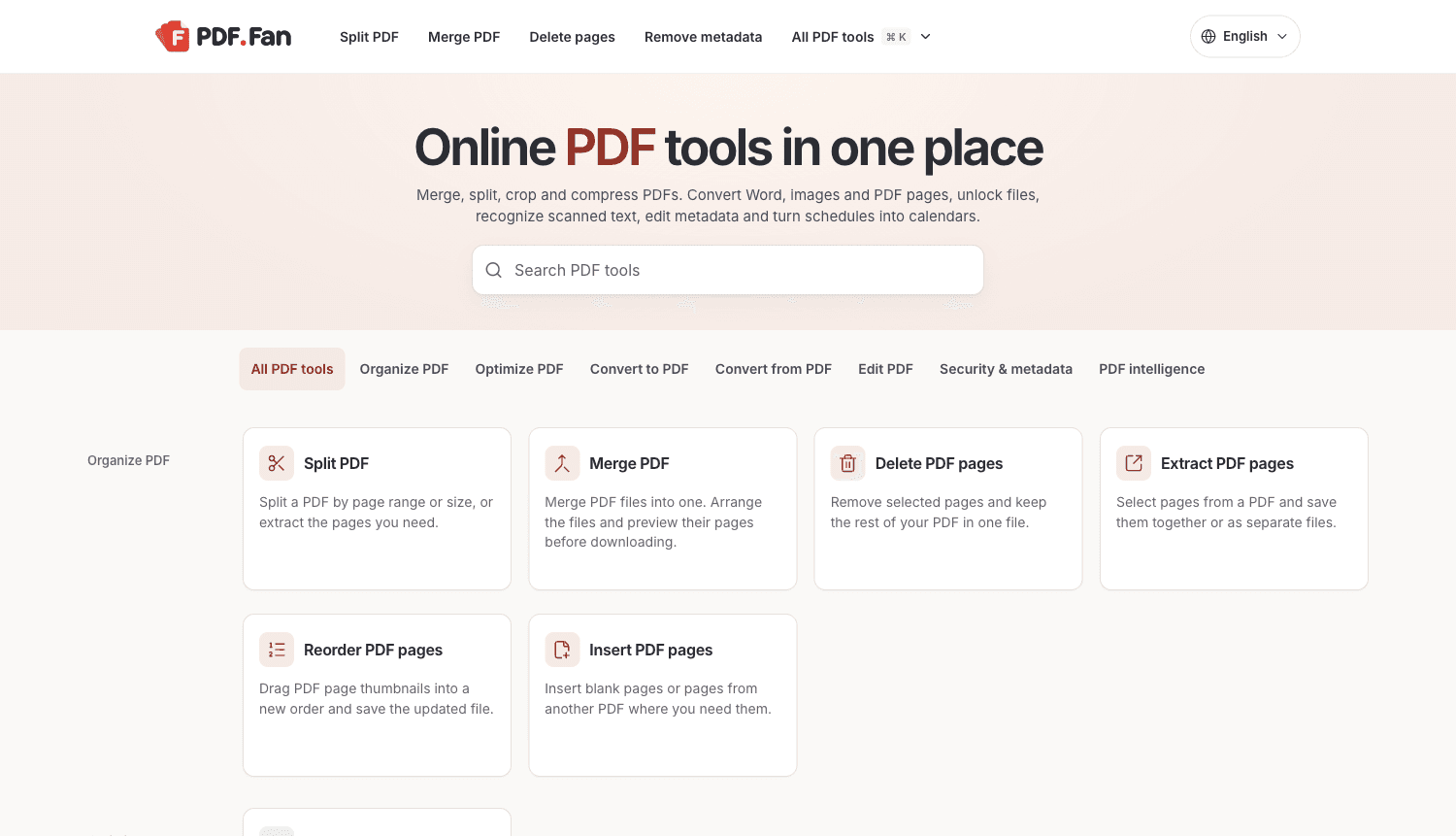
About this app
PDF Fan is a free online PDF toolkit for everyday document work. Merge files, split a PDF, reorder or delete pages, and compress documents for sharing. Convert Word documents or images to PDF, and export PDF pages as JPG or PNG. Other tools let you crop pages, edit metadata, or make scanned PDFs searchable.
Key features
- 1Merge, split, delete, extract, reorder, and insert PDF pages with drag-and-drop previews.
- 2Compress PDFs with before/after size comparison; convert Word and images to PDF.
- 3OCR scanned PDFs, edit metadata, unlock password-protected files, and export PDF schedules to .ics calendars.
Target customer profile
Drawn from the product itself, not from a survey.
Demographic
Students, office workers, and anyone who handles PDFs
Pain points
Combining files, reorganizing pages, and making PDFs smaller for sharing
Primary needs
Merge, split, organize, compress, and convert PDF documents online
Scout Review
Written by AI from measured evidence, scored out of 100.
PDF Fan is a competently built free PDF toolkit that gets the fundamentals right: a fast, well-organized catalogue, a clear search-first entry point, and a handful of tools (PDF-to-calendar, metadata editing, OCR) that go beyond the usual merge-and-split fare. Its measured performance is genuinely excellent. The two things holding it back are legibility on the tool grid and a thin security posture for a product that handles uploaded documents. Neither is fatal; both are fixable in a sprint.
Measure by measure
Usability
68Three ways in (search, tabs, dropdown) and an FAQ that preempts the obvious confusions. Similar tools blur together thanks to tiny low-contrast descriptions, and there's no single starting point.
Design
70Clean, disciplined tool catalogue: consistent card template, restrained brand-red accent, clear search-first hero. Held back by weak-contrast gutter labels and a pastel icon set that reads as stock.
Speed
88Lighthouse mobile 98/100 with 1.7s LCP, zero CLS, and 14ms TBT; desktop 95/100. Genuinely snappy for a tool grid this size.
Security
42HTTPS enforced and SPF present, but no HSTS, CSP, frame protection, or DMARC — 3/12 checklist points. No security page, audit, or compliance claims anywhere on the site.
Accessibility
80Lighthouse a11y 95/100 with one failing audit (invalid aria-* values). Language selector and responsive grid present, but no accessibility statement or WCAG claim published.
Growth
58Real universal problem, and a few genuine wedges (PDF-to-calendar .ics, metadata editing, OCR) against Smallpdf. But 'free PDF tools' is a brutally crowded, low-willingness-to-pay category.
Improvement areas
- Security headers are largely absent (no CSP, HSTS, frame protection, DMARC) with no security page or audit published.
- Low-contrast category labels and card descriptions make similar tools hard to tell apart.
- No single primary CTA or guided starting point for users who don't know which tool they need.
- One failing accessibility audit (invalid aria-* values) blocks an otherwise clean score.
Design & Usability
PDF Fan's homepage is a well-organized tool catalogue: a search-first hero, a category tab strip that mirrors the grouped sections below, and one consistent card template repeated across every tool. The brand red is used sparingly and effectively. Where it slips is legibility — the gutter category labels and card descriptions are small and light grey, so telling PDF to PNG from PDF to JPG requires squinting. Usability is helped by three entry points and a genuinely useful FAQ that preempts the convert-vs-extract and compression questions. What's missing is a single obvious starting point; the grid assumes you already know which of twenty tools you need.
Speed & Security
Speed is the standout: Lighthouse mobile 98/100 with a 1.7s LCP, zero layout shift, and 14ms total blocking time; desktop scores 95. For a page carrying this many cards, that's excellent engineering. Security is the weak flank. HTTPS is enforced and SPF is published, but there's no HSTS, no CSP, no frame protection, no X-Content-Type-Options, no Referrer-Policy, and no DMARC — 3 of 12 checklist points. For a site whose entire function is accepting uploaded documents and removing PDF passwords, the absence of a security page, audit, or even a hardened header set is a real gap, not just a missing badge.
Accessibility & Growth
Accessibility scores 95/100 on Lighthouse with a single failing audit for invalid aria-* attribute values — a one-line fix away from a clean sheet. A language selector and responsive grid are present, though no accessibility statement is published. Growth is the harder question. The problem is real and universal, and PDF Fan does have genuine wedges over Smallpdf: a PDF-to-calendar .ics export, a metadata editor, and OCR folded into one free catalogue. But free PDF tooling is a crowded, low-willingness-to-pay category where the incumbents are entrenched, and the domain is brand new with no traction signals in the collected evidence.
Conclusion
If you need to merge, split, compress, or convert a PDF right now, PDF Fan will do it quickly and without an account wall. If you're uploading anything sensitive, note that the site publishes no security documentation and runs a minimal header set. The bones are good — a fast, clean, genuinely useful utility. Tighten the contrast, harden the headers, and publish a security page, and this moves from 'nice free tool' to 'the one I bookmark.'
Suggestions for improvement
- Add HSTS, CSP, X-Content-Type-Options, Referrer-Policy, and DMARC — the header set is currently 3/12 and this is a document-upload site.
- Publish a security/privacy page explaining how uploaded files are handled, stored, and deleted.
- Increase contrast on category gutter labels and card descriptions so similar tools are distinguishable at a glance.
- Fix the failing aria-* attribute audit — it's a one-line change away from a clean accessibility score.
Alternatives comparison
Named competitors, point by point. Nobody paid to appear here or to be left out.
 PDF Fan |  Smallpdf | |
|---|---|---|
| Free tier / pricing | Free, no account required | Freemium with daily task limits; paid Pro plan |
| Core PDF tools (merge, split, compress, convert) | Yes — merge, split, compress, Word/image conversion | Yes — full merge, split, compress, convert suite |
| OCR / searchable PDFs | Yes — OCR PDF tool included free | Yes — OCR available (limited on free tier) |
| PDF to calendar (.ics) export | Yes — unique PDF-to-calendar tool | No dedicated equivalent |
| Metadata editing / removal | Yes — metadata editor and remover | Limited; not a headline feature |
| Security documentation / compliance | None published; minimal HTTP security headers | Published privacy/security info and GDPR compliance |
Comparing options? See PDF Fan alternatives, scored side by side
More Productivity apps
View all Productivity
Qamarero
92An all-in-one hospitality software for restaurants and ba...

Puzzly – B2B Lead Generation & Sales Intelligence Platform
92Puzzly is an all-in-one B2B lead generation platform that...

The Stack Newsletter
92A weekly newsletter delivering curated tech jobs, intervi...

StoryPad
92Privacy-first open source journal app with a continuous t...

Vibe Coding Agent Skills
92A free, open-source platform offering 110 AI agent skills...

Notion
92All-in-one AI workspace for docs, projects, and knowledge...

EmbedMyReviews
92White-label reputation management software for agencies s...

QRBliss
91Branded QR codes with AI Brand Sync, 15 free dynamic code...

Strukchad Property Management
91Property management for Kenyan letting agents: rent invoices raised every month, M-Pesa rent prompts to tenants, arrears tracking and landlord statements.

CC Switch
91Open-source desktop app for switching AI coding providers...

Gerty
91Private, local AI assistant for Mac that runs offline

BACKLNK
90Backlnk is a free SEO and AI visibility website: 15 website checks, a full audit as a PDF report, and guides to get found in search and AI answers.


A platform dedicated to providing unbiased reviews of newly launched applications, analyzing everything from their features to their full potential.
info@scoutforge.net© 2026 Scoutforge. All rights reserved.
