

A platform dedicated to providing unbiased reviews of newly launched applications, analyzing everything from their features to their full potential.
info@scoutforge.net© 2026 Scoutforge. All rights reserved.
A platform dedicated to providing unbiased reviews of newly launched applications, analyzing everything from their features to their full potential.
info@scoutforge.net© 2026 Scoutforge. All rights reserved.
A platform dedicated to providing unbiased reviews of newly launched applications, analyzing everything from their features to their full potential.
info@scoutforge.net© 2026 Scoutforge. All rights reserved.
Cycling through all six. Tap any point to stop.
Measured on six things
Free online PDF toolkit: edit, convert, merge, compress, ...
Offers password protection, unlock, watermark, and eSign. Browser-based with implied privacy (files not permanently stored). Lacks prominent details on encryption standards, data deletion policy, or compliance certifications.
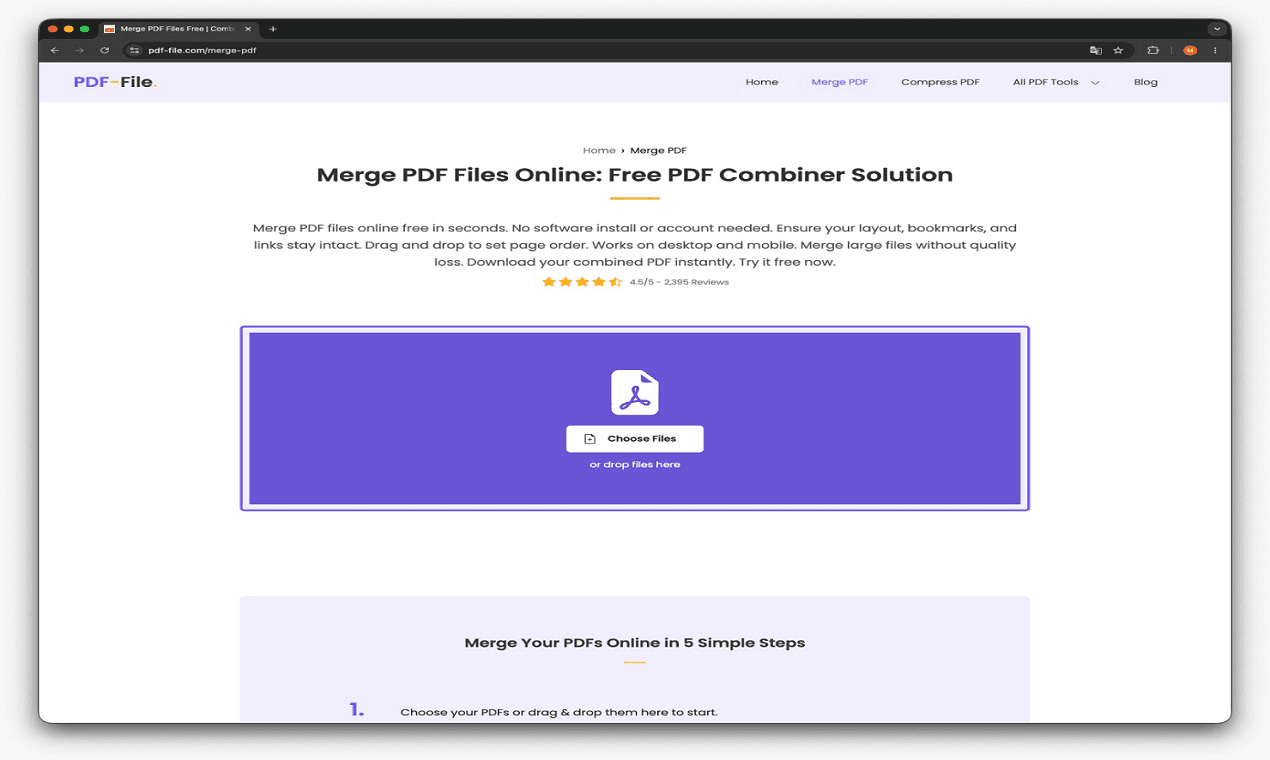
PDF-File.com is a comprehensive, free online PDF toolkit that offers over 50 tools for editing, converting, merging, compressing, and securing PDF documents. Whether you need to convert PDF to Word, Excel, or JPG, merge multiple PDFs into one, remove or rotate pages, add watermarks, or unlock password-protected files, PDF-File.com has you covered. The platform is entirely browser-based, requiring no downloads or installations. I've personally found it incredibly handy for quick conversions and edits without needing Adobe Acrobat. The interface is clean and straightforward, making it easy to navigate even for non-techies. Plus, all tools are free with no hidden fees. If you're a student, professional, or anyone who deals with PDFs regularly, this toolset is a lifesaver.
Drawn from the product itself, not from a survey.
Demographic
Office workers and administrative staff
Pain points
Need to frequently convert, merge, or edit PDFs for reports, invoices, and documents but lack access to expensive software.
Primary needs
Free, quick, and reliable PDF conversion and editing tools with no sign-up required.
Demographic
Students and educators
Pain points
Must convert lecture notes, research papers, and assignments between PDF and Word/PPT formats, often with limited budgets.
Primary needs
Affordable, easy-to-use PDF tools for conversion, compression, and merging to simplify academic workflows.
Demographic
Freelancers and small business owners
Pain points
Need to create, sign, and manage contracts, proposals, and invoices in PDF format with professional stamps and watermarks.
Primary needs
Free online PDF editing, e-signature, and security features to streamline client communications and protect sensitive data.
Written by AI from measured evidence, scored out of 100.
PDF-File.com is a genuinely useful free online PDF toolkit that lives up to its 'over 50 tools, no downloads, no fees' claim. It's particularly strong for quick conversions, merging, basic editing, and signing — ideal for the described target customers who can't justify Adobe subscriptions. Design and usability are solid for everyday tasks, making it more approachable than desktop software. However, it falls short on polish, transparency around security/privacy, and performance optimization. It scores well as a reliable utility but lacks the premium feel or trust signals of top competitors. Great for students and freelancers; sufficient for most office needs but not industry-leading.
No sign-up, no downloads, instant browser access to 50+ tools. Intuitive for non-techies. One-click access to merge, convert, edit, sign, compress. Excellent for quick office/student workflows.
Clean, minimalistic browser-based interface with straightforward navigation and direct tool access. Neutral tones, no clutter, easy for quick tasks. Strong focus on simplicity without overwhelming users.
Browser-based processing is convenient for small files. Compress and conversions are reasonably fast on standard documents. Larger files or complex edits may depend on internet and server load with no specific performance claims.
Offers password protection, unlock, watermark, and eSign. Browser-based with implied privacy (files not permanently stored). Lacks prominent details on encryption standards, data deletion policy, or compliance certifications.
Simple interface aids basic use. Mobile-friendly in theory as browser-based. Lacks explicit WCAG mentions, keyboard navigation details, screen reader optimization, or contrast adjustments in available info.
Broad free toolkit with 50+ tools attracts students, freelancers, and offices. No limits advertised (unlike competitors). Targets high-volume PDF users needing free alternatives to Adobe. Solid but no standout marketing or community features visible.
PDF-File.com delivers exactly what its description promises: a no-friction, browser-based PDF swiss army knife. The design is refreshingly uncluttered with big, clear tool categories for merge, split, convert (to/from Word, Excel, images, ePub, HTML, etc.), edit, watermark, eSign, compress, and more. Usability shines for the target users — office staff, students, and freelancers who want to convert lecture notes or stamp invoices without installing software or creating accounts. It's genuinely handy for quick jobs where Adobe Acrobat is overkill. However, the interface feels dated and purely functional. There's little polish, modern animations, or smart defaults that competitors like Smallpdf offer. It works, but it doesn't delight.
Performance is acceptable for everyday documents but nothing exceptional. Conversions and compression work well on smaller files, but heavy operations rely on your connection and their servers with no performance guarantees or optimization previews. On security, the toolkit includes the essentials — password protect, unlock, watermark, stamp, and eSign. Yet there's minimal transparency about how long files stay on servers, what encryption is used beyond basic TLS, or compliance (GDPR, SOC2). This is a weak spot compared to Smallpdf's clear 256-bit TLS and certifications or PDF24's explicit 'files deleted after short time' policy. Fine for casual use, risky for sensitive client contracts.
Accessibility is average. The clean layout helps basic navigation, and browser-based access means it works across devices without installs. However, no information on screen reader support, keyboard shortcuts, or color contrast optimizations. Growth potential is strong because it's completely free with no daily limits or watermarks (unlike ILovePDF's noted restrictions or Smallpdf's free-tier caps). It directly addresses pain points for budget-conscious students, small businesses, and admins who handle reports and invoices daily. The 50+ tools give it an edge over more limited free options, supporting long-term adoption in education and freelance markets.
Conclusion
If you need fast, free PDF magic without sign-ups or limits, PDF-File.com is a lifesaver. It's not flashy, but it gets the job done when you're staring at a stack of uneditable reports at 11 PM. Solid choice over paid software for most non-enterprise users.
Named competitors, point by point. Nobody paid to appear here or to be left out.
 PDF-File.com PDF-File.com |  Smallpdf Smallpdf |  ILovePDF ILovePDF |  PDF24 Tools PDF24 Tools | |
|---|---|---|---|---|
| Completely Free / Limits | Fully free, no limits or watermarks mentioned | Free with daily usage limits on free tier | Free with file size limits and watermarks on some tools | 100% free with no artificial limits (ads supported) |
| Number of Tools | 50+ tools (convert, edit, merge, sign, security, etc.) | Similar core set focused on popular tasks | Comprehensive toolkit with many overlapping tools | Extensive collection, no e-sign mentioned |
| eSign / Digital Signatures | Yes, included in tools | Yes, strong digital signature support | Available (premium for advanced) | Lacks e-sign functionality |
| Security Transparency | Basic (password, watermark); limited details on deletion/encryption | Strong: 256-bit TLS, ISO 27001, GDPR | Claims secure data handling; premium for more | Explicit encryption + auto-deletion policy |
| Desktop Option | Browser-only, no desktop app | Primarily online with desktop app available | Online with desktop version in premium | Strong desktop app (PDF24 Creator) for offline use |
Smallpdf
Popular online PDF tool with a similar feature set, but with daily usage limits on free tier.
ILovePDF
Comprehensive PDF toolkit, free with file size limits and watermark on some conversions.
PDF24 Tools
Free desktop and online PDF tools with no file limits, but lacks e-sign functionality.
Comparing options? See PDF-File.com alternatives, scored side by side
What the review was written against. A verdict with no sources is an opinion.

An all-in-one hospitality software for restaurants and ba...

A weekly newsletter delivering curated tech jobs, intervi...

White-label reputation management software for agencies s...

Privacy-first open source journal app with a continuous t...

Puzzly is an all-in-one B2B lead generation platform that...

All-in-one AI workspace for docs, projects, and knowledge...

A free, open-source platform offering 110 AI agent skills...

Open-source desktop app for switching AI coding providers...

One verified handle for your online identity, readable by...

Frame-perfect video-to-GIF maker that runs entirely in yo...

White-label website audits that close deals for digital a...

Automated quote follow-up for trades and service businesses.
A platform dedicated to providing unbiased reviews of newly launched applications, analyzing everything from their features to their full potential.
info@scoutforge.net© 2026 Scoutforge. All rights reserved.
