

A platform dedicated to providing unbiased reviews of newly launched applications, analyzing everything from their features to their full potential.
info@scoutforge.net© 2026 Scoutforge. All rights reserved.
A platform dedicated to providing unbiased reviews of newly launched applications, analyzing everything from their features to their full potential.
info@scoutforge.net© 2026 Scoutforge. All rights reserved.
A platform dedicated to providing unbiased reviews of newly launched applications, analyzing everything from their features to their full potential.
info@scoutforge.net© 2026 Scoutforge. All rights reserved.
Cycling through all six. Tap any point to stop.
Measured on six things
Convert table photos to editable Excel files online
HTTPS and HSTS present, but missing security headers and no compliance certifications; privacy policy covers data handling.
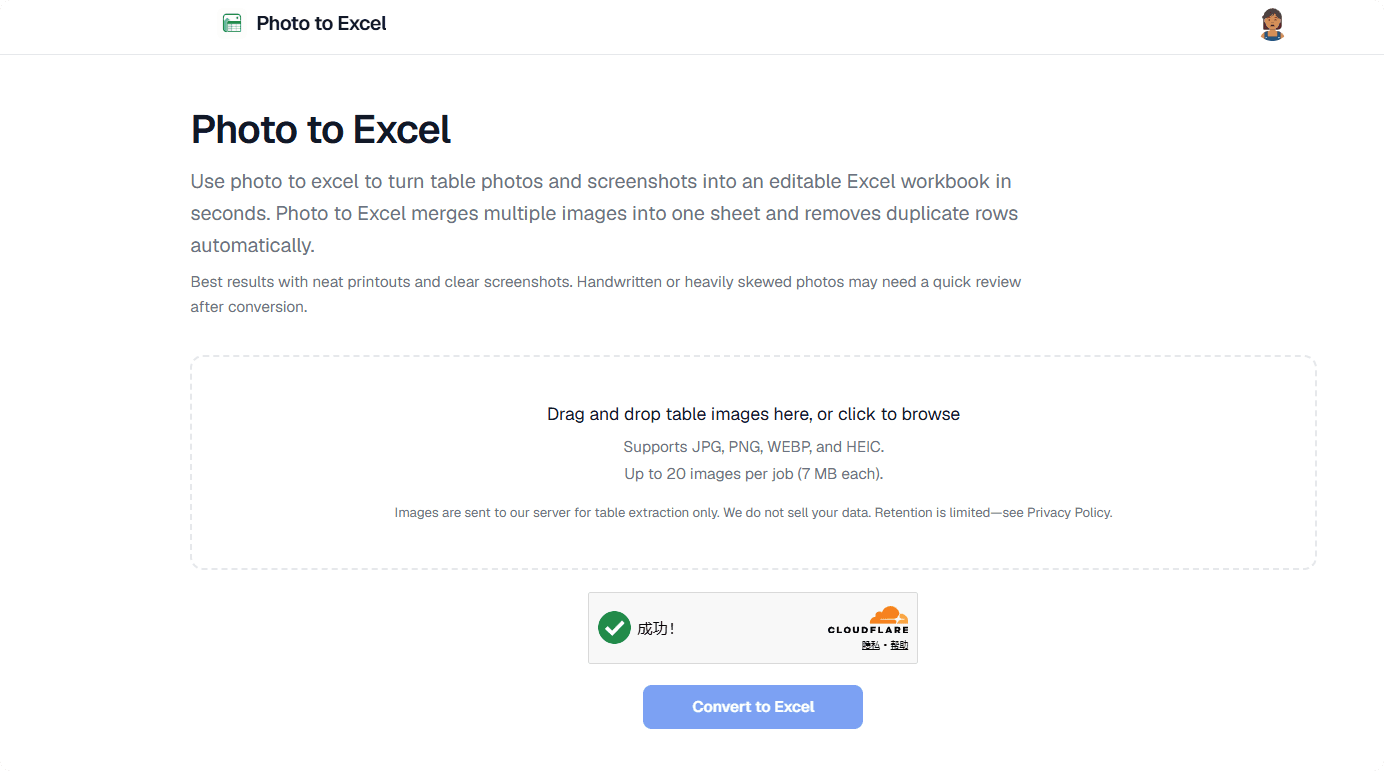
Photo to Excel is a free online tool that quickly transforms images of tables—like screenshots, photos, or scans—into real, editable .xlsx spreadsheets. No more manual typing! With support for JPG, PNG, WEBP, and HEIC, you can upload up to 20 images and get a merged, deduplicated sheet in seconds. The tool uses AI to capture table structure accurately, and you can preview the results before downloading—no login required. Ideal for office workers digitizing invoices, shop staff inventorying stock, or anyone tired of copying data by hand. It's like having a data entry assistant that never sleeps, and did I mention it's absolutely free?
Drawn from the product itself, not from a survey.
Demographic
Office administrators and finance teams
Pain points
spending hours retyping data from printed forms or PDFs
Primary needs
quick conversion to editable Excel for records and analysis
Demographic
Retail and warehouse staff
Pain points
photographing stock lists and order forms that need digitizing
Primary needs
fast, accurate conversion with minimal cleanup
Demographic
Independent professionals and freelancers
Pain points
managing data from client-provided screenshots
Primary needs
free, simple tool without registration to convert tables
Demographic
Students and researchers
Pain points
transferring table data from images into spreadsheets for projects
Primary needs
efficient, budget-friendly conversion to analyze data
Written by AI from measured evidence, scored out of 100.
Photo to Excel is a competent tool that solves a real problem: converting table images to editable Excel files. It's free, requires no login, and handles multi-image merges with duplicate removal. The design is average, and the CAPTCHA placement is a minor annoyance. Speed is good on desktop but sluggish on mobile. Security is basic but transparent. Accessibility has room for improvement. Growth potential is moderate, given the niche focus and competition. Overall, a useful utility for its target users.
No-login preview/download is a plus, but CAPTCHA placement and lack of interactive demo reduce clarity.
Average visual design with clear before/after example and consistent accents, but CAPTCHA placement and text blocks hurt flow.
Desktop fast (99/100) but mobile LCP 6.4s is sluggish; conversion time claimed 20-45s, no independent benchmarks.
HTTPS and HSTS present, but missing security headers and no compliance certifications; privacy policy covers data handling.
Lighthouse 92/100 but fails on aria-hidden focusable elements and form labels; no a11y statement or multi-language support.
Real problem, specific targets, free differentiator; but competition from general tools and no network effects limit ceiling.
The design is average but functional, with a clear before/after example that demonstrates value. However, the CAPTCHA placement disrupts the flow, and long text blocks reduce scannability. Usability benefits from no-login access, but the lack of an interactive demo makes it hard to trust the AI's accuracy. The upload zone is clear, but the CAPTCHA adds friction to an otherwise simple process.
Desktop performance is excellent (99/100), but mobile suffers with a 6.4s LCP, which could frustrate on-the-go users. Security is basic: HTTPS and HSTS are present, but missing headers like CSP and frame protection leave room for improvement. The privacy policy is transparent about data handling, but no compliance certifications are evident. Overall, speed is acceptable for a tool that processes images server-side, but mobile optimization needs work.
Accessibility scores well on automated checks (92/100) but has specific issues like missing form labels and aria-hidden focusable elements. No a11y statement or multi-language support limits broader adoption. Growth potential is solid: the problem is real, and the free, no-login differentiator appeals to a specific audience. However, competition from general tools like Google Lens and the lack of network effects cap its ceiling. It can carve a niche but won't disrupt the market.
Conclusion
If you're tired of retyping tables from photos, Photo to Excel is worth a try. It's free, quick, and does the job without requiring an account. Just be patient with the mobile load time and the CAPTCHA. For a no-cost tool, it delivers on its promise, making it a handy addition to your productivity toolkit.
Named competitors, point by point. Nobody paid to appear here or to be left out.
 Photo to Excel Photo to Excel |  Adobe Scan Adobe Scan |  Microsoft Excel Lens Microsoft Excel Lens |  Google Lens Google Lens | |
|---|---|---|---|---|
| Table-to-Excel conversion | Specialized, free, no login, multi-image merge | Scans and exports to Excel, but requires account | Mobile app for capturing tables, limited to Microsoft ecosystem | Copies text but not specialized for tables, no .xlsx output |
| Multi-image merge | Up to 20 images, automatic merge and duplicate removal | Not specified; likely single-page scans | Limited to Microsoft ecosystem, no explicit multi-image merge | No multi-image merge; copies text from single images |
| No login required | Yes, preview and download without account | Requires Adobe account | Requires Microsoft account | Requires Google account for full features |
Adobe Scan
Scans documents and can export to Excel, but requires account and might be heavier for simple tasks
Microsoft Excel Lens
A mobile app for capturing tables, but limited to Microsoft ecosystem and less web-based
Google Lens
Can copy text from images, but not specialized for tables and doesn't produce .xlsx directly
Comparing options? See Photo to Excel alternatives, scored side by side

An all-in-one hospitality software for restaurants and ba...

A weekly newsletter delivering curated tech jobs, intervi...

White-label reputation management software for agencies s...

Privacy-first open source journal app with a continuous t...

Puzzly is an all-in-one B2B lead generation platform that...

All-in-one AI workspace for docs, projects, and knowledge...

A free, open-source platform offering 110 AI agent skills...

Open-source desktop app for switching AI coding providers...

One verified handle for your online identity, readable by...

Frame-perfect video-to-GIF maker that runs entirely in yo...

White-label website audits that close deals for digital a...

Automated quote follow-up for trades and service businesses.
A platform dedicated to providing unbiased reviews of newly launched applications, analyzing everything from their features to their full potential.
info@scoutforge.net© 2026 Scoutforge. All rights reserved.
