Cycling through all six. Tap any point to stop.
Measured on six things
Every task gets its own calm desktop workspace
Design
58Bold two-tone hero and a clear purple CTA sell the 'one desk per task' idea, but five competing hero actions, a cluttered 'Featured on' strip and an unrendered six-step section undercut the polish.
Screenshots
1 / 1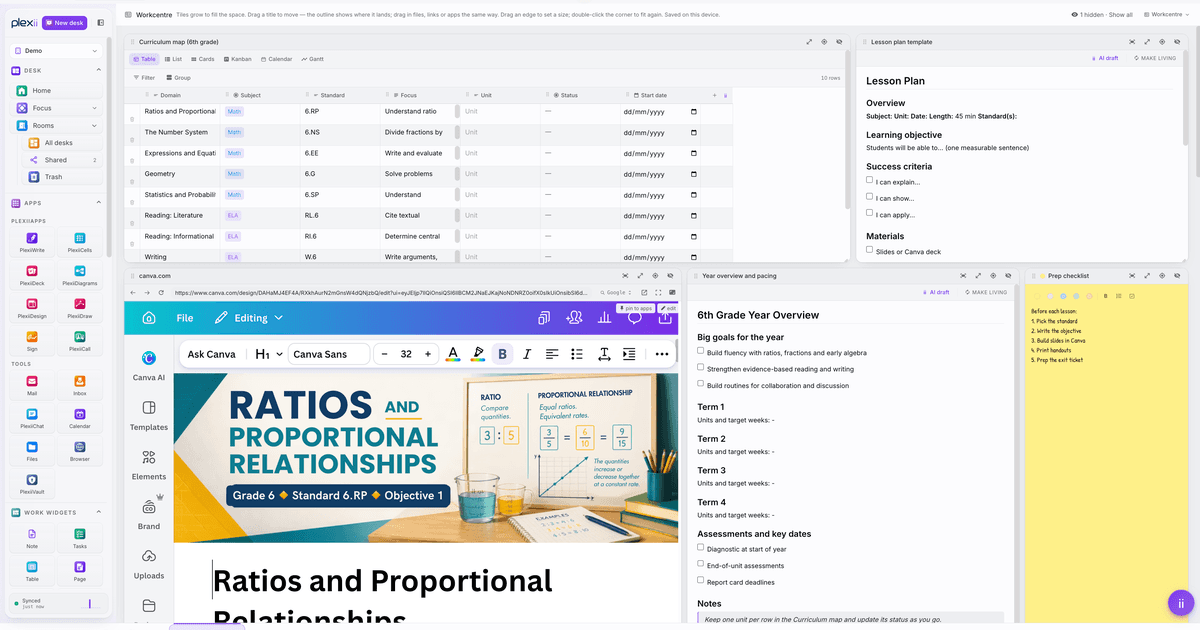
About this app
Plexii is a desktop workspace for Windows and Mac that gives every task its own calm space. Keep the docs, apps and notes for each project, class or remote-work task together, switch between them without losing your place, and focus on one thing at a time.
Key features
- 1One desk per task: files, notes, tabs and a focus timer side by side, reopening exactly where you left off.
- 2Local-first storage with a vault, offline work, and optional local AI or your own Anthropic/OpenAI key.
- 3Bundled PlexiiOffice suite (Write, Cells, Deck, Diagrams, Design, Draw) with AI that cites your own files.
Target customer profile
Drawn from the product itself, not from a survey.
Demographic
Freelancers and consultants juggling multiple clients
Pain points
Context lost between apps; rebuilding the same picture every time
Primary needs
One canvas per client task that reopens exactly where they left off
Demographic
Marketing and startup teams collaborating on campaigns
Pain points
Docs, sheets and chat scattered across tools that don't talk
Primary needs
Shared desks, AI that cites sources, and files kept beside the work
Demographic
ADHD and focus-challenged knowledge workers
Pain points
Hard to start, easy to drift, clutter causes overwhelm
Primary needs
Five-minute focus sessions, body doubling, and close-a-desk decluttering
Demographic
Students and researchers writing long-form work
Pain points
Research, notes and drafts live in separate windows
Primary needs
Grounded AI with citations and a single desk for thesis sections
Scout Review
Written by AI from measured evidence, scored out of 100.
Plexii is a desktop workspace that gives every task its own 'desk' — files, notes, tabs and a focus timer side by side, reopening exactly where you left off. The pitch is sharp and the problem is real. The marketing site is fast (Lighthouse 89 mobile / 97 desktop) and security hygiene is strong (11/12 headers, SSO and audit logs on higher tiers). Design is the weak spot: a bold hero undermined by five competing CTAs, a cluttered 'Featured on' strip and an unrendered six-step section. Usability is competent — browser demo, real docs, generous free tier — but the download flow is split. Accessibility passes automated checks at 95/100 with one ARIA mismatch. Growth is differentiated but crowded. A promising early-stage product that needs to tighten its front door.
Measure by measure
Usability
63Browser demo with sample data, no card required, plus a real docs center and a generous free tier make it easy to try. Split download links and small grey microcopy add friction to the first step.
Design
58Bold two-tone hero and a clear purple CTA sell the 'one desk per task' idea, but five competing hero actions, a cluttered 'Featured on' strip and an unrendered six-step section undercut the polish.
Speed
72Lighthouse mobile 89/100 (LCP 1.4s, CLS 0, TBT 357ms) and desktop 97/100 — a genuinely snappy marketing site with no layout shift and no lag complaints in the evidence.
Security
74Strong header hygiene (HSTS, CSP, frame protection, Referrer-Policy, SPF, DMARC; 11/12 checklist) plus SSO, audit logs and self-hosting on higher tiers. Only Permissions-Policy is missing; no third-party audit verified.
Accessibility
78Lighthouse a11y 95/100 with a single aria-role mismatch failing audit, and the app ships a 'Check accessibility' tool. No public WCAG statement or verified multi-language support in the evidence.
Growth
62A real, named problem — context lost across tabs and apps — with a specific wedge (one desk per task, local-first, cited AI) aimed at freelancers, ADHD workers and students. Differentiated, but the category is crowded.
Improvement areas
- Hero has five competing CTAs — collapse to one primary action and move downloads to the nav.
- 'Featured on' logo strip mixes styles and includes a stray cursor artifact; needs curation.
- No public WCAG conformance statement or third-party security audit (SOC 2/ISO) found in evidence.
Design & Usability
Plexii's homepage opens with a confident two-tone headline — 'Give every task its own desk' — and a single dominant purple CTA that makes the value proposition land in one read. The multi-window screenshot makes the desk concept tangible. But the hero then spends that clarity on five competing actions: browser trial, Mac/Windows download, Download Plexii free, join a live session, book a demo. The 'Featured on' strip mixes pill badges, wordmarks and boxed logos with a stray cursor, and the below-the-fold six-step section didn't render in the capture. Usability is stronger: a browser demo with sample data and no card, a real docs center with a detailed PlexiiWrite guide, and a free tier that is the whole personal workspace. The split download links and small grey microcopy are the main friction points.
Speed & Security
Speed is a genuine strength. Lighthouse mobile performance lands at 89/100 with LCP 1.4s, CLS 0 and TBT 357ms; desktop hits 97/100. That's a fast, stable marketing site with no layout shift and no lag complaints in the collected evidence — well ahead of the typical indie SaaS landing page. Security is solid for the stage: HTTPS enforced, HSTS, CSP, frame protection, X-Content-Type-Options, Referrer-Policy, SPF and DMARC all present, an 11/12 header checklist with only Permissions-Policy missing. The pricing page backs this up with SSO, directory sync, audit logs, data residency and self-hosting on Team and Enterprise tiers, and the free tier is local-first with a vault. What's missing is third-party verification — no SOC 2, ISO or pen-test report found in the evidence — so the score stays in the good-but-unproven range.
Accessibility & Growth
Accessibility scores well on automated checks: Lighthouse 95/100 with a single failing audit (aria-* attributes not matching their roles), and the app itself ships a 'Check accessibility' tool inside PlexiiWrite. What isn't verified is a public WCAG conformance statement or multi-language support. Growth is the more interesting question. The problem Plexii names — context lost across twelve tabs and four apps, rebuilding the same picture every time — is real and worth paying to solve, and the target segments (freelancers juggling clients, ADHD knowledge workers, students writing long-form) are specific. The wedge is concrete: one desk per task that reopens exactly where you left it, local-first storage, offline work, and AI that cites your own files. Against Notion, ClickUp and Microsoft Loop, that's a genuine differentiator — none of them ship a native per-task desktop canvas. The honest limit is category crowding: the canvas/workspace space is loud, and the domain is only 0.3 years old, so the idea has room but the proof of escape velocity doesn't exist yet.
Conclusion
Plexii is worth a look if the 'twelve tabs, four apps, one task' problem is yours — the browser demo costs nothing and the free tier is the whole personal workspace. The idea is specific and the execution is competent. What it needs next is a homepage that picks one action instead of five, a public accessibility statement to match its 95/100 audit, and some third-party security proof to back the SSO and audit-log claims. The foundation is there; the polish and the proof are what separate a promising indie launch from a product people trust with their work.
Suggestions for improvement
- Collapse the hero to one primary CTA (browser trial) and move Mac/Windows downloads to a single secondary link or nav dropdown.
- Fix the 'Featured on' strip: curate logos to consistent sizing and remove the stray cursor artifact from the screenshot.
- Investigate why the below-the-fold six-step section didn't render in the capture — scroll-triggered animation may be hiding content from some visitors.
- Publish a WCAG conformance statement and fix the aria-* role mismatch flagged by Lighthouse to back up the 95/100 score.
Alternatives comparison
Named competitors, point by point. Nobody paid to appear here or to be left out.
 Plexii |  Notion |  ClickUp |  Microsoft Loop | |
|---|---|---|---|---|
| Per-task desktop canvas that reopens where you left off | Yes — core feature, one desk per task | No — cloud pages, no native per-task canvas | No — task-tracker views, not a freeform canvas | Partial — collaborative canvas, not per-task desktop |
| Local-first storage and offline work | Yes — saved on your machine, works offline | No — cloud-first, limited offline | No — cloud-based | No — cloud-based, Microsoft 365 required |
| Bundled document/sheet/slides suite | Yes — PlexiiWrite, Cells, Deck, Diagrams, Design, Draw | Docs and databases, no native slides/sheets | Docs and whiteboards, no full office suite | Loop components; full Office via Microsoft 365 |
| AI that cites your own files | Yes — answers from your files with citations | Yes — Notion AI with workspace context | Yes — ClickUp Brain AI | Yes — Copilot in Microsoft 365 |
| Free tier | Free forever personal workspace, 3 desks, 100 AI credits/mo | Free personal plan with limited blocks | Free Forever plan with limited features | Free with Microsoft account, limited |
| SSO and audit logs | Yes — SSO on Team, audit logs on Enterprise | Yes — SSO on Enterprise, audit logs | Yes — SSO on Enterprise, audit logs | Yes — via Microsoft 365 enterprise |
Notion
All-in-one workspace for docs, databases and wikis; cloud-first with strong templates but a steeper setup and no native desktop canvas per task.
ClickUp
Feature-rich project management and docs platform; powerful for teams but heavier and more task-tracker-centric than a freeform canvas.
Microsoft Loop
Collaborative canvas with portable components tied to Microsoft 365; strong for Office users but requires the Microsoft ecosystem.
Comparing options? See Plexii alternatives, scored side by side
More Productivity apps
View all Productivity
Qamarero
92An all-in-one hospitality software for restaurants and ba...

Puzzly – B2B Lead Generation & Sales Intelligence Platform
92Puzzly is an all-in-one B2B lead generation platform that...

The Stack Newsletter
92A weekly newsletter delivering curated tech jobs, intervi...

StoryPad
92Privacy-first open source journal app with a continuous t...

Vibe Coding Agent Skills
92A free, open-source platform offering 110 AI agent skills...

Notion
92All-in-one AI workspace for docs, projects, and knowledge...

EmbedMyReviews
92White-label reputation management software for agencies s...

QRBliss
91Branded QR codes with AI Brand Sync, 15 free dynamic code...

Strukchad Property Management
91Property management for Kenyan letting agents: rent invoices raised every month, M-Pesa rent prompts to tenants, arrears tracking and landlord statements.

CC Switch
91Open-source desktop app for switching AI coding providers...

Gerty
91Private, local AI assistant for Mac that runs offline

BACKLNK
90Backlnk is a free SEO and AI visibility website: 15 website checks, a full audit as a PDF report, and guides to get found in search and AI answers.


A platform dedicated to providing unbiased reviews of newly launched applications, analyzing everything from their features to their full potential.
info@scoutforge.net© 2026 Scoutforge. All rights reserved.
