Cycling through all six. Tap any point to stop.
Measured on six things
Fast, free online text utilities for formatting, converti...
Growth
65Rapidly expanding with 76+ tools covering text, SEO, writing, regex, JSON, and developer utilities. Active development visible through new tools and blog content.
Screenshots
1 / 1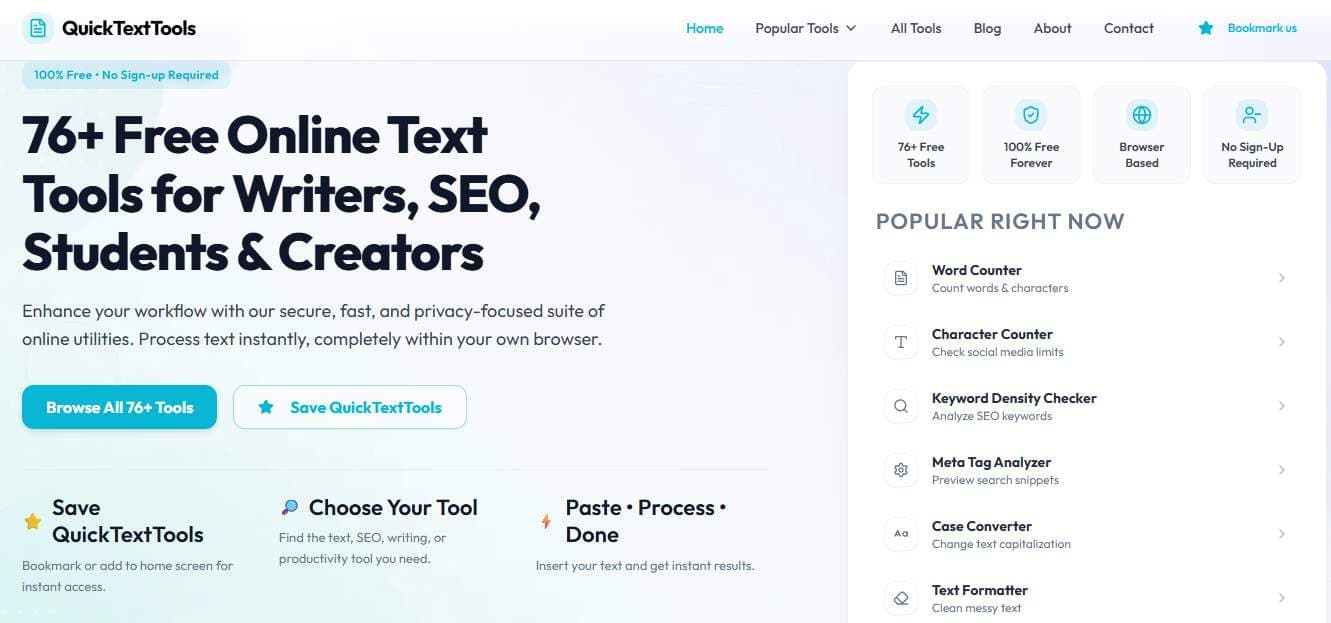
About this app
QuickTextTools is a no-fuss online platform packed with handy text utilities. Whether you need to count words, convert case, format JSON, or generate lorem ipsum, this site does it instantly in your browser—no downloads or sign-ups required. I found it super useful for quick copy-paste tasks when editing content or debugging code. It's a Swiss Army knife for text manipulation that just works. Perfect for writers, developers, and anyone who needs to wrangle text efficiently without bloatware.
Key features
- 176+ completely free, no-signup, browser-based text, SEO, writing, and developer tools
- 2All processing done client-side for instant speed and strong privacy protection
- 3Categorized navigation with popular tools, converters, JSON formatters, diff checkers, regex utilities, and more
Target customer profile
Drawn from the product itself, not from a survey.
Demographic
Freelance writers and bloggers
Pain points
Manually counting words, converting case, or formatting text takes time.
Primary needs
Quick, accurate text transformation tools without distractions.
Demographic
Web developers and programmers
Pain points
Needing to format or minify JSON/HTML quickly without installing software.
Primary needs
Clean, instant code utilities that work offline in the browser.
Demographic
Students and academics
Pain points
Checking word counts, generating citations, or cleaning up copied text.
Primary needs
Simple, free tools for proofreading and text analysis.
Scout Review
Written by AI from measured evidence, scored out of 100.
QuickTextTools is the rare utility site that feels thoughtfully built rather than thrown together. With 76+ instantly usable, privacy-first tools, it delivers exactly what writers, developers, and students need without distractions. Its clean design, blazing client-side speed, and no-nonsense approach make it a daily driver for quick text tasks. While accessibility could be deeper and the feature set, though broad, isn't revolutionary, it outperforms both main alternatives in usability and modern feel. A genuine Swiss Army knife that just works.
Measure by measure
Usability
85Instant browser-based tools with simple paste-and-go workflow. No sign-ups, no bloat. Navigation by categories (Popular, Developer, Converters) helps users find what they need quickly.
Design
82Clean, minimalist interface with intuitive card-based tool navigation. Modern color scheme, ample whitespace, and clear typography make it visually appealing and distraction-free.
Speed
92All processing happens client-side in the browser. Tools load and execute instantly with zero server round-trips. Built explicitly for speed and works offline.
Security
88100% client-side JavaScript execution. No data leaves your browser. Strong emphasis on privacy and no sign-up requirement reduces attack surface.
Accessibility
70Solid contrast and readable fonts. Keyboard-friendly inputs. However, lacks explicit ARIA labels, screen reader optimizations, or detailed accessibility statement.
Growth
65Rapidly expanding with 76+ tools covering text, SEO, writing, regex, JSON, and developer utilities. Active development visible through new tools and blog content.
Improvement areas
- Stronger accessibility compliance with ARIA labels and screen reader optimization
- Dark mode support for better developer ergonomics
- Advanced power features like keyboard shortcuts, command bar, or saved presets
- More prominent tool search and cross-linking between related utilities
Design & Usability
QuickTextTools nails the 'no-fuss' promise with a clean, modern design that prioritizes function over flashy graphics. The card layout and categorized navigation (Popular Tools, Developer Tools, Converters) make discovering the 76+ utilities effortless. Paste text, click a button, copy result — the workflow is buttery smooth. It perfectly serves freelance writers needing quick word counts or case conversion, developers formatting JSON on the fly, and students cleaning copied content. Compared to alternatives, it avoids the ad overload of TextFixer and the overwhelming clutter of Online-Utility.org.
Speed & Security
Everything runs locally in your browser, delivering near-instant results even on complex tasks like regex replace or JSON formatting. No downloads, no accounts, no data sent to servers — this is as private and fast as browser-based tools get. The emphasis on 'built for speed and privacy' in the footer isn't just marketing; it's the core architecture. This makes it ideal for sensitive content or offline use, areas where competitors sometimes fall short due to heavier server reliance or cluttered interfaces that slow users down.
Accessibility & Growth
While contrast and basic usability are strong, the platform could improve with better ARIA support and explicit accessibility features for broader audiences. Growth has been impressive, expanding from core text manipulators to a comprehensive suite including SEO keyword tools, readability checkers, diff tools, and developer utilities. The accompanying blog with practical tutorials adds real value. It positions itself well against TextFixer (more limited, ad-heavy) and Online-Utility.org (broader but dated and cluttered).
Conclusion
If you're tired of bloated, ad-infested, or ancient-looking text tools, QuickTextTools is the refreshing upgrade you've been looking for. Bookmark it — you'll use it more than you expect.
Suggestions for improvement
- Add comprehensive keyboard shortcuts and a command palette for power users
- Implement better accessibility features including full ARIA labels and screen reader testing
- Create a dark mode toggle to match modern developer expectations
- Add user-requested tool voting or a roadmap section to guide further growth
Alternatives comparison
Named competitors, point by point. Nobody paid to appear here or to be left out.
 QuickTextTools |  TextFixer |  Online-Utility.org | |
|---|---|---|---|
| Number of Tools | 76+ | 30+ | 50+ |
| Ads & Distractions | None | Heavy ads | Minimal |
| Design & Modernity | Clean & modern | Functional but ad-heavy | Dated & cluttered |
| Privacy (Client-side) | Strong emphasis, fully client-side | JS-based but less emphasized | Browser-based |
| Target Audience Fit | Writers, devs, students, SEO | General text fixing | Broad utilities including math |
TextFixer
Offers similar text formatting tools but includes ads.
Online-Utility.org
Comprehensive suite of text utilities with a more cluttered interface.
Comparing options? See QuickTextTools alternatives, scored side by side
Sources
What the review was written against. A verdict with no sources is an opinion.
More Productivity apps
View all Productivity
Qamarero
92An all-in-one hospitality software for restaurants and ba...

Puzzly – B2B Lead Generation & Sales Intelligence Platform
92Puzzly is an all-in-one B2B lead generation platform that...

The Stack Newsletter
92A weekly newsletter delivering curated tech jobs, intervi...

StoryPad
92Privacy-first open source journal app with a continuous t...

Vibe Coding Agent Skills
92A free, open-source platform offering 110 AI agent skills...

Notion
92All-in-one AI workspace for docs, projects, and knowledge...

EmbedMyReviews
92White-label reputation management software for agencies s...

QRBliss
91Branded QR codes with AI Brand Sync, 15 free dynamic code...

Strukchad Property Management
91Property management for Kenyan letting agents: rent invoices raised every month, M-Pesa rent prompts to tenants, arrears tracking and landlord statements.

CC Switch
91Open-source desktop app for switching AI coding providers...

Gerty
91Private, local AI assistant for Mac that runs offline

BACKLNK
90Backlnk is a free SEO and AI visibility website: 15 website checks, a full audit as a PDF report, and guides to get found in search and AI answers.


A platform dedicated to providing unbiased reviews of newly launched applications, analyzing everything from their features to their full potential.
info@scoutforge.net© 2026 Scoutforge. All rights reserved.
