Cycling through all six. Tap any point to stop.
Measured on six things
Scans text for AI traces and removes them: invisible characters, AI watermarks, citation leftovers, AI-style punctuation. Runs in your browser.
Growth
58Real, specific pain (hidden Unicode, utm tags, citation artifacts in AI text) with a concrete wedge: 17 named trace groups, browser-only privacy, free unlimited scanning. Early-stage domain (registered Nov 2026) is context, not the score.
Screenshots
1 / 1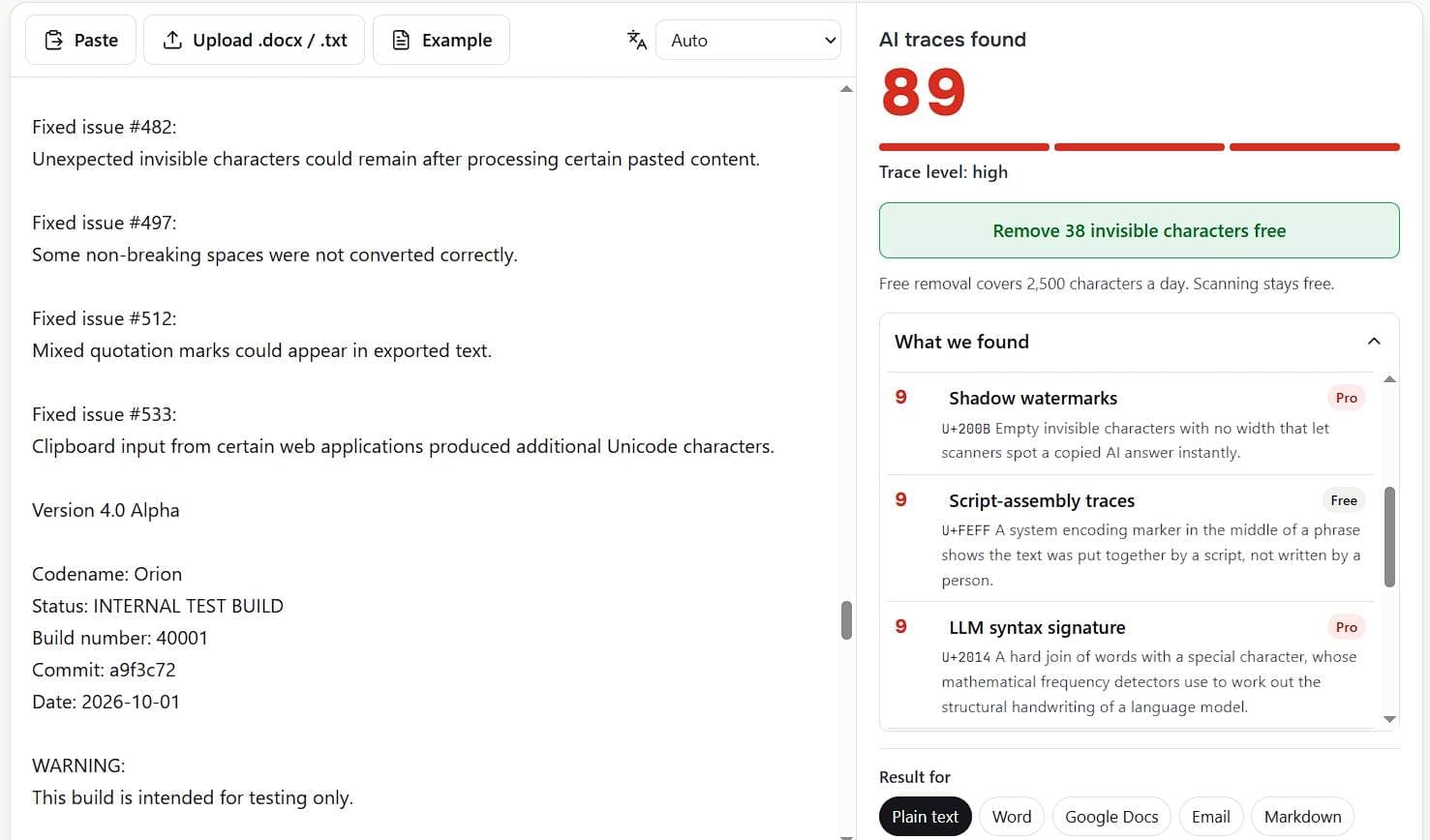
About this app
Your AI text is giving you away. Remove AI Traces finds and wipes hidden technical traces in seconds: hidden AI fingerprints, machine-generated artifacts, and copy-paste traces left behind by Claude, Gemini, and other AI tools, Markdown junk, look-alike letters, LLM syntax signatures, training-dataset artifacts, plus AI authorship clues and document creation fingerprints hidden inside Word files. 17 groups of traces, each one highlighted with its Unicode code, then removed and re-checked down to zero. Works with text from ChatGPT, Claude, Gemini and Copilot in 12 languages. 100% private: everything runs in your browser, your text never leaves the page. No sign-up. Scanning is free and unlimited, and invisible characters and Markdown are removed free every day. Paste, click, copy into Word, Google Docs or email, and publish clean. The fastest way to remove AI traces from any text or .docx. Try it free.
Key features
- 1Scans text for 17 groups of AI traces (hidden Unicode, utm tags, citation artifacts, look-alike letters, Word metadata) with Unicode codes.
- 2100% browser-based processing — text never leaves the page; no sign-up required.
- 3Free unlimited scanning and 2,500 chars/day of invisible-character and Markdown removal; Pro tier for full cleanup (not yet live).
Target customer profile
Drawn from the product itself, not from a survey.
Demographic
Content marketers and SEO specialists
Pain points
AI-generated content carries hidden characters and tags that can harm SEO or look unprofessional.
Primary needs
Clean, publish-ready text free of AI traces without rewriting.
Demographic
Students and academics
Pain points
AI-assisted writing may leave detectable traces that could trigger plagiarism or AI-detection flags.
Primary needs
Remove technical traces from essays and research papers to ensure originality.
Demographic
Professional writers and editors
Pain points
Copying AI output into documents introduces formatting issues and invisible characters.
Primary needs
Seamless conversion of AI text to clean, properly formatted content for Word, Google Docs, or email.
Scout Review
Written by AI from measured evidence, scored out of 100.
Remove AI Traces is a focused utility that does one thing well: it finds and removes hidden AI fingerprints from text, entirely in your browser. The homepage demonstrates the scanner above the fold, the red accent system is coherent, and the 17 trace groups are named with Unicode codes rather than vague promises. Speed is excellent (Lighthouse 100/100 mobile and desktop), security headers are solid (10/12), and accessibility is near-perfect (100/100 with one minor audit failure). The weak spots are design density (17 near-identical cards, tiny Free/Pro pills) and a cramped results panel that makes the most important output hard to read. Pricing is transparent ($4.99 day pass, $9.99/mo, $49.99/yr, $129 lifetime) but Pro is not yet available — the site says 'Payments open soon.' For a brand-new product, the execution is above average; the question is whether the niche is big enough to sustain it.
Measure by measure
Usability
68No sign-up, paste field dominates the page, and the empty state names the AI sources. Inline Free/Pro gating is transparent but easy to miss. Results panel is cramped in a short scroll box.
Design
71Consistent red accent system carries meaning across hero, steps and trace codes. Live scanner above the fold demonstrates the product instantly. Dense 17-card grid and tiny Free/Pro pills weaken scannability.
Speed
88Lighthouse mobile 100/100 with LCP 905ms, CLS 0, TBT 69ms; desktop also 100/100. Client-side scanning means no server round-trip. Genuinely fast.
Security
74Strong header posture: HSTS, CSP, frame protection, Referrer-Policy, Permissions-Policy, SPF, DMARC; 10/12 checklist points. Browser-only processing limits data exposure. No SOC 2/ISO claims found.
Accessibility
79Lighthouse accessibility 100/100 with one failing audit on visible-text/accessible-name mismatch. English and Russian UI toggle; 12-language text processing. Automated checks only cover part of WCAG.
Growth
58Real, specific pain (hidden Unicode, utm tags, citation artifacts in AI text) with a concrete wedge: 17 named trace groups, browser-only privacy, free unlimited scanning. Early-stage domain (registered Nov 2026) is context, not the score.
Improvement areas
- Pro checkout is not live ('Payments open soon'), so the paid value proposition is currently unavailable.
- Free/Pro tier pills are too small and low-contrast to read at a glance on the trace grid.
- Results panel is cramped in a short scroll box, making the tool's primary output hard to review.
Design & Usability
The homepage puts the scanner above the fold, which is the right call for a utility tool — you see the product work before you read a word of marketing. The red accent system is used semantically (hero, step numerals, trace codes, score), giving the page a coherent identity. The 17-card trace grid is the weak spot: dense, repetitive, and the Free/Pro pills are too small to read at a glance, so users may not realize half the fixes are paywalled until they click. Usability is solid: no sign-up, paste field dominates, empty state names the AI sources, and trust cues (browser-only, free scanning) sit right under the tool. The results panel is cramped in a short scroll box, which undercuts the most important output. Overall: competent, transparent, but the gating and results UI need breathing room.
Speed & Security
Speed is the standout: Lighthouse mobile 100/100 with LCP 905ms, CLS 0, TBT 69ms, and desktop also 100/100. Client-side processing means no server round-trip for scanning, so the tool feels instant. Security posture is strong for an indie tool: HSTS, CSP, frame protection, Referrer-Policy, Permissions-Policy, SPF and DMARC all present (10/12 checklist points), and the browser-only architecture means text never leaves the tab. Payments go through Paddle as merchant of record, so card details never touch the product. The only gap is the absence of published compliance certifications (SOC 2, ISO), which is normal at this stage but worth noting for enterprise buyers. No breach history or security incidents found in the collected evidence.
Accessibility & Growth
Accessibility scores 100/100 on Lighthouse's axe-core audit, with one failing check on visible-text/accessible-name mismatch — a minor fix. The site offers English and Russian UI toggles and processes text in 12 languages, which is good coverage for a global audience. Growth potential is a judgment call: the problem is real and specific (hidden Unicode, utm_source=chatgpt.com tags, oaicite citation artifacts, Word metadata), and the product names 17 trace groups with Unicode codes, which is a concrete differentiator against generic text cleaners and AI humanizers that rewrite content and alter meaning. The wedge is browser-only privacy plus free unlimited scanning, which suits the target customers (content marketers, students, professional writers). The category has headroom as AI-generated text becomes ubiquitous, but the domain is brand new (registered Nov 2026), so traction is unproven. Score reflects a differentiated idea in an early-stage product, not a measurement of current adoption.
Conclusion
If you paste AI text into documents and care about what's hiding in it, this tool is worth a bookmark. The free tier (unlimited scanning, 2,500 chars/day of invisible-character and Markdown removal) is genuinely useful, and the browser-only architecture means you're not shipping your text to a server. The Pro tier is where the real cleanup lives — utm tags, citation artifacts, look-alike letters, Word metadata — but it's not live yet, so the value proposition is currently half-built. Watch this one: if Pro ships and the pricing holds, it fills a real gap that generic text cleaners and AI humanizers don't touch.
Suggestions for improvement
- Ship Pro checkout — the 'Payments open soon' banner undercuts trust on a page that otherwise feels finished.
- Enlarge the Free/Pro pills and increase contrast so users can see which fixes are paywalled before clicking.
- Give the results panel more vertical space or a full-screen view; the current short scroll box hides the tool's main output.
- Add a short accessibility statement and fix the one failing audit (visible-text/accessible-name mismatch) to back up the 100/100 score.
Alternatives comparison
Named competitors, point by point. Nobody paid to appear here or to be left out.
 Remove AI Traces |  AI Detector & Humanizer | Text Cleaner | |
|---|---|---|---|
| Removes hidden AI-specific traces (Unicode, utm tags, citation artifacts) | Yes — 17 named trace groups with Unicode codes | No — rewrites text to evade detection, does not remove technical traces | Partial — removes formatting but not AI-specific traces |
| Privacy model (where text is processed) | 100% in-browser; text never leaves the page | Server-side rewriting; text sent to remote API | Varies; often server-side or unclear |
| Free tier availability | Unlimited scanning; 2,500 chars/day removal free | Limited free credits; paid subscription for full use | Often free with ads or limited features |
| Pricing model | $4.99 day pass, $9.99/mo, $49.99/yr, $129 lifetime (Pro not yet live) | Monthly subscription, typically $10–$30/mo | Free or one-time low-cost purchase |
| Preserves original meaning and formatting | Yes — removes traces without rewriting; context-aware replacement | No — rewrites text, often altering meaning | Yes — formatting cleanup only, no rewriting |
AI Detector & Humanizer
Tools that rewrite AI text to make it undetectable, but often alter meaning and don't remove technical traces.
Text Cleaner
General-purpose text cleaning tools that remove formatting but not AI-specific traces like utm_source or citation artifacts.
Comparing options? See Remove AI Traces alternatives, scored side by side
More Productivity apps
View all Productivity
StoryPad
92Privacy-first open source journal app with a continuous t...

The Stack Newsletter
92A weekly newsletter delivering curated tech jobs, intervi...

Qamarero
92An all-in-one hospitality software for restaurants and ba...

Vibe Coding Agent Skills
92A free, open-source platform offering 110 AI agent skills...

Puzzly – B2B Lead Generation & Sales Intelligence Platform
92Puzzly is an all-in-one B2B lead generation platform that...

Notion
92All-in-one AI workspace for docs, projects, and knowledge...

EmbedMyReviews
92White-label reputation management software for agencies s...

QRBliss
91Branded QR codes with AI Brand Sync, 15 free dynamic code...

CC Switch
91Open-source desktop app for switching AI coding providers...

Strukchad Property Management
91Property management for Kenyan letting agents: rent invoices raised every month, M-Pesa rent prompts to tenants, arrears tracking and landlord statements.

Gerty
91Private, local AI assistant for Mac that runs offline

username.md
90One verified handle for your online identity, readable by...


A platform dedicated to providing unbiased reviews of newly launched applications, analyzing everything from their features to their full potential.
info@scoutforge.net© 2026 Scoutforge. All rights reserved.
