

A platform dedicated to providing unbiased reviews of newly launched applications, analyzing everything from their features to their full potential.
info@scoutforge.net© 2026 Scoutforge. All rights reserved.
A platform dedicated to providing unbiased reviews of newly launched applications, analyzing everything from their features to their full potential.
info@scoutforge.net© 2026 Scoutforge. All rights reserved.
A platform dedicated to providing unbiased reviews of newly launched applications, analyzing everything from their features to their full potential.
info@scoutforge.net© 2026 Scoutforge. All rights reserved.
Cycling through all six. Tap any point to stop.
Measured on six things
Convert Outlook PST emails to browser-ready HTML without ...
Dated 2015-era layout with dense text and small screenshots. Branding is inconsistent (PST to HTML vs PST Mailbox Converter). Functional but visually unpolished.
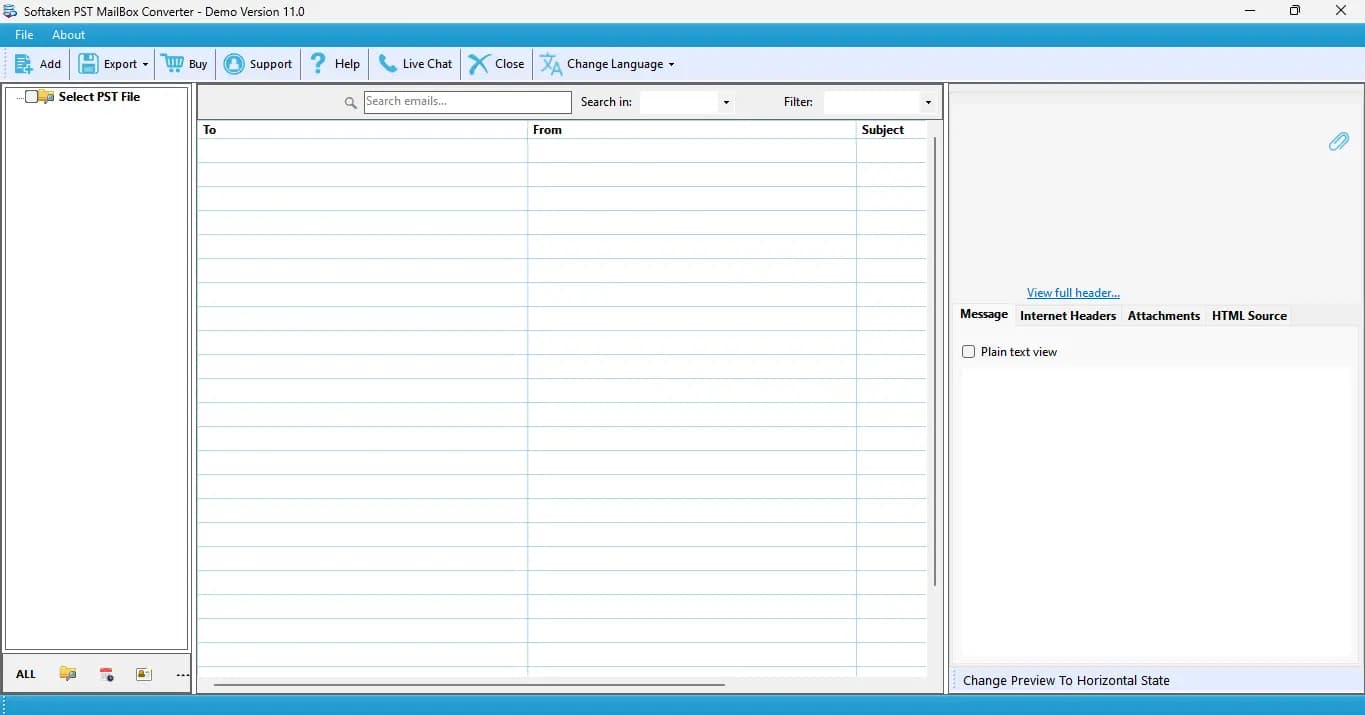
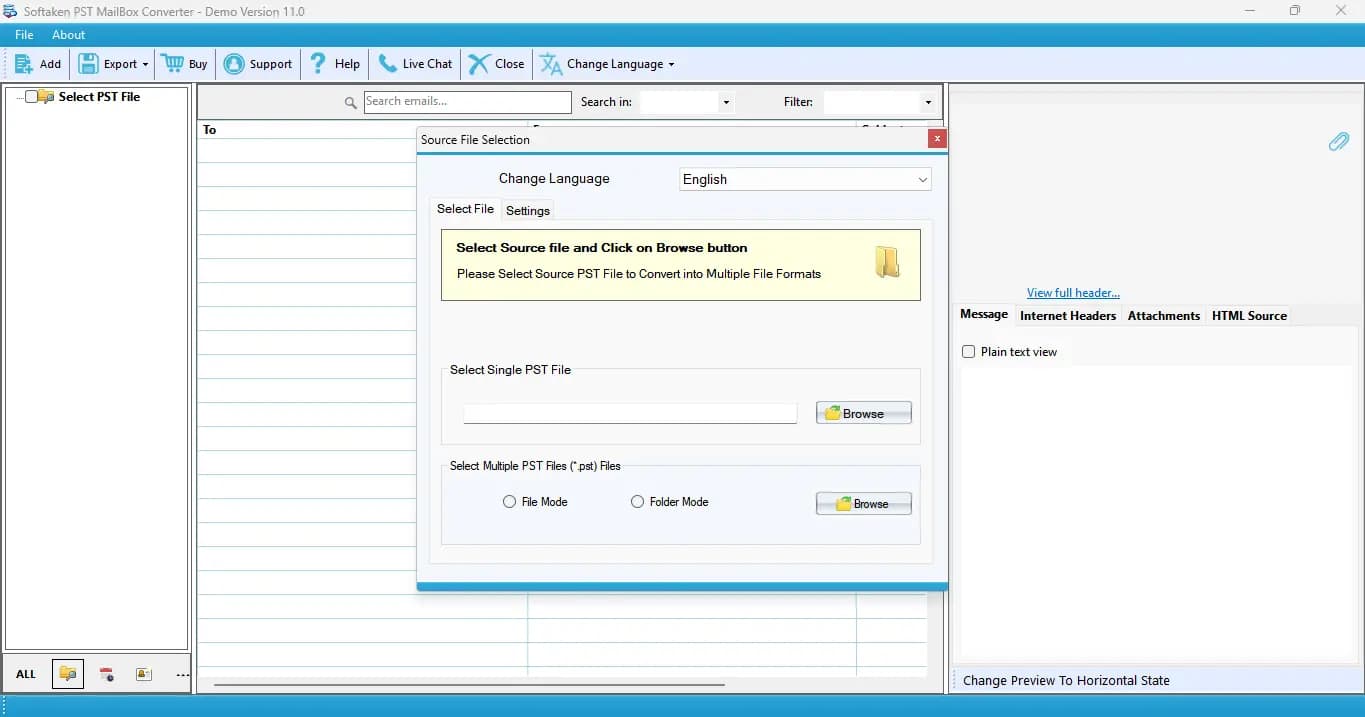
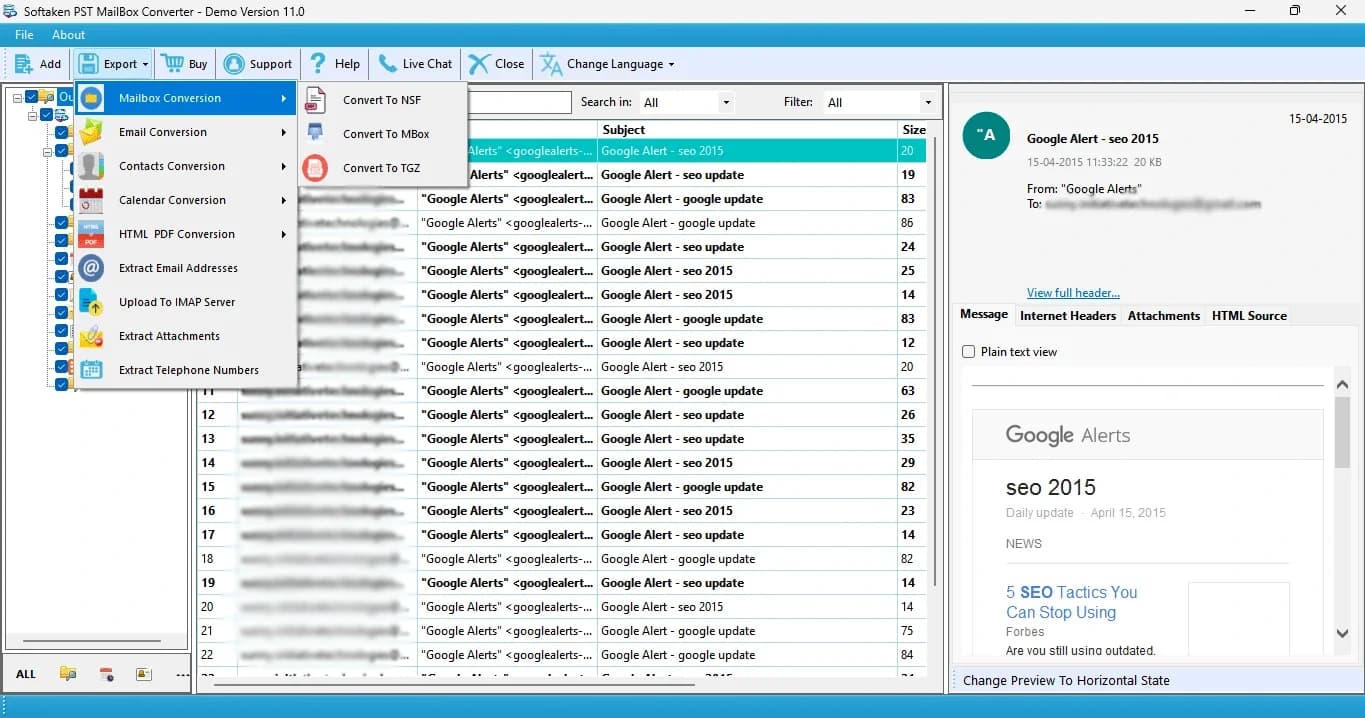
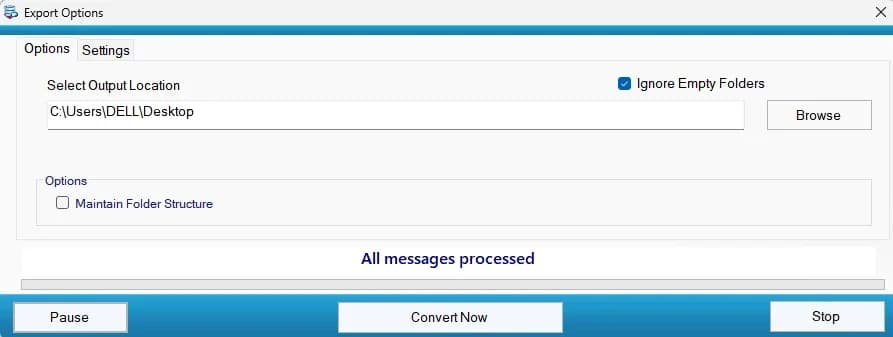
Softaken PST to HTML Converter is a reliable software for exporting emails from Outlook PST files into HTML format along with their attachments. It provides a simple and convenient way to open and access PST email data through web browsers without requiring Outlook. It also supports batch conversion allowing users to migrate multiple PST files to HTML format at once, saving time and effort. The tool supports password-protected PST files as well as both ANSI and UNICODE PST file formats making it beneficial for different Outlook data files. It also processes large-sized Outlook PST files and convert them into easily accessible HTML web pages. Users can download the software easily on all editions of Windows versions like Windows 11, 10, 8.1, 8, 7 etc. It scans the added PST file and provides an instant preview with PST email attributes. The software is self-sufficient and supports all versions of MS Outlook like Outlook 2024, 2021, 2019, 2016, 2013, 2010 etc.
Drawn from the product itself, not from a survey.
Demographic
IT administrators and email migration specialists
Pain points
Need to convert large batches of PST files to HTML for compliance or archiving without installing Outlook on every machine.
Primary needs
Batch conversion, preservation of folder structure and metadata, support for password-protected PSTs.
Demographic
Legal professionals and eDiscovery teams
Pain points
Must review and share email evidence in a universally accessible format while maintaining original formatting and attachments.
Primary needs
Accurate conversion with attachments, selective export, and output that can be opened in any browser without specialized software.
Demographic
Home users and small business owners with old PST backups
Pain points
Have PST files from old Outlook installations but no longer have Outlook installed or licensed.
Primary needs
Simple, affordable tool to convert PST emails to HTML for reading and long-term storage without Outlook dependency.
Written by AI from measured evidence, scored out of 100.
Softaken PST to HTML Converter is a functional utility for a specific need: converting Outlook PST files to HTML without requiring Outlook. It handles batch conversion, password-protected files, and preserves folder structure and attachments. The website is dated and cluttered, and the free trial is limited to 10 items. Speed is excellent, security headers are all present, but accessibility is mediocre and there's no formal security certification. The product competes with SysTools and Aryson in a niche market. For IT admins and legal teams needing a quick conversion tool, it works, but it's not a standout. The lack of a web trial and the dated design make it feel like a legacy tool. It's a solid choice if you need exactly this function and don't mind the rough edges.
Decent docs with user guide, video, and screenshots. Free trial limited to 10 items is restrictive. No live demo or web trial; must install Windows executable.
Dated 2015-era layout with dense text and small screenshots. Branding is inconsistent (PST to HTML vs PST Mailbox Converter). Functional but visually unpolished.
Lighthouse mobile 89/100, desktop 99/100. LCP 2.1s, TBT 0ms. Lightweight marketing page with no heavy SPA framework. Fast and responsive.
All 12 security headers present: HTTPS, HSTS, CSP, frame protection, SPF, DMARC. No public SOC 2, ISO, or bug bounty. Solid for a small vendor.
Lighthouse accessibility 76/100. Failing audits: missing button names, poor contrast, color-only links, no main landmark, small touch targets. No a11y statement.
Real niche problem: PST to HTML without Outlook. Targets IT admins, legal teams, and home users. Differentiated by batch conversion and password-protected PST support. Competitors exist but market is stable.
Softaken PST to HTML Converter looks and feels like a utility from a decade ago. The website is cluttered, the screenshots are tiny, and the product name changes between pages. Usability is better: documentation includes a user guide, video tutorial, and system requirements. The free trial is limited to 10 items, which is restrictive, and there's no live demo or web-based trial. You have to download and install a Windows executable just to see if it works. For IT admins and legal teams who need a quick conversion tool, the lack of a web trial is a friction point. The interface itself, based on screenshots, is a standard Windows desktop app with a folder tree and preview pane. It's functional but not intuitive for first-time users. Overall, the design and usability are adequate for a niche utility but far from modern standards.
Speed is a bright spot: Lighthouse mobile performance 89/100, desktop 99/100, with LCP 2.1s and TBT 0ms. The site is lightweight and loads quickly. Security is also solid: all 12 standard security headers are present, including HTTPS, HSTS, CSP, and DMARC. However, there's no public SOC 2, ISO certification, or bug bounty program. For a tool that handles sensitive email data, especially for legal and eDiscovery use cases, the absence of formal security certifications is a gap. The vendor has been around since 2015, which suggests stability, but transparency around security practices is limited. The privacy policy exists but doesn't detail data handling for the desktop app. Overall, speed is excellent for a marketing site, and security is above average for a small vendor, but the lack of compliance certifications holds it back for enterprise buyers.
Accessibility scores 76/100 on Lighthouse, with failing audits for missing button names, poor color contrast, color-only links, no main landmark, and small touch targets. There's no accessibility statement or WCAG compliance mention. For a tool aimed at IT admins and legal professionals, accessibility may not be top priority, but it's still a weakness. Growth potential is moderate: the product solves a real problem (converting PST to HTML without Outlook) for a specific audience. It differentiates with batch conversion, password-protected PST support, and a standalone engine. Competitors like SysTools and Aryson offer similar features, so Softaken's edge is marginal. The domain has been registered since 2015, indicating an established vendor, but the market is niche and stable rather than growing. The idea has room to grow within its niche, but it's not a high-growth category.
Conclusion
If you need to convert PST files to HTML and you're on Windows, Softaken's tool will get the job done. It's not pretty, and the trial is stingy, but it works. For a niche utility, that might be enough. Just don't expect a modern SaaS experience. The vendor has been around for over a decade, so support and updates are likely reliable. But if you're looking for a more polished or web-based solution, you might want to check the alternatives. Overall, it's a competent but unremarkable tool that does one thing well.
Named competitors, point by point. Nobody paid to appear here or to be left out.
 Softaken PST to HTML Converter Softaken PST to HTML Converter |  SysTools PST to HTML Converter SysTools PST to HTML Converter |  Aryson PST to HTML Converter Aryson PST to HTML Converter | |
|---|---|---|---|
| Batch conversion of multiple PST files | Yes, supports batch conversion via Folder mode. | Yes, supports batch conversion. | Yes, supports batch conversion. |
| Password-protected PST support | Yes, supports password-protected PST files. | Yes, supports password-protected PST files. | Yes, supports password-protected PST files. |
| Free trial limitation | First 10 items only. | First 25 items per folder (typical for SysTools). | First 10 items per folder (typical for Aryson). |
| Standalone (no Outlook required) | Yes, 100% standalone. | Yes, standalone. | Yes, standalone. |
SysTools PST to HTML Converter
A similar tool that converts PST files to HTML with attachments, also standalone and supports batch conversion.
Aryson PST to HTML Converter
Converts Outlook PST emails to HTML format with attachments and supports password-protected files.
Comparing options? See Softaken PST to HTML Converter alternatives, scored side by side

An all-in-one hospitality software for restaurants and ba...

A weekly newsletter delivering curated tech jobs, intervi...

White-label reputation management software for agencies s...

Privacy-first open source journal app with a continuous t...

Puzzly is an all-in-one B2B lead generation platform that...

All-in-one AI workspace for docs, projects, and knowledge...

A free, open-source platform offering 110 AI agent skills...

Open-source desktop app for switching AI coding providers...

One verified handle for your online identity, readable by...

Frame-perfect video-to-GIF maker that runs entirely in yo...

White-label website audits that close deals for digital a...

Automated quote follow-up for trades and service businesses.
A platform dedicated to providing unbiased reviews of newly launched applications, analyzing everything from their features to their full potential.
info@scoutforge.net© 2026 Scoutforge. All rights reserved.
