Is this your app?
Claim SwiftClip to manage its page, add your badge and see your traffic — free, and it stays free.
Cycling through all six. Tap any point to stop.
Measured on six things
An open-source clipboard manager with batch processing, organization tools, and security features for enhanced productivity.
Accessibility
50No mentioned support for screen readers, high-contrast modes, or multiple languages, limiting inclusivity for diverse users.
Screenshots
1 / 4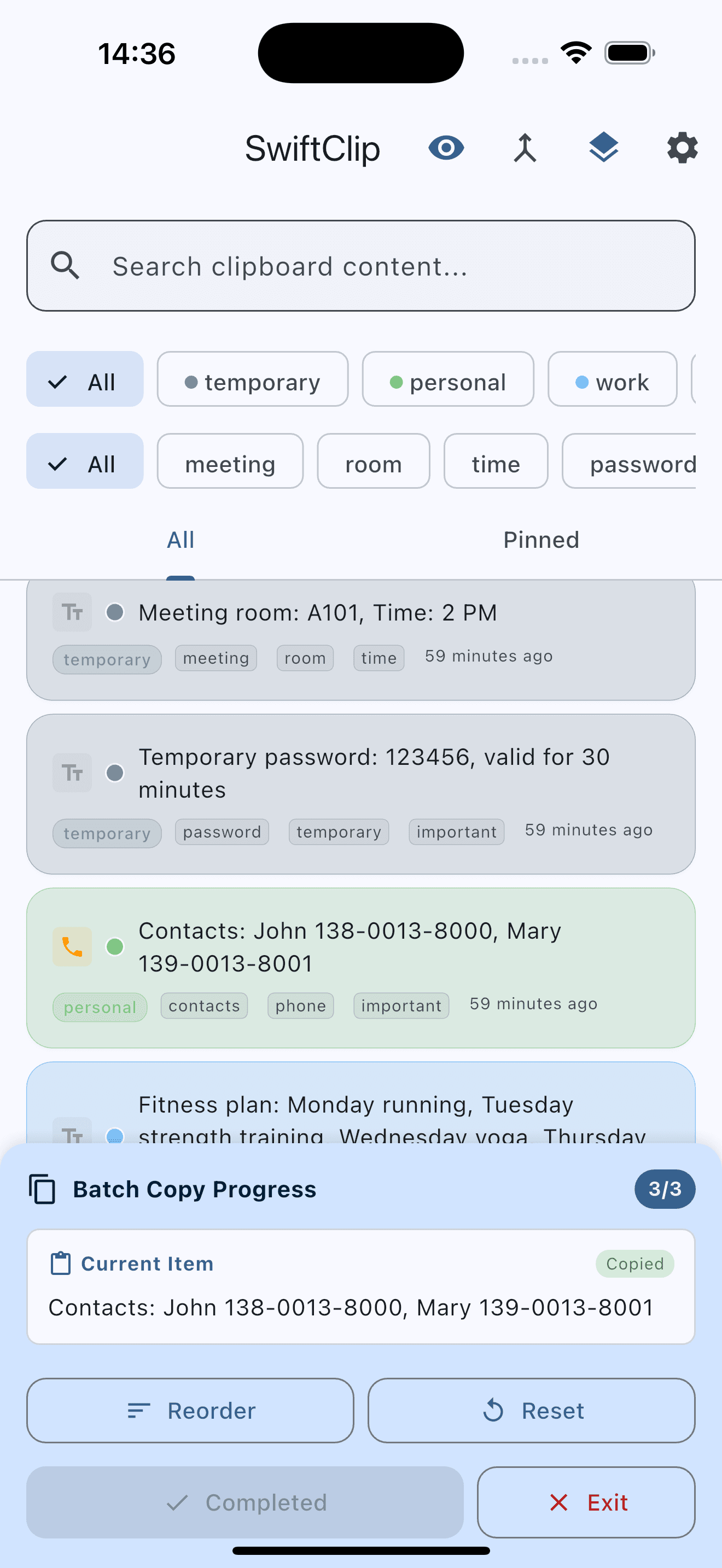
About this app
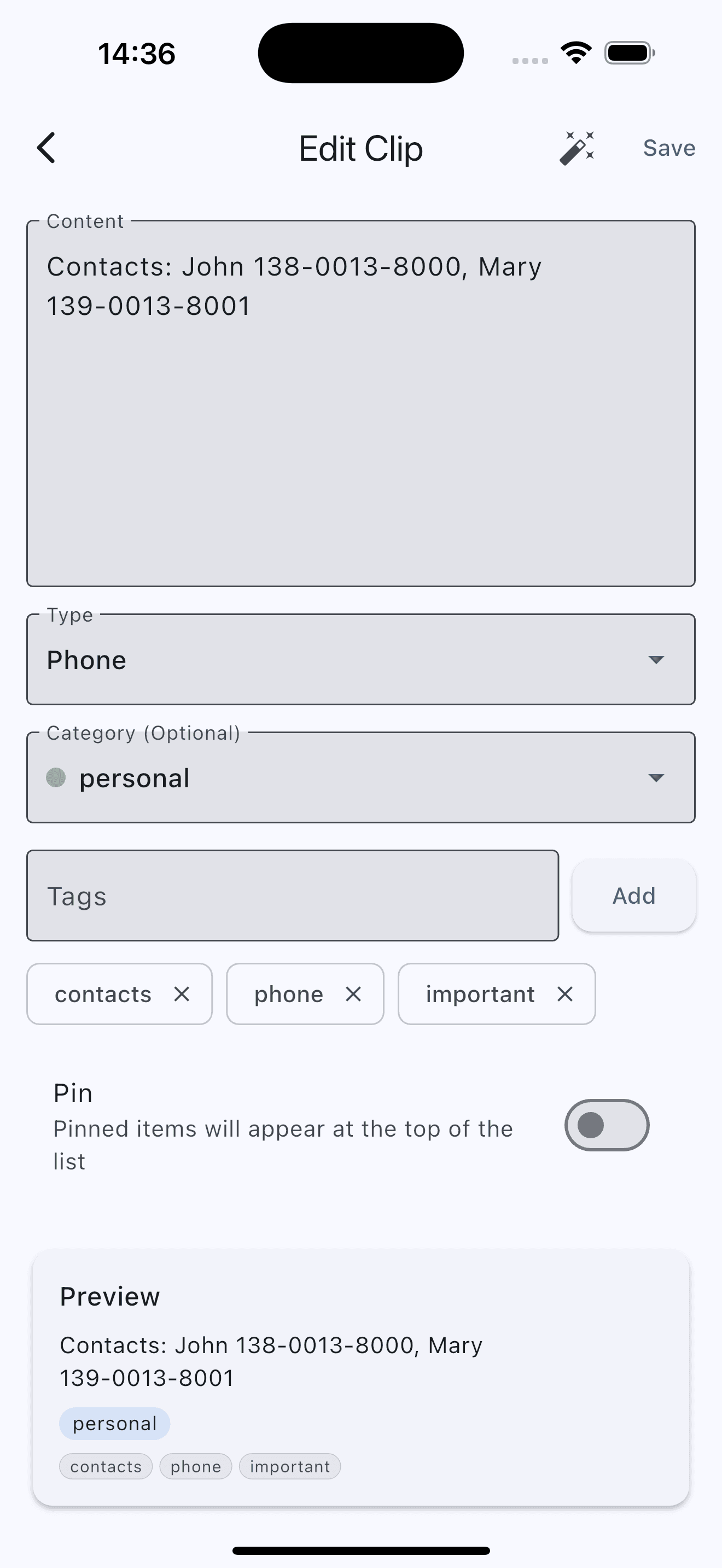
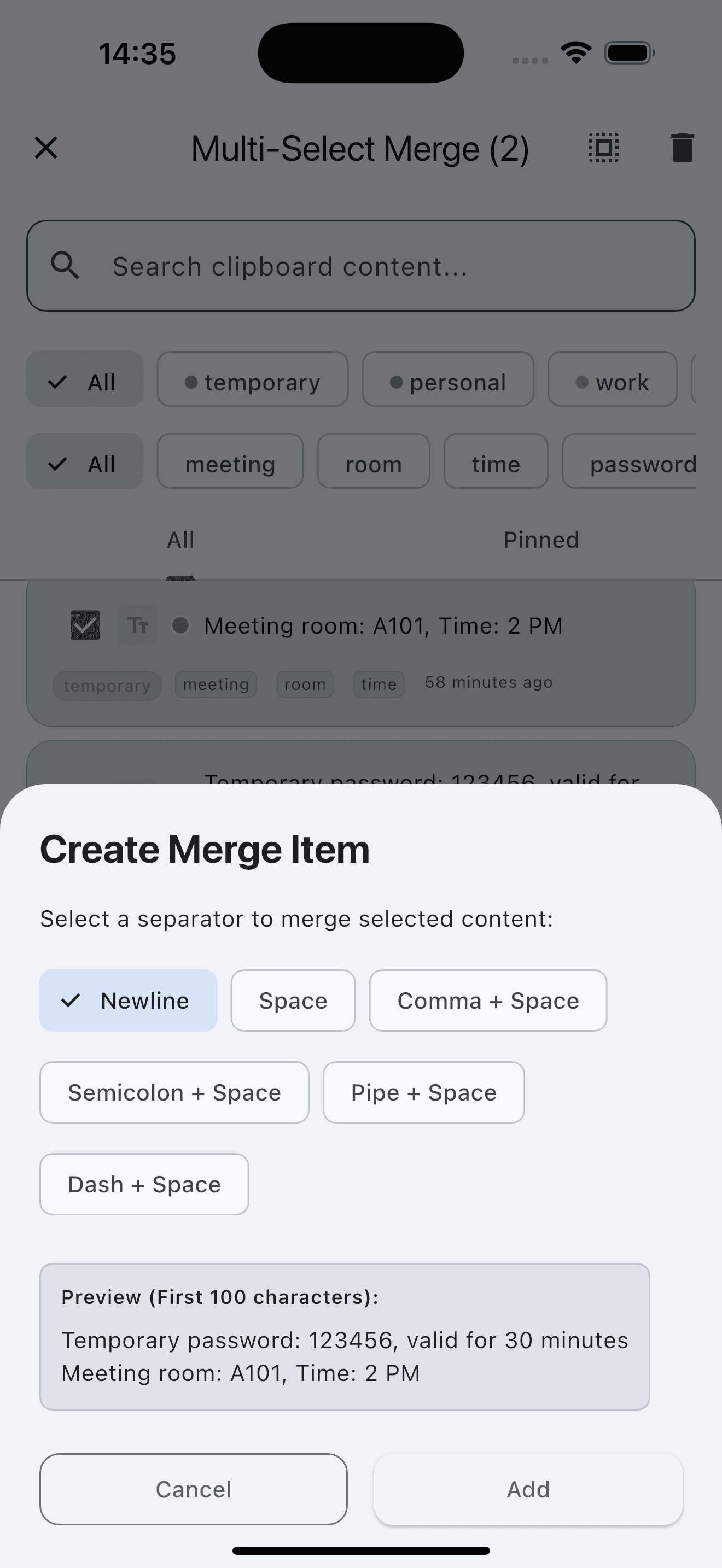
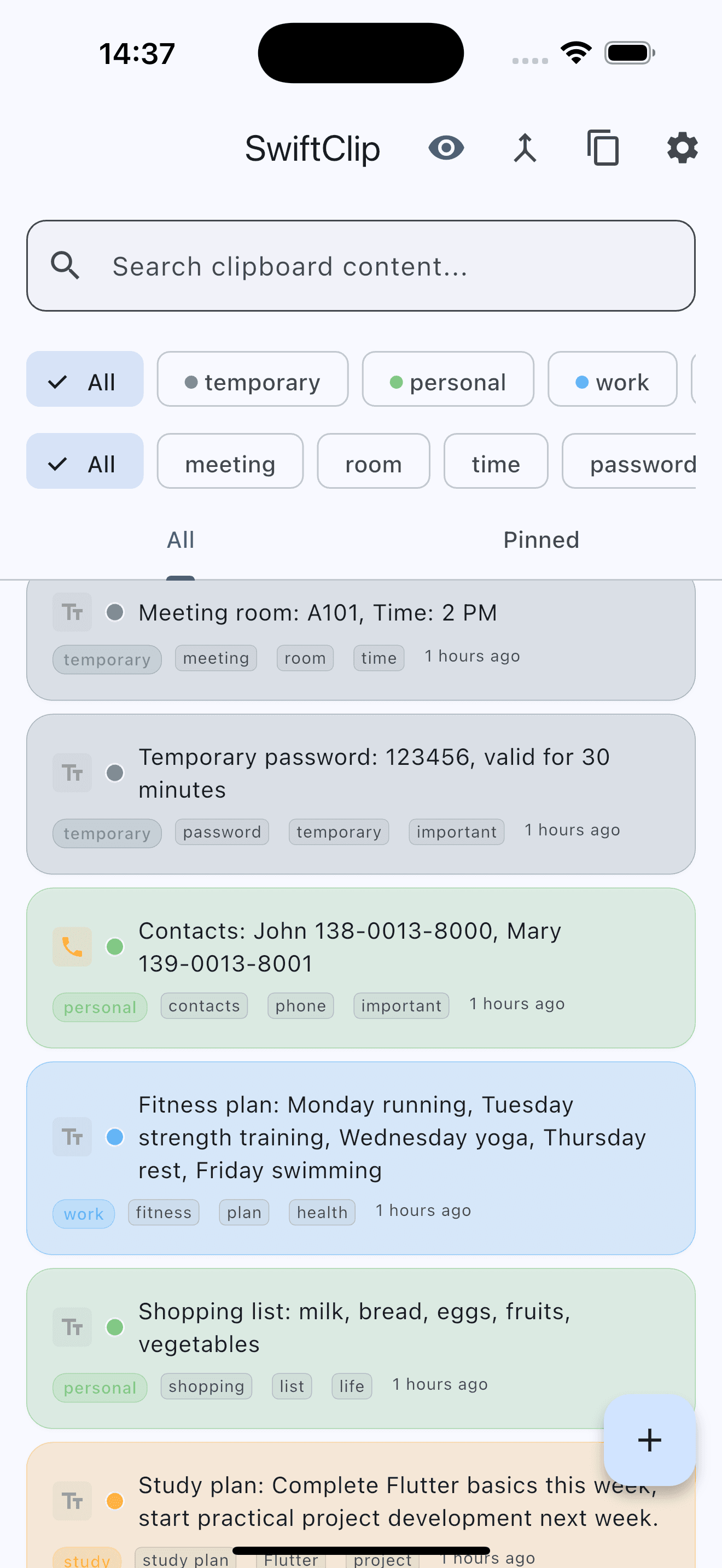
SwiftClip is a practical, open-source clipboard management application that transforms how users handle multiple clipboard entries. As someone who juggles various data snippets daily, I find its batch processing feature a game-changer—it lets you copy, paste, or delete multiple items at once, saving precious time. The app includes intuitive organization tools to categorize clips, making retrieval a breeze, and it offers security options like potential encryption to protect sensitive data. Targeted at developers, writers, and productivity enthusiasts, SwiftClip addresses common frustrations like lost snippets and cluttered histories with a clean, minimalistic interface. While it excels in usability and core functionality, it currently lacks advanced accessibility features, which might limit its appeal. Overall, it's a solid choice for anyone tired of inefficient copy-paste workflows, especially if you value open-source flexibility and basic security.
Key features
- 1Batch processing for copying, pasting, or deleting multiple clipboard items simultaneously
- 2Organization tools with categorization and easy retrieval of stored clips
- 3Security options including potential encryption for sensitive clipboard data
Target customer profile
Drawn from the product itself, not from a survey.
Demographic
Developers and programmers
Pain points
Losing code snippets, inefficient multi-item copying, security risks with clipboard data
Primary needs
Batch processing, encrypted storage, easy retrieval of clips
Demographic
Productivity enthusiasts and writers
Pain points
Cluttered clipboard history, slow access to pasted items, lack of organization
Primary needs
Categorization tools, quick search, user-friendly interface
Demographic
Open-source advocates and tech-savvy users
Pain points
Limited customization in commercial apps, privacy concerns with cloud-based tools
Primary needs
Customizable features, local data control, community-driven improvements
Scout Review
Written by AI from measured evidence, scored out of 100.
SwiftClip excels as a practical, no-frills clipboard manager that delivers where it matters most: efficient batch processing and organized clip management. The open-source approach combined with security considerations makes it particularly appealing for developers and privacy-conscious users. While the basic design and limited accessibility may deter some, the core functionality addresses genuine pain points in daily workflows.
Measure by measure
Usability
90Intuitive batch processing and categorization tools make managing multiple clipboard items surprisingly efficient and user-friendly.
Design
70Clean, minimal interface focused on functionality with neutral colors and straightforward list-based layout for clipboard items.
Speed
80Lightweight performance typical of clipboard managers, optimized for quick access without system lag during daily use.
Security
70Includes basic security options and potential encryption for sensitive data, though implementation details remain somewhat vague.
Accessibility
50No mentioned support for screen readers, high-contrast modes, or multiple languages, limiting inclusivity for diverse users.
Growth
70Open-source nature on GitHub provides strong potential for community-driven improvements and feature expansion.
Improvement areas
- Limited accessibility features for visually impaired or non-English users
- Basic visual design lacking modern aesthetics and customization options
- No cross-device synchronization capabilities for seamless workflow
Design & Usability
SwiftClip's interface embraces a no-nonsense, functional approach with a clean, minimalistic design that prioritizes efficiency over visual flair. The layout organizes recent clipboard items in a straightforward list view, making it easy to scan and select multiple entries. Navigation feels intuitive with clear buttons for batch actions like mass deletion or organization. While the aesthetic won't win design awards, the practical color scheme and uncluttered interface ensure users can focus on productivity without distractions. The batch processing capability truly shines, allowing simultaneous management of multiple clips—a feature that transforms tedious copy-paste workflows into streamlined operations.
Speed & Security
Performance-wise, SwiftClip maintains the lightweight responsiveness expected from clipboard managers, operating smoothly without noticeable system impact. The GitHub-based architecture suggests optimization for speed, though actual performance may vary by system. Security receives thoughtful attention with built-in options for protecting sensitive data, including potential encryption mechanisms for stored clipboard content. While the exact security implementation isn't extensively detailed, the inclusion of privacy-focused features addresses common concerns about clipboard data exposure. This balance between speed and basic security makes it suitable for handling everything from code snippets to confidential information.
Accessibility & Growth
Accessibility represents SwiftClip's most significant limitation, with no mentioned support for screen readers, high-contrast modes, or multilingual interfaces. This oversight excludes users with visual impairments or non-English preferences, narrowing its potential audience. However, the open-source foundation on GitHub provides substantial growth potential, allowing community contributions to expand features and address current gaps. The active development environment could lead to future enhancements like cloud synchronization, advanced customization, or the very accessibility features currently missing. For now, it serves its core demographic well while leaving room for evolution.
Conclusion
If you're tired of losing important snippets or dealing with cluttered clipboard histories, SwiftClip offers a refreshingly straightforward solution. Its batch processing capabilities alone justify the download for anyone who regularly handles multiple data pieces. The open-source nature means you're not just getting a tool—you're joining a community that can shape its future. Give this one a try if you value functionality over flash and want to reclaim control over your copy-paste workflow.
Suggestions for improvement
- Implement screen reader compatibility and high-contrast modes to support visually impaired users
- Add multilingual interface options to expand global accessibility and user base
- Develop comprehensive documentation with setup guides to ease new user adoption
- Integrate cross-device synchronization to compete with premium clipboard managers
Alternatives comparison
Named competitors, point by point. Nobody paid to appear here or to be left out.
 SwiftClip SwiftClip |  PastePal PastePal |  Clipboard Manager on Google Play Clipboard Manager on Google Play | |
|---|---|---|---|
| Batch Processing | Yes | Limited | No |
| Cross-Device Sync | No | Yes | No |
| Security Features | Basic encryption | Standard | Minimal |
| Pricing Model | Free, open-source | Paid/freemium | Free with ads |
PastePal
A native macOS clipboard manager with cross-device sync and smart actions, but often paid or with limited free features.
Clipboard Manager on Google Play
An Android app offering history tracking and auto-clear functions, though it may lack batch processing and advanced security.
Comparing options? See SwiftClip alternatives, scored side by side
More Productivity apps
View all Productivity
Vibe Coding Agent Skills
92A free, open-source platform offering 110 AI agent skills...

Puzzly – B2B Lead Generation & Sales Intelligence Platform
92Puzzly is an all-in-one B2B lead generation platform that...

Qamarero
92An all-in-one hospitality software for restaurants and ba...

StoryPad
92Privacy-first open source journal app with a continuous t...

The Stack Newsletter
92A weekly newsletter delivering curated tech jobs, intervi...

Notion
92All-in-one AI workspace for docs, projects, and knowledge...

EmbedMyReviews
92White-label reputation management software for agencies s...

QRBliss
91Branded QR codes with AI Brand Sync, 15 free dynamic code...

CC Switch
91Open-source desktop app for switching AI coding providers...

Gerty
91Private, local AI assistant for Mac that runs offline

username.md
90One verified handle for your online identity, readable by...

BACKLNK
90Backlnk is a free SEO and AI visibility website: 15 website checks, a full audit as a PDF report, and guides to get found in search and AI answers.


A platform dedicated to providing unbiased reviews of newly launched applications, analyzing everything from their features to their full potential.
info@scoutforge.net© 2026 Scoutforge. All rights reserved.
