Cycling through all six. Tap any point to stop.
Measured on six things
Find and delete duplicate files across 80+ formats on Win...
Design
46Dated, crowded homepage: hero fights between popup, chat bubble, checkmark list and CTAs. Scenario cards are tidy, but duplicated benefits copy and tiny grey body text drag it down.
Screenshots
1 / 1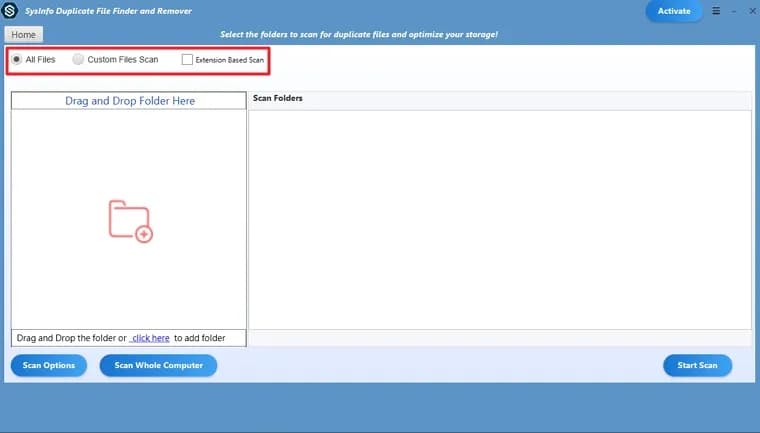
About this app
SysInfo Duplicate File Finder and Remover is a cross-platform utility designed to scan, identify, and clean up duplicate files from your system. It supports over 80 file formats, allows scanning of root folders and subfolders, and offers flexible deletion options including move to trash, permanent delete, or relocation to a separate folder. The tool provides both single and batch operation modes, and identifies duplicates based on file content or file name. A free demo version is available with limitations, while the full version offers unrestricted file handling and additional features. With compatibility across Windows, Mac, and Linux, it caters to a wide range of users seeking to reclaim storage space and improve system organization.
Key features
- 1Scans root folders and subfolders across 80+ file formats for duplicates.
- 2Matches duplicates by file content or by file name, with single and batch modes.
- 3Flexible deletion: move to trash, permanent delete, or relocate to another folder.
- 4Cross-platform builds for Windows, Mac and Linux with a free demo tier.
Target customer profile
Drawn from the product itself, not from a survey.
Demographic
Home users with large personal photo and media libraries
Pain points
Cluttered storage from duplicate photos and videos across devices
Primary needs
Quickly find and remove duplicate media files to free up space
Demographic
Small business owners and office managers
Pain points
Duplicate work documents causing confusion and wasted storage
Primary needs
Efficiently organize and deduplicate document folders
Demographic
IT professionals and system administrators
Pain points
Slow system performance due to duplicate files on multiple machines
Primary needs
Batch removal of duplicates across drives and storage devices
Scout Review
Written by AI from measured evidence, scored out of 100.
SysInfo Duplicate File Finder and Remover is a long-running (domain since 2010) cross-platform utility with a fast, secure-ish marketing site and a genuinely useful core feature set: 80+ formats, root and subfolder scanning, content- or name-based matching, and single/batch modes. The problems are presentation and positioning. The homepage is dated and crowded, the copy is padded with duplicated bullets, and the free tier's 50-file cap is a hard wall that undercuts the 'free download' pitch. It works, it's fast, and it's competent — it just doesn't look or read like it trusts its own product.
Measure by measure
Usability
54Clear scan-mode grouping and obvious download/purchase CTAs, but the free tier caps at 50 files per folder and the free-vs-paid split is buried in long paragraphs. Duplicate nav bar adds noise.
Design
46Dated, crowded homepage: hero fights between popup, chat bubble, checkmark list and CTAs. Scenario cards are tidy, but duplicated benefits copy and tiny grey body text drag it down.
Speed
88Lighthouse 99/100 on both mobile and desktop, LCP 1.1s, CLS 0, TBT 125ms. Genuinely fast, lightweight marketing site with no measurable lag.
Security
74HTTPS enforced with HSTS, CSP, Referrer-Policy, Permissions-Policy, SPF and DMARC — 10/12 checklist points. Missing X-Frame-Options and X-Content-Type-Options; no published audit or bug bounty.
Accessibility
79Lighthouse 98/100, but failing audits for missing main landmark, role conflicts and mismatched accessible names. Small low-contrast grey body text and no WCAG statement hold it below the top of the band.
Growth
58Real problem, three named segments and a cross-platform wedge, but the 50-file free cap and a single Windows-only rival leave the differentiation thin. Competent positioning, no moat.
Improvement areas
- Free tier caps at 50 files per folder, undercutting the 'free download' pitch.
- Homepage copy repeats bullets verbatim and reads as keyword-stuffed filler.
- Missing X-Frame-Options and X-Content-Type-Options; no published security audit.
- No main landmark and low-contrast small body text hurt real-world accessibility.
Design & Usability
The homepage is doing too much at once: a floating query popup, a chat bubble, a seven-line checkmark list and two separate nav bars all crowd the hero before you reach the download button. The scenario cards and specification table show the team can lay out a grid cleanly, but the Benefits section repeats bullets verbatim and the body copy is small grey text that reads as SEO filler. Usability is workmanlike — scan modes are grouped sensibly and the CTAs are unmissable — but the free tier's 50-file-per-folder cap is buried, and the free-vs-paid difference takes several paragraphs to decode.
Speed & Security
Speed is the standout: Lighthouse scores 99/100 on both mobile and desktop with a 1.1s LCP and zero layout shift, so the marketing site loads instantly. Security is above average for an indie utility vendor — HTTPS with HSTS, a real CSP, Referrer-Policy, Permissions-Policy, plus SPF and DMARC, hitting 10 of 12 header checks. The gaps are X-Frame-Options and X-Content-Type-Options, and there is no published SOC 2, ISO certification, pen-test report or bug bounty, so '100% Safe & Secure' remains a claim rather than a verified one.
Accessibility & Growth
Automated accessibility lands at 98/100, with the remaining failures being structural: no main landmark, role=presentation conflicts and visible labels without matching accessible names. Combined with small low-contrast grey body text and no WCAG statement, it's good but not finished. Growth is the softer story: duplicate cleanup is a real, universal problem and SysInfo names three credible segments (photo libraries, office documents, IT admins) with a cross-platform 80+ format wedge. But the free tier caps at 50 files per folder and the only listed competitor is Windows-only, so the differentiation is real but shallow — there's no data advantage or network effect to compound.
Conclusion
If you need to dedupe a large media or document library across Windows, Mac and Linux, this does the job and the site won't waste your time loading. Just go in knowing the demo is a sampler, not a trial, and budget for the paid version if your folders are bigger than a shoebox. The bigger ask is for the vendor: cut the duplicated benefits copy, kill the overlapping popup, and show an actual duplicate-results screen instead of an empty app window. The product is better than its landing page admits.
Suggestions for improvement
- Replace the empty app-window screenshot with a real duplicate-results view showing matched files, sizes and paths.
- Remove the duplicated Benefits bullets and rewrite the copy so each line says something new.
- Publish a clear free-vs-paid comparison table above the fold instead of burying it in paragraphs.
- Add X-Frame-Options and X-Content-Type-Options headers, and publish a short security/data-handling page.
Alternatives comparison
Named competitors, point by point. Nobody paid to appear here or to be left out.
 SysInfo Duplicate File Finder and Remover | Duplicate Cleaner | |
|---|---|---|
| Platform support | Windows, Mac and Linux | Windows only |
| Duplicate matching criteria | File content or file name | Content-based with advanced filtering rules |
| Free version limits | Reads only first 50 files per folder | Free trial with scan limits; paid license unlocks full scan |
| Batch operations | Single Mode and Batch Mode supported | Batch selection and bulk deletion supported |
| Deletion options | Move to trash, permanent delete, or relocate to folder | Delete, move, or recycle bin with safety rules |
| File format coverage | 80+ formats including MP4, HTML, TXT, DOC, RTF | Any file type via content hashing |
Comparing options? See SysInfo Duplicate File Finder and Remover alternatives, scored side by side
More Productivity apps
View all Productivity
Qamarero
92An all-in-one hospitality software for restaurants and ba...

Puzzly – B2B Lead Generation & Sales Intelligence Platform
92Puzzly is an all-in-one B2B lead generation platform that...

The Stack Newsletter
92A weekly newsletter delivering curated tech jobs, intervi...

StoryPad
92Privacy-first open source journal app with a continuous t...

Vibe Coding Agent Skills
92A free, open-source platform offering 110 AI agent skills...

Notion
92All-in-one AI workspace for docs, projects, and knowledge...

EmbedMyReviews
92White-label reputation management software for agencies s...

QRBliss
91Branded QR codes with AI Brand Sync, 15 free dynamic code...

Strukchad Property Management
91Property management for Kenyan letting agents: rent invoices raised every month, M-Pesa rent prompts to tenants, arrears tracking and landlord statements.

CC Switch
91Open-source desktop app for switching AI coding providers...

Gerty
91Private, local AI assistant for Mac that runs offline

username.md
90One verified handle for your online identity, readable by...


A platform dedicated to providing unbiased reviews of newly launched applications, analyzing everything from their features to their full potential.
info@scoutforge.net© 2026 Scoutforge. All rights reserved.
