Cycling through all six. Tap any point to stop.
Measured on six things
Export MBOX emails to PST, PDF, EML, and migrate to Gmail...
Design
44Dated, cluttered homepage: hero crams rating, 8 bullets, platform toggles and two CTAs with no breathing room. Orange chat bubble overlaps the product shot and clashes with the blue palette. Specs still list Windows 2008/2012.
Screenshots
1 / 1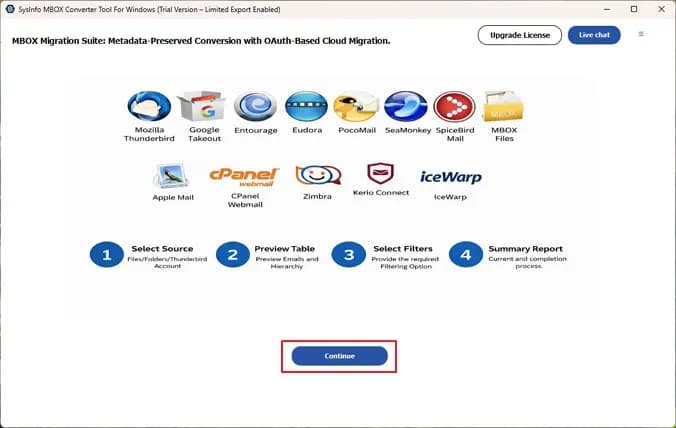
About this app
SysInfo MBOX Exporter is a Windows and Mac utility built to solve a common headache: MBOX files are used by many email clients (Thunderbird, Apple Mail, Google Takeout, etc.), but they don't play nicely with Outlook or cloud services. This tool steps in to convert those MBOX files into standard formats like PST, EML, PDF, MSG, and CSV. It also directly imports MBOX data into Gmail, Office 365, IMAP, Thunderbird, and other webmail clients. Standout features include batch conversion of multiple MBOX files or entire folders, maintaining the original folder hierarchy, and a preview panel to check emails and attachments before committing. You can split large PSTs, exclude attachments, save them separately, or convert them to PDF. A date filter helps migrate only specific time ranges. The free version converts 50 emails per MBOX file, which is enough to test the waters. The interface is straightforward, and it runs on Windows 11 and earlier, plus macOS. For anyone stuck with MBOX archives...
Key features
- 1Batch conversion of MBOX files or entire folders to PST, EML, PDF, MSG and CSV with folder hierarchy preserved.
- 2Direct import of MBOX data into Gmail, Office 365, IMAP, Thunderbird and other webmail clients.
- 3Preview panel to inspect emails and attachments before converting, plus date filters and PST splitting.
- 4Free demo converts 50 emails per MBOX file; 30-day money-back guarantee on purchase.
Target customer profile
Drawn from the product itself, not from a survey.
Demographic
IT administrators and email migration specialists
Pain points
Migrating MBOX archives to Outlook or cloud platforms without data loss; managing bulk conversions efficiently.
Primary needs
Batch conversion, folder hierarchy preservation, direct migration to Office 365 or Gmail, and reliable support for large files.
Demographic
Small business owners using Thunderbird or Apple Mail
Pain points
Need to switch to Outlook or Google Workspace but stuck with MBOX files; limited technical know-how.
Primary needs
Simple wizard-based conversion, ability to preview emails, and a free trial to test before buying.
Demographic
Freelancers and consultants who use multiple email clients
Pain points
Juggling different email formats; needing to archive or backup emails in PDF or PST for client records.
Primary needs
Convert MBOX to PDF for legal/archival purposes, save attachments separately, and filter by date.
Demographic
Home users switching from Thunderbird to Gmail
Pain points
Losing years of email history when changing email providers; confusing manual methods.
Primary needs
Direct MBOX to Gmail migration, duplicate email removal, and a straightforward GUI.
Scout Review
Written by AI from measured evidence, scored out of 100.
SysInfo MBOX Exporter is a competent, long-running niche utility wrapped in a dated marketing site. The core offer is clear and specific: convert MBOX archives to PST, EML, PDF, MSG or CSV, or push them straight into Gmail, Office 365, IMAP or Thunderbird, with batch processing, folder hierarchy preservation, a preview panel and date filters. The free tier converts 50 emails per MBOX file, which is a real trial rather than a teaser. Where it stumbles is presentation: the homepage is visually dated and overstuffed, the nav bar is crowded, and the specs still list Windows 2008/2012. Speed is excellent (Lighthouse 99/100), security headers are mostly in place but compliance documentation is absent, and accessibility is good on automated checks with four real failures remaining. Growth is solid but bounded by a one-time-purchase migration category.
Measure by measure
Usability
58Numbered steps plus a real app screenshot give a clear mental model, and CTAs are obvious. But a six-item nav bar, dual 12-bullet columns and a 50-email demo cap make the path to value harder than it needs to be.
Design
44Dated, cluttered homepage: hero crams rating, 8 bullets, platform toggles and two CTAs with no breathing room. Orange chat bubble overlaps the product shot and clashes with the blue palette. Specs still list Windows 2008/2012.
Speed
88Lighthouse 99/100 on both mobile and desktop: LCP 1.1s, CLS 0, TBT 108ms. The marketing site is genuinely fast and lightweight, with no lag complaints in the collected evidence.
Security
74HTTPS enforced with HSTS, CSP, Referrer-Policy and Permissions-Policy; SPF and DMARC set; 10/12 header checks pass. Frame protection and X-Content-Type-Options are missing, and no SOC 2/ISO page was found.
Accessibility
80Lighthouse accessibility 95/100, but four real failures remain: color-only links, no main landmark, role=presentation conflicts, and text labels without matching accessible names. No WCAG statement published.
Growth
62A real, narrow pain — MBOX archives that Outlook and cloud won't ingest — with concrete differentiators (batch, hierarchy, direct Gmail/O365 import). A 16-year-old domain signals a durable niche vendor, not a rocket.
Improvement areas
- Dated, overcrowded homepage with no visual hierarchy in the hero and a clashing chat widget.
- No published security or data-handling documentation (SOC 2, ISO, pen-test) for archive-sensitive work.
- Accessibility gaps: no main landmark, color-only links, role conflicts, mismatched accessible names.
- 50-email demo cap is too small to validate a real migration; no full-feature trial.
Design & Usability
The homepage looks like it was designed in 2013 and updated by committee ever since. The hero stacks a 4.9-star rating, 1,469 reviews, a long paragraph, eight bullets, platform toggles and two CTAs with almost no vertical spacing, so the value proposition is buried under its own evidence. A generic orange chat bubble overlaps the product screenshot and fights the blue palette, and the specs table still advertises Windows 2008/2012 support. Usability is better than the design suggests: a numbered step list paired with a real app screenshot gives a clear mental model, and the Download and Purchase CTAs are impossible to miss. But the header crams six nav items plus Help Center, Mail Us, Call Us and a search field into one thin bar, and the benefits section is two columns of twelve checkmarks each with no grouping. The 50-email demo cap is enough to click around, not enough to trust a migration.
Speed & Security
Speed is the standout. Lighthouse scores 99/100 on both mobile and desktop, with LCP at 1.1s, CLS at 0 and TBT at 108ms — the marketing site is genuinely lightweight and snappy, and nothing in the collected evidence suggests lag complaints. Security is competent but not exceptional: HTTPS is enforced with HSTS, CSP, Referrer-Policy and Permissions-Policy, SPF and DMARC are configured, and 10 of 12 header checks pass. The gaps are frame protection and X-Content-Type-Options, both easy fixes. More importantly for a tool that handles entire email archives, there is no SOC 2, ISO 27001, penetration-test summary or bug bounty page in the collected evidence, so buyers handling client or legal mail have to take the vendor's word on data handling. That is normal for a niche desktop utility, but it caps how far the security story can go.
Accessibility & Growth
Accessibility lands at 80: Lighthouse scores 95/100, but four real failures remain — links distinguished by color alone, no main landmark, role=presentation conflicts, and visible text labels without matching accessible names. No WCAG conformance statement is published, so the automated score is the only evidence available. Growth is a judgement on the idea: the problem is real and specific — MBOX archives from Thunderbird, Apple Mail and Google Takeout that Outlook and cloud services won't ingest — and the site names concrete differentiators: batch conversion, folder hierarchy preservation, direct Gmail/Office 365/IMAP import, PST splitting and date filters. Against a dedicated MBOX-to-PST converter and free Thunderbird, the wedge is the cloud-import path and the all-in-one format spread. The limit is the category: migration is a one-time purchase, the buyer churns after the job is done, and the 16-year-old domain suggests steady niche revenue rather than compounding growth.
Conclusion
If you have a Thunderbird or Apple Mail archive that Outlook refuses to touch, this is a plausible, low-risk option: the demo is free, the money-back window is 30 days, and the feature list covers the awkward parts of migration — hierarchy, attachments, PST splitting and date filtering. Go in expecting a functional tool rather than a polished product experience, and verify the vendor's data-handling terms yourself before feeding it client or legal mail. For IT admins doing bulk migrations it is worth a trial run on a small archive first; for home users switching to Gmail, the direct import path is the feature that matters most.
Suggestions for improvement
- Rebuild the hero: one headline, one sentence, one primary CTA, and move the rating and bullet list below the fold.
- Publish a security/data-handling page covering where converted mail goes and whether anything leaves the machine.
- Add a WCAG conformance statement and fix the four failing audits: main landmark, color-only links, role conflicts, accessible names.
- Replace the 50-email demo cap with a full-feature trial on a small archive so buyers can validate a real migration.
Alternatives comparison
Named competitors, point by point. Nobody paid to appear here or to be left out.
 SysInfo MBOX Exporter |  MBOX to PST Converter |  Thunderbird | |
|---|---|---|---|
| MBOX to PST conversion | Yes, with batch support and PST splitting | Yes, core focus with batch and preview | No native PST export |
| Direct cloud import (Gmail / Office 365 / IMAP) | Yes, direct migration to Gmail, O365, IMAP | Not a stated focus; PST-centric | Limited; no direct cloud migration |
| Output format range | PST, EML, PDF, MSG, CSV, MBOX | Primarily PST | MBOX native; export via add-ons |
| Batch conversion and folder hierarchy | Yes, entire folders with hierarchy preserved | Yes, batch support | Folder-based natively; no conversion batch |
| Free tier / trial | Free demo: 50 emails per MBOX file | Trial typically limited by item count | Free and open source |
| Platform support | Windows 11 and earlier, macOS | Windows | Windows, macOS, Linux |
MBOX to PST Converter
A dedicated tool from a different vendor focused on converting MBOX files to Outlook PST, with batch support and preview.
Thunderbird
Mozilla's free email client that can import and manage MBOX files natively, but lacks direct cloud migration features.
Comparing options? See SysInfo MBOX Exporter alternatives, scored side by side
More Productivity apps
View all Productivity
Vibe Coding Agent Skills
92A free, open-source platform offering 110 AI agent skills...

Puzzly – B2B Lead Generation & Sales Intelligence Platform
92Puzzly is an all-in-one B2B lead generation platform that...

Qamarero
92An all-in-one hospitality software for restaurants and ba...

StoryPad
92Privacy-first open source journal app with a continuous t...

The Stack Newsletter
92A weekly newsletter delivering curated tech jobs, intervi...

Notion
92All-in-one AI workspace for docs, projects, and knowledge...

EmbedMyReviews
92White-label reputation management software for agencies s...

QRBliss
91Branded QR codes with AI Brand Sync, 15 free dynamic code...

CC Switch
91Open-source desktop app for switching AI coding providers...

Gerty
91Private, local AI assistant for Mac that runs offline

username.md
90One verified handle for your online identity, readable by...

BACKLNK
90Backlnk is a free SEO and AI visibility website: 15 website checks, a full audit as a PDF report, and guides to get found in search and AI answers.


A platform dedicated to providing unbiased reviews of newly launched applications, analyzing everything from their features to their full potential.
info@scoutforge.net© 2026 Scoutforge. All rights reserved.
