Cycling through all six. Tap any point to stop.
Measured on six things
Migrate Thunderbird MBOX emails to Office 365 with ease a...
Design
46Dated but functional. Consistent line-icon cards and a clean spec block are undercut by three competing download CTAs, duplicated navigation systems, and overlapping chat widgets.
Screenshots
1 / 1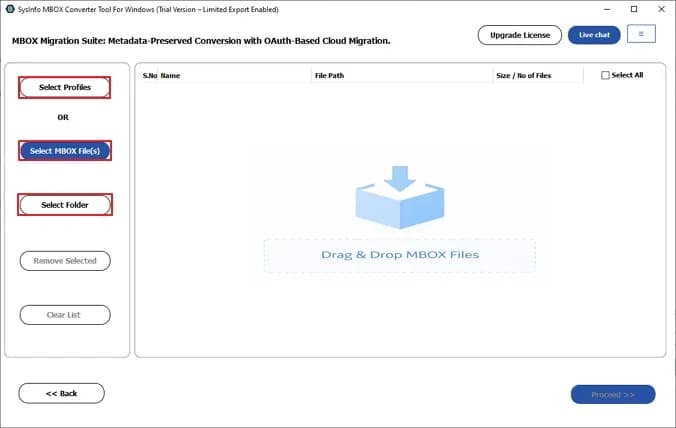
About this app
The SysInfo MBOX to Office 365 Migration Tool is a specialized utility designed to simplify the migration of MBOX files from email clients like Thunderbird to Microsoft Office 365. It supports batch migration, maintains folder hierarchy, and offers features like duplicate removal, date range filters, and attachment management. The tool ensures data integrity and is compatible with all Windows versions. With a user-friendly interface, both technical and non-technical users can efficiently transfer emails to Office 365, including Public, Archive, and Online folders. It also allows conversion to other formats and migration to various email clients, making it a versatile solution for email data management.
Key features
- 1Batch migration of multiple MBOX files to Office 365 with attachments and folder hierarchy preserved.
- 2Targets Public, Archive, and Online folders in Office 365; duplicate removal and date-range filters included.
- 3Converts MBOX to EML, PST, PDF, CSV, MSG, HTML, JSON and more; migrates to Gmail, Yahoo, IMAP and others.
Target customer profile
Drawn from the product itself, not from a survey.
Demographic
IT administrators in small to medium businesses
Pain points
Manual migration is time-consuming and prone to errors; need to maintain data integrity.
Primary needs
Reliable, bulk migration of MBOX files to Office 365 with minimal downtime.
Demographic
Individual users switching from Thunderbird to Office 365
Pain points
Lack of technical expertise; fear of data loss during migration.
Primary needs
Simple, guided migration process with preview and safety features.
Demographic
Managed service providers (MSPs) handling multiple clients
Pain points
Need to migrate large volumes of email data across different clients efficiently.
Primary needs
Scalable solution with support for multiple files and customizable migration options.
Scout Review
Written by AI from measured evidence, scored out of 100.
SysInfo MBOX to Office 365 Migration Tool is a competent, long-running Windows utility from a vendor whose domain dates to 2010. The marketing site is genuinely fast (99 mobile / 100 desktop Lighthouse) and reasonably well-secured (10/12 headers, SPF and DMARC). The problems are presentation and honesty: a dated, cluttered homepage with three competing download buttons and duplicated navigation, a 50-email trial cap buried in a bullet list, and a Windows/Mac toggle that implies Mac support the screenshots don't show. Accessibility is decent on automated checks but lacks alt text and landmarks. The underlying idea is sound and the target segments are specific, but the migration-tool category is crowded and nothing here is structurally defensible.
Measure by measure
Usability
58The numbered Steps to Transfer timeline explains the workflow well, but the 50-email trial cap hides in a bullet list and the Windows/Mac toggle misleads before download.
Design
46Dated but functional. Consistent line-icon cards and a clean spec block are undercut by three competing download CTAs, duplicated navigation systems, and overlapping chat widgets.
Speed
88Lighthouse mobile 99/100 with 1.1s LCP and zero CLS; desktop a perfect 100. The marketing site is genuinely fast and lightweight.
Security
74HTTPS enforced with HSTS, CSP, Referrer-Policy, Permissions-Policy, SPF and DMARC — 10/12 header checks. Missing frame protection and X-Content-Type-Options; no published audits.
Accessibility
70Lighthouse a11y 90/100, but images lack alt text, several links have no discernible name, and there's no main landmark. No accessibility statement or WCAG claim on site.
Growth
58A real, recurring migration problem with specific segments (SMB IT admins, MSPs) and concrete differentiators — batch import, folder hierarchy, duplicate removal. Crowded category, no structural moat.
Improvement areas
- Dated homepage with three competing download CTAs and duplicated navigation systems.
- 50-emails-per-folder trial limit buried in a benefits list; Windows/Mac toggle misleads.
- Missing alt text, main landmark, and accessible link names; no accessibility statement.
Design & Usability
The homepage looks like it was designed in 2014 and never revisited: a saturated green Free Download button sits next to a blue Purchase Now and a Microsoft Store badge, so the primary action is a three-way coin flip. Two navigation systems — the hero anchor grid and the sticky section bar — repeat the same five links, and a floating chat bubble plus a query popup overlap the hero. On usability, the numbered Steps to Transfer timeline is the single clearest element on a very long, keyword-stuffed page. But the free tier's real limit — 50 emails per folder — is buried as one bullet among ten benefits, and the Windows/Mac toggle shows Mac unselected with no plain statement that the product is Windows-only. The desktop app UI itself is readable, with a clear select-source, drag-files, proceed flow.
Speed & Security
Speed is the standout: Lighthouse mobile 99/100 with a 1.1s LCP, zero cumulative layout shift and 115ms total blocking time; desktop scores a clean 100. The marketing site is static-feeling and snappy, with no evidence of user complaints about lag. Security is solid but not exceptional: HTTPS is enforced with HSTS, a Content-Security-Policy, Referrer-Policy and Permissions-Policy, and the domain publishes both SPF and DMARC — 10 of 12 header checks pass. The two gaps are X-Frame-Options (no clickjacking protection) and X-Content-Type-Options. There is no SOC 2, ISO certification, security page or bug bounty published, which is normal for a desktop utility vendor of this size but caps how high this can score.
Accessibility & Growth
Accessibility lands at a respectable 90/100 on Lighthouse, but the failing audits are the telling ones: images without alt attributes, links with no discernible name, no main landmark, and role=presentation conflicts. There is no accessibility statement or WCAG claim anywhere on the site. Growth is the more interesting question. The problem is real and recurring — every Thunderbird-to-Office-365 switch needs an MBOX migration — and the product names specific segments (SMB IT admins, MSPs handling multiple clients) with concrete differentiators: batch import, folder hierarchy preservation, duplicate removal, date-range filters, and targeting Public/Archive/Online folders. But the category is crowded and the listed competitor, PST Walker, sells essentially the same wizard. There is no network effect, no accumulating data advantage, and no structural wedge incumbents can't copy.
Conclusion
If you need to move Thunderbird MBOX files into Office 365 and you're on Windows, this will likely do the job — the workflow is documented, the app UI is clear, and the vendor has been around long enough to trust with a one-off migration. Just read the trial terms before you download: 50 emails per folder is a demo, not a migration. And ignore the Mac toggle. For a one-time job, compare against PST Walker's converter on price and trial limits before committing; both do the same core thing, so the differentiator is support and licensing, not features.
Suggestions for improvement
- Collapse the three download CTAs into one primary action and demote the Microsoft Store badge to a secondary link.
- State the 50-emails-per-folder trial limit prominently near the download button, not buried in a benefits list.
- Remove or clearly disable the Mac toggle, or state plainly that the product is Windows-only.
- Add alt text to images, a main landmark, and accessible names on links to clear the remaining Lighthouse failures.
Alternatives comparison
Named competitors, point by point. Nobody paid to appear here or to be left out.
 SysInfo MBOX to Office 365 Migration Tool | PST Walker MBOX to Office 365 Converter | |
|---|---|---|
| Batch migration of multiple MBOX files | Yes — multiple files/folders, no stated size limit | Yes — batch conversion supported |
| Advanced filtering (date range, duplicates) | Date range filters and duplicate removal | Advanced filtering options advertised |
| Free trial limit | 50 emails per folder | Trial limit not confirmed in collected evidence |
| Folder hierarchy preservation | Yes — hierarchy and data integrity maintained | Not confirmed in collected evidence |
| Target Office 365 folder types | Public, Archive, and Online folders | Not confirmed in collected evidence |
Comparing options? See SysInfo MBOX to Office 365 Migration Tool alternatives, scored side by side
More Productivity apps
View all Productivity
Qamarero
92An all-in-one hospitality software for restaurants and ba...

Puzzly – B2B Lead Generation & Sales Intelligence Platform
92Puzzly is an all-in-one B2B lead generation platform that...

The Stack Newsletter
92A weekly newsletter delivering curated tech jobs, intervi...

StoryPad
92Privacy-first open source journal app with a continuous t...

Vibe Coding Agent Skills
92A free, open-source platform offering 110 AI agent skills...

Notion
92All-in-one AI workspace for docs, projects, and knowledge...

EmbedMyReviews
92White-label reputation management software for agencies s...

QRBliss
91Branded QR codes with AI Brand Sync, 15 free dynamic code...

Strukchad Property Management
91Property management for Kenyan letting agents: rent invoices raised every month, M-Pesa rent prompts to tenants, arrears tracking and landlord statements.

CC Switch
91Open-source desktop app for switching AI coding providers...

Gerty
91Private, local AI assistant for Mac that runs offline

username.md
90One verified handle for your online identity, readable by...


A platform dedicated to providing unbiased reviews of newly launched applications, analyzing everything from their features to their full potential.
info@scoutforge.net© 2026 Scoutforge. All rights reserved.
