Cycling through all six. Tap any point to stop.
Measured on six things
Convert Lotus Notes NSF files to MBOX and other formats w...
Growth
52A real, specific migration problem with genuine differentiators (batch, dedupe, direct-to-IMAP), but the addressable market is Lotus Notes shops — a customer base that shrinks every year by design.
Screenshots
1 / 1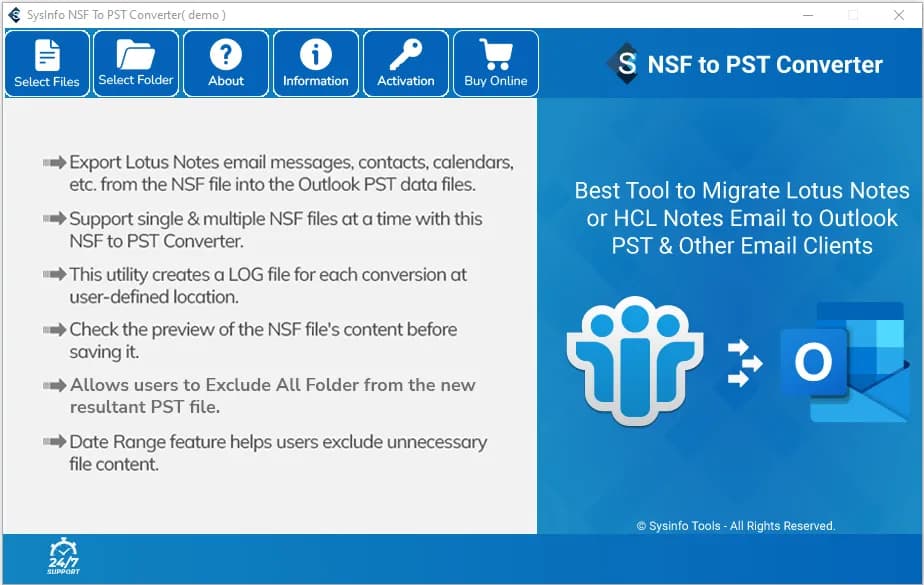
About this app
SysInfo NSF to MBOX Converter is a specialized tool for migrating Lotus Notes data to MBOX format, compatible with clients like Thunderbird and Apple Mail. It supports conversion of emails, attachments, contacts, calendars, tasks, and journals, and offers batch processing, date filtering, duplicate removal, and preview before conversion. The tool also enables direct migration to Gmail, Yahoo, Office 365, and IMAP, and exports to PST, EML, MSG, PDF, CSV, and HTML. With a user-friendly interface and broad Windows compatibility, it caters to both technical and non-technical users. A free version allows conversion of 50 items per folder for evaluation.
Key features
- 1Batch convert multiple Lotus Notes NSF files to MBOX with emails, attachments, contacts, calendars, tasks and journals preserved.
- 2Duplicate removal by To/From/Subject/Cc/Bcc, date-range filtering, and folder exclusion before conversion.
- 3Direct migration to Gmail, Yahoo, Office 365 and IMAP, plus export to PST, EML, MSG, PDF, CSV and HTML.
- 4Free version converts the first 50 emails per folder for evaluation before purchase.
Target customer profile
Drawn from the product itself, not from a survey.
Demographic
IT administrators and email migration specialists in enterprises
Pain points
Manual NSF to MBOX conversion is error-prone and time-consuming; risk of data loss or corruption; need to migrate multiple NSF files efficiently.
Primary needs
Reliable batch conversion with data integrity; support for large NSF files; ability to migrate to various email platforms; detailed reporting.
Demographic
Small business owners or individuals using Lotus Notes
Pain points
Limited technical knowledge; need to move away from Lotus Notes to more modern email clients; want to preserve email history and contacts.
Primary needs
User-friendly interface with step-by-step guidance; affordable one-time purchase; ability to convert all mailbox items without data loss.
Demographic
Email service providers and support teams assisting clients
Pain points
Clients use different email formats; need a versatile tool to convert NSF files to MBOX and other formats; require quick turnaround and high accuracy.
Primary needs
Multi-format support; ability to exclude folders and remove duplicates; compatibility with various Windows versions and IBM Notes versions.
Scout Review
Written by AI from measured evidence, scored out of 100.
SysInfo NSF to MBOX Converter is a competent, long-standing utility wrapped in a marketing page that undermines it. The engineering signals are good — a 99/100 mobile Lighthouse score, 10/12 security headers, 98/100 accessibility — and the feature set is credible: batch conversion, duplicate removal, date filtering, folder exclusion, preview, and direct migration to Gmail, Office 365 and IMAP, with a free tier covering 50 emails per folder. The problem is craft. A leaked 'mbox-file.webp' filename as a section heading, a PST screenshot on an MBOX product page, and version numbers that contradict each other tell a buyer the page was never proofread — which is a bad first impression for a tool asking to be trusted with an entire mail archive. Against Aid4Mail and BitRecover it is roughly on par, neither clearly ahead nor behind.
Measure by measure
Usability
61Anchor nav, screenshots, video and a 50-email free tier make evaluation straightforward, but the FAQ that answers real install pain is collapsed under a long spec table and body copy is dense 13px grey.
Design
57Coherent blue/green palette and scannable section rhythm, but the page ships a leaked 'mbox-file.webp' heading, a PST screenshot on an MBOX product page, and version numbers that disagree (22.3 vs 9.0.1).
Speed
88Lighthouse mobile 99/100 (LCP 1.1s, CLS 0, TBT 102ms) and desktop 100/100. The marketing page is genuinely fast, with no measured layout shift and no lag complaints in the collected evidence.
Security
74HTTPS enforced with HSTS, CSP, Referrer-Policy and Permissions-Policy, plus SPF and DMARC — 10/12 probe points. Missing frame protection and nosniff headers; no published audit or security page found.
Accessibility
79Lighthouse accessibility 98/100, but three real failures remain: no main landmark, role=presentation conflicts, and visible labels without matching accessible names. No WCAG statement or non-English support found.
Growth
52A real, specific migration problem with genuine differentiators (batch, dedupe, direct-to-IMAP), but the addressable market is Lotus Notes shops — a customer base that shrinks every year by design.
Improvement areas
- Content QA: leaked 'mbox-file.webp' heading, wrong-product screenshot, and conflicting version numbers (22.3 vs 9.0.1).
- Trust layer: no SOC 2/ISO claim, no security page, no bug bounty for software handling entire mail archives.
- Accessibility structure: missing <main> landmark, role=presentation conflicts, and unlabeled visible text.
- Page density: 13px grey justified paragraphs in narrow columns and a collapsed FAQ buried below the spec table.
Design & Usability
The landing page has a coherent brand system — blue and green carried from logo to CTA bar — and a section rhythm that scans well: centered headings, alternating bands, generous spacing. Then the QA falls apart. A card in 'When to Use' is literally titled 'mbox-file.webp'. The step-by-step screenshot shows an NSF to PST converter on a page selling MBOX conversion. The spec table says Version 22.3 while body copy says v9.0.1. Usability is better than design: a sticky anchor nav, screenshots, a video, and a free tier covering 50 emails per folder make evaluation easy. But the FAQ addressing real antivirus install friction is collapsed below a long spec table, and the feature grid runs 13px grey justified paragraphs six to eight lines deep in narrow columns.
Speed & Security
Speed is the standout: Lighthouse mobile 99/100 with LCP 1.1s, CLS 0 and TBT 102ms, and desktop a clean 100/100. Whatever else is wrong with this page, it is not slow, and no lag complaints surfaced in the collected evidence. Security is competent rather than exceptional. The probe found HTTPS enforced with HSTS, a Content-Security-Policy, Referrer-Policy and Permissions-Policy, plus SPF and DMARC — 10 of 12 checklist points. The two gaps are X-Frame-Options and X-Content-Type-Options, both cheap to add. What is missing entirely is the trust layer a mail-migration tool should have: no SOC 2 or ISO claim, no security page, no bug bounty, no pen-test disclosure. For software that ingests an entire corporate mailbox, that silence is the notable part.
Accessibility & Growth
Accessibility scores 98/100 on Lighthouse, which is genuinely strong, but three failures survive: the document has no main landmark, role=presentation elements conflict, and some visible text labels have no matching accessible names. There is no WCAG conformance statement and the site is English-only in the collected content. Growth is the harder question. The problem is real and specific — Lotus Notes shops need their mail out, and this tool names concrete wedges: batch conversion, duplicate removal by To/From/Subject/Cc/Bcc, date-range filtering, folder exclusion, and direct migration to Gmail, Yahoo, Office 365 and IMAP. Against Aid4Mail and BitRecover it is on par, not ahead. The limit is structural: the IBM/HCL Notes install base declines every year, so the total market shrinks regardless of execution. The 16-year-old domain shows a durable vendor, not a growing one.
Conclusion
Buy this if you are an IT admin with a stack of NSF files and a deadline, and you want a cheap, fast, well-featured converter with a free tier to prove it works before you pay. Skip it if you need vendor compliance documentation, multi-language support, or a polished, trustworthy purchase experience — the page's QA failures will make procurement nervous. Either way, download the free version and convert 50 emails first. If the output opens cleanly in Thunderbird, the rest is a purchasing decision, not a leap of faith.
Suggestions for improvement
- Fix the 'mbox-file.webp' card heading and replace the PST screenshot with a genuine MBOX conversion walkthrough.
- Reconcile the version numbers (22.3 vs 9.0.1) and remove the 'Converter Online' reference on a desktop product page.
- Add X-Frame-Options and X-Content-Type-Options headers, then publish a short security/data-handling page.
- Add a <main> landmark, fix role=presentation conflicts and label mismatches, and publish a WCAG conformance statement.
Alternatives comparison
Named competitors, point by point. Nobody paid to appear here or to be left out.
 SysInfo NSF to MBOX Converter |  Aid4Mail | MBOX to PST Converter |  LotusNotes to MBOX Converter | |
|---|---|---|---|---|
| NSF to MBOX conversion | Yes — core function, with preview before conversion | Yes — one of many supported format pairs | Partial — primarily MBOX to PST; NSF support needs verification | Yes — dedicated NSF to MBOX tool |
| Batch conversion of multiple NSF files | Yes — select an entire folder of NSF files | Yes — batch processing is a core strength | Limited / verify per tool | Yes — batch conversion supported |
| Duplicate removal and date-range filtering | Yes — dedupe by To/From/Subject/Cc/Bcc plus date filter | Filtering yes; dedupe not a headline feature | Not advertised | Date filter yes; dedupe varies by product |
| Direct migration to Gmail / Office 365 / IMAP | Yes — Gmail, Yahoo, Office 365, IMAP | Yes — broad destination support | Not the focus | Yes — cloud/IMAP migration offered |
| Free evaluation tier | Yes — first 50 emails per folder | Trial available (limited) | Demo version typically offered | Yes — demo converts limited items |
| Additional export formats (PST, EML, MSG, PDF, CSV, HTML) | Yes — PST, EML, MSG, PDF, CSV, HTML | Yes — very broad format matrix | PST-focused | Yes — multiple formats offered |
Aid4Mail
Aid4Mail is a popular email conversion tool that supports NSF to MBOX conversion among many other formats. It offers batch processing and a user-friendly interface.
MBOX to PST Converter
While primarily known for MBOX to PST conversion, some tools like MBOX to PST Converter also support NSF to MBOX conversion. However, verify compatibility.
LotusNotes to MBOX Converter
A dedicated tool by BitRecover that converts NSF files to MBOX with support for attachments and batch conversion.
Comparing options? See SysInfo NSF to MBOX Converter alternatives, scored side by side
More Productivity apps
View all Productivity
Qamarero
92An all-in-one hospitality software for restaurants and ba...

Puzzly – B2B Lead Generation & Sales Intelligence Platform
92Puzzly is an all-in-one B2B lead generation platform that...

The Stack Newsletter
92A weekly newsletter delivering curated tech jobs, intervi...

StoryPad
92Privacy-first open source journal app with a continuous t...

Vibe Coding Agent Skills
92A free, open-source platform offering 110 AI agent skills...

Notion
92All-in-one AI workspace for docs, projects, and knowledge...

EmbedMyReviews
92White-label reputation management software for agencies s...

QRBliss
91Branded QR codes with AI Brand Sync, 15 free dynamic code...

Strukchad Property Management
91Property management for Kenyan letting agents: rent invoices raised every month, M-Pesa rent prompts to tenants, arrears tracking and landlord statements.

CC Switch
91Open-source desktop app for switching AI coding providers...

Gerty
91Private, local AI assistant for Mac that runs offline

username.md
90One verified handle for your online identity, readable by...


A platform dedicated to providing unbiased reviews of newly launched applications, analyzing everything from their features to their full potential.
info@scoutforge.net© 2026 Scoutforge. All rights reserved.
