Cycling through all six. Tap any point to stop.
Measured on six things
Convert Lotus Notes NSF files to Outlook PST, Office 365,...
Design
44Dated but functional. The sticky section nav and scenario cards show intent, but competing green/blue hero CTAs, a self-contradicting spec table (184 MB installer vs 512 GB disk), visible typos, and 16 undifferentiated checkmark bullets undercut polish.
Screenshots
1 / 1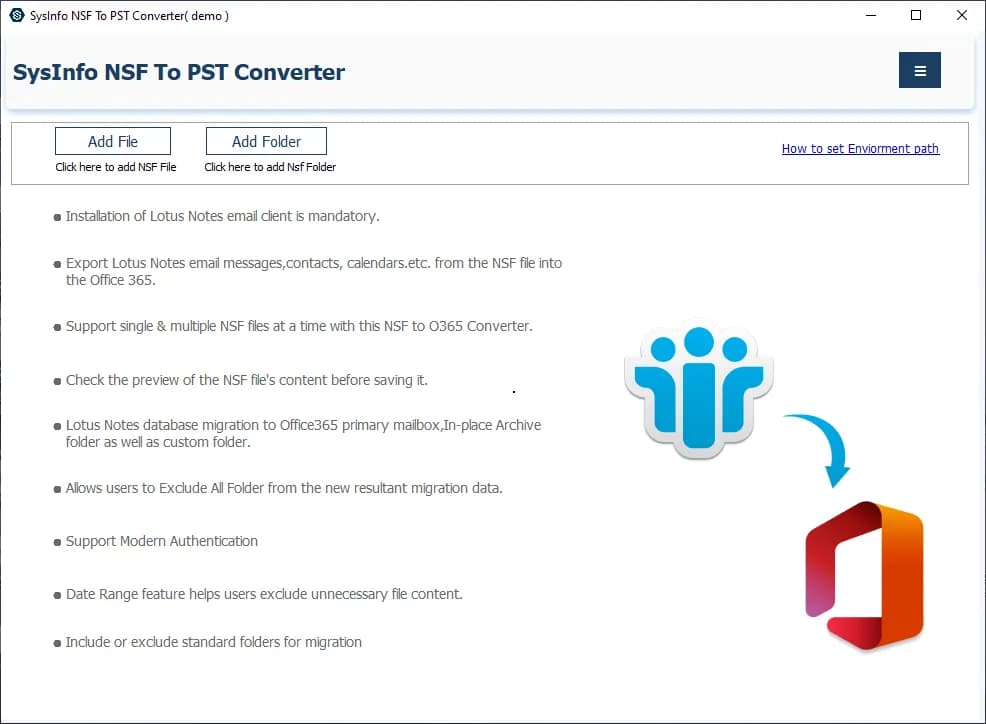
About this app
SysInfo NSF to PST Converter is a purpose-built migration utility for organizations and individuals moving from IBM/HCL Lotus Notes to Microsoft Outlook or Office 365. It handles bulk NSF file conversion while preserving folder hierarchies, metadata, attachments, and HTML formatting, and it adds practical extras like date-range filtering, duplicate removal, PST splitting, and customizable naming conventions. The tool also exports to EML and PDF, saves contacts in VCF/MSG, and supports direct cloud migration to Office 365 with Modern Authentication. A preview pane lets you verify mailbox contents before converting. Note that Lotus Notes (or HCL Notes) must be installed and configured on the machine to perform the conversion, and password-protected NSF files require decryption with a separate utility first. The free demo converts up to 50 items per folder so you can test the workflow before buying. It supports Windows 7 through 11 and works with Outlook 2003 through 2021/365.
Key features
- 1Bulk NSF to PST conversion preserving folder hierarchy, metadata, attachments and HTML formatting.
- 2Direct Office 365 migration with Modern Authentication, plus EML and PDF export.
- 3Date-range filtering, duplicate removal, PST splitting, and VCF/MSG contact export.
- 4Preview pane to verify mailbox contents before converting; 50-item-per-folder free demo.
Target customer profile
Drawn from the product itself, not from a survey.
Demographic
IT administrators and enterprise migration teams
Pain points
Large-scale mailbox migrations from Lotus Notes to Outlook are slow and error-prone; metadata and folder structure often break
Primary needs
Batch conversion, folder hierarchy preservation, PST splitting, zero data loss
Demographic
Individual professionals leaving Notes-based workplaces
Pain points
Years of project emails and attachments are locked in legacy NSF files with no easy way to open them in Outlook
Primary needs
Simple step-by-step conversion, preview before export, single searchable PST
Demographic
Legal, compliance, and eDiscovery teams
Pain points
Audits require complete, verifiable mailbox data from obsolete systems in universally accepted formats
Primary needs
Accurate PDF/EML export, date-range filtering, intact metadata for auditable records
Demographic
SMB owners migrating to cloud email
Pain points
Moving from on-premises Notes to Office 365 is complex and risks losing contacts and calendars
Primary needs
Direct Office 365 migration, contact export in VCF/MSG, cost-effective licensing
Scout Review
Written by AI from measured evidence, scored out of 100.
SysInfo NSF to PST Converter is a purpose-built migration tool for a problem that is real, specific and slowly disappearing: getting Lotus/HCL Notes mailboxes into Outlook or Office 365 without breaking folder hierarchies, metadata or attachments. The marketing site is dated — competing CTAs, a self-contradicting spec table, typos — but the underlying product is competent, the site is genuinely fast, and security hygiene is solid. The biggest friction is informational: the Lotus Notes prerequisite is buried and pricing isn't surfaced on the homepage. Against Stellar Converter for NSF, this is a credible peer, not a clear winner.
Measure by measure
Usability
58The app itself is straightforward — Add File/Add Folder up top, preview before export, 50-item-per-folder demo. But the homepage buries the hard prerequisite (Lotus Notes must be installed) below the CTA and never surfaces pricing, so buyers hit the wall after downloading.
Design
44Dated but functional. The sticky section nav and scenario cards show intent, but competing green/blue hero CTAs, a self-contradicting spec table (184 MB installer vs 512 GB disk), visible typos, and 16 undifferentiated checkmark bullets undercut polish.
Speed
88Genuinely fast. Lighthouse mobile 100/100 (LCP 1.1s, CLS 0, TBT 74ms) and desktop 99/100. The marketing site loads instantly despite being a long, dense page — no bloat, no layout shift, no complaints found.
Security
74Solid hygiene: HTTPS enforced, HSTS, CSP, Referrer-Policy, Permissions-Policy, SPF and DMARC all present (10/12 probe points). Missing frame protection and X-Content-Type-Options, and no SOC 2/ISO/pen-test page found, which is typical for a desktop-utility vendor.
Accessibility
79Lighthouse a11y 98/100, but three real failures: no main landmark, role='none'/'presentation' conflicts, and visible labels without matching accessible names. English-only, no WCAG statement, and the Windows-only product limits platform reach.
Growth
54A real, specific problem with concrete differentiators (direct 365 migration, PST splitting, duplicate removal, PDF/EML export). But the category is structurally shrinking as the Notes installed base declines — a solid niche business, not a growth story.
Improvement areas
- Homepage buries the Lotus Notes installation prerequisite and never surfaces pricing.
- Spec table is internally inconsistent (184 MB installer vs 512 GB disk) and has an empty Notes 9.0 row.
- Three failing accessibility audits: no main landmark, role conflicts, mismatched accessible names.
- Missing frame protection and X-Content-Type-Options headers; no published compliance certifications.
Design & Usability
The site looks like it was designed in 2014 and last touched in 2019 — green and blue CTAs fighting for attention, a spec table that lists a 184 MB installer next to a 512 GB disk requirement, and typos like 'Enviorment path' sitting in the product itself. Underneath the dated shell, the workflow is actually sensible: Add File/Add Folder at the top, a preview pane before conversion, and a 50-item-per-folder demo that lets you test before buying. The real usability failure is informational, not functional — the hard prerequisite that Lotus Notes must be installed is buried in body copy, and pricing never appears on the homepage. Buyers download first, discover the wall second.
Speed & Security
Speed is the standout: Lighthouse mobile 100/100 with LCP 1.1s, CLS 0 and TBT 74ms, desktop 99/100. For a long, dense marketing page that's genuinely impressive and there are no user complaints about lag in the collected evidence. Security is competent rather than exceptional — HTTPS enforced with HSTS, a real CSP, Referrer-Policy, Permissions-Policy, and both SPF and DMARC configured, scoring 10/12 on the header probe. The gaps are frame protection and X-Content-Type-Options, and there's no published SOC 2, ISO 27001 or pen-test report, which is normal for a desktop-utility vendor but means enterprise buyers will have to do their own due diligence.
Accessibility & Growth
Accessibility scores 98/100 on Lighthouse, but the three failing audits are real: no main landmark, role='none'/'presentation' conflicts, and visible labels without matching accessible names. There's no WCAG conformance statement, the site is English-only, and the product is Windows-only, which limits reach for assistive-tech users on other platforms. Growth is a judgment on the idea: the problem — migrating legacy Lotus/HCL Notes mailboxes to Outlook or 365 with metadata and folder hierarchy intact — is real and specific, and the differentiators (direct 365 migration with Modern Authentication, PST splitting, duplicate removal, date filtering, VCF/MSG contact export, PDF/EML output) are concrete. But the category is structurally shrinking as the Notes installed base declines. It's a solid niche business with a real buyer, not a growth story.
Conclusion
If you're an IT admin or compliance team with a Notes-to-Outlook migration on the calendar, this is worth a demo run — the 50-item-per-folder limit is enough to validate that your folder structure and metadata survive. Just install and configure Lotus Notes first, confirm pricing directly with the vendor, and test a password-protected NSF separately since it needs decryption before conversion. For a shrinking category, the tool does its job; the website just needs to get out of its way.
Suggestions for improvement
- Surface the 'Lotus Notes must be installed' prerequisite directly under the download CTA, not buried in body copy.
- Fix the spec table: reconcile the 184 MB installer with the 512 GB disk requirement and fill in the empty Notes 9.0 row.
- Add a main landmark and fix accessible-name mismatches on visible labels to clear the three failing Lighthouse audits.
- Publish pricing on the homepage or a linked pricing page — buyers currently have to hunt for it after downloading.
Alternatives comparison
Named competitors, point by point. Nobody paid to appear here or to be left out.
 SysInfo NSF to PST Converter |  Stellar Converter for NSF | |
|---|---|---|
| Primary conversion target | NSF to PST, plus EML, PDF, and direct Office 365 migration | NSF to PST, plus EML, MSG, RTF, HTML, and PDF |
| Preview before conversion | Yes — preview pane to verify mailbox contents | Yes — preview option before saving |
| Direct Office 365 / cloud migration | Yes — Office 365 with Modern Authentication | Not stated in provided description |
| Free trial / demo limit | Free demo converts up to 50 items per folder | Free demo available (limit not stated in provided description) |
| Lotus Notes installation required | Yes — IBM/HCL Lotus Notes must be installed and configured | Not stated in provided description |
Comparing options? See SysInfo NSF to PST Converter alternatives, scored side by side
More Productivity apps
View all Productivity
Puzzly – B2B Lead Generation & Sales Intelligence Platform
92Puzzly is an all-in-one B2B lead generation platform that...

Qamarero
92An all-in-one hospitality software for restaurants and ba...

EmbedMyReviews
92White-label reputation management software for agencies s...

StoryPad
92Privacy-first open source journal app with a continuous t...

Notion
92All-in-one AI workspace for docs, projects, and knowledge...

The Stack Newsletter
92A weekly newsletter delivering curated tech jobs, intervi...

Vibe Coding Agent Skills
92A free, open-source platform offering 110 AI agent skills...

QRBliss
91Branded QR codes with AI Brand Sync, 15 free dynamic code...

Gerty
91Private, local AI assistant for Mac that runs offline

Strukchad Property Management
91Property management for Kenyan letting agents: rent invoices raised every month, M-Pesa rent prompts to tenants, arrears tracking and landlord statements.

CC Switch
91Open-source desktop app for switching AI coding providers...

username.md
90One verified handle for your online identity, readable by...


A platform dedicated to providing unbiased reviews of newly launched applications, analyzing everything from their features to their full potential.
info@scoutforge.net© 2026 Scoutforge. All rights reserved.
