Cycling through all six. Tap any point to stop.
Measured on six things
Repair corrupt SharePoint MDF databases and restore docum...
Design
44Dated marketing page: competing green/blue hero CTAs, mismatched icon styles, and a v22.0 page showing a v19.0 screenshot with a 2017 splash. The numbered 'Steps to Restore' timeline and clean spec table are the bright spots.
Screenshots
1 / 1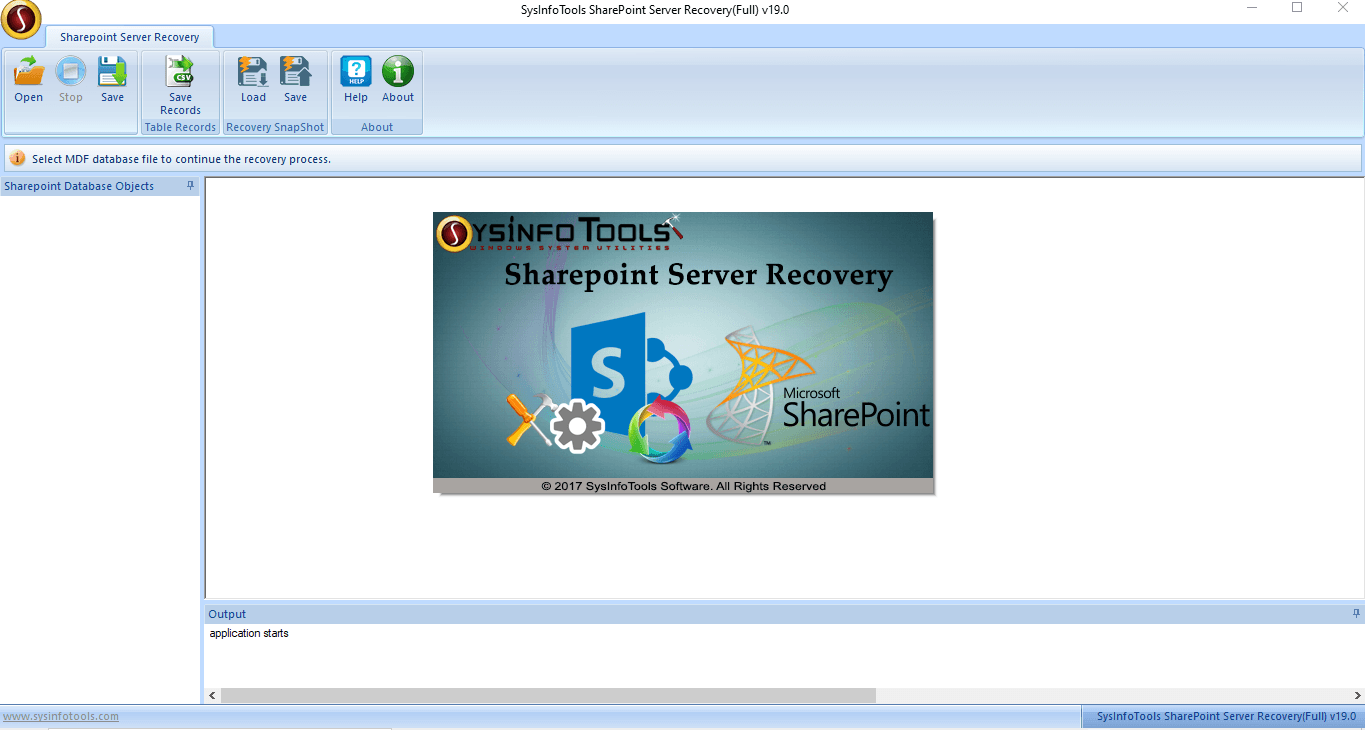
About this app
SysInfo SharePoint Server Recovery is a Windows-based utility built to repair and recover corrupt Microsoft SharePoint content databases at the MDF level. It offers two distinct recovery paths — Complete Database Recovery for restoring full database objects like tables, views, and programmability items, and Document Recovery for pulling documents out at original file levels. Users can pick between Standard and Advanced recovery modes to handle anything from minor table corruption to severe database damage, and the tool includes a manual or auto-detect collation type setting, preview of deleted and advanced deleted records in a tree structure, and automatic TXT log generation for audit purposes. Recovered data can be saved into a SQL Server database or exported as SQL-compatible scripts while preserving the original folder hierarchy. It supports MDF files from SharePoint Server 2016/2014/2010/2007 and SQL Server 2016/2014/2012/2008 R2/2008/2005, and runs across Windows 95 through Win...
Key features
- 1Two recovery paths: Complete Database Recovery and Document Recovery for MDF-level SharePoint repair.
- 2Standard and Advanced recovery modes for minor table corruption versus severe database damage.
- 3Manual or auto-detect collation type setting, with deleted-record preview in a tree structure.
- 4Export recovered data to a SQL Server database or SQL-compatible scripts, preserving folder hierarchy.
- 5Supports SharePoint Server 2016/2014/2010/2007 and SQL Server 2016 down to 2005.
Target customer profile
Drawn from the product itself, not from a survey.
Demographic
IT administrators at mid-size companies running on-premises SharePoint Server
Pain points
Corrupt MDF files from server crashes or mismanagement; pressure to restore fast with no data loss
Primary needs
Reliable SharePoint database recovery with standard and advanced modes plus log reports
Demographic
Database administrators (SQL Server DBAs) managing SharePoint content databases
Pain points
Minor table corruption versus severe damage needs different handling; collation mismatches break restores
Primary needs
Manual collation control, complete database recovery, and export to SQL Server or SQL scripts
Demographic
Small business owners or MSP technicians with limited SharePoint expertise
Pain points
No in-house SQL knowledge; fear of worsening the database with manual repair attempts
Primary needs
Beginner-friendly UI, preview of deleted records, and a safe demo before buying
Scout Review
Written by AI from measured evidence, scored out of 100.
SysInfo SharePoint Server Recovery is a competent, long-lived Windows utility for a specific and painful problem: repairing corrupt on-prem SharePoint content databases at the MDF level. It offers two recovery paths (Complete Database and Document), Standard and Advanced modes, collation control, deleted-record preview, and export to SQL Server or SQL scripts — a feature set that maps cleanly to what a DBA actually needs during an outage. The marketing site, however, is dated and self-contradicting, and the product publishes no security audit despite targeting enterprise IT. Against Lepide, it competes on price and simplicity rather than depth. Worth a look if you're stuck with an on-prem SharePoint and a corrupt MDF; less compelling as a long-term bet.
Measure by measure
Usability
58Clear section sub-nav, a free download, and a 30-day moneyback make trying it low-risk. But the FAQ hides answers behind accordions, body copy is small grey type, and the 4.2–4.5 star trust badges sit far from the buy buttons.
Design
44Dated marketing page: competing green/blue hero CTAs, mismatched icon styles, and a v22.0 page showing a v19.0 screenshot with a 2017 splash. The numbered 'Steps to Restore' timeline and clean spec table are the bright spots.
Speed
88Lighthouse 100/100 on both mobile and desktop, LCP 1.1s, CLS 0, TBT 76ms. Genuinely fast, lightweight marketing page with no measured lag complaints.
Security
74HTTPS enforced with HSTS, CSP, Referrer-Policy, Permissions-Policy, SPF and DMARC (10/12 header checks). Missing X-Frame-Options and X-Content-Type-Options; no published SOC 2/ISO audit found.
Accessibility
80Lighthouse accessibility 98/100. Minor failures: no main landmark, role=presentation conflicts, and visible labels without matching accessible names. No WCAG statement or multi-language support found.
Growth
52Real niche (on-prem SharePoint MDF corruption) with concrete differentiators — dual modes, collation control, deleted-record preview. But the category shrinks as SharePoint moves to cloud, and Lepide is the only named rival.
Improvement areas
- Dated, self-contradicting marketing page: v22.0 page, v19.0 screenshot, 2017 splash, competing hero CTAs.
- No published security audit (SOC 2 / ISO 27001) despite targeting enterprise IT administrators.
- Missing X-Frame-Options and X-Content-Type-Options headers; no <main> landmark for screen readers.
- Trust badges buried near the footer instead of beside the buy button; FAQ hides troubleshooting answers.
Design & Usability
The marketing page is stuck in a previous decade: a green 'Free Download' and a blue 'Purchase Now' fight for the same click, the feature icons come from three different icon packs, and the page advertises v22.0 while showing a v19.0 screenshot with a 2017 copyright splash. Usability is better than the design suggests — a clear Features/Specification/Guide/Screenshots sub-nav, a free download, and a 30-day moneyback make it genuinely low-risk to try. But the FAQ hides troubleshooting behind accordions, body copy is small grey type, and the 4.2–4.5 star trust badges sit near the footer instead of beside the buy button where they'd actually convert.
Speed & Security
Speed is the standout: Lighthouse 100/100 on both mobile and desktop, LCP 1.1s, CLS 0, TBT 76ms — a genuinely lightweight page with no measured lag complaints. Security is competent but not exceptional: HTTPS enforced with HSTS, CSP, Referrer-Policy, Permissions-Policy, SPF and DMARC (10/12 header checks), but X-Frame-Options and X-Content-Type-Options are missing, and there's no published SOC 2, ISO 27001, or third-party audit to reassure enterprise IT buyers — which is exactly the audience this tool targets. For a utility that touches production SharePoint databases, a security page and audit trail would matter more than another feature bullet.
Accessibility & Growth
Accessibility scores 98/100 on Lighthouse with only minor failures — no <main> landmark, role=presentation conflicts, and visible labels without matching accessible names — all fixable in an afternoon. There's no WCAG statement or multi-language support, which limits reach for international SharePoint admins. Growth is the harder question: the problem (corrupt on-prem SharePoint MDF files) is real and painful, and the tool has concrete differentiators — dual Standard/Advanced modes, manual/auto collation, deleted-record preview, SQL export. But the category is structurally shrinking as Microsoft pushes customers to SharePoint Online, and the only listed alternative (Lepide) already owns the enterprise-recovery narrative. A 16-year-old domain is context, not momentum.
Conclusion
If you're an IT admin staring at a corrupt SharePoint content database and a boss asking for an ETA, the free download and 30-day moneyback make this a reasonable first call before you escalate to a consultant. Just verify the version you're downloading matches the version you're reading about, and don't expect the marketing page to sell you on it — the tool has to do that itself.
Suggestions for improvement
- Reconcile the version numbers: the page says v22.0, the screenshot says v19.0, and the splash says 2017. Ship one current screenshot.
- Add X-Frame-Options and X-Content-Type-Options headers, and publish a security/trust page with any audit or pen-test results.
- Add a <main> landmark and fix the accessible-name failures flagged by Lighthouse — a one-afternoon accessibility pass.
- Move the 4.2–4.5 star trust badges next to the buy button and collapse the two competing hero CTAs into one primary action.
Alternatives comparison
Named competitors, point by point. Nobody paid to appear here or to be left out.
 SysInfo SharePoint Server Recovery | SharePoint Database Recovery by Lepide | |
|---|---|---|
| Recovery modes | Standard and Advanced modes for minor vs. severe corruption | Recovery utility with preview; mode structure not specified on site |
| Collation control | Manual or auto-detect collation type | Not highlighted as a feature |
| Deleted-record preview | Tree-structure preview of normal and advanced deleted records | Preview option available before restore |
| Export options | Save to SQL Server database or export as SQL-compatible scripts | Restores sites, lists, and documents |
| Free trial / demo | Free download with 30-day moneyback | Trial availability not confirmed in collected evidence |
| Security audit / compliance | No SOC 2 / ISO audit found in collected content | Not verified in collected evidence |
Comparing options? See SysInfo SharePoint Server Recovery alternatives, scored side by side
More Productivity apps
View all Productivity
Qamarero
92An all-in-one hospitality software for restaurants and ba...

Puzzly – B2B Lead Generation & Sales Intelligence Platform
92Puzzly is an all-in-one B2B lead generation platform that...

The Stack Newsletter
92A weekly newsletter delivering curated tech jobs, intervi...

StoryPad
92Privacy-first open source journal app with a continuous t...

Vibe Coding Agent Skills
92A free, open-source platform offering 110 AI agent skills...

Notion
92All-in-one AI workspace for docs, projects, and knowledge...

EmbedMyReviews
92White-label reputation management software for agencies s...

QRBliss
91Branded QR codes with AI Brand Sync, 15 free dynamic code...

Strukchad Property Management
91Property management for Kenyan letting agents: rent invoices raised every month, M-Pesa rent prompts to tenants, arrears tracking and landlord statements.

CC Switch
91Open-source desktop app for switching AI coding providers...

Gerty
91Private, local AI assistant for Mac that runs offline

BACKLNK
90Backlnk is a free SEO and AI visibility website: 15 website checks, a full audit as a PDF report, and guides to get found in search and AI answers.


A platform dedicated to providing unbiased reviews of newly launched applications, analyzing everything from their features to their full potential.
info@scoutforge.net© 2026 Scoutforge. All rights reserved.
