Cycling through all six. Tap any point to stop.
Measured on six things
Free Tea app checker: search by first name, city and age, or a photo, and see in about 10 seconds if you've been posted on Tea.
Design
58Clean, functional hero with a strong single blue CTA and a well-built locked-result mock. Undercut by native video controls and dense centered text blocks lower down.
Screenshots
1 / 1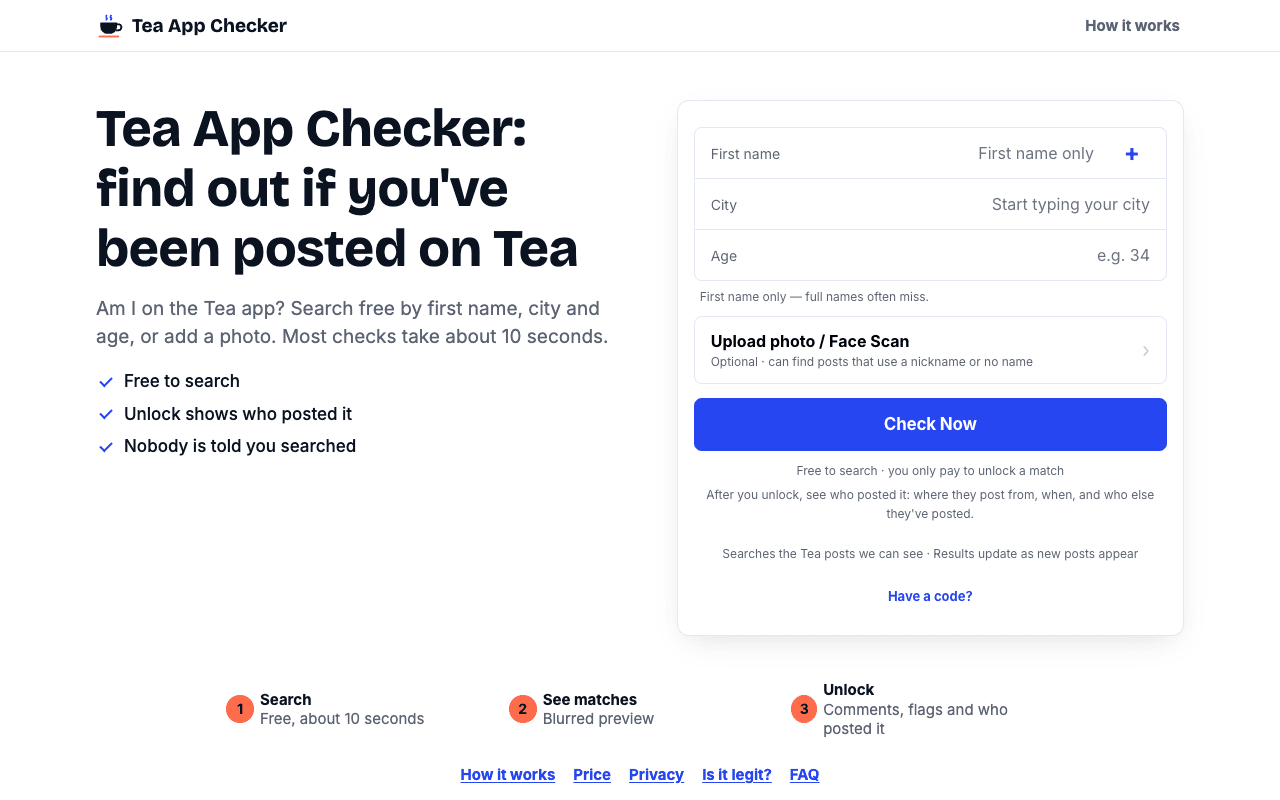
About this app
TeaAppChecker.app is a simple web tool for one question: have you been posted on the Tea dating app? Search by first name, city and age, or upload a photo, and in about 10 seconds you'll see whether any Tea posts we can see may match you. There is no account and no app to download, and the search is free. If something comes up, you can choose to unlock the full results. Photos are kept in encrypted storage.
Key features
- 1Free search by first name, city and age, or optional photo/face scan, with results in about 10 seconds.
- 2No account required; each match's photo, name, age, city, date and flag counts are free to see.
- 3Pay-once-per-post unlock with no subscription, no renewal, and 7-day access in the browser.
Target customer profile
Drawn from the product itself, not from a survey.
Scout Review
Written by AI from measured evidence, scored out of 100.
Tea App Checker is a narrow, well-executed utility aimed at a genuinely awkward problem: you can't log into Tea to see if you've been posted, so this searches from the outside. The execution is above average where it counts — a 93/100 mobile Lighthouse score, a 100/100 accessibility audit, a full 12/12 security header set, and a hero form that gets you to a result in about ten seconds with no account. The pay-per-post model is honest and avoids the subscription trap. The weaknesses are presentation and disclosure: dense lower-page copy, a video with native controls, and pricing buried in fine print. It's a competent niche tool, not a category-defining one.
Measure by measure
Usability
64No account, free search, clear primary action and a 1-2-3 step strip. The pay-per-post model is buried in tiny grey fine print, which is exactly the detail users need to trust.
Design
58Clean, functional hero with a strong single blue CTA and a well-built locked-result mock. Undercut by native video controls and dense centered text blocks lower down.
Speed
82Lighthouse 93 mobile / 97 desktop, LCP 1.5s, CLS 0.002. Genuinely fast and stable; TBT 290ms is the only blemish.
Security
74Full security header set (HSTS, CSP, frame protection, Permissions-Policy), SPF and DMARC, Stripe payments, encrypted photo storage. No published audit or security page.
Accessibility
78Lighthouse accessibility 100/100 with labelled fields and readable contrast. No accessibility statement or multi-language support found, so automated checks are the ceiling here.
Growth
58Real, specific wedge: Tea is women-only, so men literally cannot self-check. Pay-per-post fits the one-time-anxiety use case. Niche ceiling and reputational risk cap it.
Improvement areas
- Pricing model is buried in tiny light-grey fine print under the CTA instead of stated clearly up front.
- No security page, audit claim, or vulnerability disclosure policy despite handling sensitive data.
- Lower-page sections are dense centered text blocks with no in-page navigation or visual support.
Design & Usability
The homepage does the hard part well: a compact hero search card with labelled First name, City and Age fields, one dominant blue 'Check Now' button, and a mock result card that clearly demonstrates the locked-preview pattern with flag chips and blurred body text. The 1-2-3 step strip and footer anchors give a quick map of the flow. Where it slips is below the fold — long centered text blocks with little visual support, an explainer video still wearing its native browser playback bar, and an orange accent that doesn't connect to the blue system. The bigger usability issue is trust: the pay-per-post model is the entire commercial proposition and it's rendered in tiny light-grey fine print under the button.
Speed & Security
Speed is the standout. Lighthouse scores 93 on mobile and 97 on desktop, with LCP at 1.5s, CLS at 0.002 and FCP at 1.5s — the page is essentially instant, and TBT of 290ms is the only soft metric. Security is solid on the transport and header layer: HTTPS enforced, HSTS, CSP, frame protection, X-Content-Type-Options, Referrer-Policy and Permissions-Policy all present, plus SPF and DMARC for a 12/12 checklist. The site states payments run through Stripe and photos sit in encrypted storage. What's missing is the layer above headers — no security page, no SOC 2 or ISO claim, no bug bounty or disclosure policy, which is a gap worth closing given the sensitivity of the data being searched.
Accessibility & Growth
Accessibility scores a clean 100/100 on Lighthouse's axe-core run, backed by labelled form fields, a readable type hierarchy and a responsive layout. That's automated coverage only — there's no accessibility statement and no multi-language support, so the manual-WCAG picture is unverified. Growth is the more interesting question. The wedge is real and specific: Tea is a women-only dating safety app, men cannot create an account to look themselves up, and asking a friend is awkward. This tool searches from the outside by first name, city and age, or by photo, and charges per unlocked post rather than by subscription — which fits a one-time anxiety check rather than a recurring need. The limits are structural: it depends entirely on one third-party app's data, the category is reputationally fraught, and the audience by definition hopes never to return.
Conclusion
Whether this is worth using comes down to one thing: do you actually suspect you've been posted? If yes, the free search costs you nothing but ten seconds and a first name, and the per-post unlock is a fair price for a straight answer. If no, there's nothing here to keep you. The product's own copy is refreshingly honest about the limits — a name match is a possible match, not proof, and a clean result isn't proof you were never posted. That candor is the most trustworthy thing on the site. The improvements that would move the needle are unglamorous: surface the pricing model above the fold, replace the native video controls with a custom player, and publish a security page given what's being searched.
Suggestions for improvement
- Move the pay-per-post explanation out of the fine print and into the hero card as a visible line item.
- Replace the native video playback bar with a custom player or a static illustrated still.
- Break the long centered text sections into two-column layouts with supporting visuals or icons.
- Publish a security page covering encryption at rest, Stripe handling and a vulnerability disclosure contact.
Alternatives comparison
Named competitors, point by point. Nobody paid to appear here or to be left out.
 Tea App Checker | ||
|---|---|---|
| Free to search without an account | Yes — free search by name, city, age or photo | Not specified in provided details |
| Pricing model | Pay once per post unlocked; no subscription | Not specified in provided details |
| Photo / face-match search | Optional photo upload with own face-match | Not specified in provided details |
| Account required | No account, no app download | Not specified in provided details |
Comparing options? See Tea App Checker alternatives, scored side by side
More Social & Community apps
View all Social & Community
username.md
90One verified handle for your online identity, readable by...

HackathonHost
88End-to-end hackathon and game jam event management software

Creastor
88An all-in-one platform for creators to sell digital produ...

LaunchSpot
87A vibrant platform for discovering and launching new tech...

67ez
86Free viral 67 (Six Seven) browser games, world counter & ...

Recap Raven
83Discord bot for D&D session recordings, AI recaps, and se...

Dev Hunt
82A launchpad for discovering and voting on the best new de...

TikSave
81Free Download TikTok videos without watermark in HD and conver...

PostPocket
81A powerful content management app for iPhone users to save, organize, and access articles and posts offline.

Samasemua
80Samasemua is a dynamic platform empowering creators to monetize digital products with an intuitive website builder and community support.

FlowPrompter
80A web-based teleprompter with a transparent interface for seamless script delivery during recordings, ideal for content creators and professionals.

CleanVid
80CleanVid removes distractions from YouTube embeds, offering clean, focused video players to boost engagement and reduce bounce rates on websites.


A platform dedicated to providing unbiased reviews of newly launched applications, analyzing everything from their features to their full potential.
info@scoutforge.net© 2026 Scoutforge. All rights reserved.
