Cycling through all six. Tap any point to stop.
Measured on six things
Free, private browser tools for images, chats, QR codes, ...
Growth
58Real problem, sharp wedge: on-device processing vs iLovePDF and TinyPNG's cloud uploads, aimed at high-intent searches like 'compress under 50KB' and country passport sizes. No monetization or moat visible.
Screenshots
1 / 1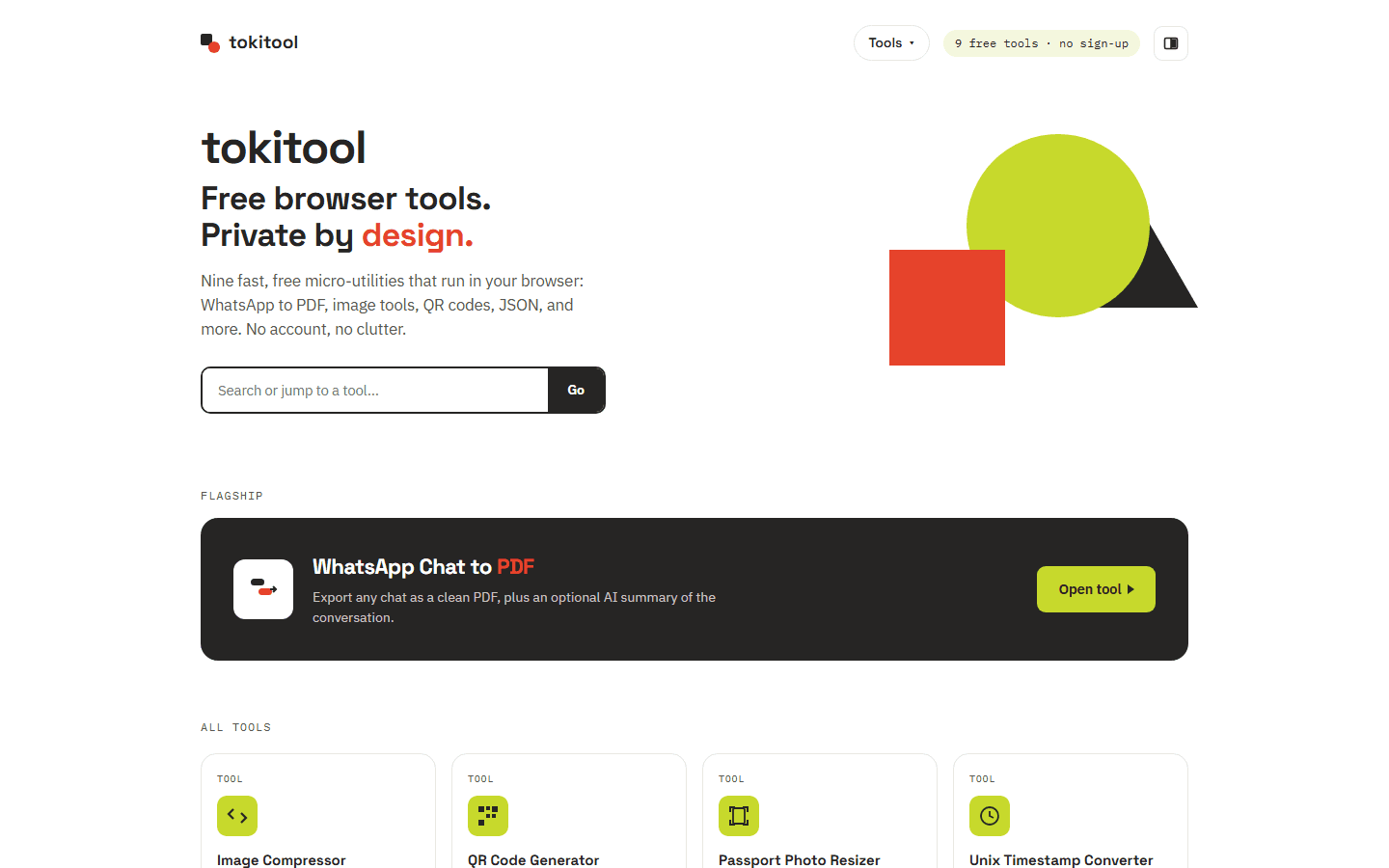
About this app
Tokitool is a free suite of 12+ browser-based micro-utilities that prioritize privacy by processing your files directly in your browser. Key tools include WhatsApp Chat to PDF for exporting conversations without uploading them, an Image Compressor that shrinks photos to exact sizes, a Passport Photo Resizer with country-specific presets, and a Background Remover that works on-device. Additional utilities cover QR code generation, JSON formatting, CSV/JSON conversion, Base64 encoding, Unix timestamp conversion, favicon creation, and password generation. The platform is designed for users who need quick, reliable file conversions without creating an account or sending sensitive data to a server. It also offers practical guides for common tasks like compressing photos for email and exporting WhatsApp chats. While not a replacement for full-featured design or document suites, Tokitool excels as a convenient, privacy-conscious assistant for everyday digital chores.
Key features
- 112+ browser-based micro-utilities: WhatsApp Chat to PDF, Image Compressor, Passport Photo Resizer, Background Remover, QR, JSON/CSV/Base64, favicon, passwords.
- 2On-device processing — files are read and processed in the tab, never uploaded to a server, with no account required.
- 311+ tool-specific guides and country size hubs targeting high-intent searches like 'compress under 50 KB' and passport photo millimetres.
Target customer profile
Drawn from the product itself, not from a survey.
Demographic
Job seekers and applicants uploading documents online
Pain points
Struggling to compress photos to exact KB limits and resize passport photos correctly
Primary needs
Fast, on-device tools to compress images and resize photos to official specs
Demographic
Privacy-conscious individuals sharing sensitive chats and photos
Pain points
Concern about uploading personal conversations or ID photos to third-party servers
Primary needs
Browser-based tools that never upload files and work without an account
Demographic
Students, researchers, and office workers handling data files
Pain points
Need to quickly format JSON, convert CSV to JSON, or encode Base64 without complex software
Primary needs
Simple, free online converters and formatters that work instantly in the browser
Scout Review
Written by AI from measured evidence, scored out of 100.
Tokitool is a free suite of 12+ browser-based micro-utilities — WhatsApp Chat to PDF, Image Compressor, Passport Photo Resizer, Background Remover, QR codes, JSON/CSV/Base64 converters, favicon and password generators — built around one promise: your files never leave your device. The measured evidence backs the promise's practical side: Lighthouse mobile 99/100 and desktop 100/100, a full security header stack at 11/12 checklist points, and a 96/100 accessibility audit with a single contrast failure. The design is disciplined and systematic, the guides are genuinely tool-specific rather than scraped, and the positioning against iLovePDF and TinyPNG is clear and honest. What it lacks is third-party assurance (no SOC 2, no DMARC), a fix for the low-contrast body text, and any visible path to revenue or defensibility. As a free privacy-first utility belt, it does its job well.
Measure by measure
Usability
68Search bar, persistent 'Tools' dropdown and a flagship CTA put a task on the first screen; 11+ tool-specific guides cover the edge cases. Dense SEO link blocks between grid and footer add friction for visitors who just want the tool.
Design
71Coherent lime/red-orange/near-black palette, disciplined grotesk+monospace type, and a uniform 12-card tool grid that scans cleanly. Held back by small light-grey body copy and a cluttered, mismatched partner badge strip in the footer.
Speed
88Lighthouse mobile 99/100 (LCP 1.7s, CLS 0, TBT 0ms) and desktop 100/100. Client-side processing means no upload round-trip for file work. Among the fastest utility sites in this category.
Security
74Full header stack present (HSTS, CSP, frame protection, Referrer/Permissions-Policy) at 11/12 checklist points; on-device processing is a real privacy advantage. DMARC missing and no published audit, SOC 2 or bug bounty.
Accessibility
79Lighthouse accessibility 96/100 with one failing audit: insufficient color contrast. The visual audit independently flagged small light-grey body text. No WCAG statement or multi-language support found.
Growth
58Real problem, sharp wedge: on-device processing vs iLovePDF and TinyPNG's cloud uploads, aimed at high-intent searches like 'compress under 50KB' and country passport sizes. No monetization or moat visible.
Improvement areas
- Body copy contrast fails the Lighthouse accessibility audit and was independently flagged as hard to read.
- No DMARC record; no published SOC 2, ISO, pen-test or bug bounty despite handling ID photos and chat exports.
- No visible monetization or sustainability model, and the on-device privacy wedge is easily copied by competitors.
Design & Usability
Tokitool's homepage is a properly designed utility catalogue: a lime/red-orange/near-black palette applied consistently, grotesk headings paired with monospace eyebrow labels, and a 12-card grid where every tool uses the same template so you can scan and compare in seconds. The hero search with an attached 'Go' button and the dark WhatsApp-to-PDF banner give two clear entry points, and the header keeps a 'Tools' dropdown and a '12 free tools · no sign-up' pill visible at all times. Usability is solid where it counts: a task is reachable on the first screen, and the guides section carries 11+ articles tied to specific workflows (WhatsApp export, compress under 100 KB, passport sizing) rather than generic filler. The friction is below the fold — dense SEO link blocks and long paragraphs sit between the tool grid and the footer, which helps search discovery but slows down a visitor who already knows what they came for. Small light-grey body copy and a mismatched partner badge strip are the visible polish gaps.
Speed & Security
Speed is the standout: Lighthouse mobile 99/100 with LCP 1.7s, CLS 0 and TBT 0ms, and desktop a clean 100/100. The architecture explains it — files are processed in the tab with client-side libraries and on-device models, so there is no upload round-trip for the actual work. Security is above category norm for an indie utility suite: the HTTP probe found HTTPS enforced with HSTS, CSP, frame protection, X-Content-Type-Options, Referrer-Policy and Permissions-Policy, 11 of 12 checklist points. The missing piece is DMARC, and there is no published SOC 2, ISO certification, pen-test report or bug bounty. What Tokitool does instead is unusually honest: a first-party threat-model guide explaining what 'private browser tools' actually mean and telling users to verify with the Network tab. That is a better security posture than most competitors in this space, but it is transparency rather than third-party assurance.
Accessibility & Growth
Accessibility scores 96/100 on the Lighthouse audit with exactly one failing check — insufficient background/foreground contrast — and the independent visual audit flagged the same thing: small light-grey body text that is hard to read at that size. That convergence makes it a real, fixable flaw rather than a false positive. There is no accessibility statement or WCAG conformance claim on the site, and no multi-language support indicated, so the score sits in the upper-middle of the band rather than at the top. Growth is the more interesting question. The category — online file converters — is crowded and dominated by iLovePDF and TinyPNG, both of which upload files to servers. Tokitool's wedge is concrete and demonstrable: everything runs on-device, no account, no paywall, and the content strategy targets high-intent long-tail searches (compress under 50 KB, India/Canada passport photo size, WhatsApp chat export). That is a real reason to pick it over the listed alternatives. The limit is that the wedge is copyable — a competitor adding a client-side library closes the gap — and the site shows no monetization path or network effect, so the idea can grow but not compound.
Conclusion
If you need to compress a photo under 100 KB for a government form, resize a passport picture to a country's exact millimetres, or turn a WhatsApp export into a PDF without handing your chat log to a stranger's server, Tokitool is a sensible first stop — it is fast, free, accountless, and the on-device processing is real rather than marketing. Judge it as what it is: a sole-proprietorship utility suite, not a design or document platform. The gaps that matter are fixable — contrast on body text, a DMARC record, and eventually some form of third-party security attestation if it wants to be trusted with ID photos at scale. The gaps that matter more are strategic: no monetization, no moat beyond 'we don't upload,' and a category where the incumbents can copy the wedge. Worth bookmarking today; worth watching to see whether it turns a good idea into a durable one.
Suggestions for improvement
- Fix the contrast failure: bump body copy from light grey to a darker tone at a readable size — it is the one accessibility audit Tokitool fails.
- Add a DMARC record to complete the email authentication stack alongside the existing SPF.
- Publish a short accessibility statement and consider a language toggle; both are cheap credibility wins for a privacy-positioned tool.
- Clarify the business model on the site — even a 'how this stays free' page would answer the obvious question a returning user has.
Alternatives comparison
Named competitors, point by point. Nobody paid to appear here or to be left out.
 Tokitool |  iLovePDF |  TinyPNG | |
|---|---|---|---|
| Where files are processed | On-device in the browser; files never uploaded | Uploaded to iLovePDF servers for processing | Uploaded to TinyPNG cloud servers |
| Account required | No account, no sign-up | Free tier without account; account for premium features | No account for basic use; API key for developer access |
| Pricing model | Free, no paywall on any tool | Freemium with paid Premium tier | Free web tool; paid API plans for developers |
| Tool breadth | 12+ utilities: PDF export, image, passport, QR, JSON/CSV/Base64, favicon, passwords | Broad PDF suite: merge, split, compress, convert, sign, OCR | Focused: PNG/JPEG/WebP compression only |
| WhatsApp chat to PDF | Yes — flagship tool, runs in browser, no upload | Not offered as a dedicated tool | Not offered |
| Passport / ID photo resizing | Yes — country-specific mm/pixel presets, on-device | Not a dedicated passport photo tool | Not offered |
| Measured site performance (Lighthouse mobile) | 99/100 mobile, LCP 1.7s, CLS 0 | Not measured in this review | Not measured in this review |
iLovePDF
A popular online suite for PDF and image editing that requires uploading files to its servers.
TinyPNG
A widely used image compression tool that uses smart lossy compression but processes files on the cloud.
Comparing options? See Tokitool alternatives, scored side by side
More Productivity apps
View all Productivity
StoryPad
92Privacy-first open source journal app with a continuous t...

The Stack Newsletter
92A weekly newsletter delivering curated tech jobs, intervi...

Qamarero
92An all-in-one hospitality software for restaurants and ba...

Vibe Coding Agent Skills
92A free, open-source platform offering 110 AI agent skills...

Puzzly – B2B Lead Generation & Sales Intelligence Platform
92Puzzly is an all-in-one B2B lead generation platform that...

Notion
92All-in-one AI workspace for docs, projects, and knowledge...

EmbedMyReviews
92White-label reputation management software for agencies s...

QRBliss
91Branded QR codes with AI Brand Sync, 15 free dynamic code...

CC Switch
91Open-source desktop app for switching AI coding providers...

Strukchad Property Management
91Property management for Kenyan letting agents: rent invoices raised every month, M-Pesa rent prompts to tenants, arrears tracking and landlord statements.

Gerty
91Private, local AI assistant for Mac that runs offline

username.md
90One verified handle for your online identity, readable by...


A platform dedicated to providing unbiased reviews of newly launched applications, analyzing everything from their features to their full potential.
info@scoutforge.net© 2026 Scoutforge. All rights reserved.
